
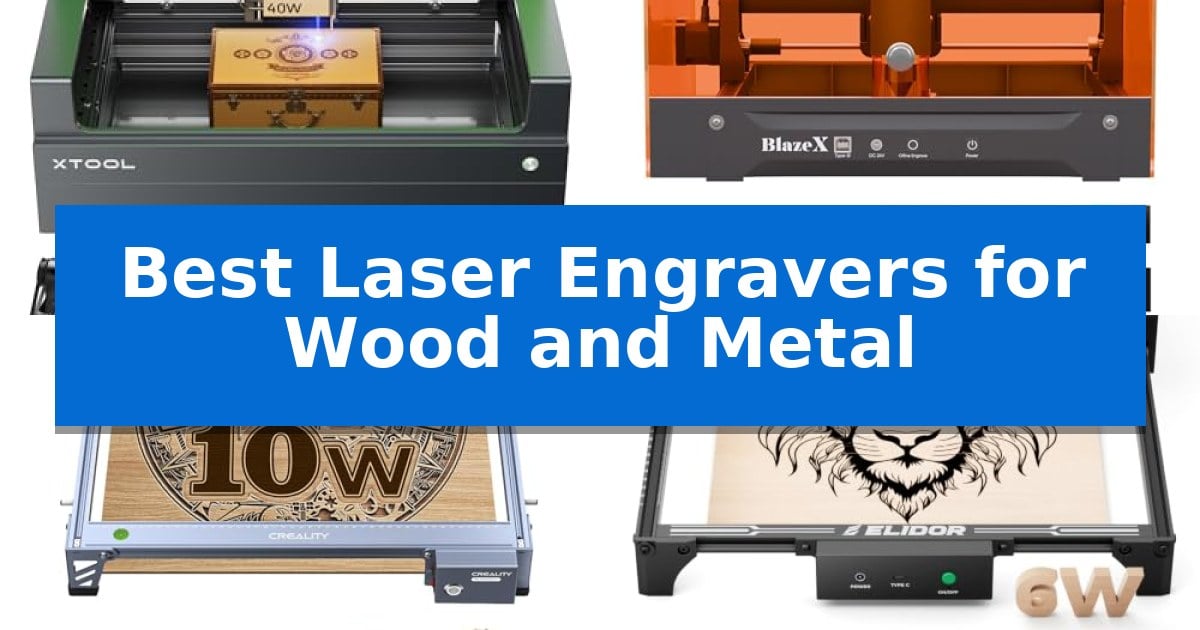
Finding the right equipment for detailed fabrication can be a challenge, especially when you need consistent results across diverse materials. Whether you are crafting custom signage or intricate metal jewelry, selecting the Best Laser Engravers for Wood and Metal requires balancing power, workspace size, and ease of operation.
Our guide evaluates five distinct models to help you identify which machine aligns with your specific production needs. We focus on technical capabilities, safety features, and software integration to ensure you make an informed decision for your creative projects.
Best Laser Engravers for Wood and Metal in 2026
Quick Comparison
| Product | Best For | Key Strength | Score |
|---|---|---|---|
| xTool S1 40W Laser Engraver | Best Overall | 40W laser power for efficient cutting and engraving on wood and metal. | 4.9 |
| BlazeX M3 10W Laser Engraver | Easiest Precision Positioning | High-definition smart camera for real-time design preview and precise alignment. | 4.4 |
| Creality Falcon 10W Laser Engraver | Best for Budget-Conscious Makers | 10W output power enables efficient cutting of wood and acrylic in one pass. | 4.8 |
| ELIDOR Laser Engraver | Compact Pick for Small Workshops | High-precision 0.01 mm accuracy for detailed graphics and text. | 4.9 |
| Twotrees TTS-55 Pro Laser Engraver | Fastest Setup for Beginners | Advanced compression laser technology for high-precision detail. | 4.5 |
How We Chose
- Laser power output and its direct impact on material cutting depth and engraving speed.
- Precision and spot size capabilities for handling intricate graphic details.
- Safety features, including enclosure design and integrated sensors for flame detection.
- Software compatibility and ease of setup for both beginners and experienced users.
- Workspace dimensions and material handling flexibility, such as passthrough technology.
1 xTool S1 40W Laser Engraver — Best for High-Volume Production
Achieving precise, high-volume production on wood and metal requires a machine capable of both speed and consistency. The xTool S1 40W Laser Engraver distinguishes itself with a powerful 40W laser module, allowing it to slice through 18mm cherry wood in a single pass while maintaining engraving speeds up to 600mm/s.
This system is built for versatility, featuring AutoPassthrough Technology that enables users to handle projects up to 118 inches in length. Its Pin-point Positioning system ensures accuracy on complex or curved surfaces, such as spoons and plates, which is essential for creators working with diverse materials.
Safety and ease of use are integrated into the design through a Class 1 enclosed housing that filters 99% of laser light, removing the need for protective goggles. The unit includes 5 built-in flame sensors and an emergency stop button, providing a secure environment for operation. The xTool Creative Space (XCS) software simplifies the workflow with pre-tested parameters for over 400 materials and AI-powered design tools.
Constructed with a 3mm aerospace-grade aluminum frame, the machine is engineered for long-term stability. Every unit undergoes rigorous testing, including 71,830 hours of laser tube aging and multiple pre-shipment inspections, ensuring it meets high standards for durability in a workshop setting.
Best for: High-volume production and creators who need a versatile, enclosed laser system for both large-format projects and curved objects.
Skip if: Users who require a portable or ultra-compact laser engraver may find the robust, enclosed design of this unit too large for their workspace.
PROS
- 40W laser power for efficient cutting and engraving on wood and metal.
- AutoPassthrough Technology supports extra-long materials up to 118 inches.
- Class 1 safety enclosure with integrated flame sensors for secure operation.
- AI-powered software with pre-tested settings for over 400 materials.
CONS
- Large physical footprint may limit placement options in smaller workshops.
2 BlazeX M3 10W Laser Engraver — Easiest Precision Positioning
Achieving precise detail on diverse materials requires a system that bridges the gap between software planning and physical execution. The BlazeX M3 10W Laser Engraver distinguishes itself with an integrated high-definition smart camera, which allows users to preview designs directly on their workpiece through a PC interface. This visual guidance system minimizes material waste by ensuring exact placement before the laser engages, making it a practical choice for those who prioritize accuracy in their creative projects.
Engineered for versatility, this 2-in-1 laser cutter and engraver utilizes a high-density beam capable of achieving 0.01mm ultra-precision. This level of detail supports intricate work on metal and glass, while the 10W output provides the necessary power to perform clean cuts on wood and acrylic. The machine arrives as an all-in-one vision kit, including a honeycomb laser bed, protective enclosure, and a variety of starter materials to facilitate immediate use.
Safety and environmental control are central to its design, featuring a Class 1 Safety rating that filters harmful radiation. The unit includes an integrated fan system to exhaust smoke and odors, contributing to a quieter and cleaner workspace. For users looking to expand their capabilities, the ecosystem supports professional upgrades such as a Rotary Roller for cylindrical objects, as well as an Air Assist and Purifier to enhance cutting edge clarity and detail.
The system offers broad accessibility through compatibility with LightBurn, LaserGRBL, and CutLabX, functioning across Windows, macOS, iOS, and Android platforms. This wide software support ensures that both beginners and experienced creators can integrate the machine into their existing digital workflows without proprietary software barriers.
Best for: Beginners and hobbyists who require precise material positioning and integrated safety features for wood, metal, and glass projects.
Skip if: Users requiring high-volume industrial production speeds or those who prefer a modular, open-frame design without an integrated enclosure.
PROS
- High-definition smart camera for real-time design preview and precise alignment.
- 0.01mm ultra-precision laser beam for detailed engraving on metal and glass.
- Class 1 Safety rating with integrated smoke exhaustion and noise reduction.
- Broad software compatibility including LightBurn and CutLabX.
CONS
- Fixed enclosure design may limit the size of materials that can be processed compared to open-frame models.
- Requires additional accessory purchases like the Rotary Roller for advanced cylindrical engraving tasks.
3 Creality Falcon 10W Laser Engraver — Best for Budget-Conscious Makers
Achieving precise detail on various materials requires a reliable tool, and the Creality Falcon 10W Laser Engraver provides a robust solution for makers focusing on wood and metal projects. This machine features a 10W output power capable of cutting through 5mm basswood or 3mm black acrylic in a single pass, supported by a 0.06mm super fine spot focus for high-precision results.
The structural integrity of the Creality Falcon 10W Laser Engraver is built on an all-aluminum alloy frame with a steel shaft wheel guide rail, ensuring stability during operation. To maintain accuracy, the system includes a belt tension adjustment device, keeping repositioning precision within 0.007 inches. Users can manage their workflow via Wi-Fi, USB, or SD card, with compatibility for LightBurn and LaserGRBL software.
Safety and ease of use are prioritized through an anti-UV filter acrylic module that blocks 97% of UV rays. The setup process is streamlined for quick assembly, and the laser head includes a tool-free focusing plate for rapid adjustments. This combination of structural durability and user-friendly design makes it a practical choice for those needing consistent performance across diverse materials like glass, leather, and paper.
Best for: Budget-conscious makers who need a versatile, easy-to-assemble laser engraver for wood, metal, and acrylic projects.
Skip if: Users requiring higher power output for thick industrial-grade materials or those who prefer a fully enclosed, pre-assembled professional cabinet system.
PROS
- 10W output power enables efficient cutting of wood and acrylic in one pass.
- High-precision 0.06mm spot focus ensures detailed engraving results.
- Tool-free focusing plate simplifies the setup and adjustment process.
- Multiple connectivity options including Wi-Fi, USB, and SD card.
CONS
- Manual assembly required, taking approximately 10-20 minutes.
- Open-frame design necessitates careful placement for safety despite the UV filter.
4 ELIDOR Laser Engraver — Compact Pick for Small Workshops
Precision and portability define the ELIDOR Laser Engraver, a compact machine designed to bring professional-grade detail to personal workshops and mobile projects. With a fine 0.04 × 0.14 mm laser spot and an engraving accuracy of 0.01 mm, this device provides the control necessary for intricate graphics, portraits, and crisp text on a variety of materials.
The unit features a 300 × 300 mm working area, offering a balance between workspace capacity and a lightweight 2.13 kg frame. It is engineered for versatility, capable of engraving wood, leather, acrylic, metal, and glass. For users prioritizing safety, the system can be paired with a compatible protective enclosure to achieve a Class 1 laser classification.
Compatibility is a core strength, as the ELIDOR Laser Engraver integrates seamlessly with industry-standard software like LaserGRBL and LightBurn. It supports common file formats such as NC, DXF, BMP, and PNG, allowing for a streamlined workflow across Windows, macOS, and Linux operating systems. This flexibility makes it a practical choice for both hobbyists and small business creators looking to produce custom keychains, tumblers, and personalized gifts.
Designed for ease of use, the machine supports speeds up to 10,000 mm/min, ensuring efficient project completion without sacrificing the consistency required for detailed work. Whether operating in a classroom, craft fair, or home studio, the system provides the technical foundation for reliable, repeatable results.
Best for: Small business creators and hobbyists who need a portable, software-compatible machine for detailed engraving on wood, metal, and acrylic.
Skip if: Users requiring high-volume industrial production or those who need a larger working area than 300 × 300 mm will find this compact model limiting.
PROS
- High-precision 0.01 mm accuracy for detailed graphics and text.
- Wide software compatibility with LightBurn and LaserGRBL.
- Portable, lightweight design weighing only 2.13 kg.
- Versatile material support including wood, metal, leather, and glass.
CONS
- Limited 300 × 300 mm working area may restrict larger project dimensions.
- Requires separate protective enclosure to meet Class 1 safety standards.
5 Twotrees TTS-55 Pro Laser Engraver — Fastest Setup for Beginners
Precision engraving on diverse surfaces requires a machine capable of fine-tuned control, and the Twotrees TTS-55 Pro Laser Engraver addresses this by utilizing LD+FAC+C-Lens compression technology to achieve a 0.08 x 0.46mm super fine spot focus. This design choice allows for high-detail work, reaching up to 0.1mm engraving accuracy on materials ranging from wood and leather to stainless steel and acrylic.
The device is built for efficiency, featuring a 32-bit dual-core MCU that supports engraving speeds up to 30,000mm/min. For those who prefer a streamlined workspace, the unit includes built-in Wi-Fi for mobile app or web-based control, alongside support for offline engraving via TF card, reducing the need for a constant tether to a computer.
Safety and cutting performance are enhanced by the inclusion of a metal air-assisted nozzle and a red laser shield. These additions facilitate cleaner, deeper cuts through materials like 5mm plywood and 3mm acrylic, while the 300 x 300mm work area provides sufficient space for hobbyist projects and small business production.
Compatibility is a core strength, as the system integrates with LaserGRBL and LightBurn across Windows, macOS, and Linux platforms. The machine arrives with the necessary tools for assembly, supported by a 1-year warranty and 24/7 technical assistance to help users navigate the setup process.
Best for: Hobbyists and small business owners seeking a high-precision, Wi-Fi-enabled laser engraver for diverse material projects.
Skip if: Users requiring a larger work surface than 300 x 300 mm or those needing a laser power output significantly higher than 5.5W for industrial-scale cutting.
PROS
- Advanced compression laser technology for high-precision detail.
- Integrated air assist support for cleaner and deeper cuts.
- Versatile connectivity including Wi-Fi and offline TF card support.
- Broad software compatibility with industry-standard tools like LightBurn.
CONS
- Limited work area of 300 x 300 mm may restrict larger projects.
- 5.5W laser power is optimized for light cutting rather than heavy-duty industrial fabrication.
Best Laser Engravers for Wood and Metal Buying Guide
Understanding Laser Power and Material Compatibility
The laser power rating, typically measured in watts, is the primary factor in determining what a machine can cut or engrave. Higher wattage lasers, such as 40W units, are capable of slicing through thicker materials like cherry wood in a single pass, whereas lower-power models are better suited for surface-level marking and lighter materials.
When working with metal, the surface finish and laser type are critical. Most diode lasers require specialized coatings or specific settings to mark metal effectively. Always verify that your chosen engraver supports the specific metal types and thicknesses you intend to process.
Precision and Positioning Accuracy
For projects requiring high detail, such as portraits or fine text, the laser spot size is a vital metric. A smaller spot size allows for finer lines and higher resolution, which is essential for professional-grade results. Look for machines that offer ultra-precision focus, often measured in fractions of a millimeter.
Smart camera guidance is a significant advantage for ensuring perfect placement. This technology allows you to preview your design directly on the material, which helps eliminate alignment errors and reduces the risk of wasting expensive stock.
Safety and Environmental Considerations
Operating a laser engraver involves potential risks, including harmful light exposure and smoke production. A Class 1 safety rating indicates that the machine is fully enclosed, which filters out dangerous radiation and often eliminates the need for additional protective goggles.
Integrated smoke extraction and noise reduction features are essential for indoor use. Furthermore, advanced models include flame sensors that automatically halt operations if a fire is detected, providing peace of mind during long, unattended engraving sessions.
Software and Workflow Integration
The software ecosystem determines how easily you can translate your digital designs into physical products. Compatibility with industry-standard software like LightBurn or LaserGRBL is highly recommended, as these programs offer advanced control over power, speed, and pathing.
Look for machines that offer intuitive interfaces and pre-tested parameter settings for various materials. This reduces the learning curve, allowing you to focus on design rather than troubleshooting technical settings.
Workspace and Scalability
Consider the physical footprint of the machine and the size of the working area. If you plan to work on large door signs or long boards, features like AutoPassthrough technology can be a game-changer, allowing you to feed materials through the machine that exceed the standard bed size.
Think about future growth. Many systems allow for rotary attachments or risers, which enable you to engrave cylindrical objects like tumblers. Choosing a platform with a robust accessory ecosystem ensures your machine can evolve with your creative ambitions.
Frequently Asked Questions
Can these laser engravers cut through all types of metal?
Most diode laser engravers are designed for marking or engraving metal surfaces rather than cutting through thick metal sheets. You may need to use a marking spray to achieve a visible result on certain metals.
Do I need special software to use these machines?
While many machines come with proprietary software, most are compatible with standard third-party programs like LightBurn or LaserGRBL, which provide extensive control over your projects.
What is the benefit of a Class 1 safety rating?
A Class 1 rating means the laser is fully enclosed, which protects your eyes from harmful radiation and helps contain smoke and debris within the machine.
Can I engrave curved objects like tumblers?
Yes, many models support the use of a rotary roller attachment, which rotates the object while the laser remains focused, allowing for 360-degree engraving.
How do I know if a laser is powerful enough for my project?
Check the manufacturer's specifications for cutting depth on specific materials. A 40W laser is significantly more capable of deep cutting than a 5W or 10W laser.
Conclusion: Our Top Pick
Selecting the right tool depends heavily on your specific project scale and material requirements. For those prioritizing high-volume production and the ability to handle larger materials, the xTool S1 40W Laser Engraver stands out due to its powerful 40W laser, spacious bed, and advanced safety features.
This machine offers a balance of professional-grade power and user-friendly software, making it a versatile choice for both complex large-scale projects and detailed engraving tasks. Its robust construction and integrated safety systems ensure it remains a reliable asset for any workshop.