
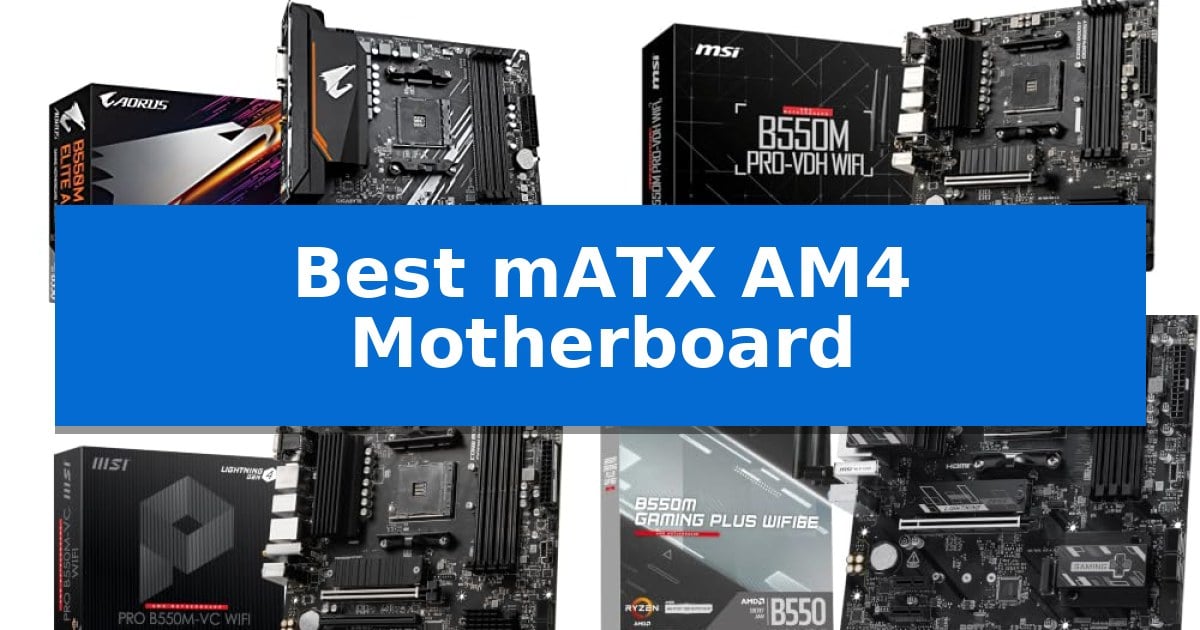
Building a compact PC requires careful planning, especially when selecting a foundation that balances size with essential features. The Best mATX AM4 Motherboard serves as the backbone of your system, providing the necessary socket support for Ryzen 5000, 4000, and 3000 series processors while fitting into space-conscious cases.
Whether you are prioritizing high-speed storage, advanced wireless networking, or efficient thermal management, choosing the right board ensures your components operate reliably. This guide examines five distinct options to help you identify which model aligns with your specific hardware requirements and build goals.
You may also want to compare Best MATX AM3+ Motherboards, Best MATX AM3 Motherboards, and Best Matter-Compatible Zigbee Hubs.
Best mATX AM4 Motherboard
Quick Comparison
| Product | Best For | Key Strength | Score |
|---|---|---|---|
| GIGABYTE B550M AORUS Elite AX | Best Overall | WIFI 6E connectivity for reduced network congestion. | 4.9 |
| MSI B550M PRO-VDH WiFi | Reliable cooling for steady performance | Flash BIOS Button allows for easy updates without a CPU. | 4.8 |
| MSI PRO B550M-VC WiFi | High-speed storage with Shield Frozr | M.2 Shield Frozr for effective storage thermal management | 4.9 |
| MSI B550M Gaming Plus WIFI6E | Enhanced stability for modern gaming | Wi-Fi 6E and Bluetooth 5.3 integration for modern wireless connectivity | 4.7 |
| GIGABYTE B550M K | Essential features for budget builds | PCIe 4.0 support for high-speed graphics and NVMe storage. | 4.3 |
How We Chose
- Socket and CPU compatibility for the AM4 platform.
- Thermal management features including heatsinks and power phase design.
- Expansion capabilities such as PCIe 4.0 slots and M.2 storage support.
- Integrated connectivity including Wi-Fi standards and USB port configurations.
- Ease of assembly features like BIOS flashing tools and integrated I/O shields.
1 GIGABYTE B550M AORUS Elite AX — Premium connectivity with Wi-Fi 6E
Building a compact yet powerful PC requires a foundation that balances space constraints with modern connectivity, and the GIGABYTE B550M AORUS Elite AX is engineered specifically for this purpose. Featuring an AMD Socket AM4 interface, this motherboard provides a reliable base for Ryzen 5000, 4000, and 3000 series processors, making it a versatile choice for various performance builds.
The board prioritizes stable power delivery through its Pure Digital 5+3 Power Phase design, utilizing premium chokes and capacitors to maintain efficiency under load. To manage heat effectively, it includes Advanced Thermal Armor with an enlarged MOSFET heatsink, ensuring that critical components stay cool during intensive tasks. The inclusion of an integrated I/O shield further simplifies the assembly process for DIY builders.
Connectivity is a standout aspect of this model, highlighted by WIFI 6E support. By utilizing the 6 GHz frequency band, it offers increased bandwidth and reduced interference, which is essential for a stable online experience. For storage and expansion, the board provides PCIe 4.0 support for both the x16 slot and one M.2 slot, alongside a secondary PCIe 3.0 M.2 slot, offering flexibility for high-speed storage configurations.
User accessibility is addressed through the Q-Flash Plus feature, which allows for effortless BIOS updates without the need to install a CPU, RAM, or GPU. Complementing this is a refreshed BIOS interface with an Easy Mode that simplifies system configuration. With its compact mATX form factor, this motherboard fits into smaller chassis while maintaining the essential features required for a modern, high-performance desktop.
Best for: Builders seeking a compact mATX foundation with high-speed Wi-Fi 6E and PCIe 4.0 support for Ryzen-based systems.
Skip if: Users requiring multi-GPU setups or those needing more than two M.2 storage slots will find the expansion options limiting.
PROS
- WIFI 6E connectivity for reduced network congestion.
- Q-Flash Plus enables BIOS updates without a CPU.
- PCIe 4.0 support for high-speed storage and graphics.
- Integrated I/O shield for easier installation.
CONS
- Limited to two M.2 slots for storage expansion.
- mATX form factor restricts the number of available PCIe expansion slots.
2 MSI B550M PRO-VDH WiFi — Reliable cooling for steady performance
The MSI B550M PRO-VDH WiFi provides a foundation for compact PC builds by integrating PCIe 4.0 support and a Flash BIOS Button that allows for system updates without requiring a CPU or memory installed. This motherboard is designed to support 3rd Gen AMD Ryzen processors and future compatible models, making it a versatile choice for users prioritizing a smaller footprint without sacrificing modern connectivity standards.
Engineered for thermal efficiency, the board features a Premium Thermal Solution including a heatsink with a 7W/mk thermal pad and a PCB constructed with 2oz thickened copper. These elements work in tandem with Core Boost technology, which utilizes optimized power circuit layouts and digital power regulation to maintain steady current delivery to the processor during operation.
Memory and audio capabilities are central to its design, supporting dual channel DDR4 memory up to 128 GB at speeds reaching 4400 MHz. For audio, the board incorporates the Realtek ALC892/ALC897 Codec and AUDIO BOOST technology, intended to provide clear sound output for gaming and media consumption.
The Micro-ATX form factor ensures compatibility with a wide range of smaller cases while maintaining essential expansion options. With integrated Wi-Fi and Bluetooth connectivity, it reduces the need for additional expansion cards, keeping the internal layout clean and functional for various desktop configurations.
Best for: Users building a compact, high-performance PC who require integrated wireless connectivity and support for modern PCIe 4.0 components.
Skip if: Users who require extensive multi-GPU support or a larger ATX form factor for advanced multi-card expansion setups.
PROS
- Flash BIOS Button allows for easy updates without a CPU.
- Premium Thermal Solution with 7W/mk thermal pads and 2oz copper PCB.
- Integrated Wi-Fi and Bluetooth connectivity.
- Core Boost technology for precise power delivery.
CONS
- Micro-ATX form factor limits the number of available PCIe expansion slots compared to ATX boards.
3 MSI PRO B550M-VC WiFi — High-speed storage with Shield Frozr
The MSI PRO B550M-VC WiFi centers its design around the M.2 Shield Frozr, a dedicated thermal solution engineered to manage heat for high-speed storage. This mATX motherboard provides a robust foundation for AMD Ryzen 5000 and 3000 series processors, utilizing a 2oz thickened copper PCB and Digital PWM IC to support stable power delivery during intensive tasks.
Built for versatility, the board features PCIe 4.0 support and Lightning Gen4 x4 M.2 slots, enabling faster data transfer rates for compatible storage devices. Memory performance is enhanced through DDR4 Boost technology, which allows for memory speeds up to 4400(OC) MHz, providing flexibility for users looking to optimize their system memory configuration.
Connectivity is a primary focus, highlighted by the inclusion of Wi-Fi 6E and Bluetooth 5.2 for modern wireless networking and peripheral integration. The rear I/O panel includes USB 3.2 Gen 2 ports, alongside HDMI and DisplayPort outputs, ensuring compatibility with a variety of displays and high-speed external devices.
Thermal management is further addressed by a 7W/mK thermal pad and additional choke thermal pads, which work in tandem with the M.2 Shield Frozr to maintain performance during non-stop operation. This combination of thermal efficiency and component design makes it a practical choice for users building compact, high-performance systems.
Best for: Users building a compact, high-performance PC who require modern wireless connectivity and fast PCIe 4.0 storage support.
Skip if: Users with older AMD Ryzen 5 3400G or Ryzen 3 3200G processors, as this motherboard is not compatible with those specific models.
PROS
- M.2 Shield Frozr for effective storage thermal management
- Integrated Wi-Fi 6E and Bluetooth 5.2 for modern connectivity
- Supports high-speed DDR4 memory up to 4400(OC) MHz
- PCIe 4.0 support for next-generation storage and expansion
CONS
- Incompatible with specific legacy APUs like the Ryzen 5 3400G and Ryzen 3 3200G
- mATX form factor may limit expansion slots compared to full ATX boards
4 MSI B550M Gaming Plus WIFI6E — Enhanced stability for modern gaming
Building a compact yet powerful PC requires a foundation that balances thermal management with modern connectivity. The MSI B550M Gaming Plus WIFI6E addresses this by integrating a robust VRM design with MSI Core Boost technology, ensuring stable power delivery for high-performance AMD Ryzen 5000, 4000, and 3000 series processors.
Thermal efficiency is managed through the Frozr Guard system, which utilizes an Extended Heatsink and dedicated thermal pads across the VRM and chokes. For storage and expansion, the board features a PCIe 4.0 x16 slot reinforced with Steel Armor to support heavy graphics cards, alongside an M.2 Gen4 x4 slot protected by an M.2 Shield Frozr to mitigate thermal throttling during intensive data transfers.
Connectivity is a highlight, featuring an integrated Wi-Fi 6E module with Bluetooth 5.3 for modern wireless standards, complemented by a 1Gbps LAN port. The board supports high-speed memory configurations, with four DIMM slots capable of reaching 4400+ MHz (OC), providing flexibility for users looking to optimize their system memory performance.
Designed for the mATX form factor, this motherboard balances essential features like 7.1 HD Audio with Audio Boost and multiple fan headers, including a dedicated Pump-sys header, making it a practical choice for users building in space-constrained cases without sacrificing core functionality.
Best for: Users building a compact, high-performance gaming PC who require modern wireless connectivity and reliable thermal management for Ryzen processors.
Skip if: Users who require multi-GPU configurations, extreme overclocking headroom beyond standard DDR4 limits, or 2.5G/10G networking capabilities.
PROS
- Wi-Fi 6E and Bluetooth 5.3 integration for modern wireless connectivity
- M.2 Shield Frozr and extended heatsinks for effective thermal management
- Steel Armor reinforced PCIe 4.0 slot for structural durability
- MSI Core Boost for improved power stability
CONS
- Limited to 1Gbps LAN connectivity
- Standard mATX form factor may not fit in ultra-compact ITX-only cases
5 GIGABYTE B550M K — Essential features for budget builds
The GIGABYTE B550M K serves as a specialized foundation for AMD Ryzen 5000, 4000, and 3000 series processors, leveraging the AM4 socket to provide a stable, compact platform. Its digital 3+3 VRM design, reinforced with premium chokes and capacitors, ensures consistent power delivery, which is essential for maintaining system stability under varying workloads. This power architecture is particularly beneficial for builders who prioritize reliability in a space-constrained environment.
Thermal management is addressed through integrated chipset heatsinks, which assist in dissipating heat during operation. For memory-intensive tasks, the board includes four DIMM slots with Extreme Memory Profile (XMP) support, allowing users to easily optimize their DDR4 RAM performance. The Micro-ATX form factor strikes a balance between component density and physical footprint, making it a practical choice for smaller chassis designs where space is at a premium.
Connectivity is a core strength of this motherboard, featuring an Ultra Durable PCIe 4.0 x16 slot for high-bandwidth graphics cards. Storage flexibility is provided by dual M.2 slots, with one supporting PCIe 4.0 and the other PCIe 3.0, enabling fast NVMe storage configurations. Additionally, the Q-Flash utility simplifies the maintenance process by allowing BIOS updates without the need for a CPU or memory to be installed, a significant convenience for initial system setup.
While the board offers robust essential features, it is designed with specific trade-offs inherent to its size and target market. The compact layout naturally limits the total number of expansion slots compared to larger ATX boards, and the lack of integrated Wi-Fi means users will need to rely on Ethernet or add a separate expansion card for wireless connectivity.
Best for: Budget-conscious builders seeking a compact AM4 motherboard that supports PCIe 4.0 storage and graphics for Ryzen processors.
Skip if: Users who require integrated Wi-Fi, multi-GPU configurations, or the extensive expansion options found on larger ATX motherboards.
PROS
- PCIe 4.0 support for high-speed graphics and NVMe storage.
- Digital 3+3 power phase design for reliable power delivery.
- Four DIMM slots offering memory expansion flexibility.
- Q-Flash utility for convenient, CPU-less BIOS updates.
CONS
- Limited expansion slots due to the compact Micro-ATX form factor.
- No integrated Wi-Fi connectivity.
Best mATX AM4 Motherboard Buying Guide
Understanding Form Factor Compatibility
The mATX (Micro-ATX) form factor is a popular choice for builders who want a balance between the tiny footprint of Mini-ITX and the expansive nature of ATX. Before purchasing, ensure your PC case supports the mATX standard, as some smaller cases are strictly limited to Mini-ITX.
While mATX boards are smaller, they often retain enough PCIe slots and DIMM slots for most users. Always check the physical dimensions of the board to ensure it fits comfortably within your chosen chassis, leaving enough room for cable management and airflow.
Power Delivery and Thermal Design
The power phase design of a motherboard determines how efficiently it delivers electricity to your CPU. A more robust power phase, often paired with high-quality chokes and capacitors, is essential if you plan to use higher-end Ryzen processors or engage in overclocking.
Look for boards that feature enlarged MOSFET heatsinks or dedicated thermal pads. These components help dissipate heat from the power delivery circuitry, preventing thermal throttling during intensive tasks and ensuring long-term system stability.
Storage and Expansion Standards
Modern builds benefit significantly from PCIe 4.0 support, which offers faster data transfer rates for compatible NVMe SSDs and graphics cards. Ensure your motherboard provides at least one PCIe 4.0 M.2 slot to take full advantage of high-speed storage drives.
Beyond storage, consider the number of available PCIe slots if you plan to add expansion cards like sound cards or capture cards. A well-designed layout ensures that these cards do not obstruct airflow to your primary graphics card.
Connectivity and Networking
Integrated Wi-Fi 6E or Wi-Fi 6 is a major convenience for users who cannot run a wired Ethernet connection to their desk. These standards offer lower latency and better bandwidth management, which is particularly useful for online gaming and streaming.
Check the rear I/O panel for the number and type of USB ports. Having a mix of USB 3.2 Gen 1 or Gen 2 ports ensures you can connect high-speed external drives and peripherals without needing additional hubs.
BIOS and DIY Features
Building a PC can be intimidating, but features like Q-Flash Plus or a dedicated Flash BIOS button simplify the process. These tools allow you to update the motherboard firmware without needing a CPU, RAM, or GPU installed, which is vital if you buy a board that requires an update for newer processors.
An intuitive BIOS interface with an "Easy Mode" is also beneficial for beginners. It allows you to monitor temperatures, adjust fan curves, and enable memory profiles like XMP without navigating complex, deep-level settings.
Frequently Asked Questions
Will an AM4 motherboard support all Ryzen processors?
Most AM4 motherboards support Ryzen 3000, 4000, and 5000 series processors, but a BIOS update may be required. Always check the manufacturer's website for specific CPU support lists.
What is the benefit of an integrated I/O shield?
An integrated I/O shield simplifies the installation process by pre-attaching the shield to the motherboard, preventing the common frustration of forgetting to install it in the case before the board.
Does mATX limit my graphics card options?
Generally, no. Most mATX boards include a PCIe x16 slot that is fully compatible with standard-sized graphics cards, provided your case has enough physical clearance.
Why is PCIe 4.0 important?
PCIe 4.0 provides double the bandwidth of PCIe 3.0, allowing for faster data transfer speeds for modern NVMe SSDs and ensuring your graphics card is not bottlenecked by the interface.
Can I use DDR4 memory with these boards?
Yes, all the listed AM4 motherboards are designed for DDR4 memory. Ensure your RAM kit is compatible with the motherboard's maximum supported frequency.
Conclusion: Our Top Pick
Selecting the right motherboard is a critical step in your build process, and the GIGABYTE B550M AORUS Elite AX stands out as a versatile choice. With its support for Wi-Fi 6E, robust 5+3 power phase design, and DIY-friendly features like Q-Flash Plus, it provides a stable and modern foundation for a wide range of Ryzen-based systems.
While other options like the MSI B550M PRO-VDH WiFi offer excellent cooling and value, the GIGABYTE board's combination of connectivity and ease of assembly makes it our top recommendation. Ensure your chosen CPU and case are compatible before finalizing your purchase to guarantee a smooth building experience.