
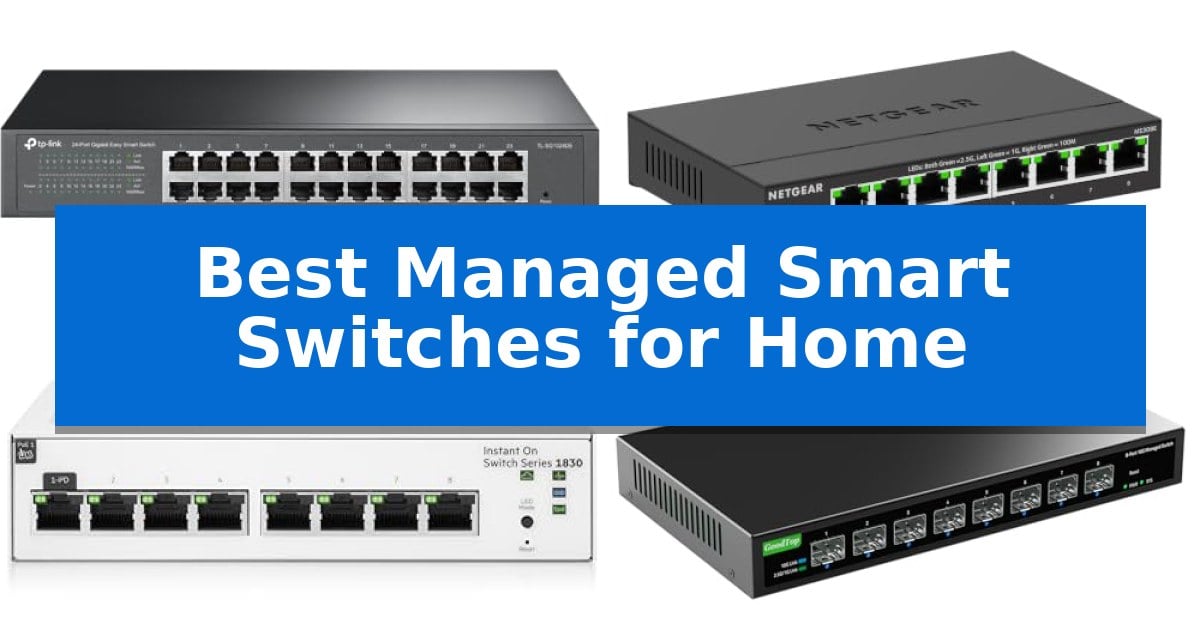
Managing a modern home network often requires more than a basic unmanaged switch, especially when you need to isolate traffic for security or prioritize bandwidth for specific devices. The Best Managed Smart Switches for Home provide the granular control necessary to segment your network, monitor performance, and ensure that latency-sensitive applications receive the priority they deserve.
Whether you are setting up a home lab, managing a high-bandwidth media server, or simply looking to organize your wired connections with better oversight, choosing the right hardware is essential. We have analyzed several smart-managed options to help you understand which features—from VLAN support to multi-gigabit speeds—align with your specific home networking requirements.
You may also want to compare Best Managed PoE Switches for Small Business, Best Managed PoE Switches for Security Cameras, and Best Managed PoE Switches.
Best Managed Smart Switches for Home
Quick Comparison
| Product | Best For | Key Strength | Score |
|---|---|---|---|
| TP-Link TL-SG1024DE Gigabit Smart Switch | Best Overall | 24 Gigabit ports for high-capacity wired networking. | 4.9 |
| NETGEAR MS308E 2.5G Multi-Gig Switch | Fast Multi-Gigabit Home Connectivity | 8 x 2.5Gbps ports for high-speed multi-gigabit throughput. | 4.8 |
| HPE Instant On 1830 Smart Switch | Simplified Enterprise-Grade Management | Fan-less design ensures silent operation in home environments. | 4.7 |
| GoodTop 8-Port 10G SFP+ Switch | High-Speed Fiber for Home Labs | Eight 10G SFP+ ports for high-bandwidth versatility. | 4.9 |
| TP-Link TL-SG105E Gigabit Smart Switch | Compact Desktop Traffic Management | Easy Smart Managed features including QoS and VLAN. | 4.5 |
How We Chose
- Management Interface: We assessed the ease of use and depth of configuration options, such as VLAN tagging and QoS settings, provided through the web-based interface.
- Port Capacity and Speed: We prioritized switches that offer a balance of port count and throughput, including support for 2.5G or 10G speeds where applicable.
- Build and Mounting: We considered the physical footprint and mounting versatility, focusing on metal housings that offer durability and effective heat dissipation.
- Network Features: We looked for essential traffic management tools like IGMP snooping, loop prevention, and link aggregation that directly impact network stability.
1 TP-Link TL-SG1024DE Gigabit Smart Switch — High-Capacity Wired Network Control
Managing high-density wired networks requires hardware that balances port density with granular traffic control. The TP-Link TL-SG1024DE Gigabit Smart Switch addresses this by offering 24 Gigabit ports in a robust, rack-mountable metal chassis, designed to handle large file transfers and complex network configurations without the overhead of a fully managed enterprise solution.
This device simplifies network administration through features like Port Mirroring, Loop Prevention, and Cable Diagnostics, which allow for effective monitoring and troubleshooting. By supporting 9K Jumbo frames, the switch enhances performance during large data transfers, ensuring that bandwidth-heavy tasks move efficiently across your home or small office infrastructure.
Security and traffic prioritization are managed through Abundant VLAN features and Port and tag-based QoS. These tools allow you to segment traffic for improved security and ensure that latency-sensitive applications receive the necessary priority. Additionally, IGMP Snooping is included to optimize multicast traffic, preventing unnecessary data flooding across your network.
Designed for versatility, the unit supports both desktop and rackmount installations. Its plug-and-play connectivity allows for immediate use, while the advanced management interface remains accessible for those who need to fine-tune their network settings. The inclusion of shielded ports further emphasizes its focus on a sturdy, reliable build for long-term operation.
Best for: Home users or small offices requiring high-density Gigabit connectivity with advanced traffic management and VLAN support.
Skip if: Users who require a fully managed Layer 3 switch or those with limited physical space who do not need 24 ports.
PROS
- 24 Gigabit ports for high-capacity wired networking.
- Advanced traffic management including VLAN, QoS, and IGMP Snooping.
- Sturdy metal construction suitable for desktop or rackmount use.
- Integrated diagnostic tools for loop prevention and cable testing.
CONS
- Large physical footprint compared to smaller 5 or 8-port switches.
- Requires configuration to utilize advanced features like VLANs and QoS.
2 NETGEAR MS308E 2.5G Multi-Gig Switch — Fast Multi-Gigabit Home Connectivity
The NETGEAR 8-Port 2.5G Multi-Gig Ethernet Easy Smart Managed Switch (MS308E) addresses the need for high-speed local network traffic by providing eight dedicated 2.5Gbps ports in a compact, fanless metal chassis. This device is engineered to handle bandwidth-intensive tasks by utilizing auto-negotiating ports that seamlessly detect the optimal speed for connected hardware while remaining compatible with existing Cat5e or Cat6 cabling infrastructures.
Designed for versatility, the switch features a fanless design that ensures silent operation, making it suitable for desktop placement in home offices or workspaces. It also supports wall-mount installation for those looking to save desk space. The inclusion of IEEE 802.3az Energy Efficient Ethernet allows the unit to reduce power consumption during operation without sacrificing the high-speed throughput required for modern multi-gigabit connections.
The Easy Smart Managed Essentials software interface provides granular control over network traffic. Users can configure VLANs to segment network traffic, implement Quality of Service (QoS) to prioritize critical data streams, and monitor port status to maintain network security. These management capabilities offer a balance between plug-and-play simplicity and the administrative control often required for complex home or small business setups.
Backed by a limited 3-year hardware warranty, this switch is built for reliability in U.S. and Canadian environments. Its combination of multi-gigabit performance, silent operation, and essential management tools makes it a practical solution for upgrading home network backbones to support faster data transfers across multiple devices.
Best for: Home users and small offices requiring high-speed 2.5Gbps connectivity with basic network management features like VLANs and QoS.
Skip if: Users who require advanced Layer 3 routing, 10Gbps uplink ports, or managed features beyond the Essentials software suite.
PROS
- 8 x 2.5Gbps ports for high-speed multi-gigabit throughput.
- Fanless, silent design suitable for quiet work environments.
- Easy Smart Managed interface for VLAN and QoS configuration.
- Flexible mounting options including desktop and wall-mount.
CONS
- Regional limitation for use in U.S. and Canada only.
- Essentials management may be too limited for advanced power users.
3 HPE Instant On 1830 Smart Switch — Simplified Enterprise-Grade Management
Managing a home network requires hardware that provides both reliable connectivity and intuitive control, and the HPE Networking Instant On Switch Series 1830 8-Port Gb Smart-Managed Layer 2 Ethernet Switch addresses these needs through its versatile, fan-less design. This switch is built for environments where network demands are evolving, offering a straightforward approach to managing traffic without the complexity of enterprise-grade CLI interfaces.
The HPE Instant On 1830 Smart Switch features eight active 1G copper RJ45 ports, providing gigabit speeds for connected devices. A significant advantage for home users is the flexible power delivery; the unit can be powered via an external adapter or through an upstream Power over Ethernet (PoE) switch, which simplifies installation in locations lacking dedicated wall outlets.
Configuration and monitoring are handled through the Instant On mobile app or a standard web browser, eliminating the need for recurring subscriptions or licensing fees. For those who prefer traditional methods, the device also includes an integrated local web interface with a quick start-up wizard and SNMP support, ensuring that setup remains accessible regardless of your technical background.
Physical installation is equally adaptable, as the switch supports table-top, wall, or under-table mounting. The included brackets and base surface holes allow for mounting with ports facing either up or down, making it easy to integrate into tight spaces or home office setups. The unit is backed by an industry-leading limited lifetime warranty, providing long-term support for your home network infrastructure.
Best for: Home users who need a quiet, fan-less, and easy-to-manage gigabit switch that can be powered via PoE.
Skip if: Users requiring 10GbE uplinks or advanced Layer 3 routing capabilities, as this is a Layer 2 smart-managed device.
PROS
- Fan-less design ensures silent operation in home environments.
- Flexible power options allow for operation via external adapter or upstream PoE.
- No recurring costs or subscription fees for management software.
- Versatile mounting options including wall and under-table configurations.
CONS
- Layer 2 management only, which may limit advanced network routing needs.
- 8-port capacity may be insufficient for larger home networks requiring more physical connections.
4 GoodTop 8-Port 10G SFP+ Switch — High-Speed Fiber for Home Labs
Managing high-bandwidth home networks requires hardware that balances throughput with granular control. The GoodTop 8-Port 10G SFP+ Switch addresses this by providing eight 10G SFP+ slots in a compact, fanless chassis, making it suitable for environments where silent operation is as critical as network speed.
This smart web managed device offers essential administrative features including VLAN, QoS, Spanning Tree, and Link Aggregation (supporting both static and IEEE 802.3ad dynamic configurations). These tools allow users to segment traffic and prioritize bandwidth for demanding tasks like 8K video streaming or high-speed NAS data transfers.
Designed for versatility, the switch supports 10G, 2.5G, and 1G connection modes, which are configurable via the web interface. Its fanless metal housing ensures silent heat dissipation, while the small footprint and integrated mounting holes allow for flexible installation on desks, walls, or via velcro in tight spaces.
While the unit is built for efficiency with the RTL9303 master chip, it is worth noting that it may generate heat during full-load operation, particularly when utilizing 10G SFP+ RJ45 modules. Users should ensure adequate ventilation in the 0–40°C operating environment to maintain optimal performance.
Best for: Home labs and power users requiring high-speed 10G connectivity with managed network features in a silent, compact form factor.
Skip if: Users who require standard RJ45 Ethernet ports without the need for SFP+ modules or those who prefer a plug-and-play unmanaged switch.
PROS
- Eight 10G SFP+ ports for high-bandwidth versatility.
- Fanless, silent operation suitable for home or office environments.
- Comprehensive management features including VLAN, QoS, and Link Aggregation.
- Compact, mountable design with a small physical footprint.
CONS
- Heat generation may occur under full load when using RJ45 modules.
- Manual IP configuration required via IPv4 before initial web interface access.
5 TP-Link TL-SG105E Gigabit Smart Switch — Compact Desktop Traffic Management
Managing network traffic in a home or small office environment requires more than a basic unmanaged switch, and the TP-Link 5-Port Gigabit Ethernet Easy Smart Switch (TL-SG105E) provides the necessary control through its Easy Smart Managed features. By utilizing an intuitive web-based interface, users can implement QoS (Quality of Service), VLAN, IGMP snooping, and port mirroring to prioritize bandwidth and segment traffic effectively.
The TP-Link TL-SG105E Gigabit Smart Switch is built with a sturdy metal casing and shielded ports, which contribute to improved heat dissipation and protection against signal interference. This hardware design ensures durability for long-term placement on a desk or shelf, while the compact desktop form factor keeps the footprint minimal in tight workspaces.
For those who prefer a simple setup, the device functions as a Plug and Play switch for basic connectivity, requiring no configuration for standard use. When advanced network management is needed, the smart features are readily accessible. The unit supports 5 Gigabit RJ45 ports capable of 10/100/1000 Mbps speeds, offering reliable wired connectivity for multiple devices.
To support long-term reliability, the switch is backed by a Limited Lifetime Replacement policy and free technical support. This commitment provides a layer of security for your network infrastructure, ensuring that the hardware remains a viable part of your home setup for years to come.
Best for: Home and small office users who need basic traffic management features like VLAN and QoS in a compact, durable form factor.
Skip if: Users who require advanced Layer 3 routing capabilities, Power over Ethernet (PoE), or more than five ports for their network expansion.
PROS
- Easy Smart Managed features including QoS and VLAN.
- Durable metal housing with shielded ports.
- Plug and Play simplicity for basic setups.
- Limited Lifetime Replacement policy.
CONS
- Limited to 5 ports, which may not be enough for larger home networks.
- No Power over Ethernet (PoE) support for devices like cameras or access points.
Best Managed Smart Switches for Home Buying Guide
Understanding Managed vs. Unmanaged Switches
An unmanaged switch is a plug-and-play device that requires no configuration, making it suitable for simple setups. However, a managed or smart-managed switch allows you to actively control how data flows across your network.
By using features like VLANs (Virtual Local Area Networks), you can segment your network to keep guest traffic separate from your private devices, significantly improving overall network security and reducing broadcast traffic.
The Importance of Quality of Service (QoS)
Quality of Service (QoS) is a critical feature for homes with heavy internet usage. It allows you to prioritize specific types of traffic, such as video conferencing or gaming, over less time-sensitive data like file downloads.
When your network is congested, a switch with robust QoS settings ensures that your most important applications remain responsive, preventing buffering or lag during critical tasks.
Selecting the Right Port Speed
While standard Gigabit Ethernet (1Gbps) is sufficient for most home devices, high-performance setups—such as those involving Network-Attached Storage (NAS) or high-speed internet plans—may benefit from 2.5G or 10G ports.
Before purchasing, check the capabilities of your connected devices. Investing in multi-gigabit hardware is only beneficial if your router, cables, and end devices support those higher speeds.
Physical Design and Heat Management
Home network gear is often placed in tight spaces, such as closets or media cabinets. A fanless design is highly desirable for home use because it ensures silent operation, which is critical if the switch is located in a living area or bedroom.
Look for switches with sturdy metal housings, as these act as passive heat sinks. Proper heat dissipation is vital for long-term reliability, especially when the switch is fully loaded with high-speed modules.
Network Monitoring and Diagnostics
Smart-managed switches often include built-in diagnostic tools like cable testing and port mirroring. These features can save significant time when troubleshooting connectivity issues.
Being able to identify a faulty cable or monitor traffic patterns directly through the switch's interface provides a level of visibility that is simply not available with basic, low-cost hardware.
Frequently Asked Questions
Do I need technical expertise to set up a smart-managed switch?
Most smart-managed switches are designed for easy setup. While they offer advanced features, they often include a web-based interface with a quick-start wizard to help you configure basic settings without needing deep networking knowledge.
Can I use a managed switch with my existing router?
Yes, a managed switch is compatible with virtually any standard home router. You simply connect the switch to one of your router's LAN ports, and it will handle the distribution of traffic to your connected devices.
What is the difference between a smart switch and a fully managed switch?
Smart-managed switches offer a subset of features found in fully managed enterprise switches, such as VLANs and QoS, but at a lower price point and with a simplified interface. They are generally sufficient for most home and small office needs.
Will a 10G switch work with my 1G devices?
Yes, most 10G switches are backward compatible. However, you should verify the specific port modes supported by the switch, as some may require manual configuration to recognize 1G or 2.5G connections.
Are metal-cased switches better than plastic ones?
Metal cases are generally preferred for home networking because they provide better durability and act as a heat sink to dissipate heat generated by the internal components, which can improve the lifespan of the device.
Conclusion: Our Top Pick
For those seeking a balance of port density and advanced traffic control, the TP-Link TL-SG1024DE Gigabit Smart Switch stands out as a reliable choice. Its 24-port capacity is ideal for larger home networks, and it provides essential management features like VLANs and QoS that help maintain a stable, organized connection for all your devices.
While it offers significant control, ensure your home layout can accommodate its size, as it is a larger unit compared to compact 5-port or 8-port alternatives. For most users, this switch provides the perfect combination of high-capacity throughput and the administrative tools needed to manage a modern, demanding home network.