
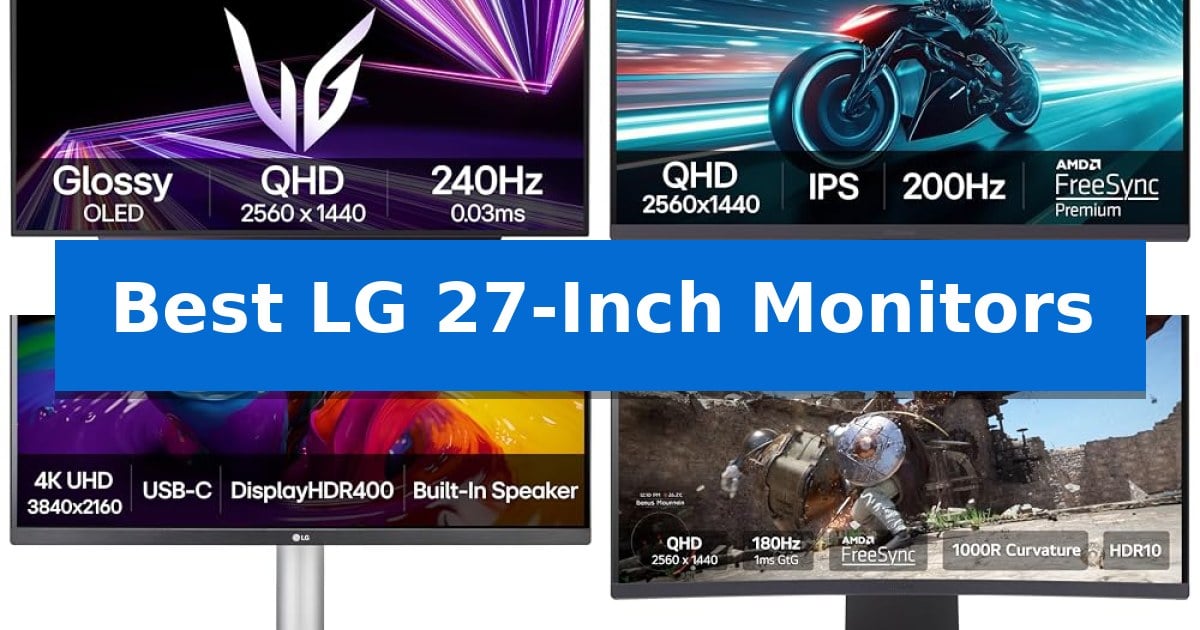
Finding the right display for your workspace often comes down to balancing screen real estate with pixel density. The Best LG 27-Inch Monitors offer a versatile middle ground, providing enough surface area for multitasking without overwhelming a standard desk setup.
Whether you are looking for high-refresh-rate gaming performance or color-accurate panels for creative work, selecting the right model requires understanding how specific features like panel technology and input standards impact your daily workflow.
You may also want to compare Best LG 27-Inch Monitor, Best LG 24-Inch Monitor, and Best LG 23.8-Inch FHD FreeSync Monitors.
Best LG 27-Inch Monitors
Quick Comparison
| Product | Best For | Key Strength | Score |
|---|---|---|---|
| LG UltraGear 27GX704A-B OLED Gaming Monitor | Best Overall | 0.03ms response time for near-instantaneous visual clarity. | 4.9 |
| LG UltraGear 27GS75Q-B Gaming Monitor | High Refresh Rate QHD Performance | 200Hz refresh rate for smooth motion | 4.6 |
| LG UltraFine 27UP850K-W 4K Monitor | Professional Color and Connectivity | 90W USB-C Power Delivery for convenient laptop charging and connectivity. | 4.5 |
| LG UltraGear 27GS60QC-B Curved Gaming Monitor | Immersive Curved Gaming Experience | 1000R steep curve for enhanced immersion. | 4.4 |
| LG 27U631A-B QHD Computer Monitor | Versatile QHD Productivity Pick | Integrated Switch app for efficient multi-window multitasking. | 4.4 |
How We Chose
- Resolution and pixel density for clarity in text and media.
- Refresh rate and response time capabilities for motion handling.
- Color gamut coverage and HDR support for visual accuracy.
- Connectivity options including USB-C power delivery and display standards.
- Ergonomic adjustments and stand versatility for long-term comfort.
1 LG UltraGear 27GX704A-B OLED Gaming Monitor — Elite OLED Speed and Clarity
Achieving a competitive edge in fast-paced gaming requires hardware that can keep up with instantaneous inputs, which is exactly why the LG UltraGear 27GX704A-B OLED Gaming Monitor is designed for high-performance setups. Featuring a 27-inch QHD OLED display with a 240Hz refresh rate and an ultra-fast 0.03ms response time, this monitor minimizes ghosting to ensure visuals remain sharp during intense movement.
The display is engineered for visual fidelity, utilizing VESA DisplayHDR True Black 400 and a 1.5M:1 contrast ratio to produce deep blacks and vibrant highlights. With a peak brightness of 1300 nits and support for 98.5% DCI-P3 color gamut, the screen delivers intense color depth. To maintain comfort during long sessions, the panel is UL-certified for flicker-free performance, low blue light, and anti-glare properties.
Connectivity is robust, offering dual HDMI 2.1 ports, a DisplayPort 1.4, and integrated USB 3.2 ports for peripherals. The monitor supports NVIDIA G-SYNC Compatible and AMD FreeSync Premium Pro technologies to ensure smooth, tear-free frame delivery regardless of the GPU. The stand provides full ergonomic flexibility, including height, tilt, swivel, and pivot adjustments to suit any desk configuration.
Maintenance is simplified through built-in OLED Care features, which include automatic pixel care cycles during standby to mitigate image retention. Users can manage these settings and display modes via the On-Screen Control menu, ensuring the panel remains optimized for both gaming and general use.
Best for: Competitive gamers seeking a high-refresh-rate OLED display with rapid response times and advanced sync technology.
Skip if: Users who primarily perform static productivity work may prefer an IPS or VA panel to avoid the maintenance requirements associated with OLED pixel care.
PROS
- 0.03ms response time for near-instantaneous visual clarity.
- 240Hz refresh rate provides ultra-smooth motion for gaming.
- VESA DisplayHDR True Black 400 ensures deep, accurate contrast.
- Comprehensive ergonomics with height, tilt, swivel, and pivot controls.
CONS
- OLED maintenance required to mitigate potential image retention.
- Glossy finish may require specific lighting control to avoid reflections.
2 LG UltraGear 27GS75Q-B Gaming Monitor — High Refresh Rate QHD Performance
The LG UltraGear 27GS75Q-B Gaming Monitor is designed for high-speed gaming, featuring a 200Hz refresh rate and a 1ms GtG response time to minimize motion blur during fast-paced sequences. This 27-inch display utilizes an IPS panel with QHD (2560×1440) resolution, providing a balance between visual clarity and performance for competitive play.
Visual fidelity is supported by HDR10 and a 99% sRGB color gamut, ensuring vibrant color reproduction. To maintain smooth gameplay, the monitor is NVIDIA G-SYNC Compatible and includes AMD FreeSync support, which works to reduce screen tearing and stuttering during variable frame rate scenarios.
The monitor features a three-side virtually borderless design that helps maximize screen real estate. Ergonomics are addressed through a versatile stand that offers tilt, height, and pivot adjustments, allowing for customized positioning on a desk. Connectivity options include two HDMI ports and a DisplayPort.
For specialized gaming needs, the Enhanced Gaming GUI provides specific modes like FPS and RTS to optimize settings. Additional integrated tools include a Black Stabilizer to improve visibility in dark environments, a crosshair overlay for aiming precision, and an FPS counter for real-time performance data.
Best for: Competitive gamers seeking a high-refresh-rate QHD display with versatile ergonomic adjustments.
Skip if: Users who require 4K resolution for professional creative work or those who prefer a curved panel design.
PROS
- 200Hz refresh rate for smooth motion
- 1ms GtG response time to reduce ghosting
- Height, tilt, and pivot adjustable stand for ergonomic comfort
- NVIDIA G-SYNC and AMD FreeSync support for tear-free gaming
CONS
- QHD resolution may not satisfy users requiring 4K fidelity
- Standard IPS contrast ratios may limit deep black performance compared to OLED alternatives
3 LG UltraFine 27UP850K-W 4K Monitor — Professional Color and Connectivity
Achieving a streamlined workspace often begins with the display, and the LG UltraFine 27UP850K-W 4K Monitor addresses this by integrating high-resolution clarity with versatile connectivity. This 27-inch UHD display is engineered to support a 95% DCI-P3 color gamut, providing a broad spectrum for color-sensitive tasks, while its VESA DisplayHDR 400 compatibility ensures that contrast and brightness levels are optimized for high dynamic range content.
Beyond its visual output, the monitor serves as a functional hub for modern setups. It features a USB Type-C port capable of delivering up to 90W of power, allowing users to charge compatible laptops while simultaneously transferring data. This single-cable solution helps reduce desktop clutter by eliminating the need for extra adapters. For those who require additional connectivity, the monitor includes DisplayPort, two HDMI ports, and two USB 3.0 ports.
The design prioritizes user comfort and multitasking efficiency. The ergonomic stand allows for height, tilt, and pivot adjustments to suit various viewing angles. Furthermore, the included Switch app enables users to split the screen into up to 6 sections, facilitating a more organized workflow. Integrated stereo speakers with Waves MaxxAudio provide sound output, while gaming-specific features like Black Stabilizer and Dynamic Action Sync are included to assist with visibility and responsiveness during gameplay.
While the monitor offers a robust feature set for productivity and entertainment, it is important to note that it operates at a 60Hz refresh rate. This is standard for professional creative work and office tasks but may not meet the requirements of users seeking higher refresh rates for competitive gaming.
Best for: This monitor is best for creative professionals and office users who require high color accuracy and a single-cable USB-C power delivery solution for their laptops.
Skip if: Skip this monitor if you are a competitive gamer who requires refresh rates higher than 60Hz for fast-paced, high-frame-rate gaming.
PROS
- 90W USB-C Power Delivery for convenient laptop charging and connectivity.
- 95% DCI-P3 color gamut provides accurate and vibrant color reproduction.
- Ergonomic stand supports height, tilt, and pivot adjustments.
- Switch app enables efficient screen splitting and multitasking.
CONS
- 60Hz refresh rate may be limiting for high-end gaming needs.
4 LG UltraGear 27GS60QC-B Curved Gaming Monitor — Immersive Curved Gaming Experience
The LG UltraGear 27GS60QC-B Curved Gaming Monitor centers its design around a steep 1000R curvature, which is engineered to wrap the display around your field of view for a more immersive gaming experience. This 27-inch panel delivers QHD (2560×1440) resolution, providing a balance between screen real estate and pixel density for detailed visuals.
Performance is driven by a high 180Hz refresh rate paired with a 1ms GtG response time, ensuring that fast-paced motion remains fluid. To maintain visual integrity during gameplay, the monitor integrates AMD FreeSync technology, which works to minimize screen tearing and stuttering. The inclusion of Dynamic Action Sync further assists by reducing input lag, allowing for more responsive interactions in competitive scenarios.
For visual accuracy, the display covers 99% of the sRGB color gamut and supports HDR10, enhancing contrast and color depth in supported content. The Black Stabilizer feature provides a functional advantage by brightening dark areas, making it easier to spot details in shadow-heavy environments. Users can also utilize the Enhanced Gaming GUI to toggle between specific display modes like FPS or RTS, or track performance metrics via the built-in FPS Counter.
The physical design features a three-side virtually borderless aesthetic that helps save space on a desk. Connectivity is handled by two HDMI ports and a DisplayPort, allowing for multi-device setups. The stand is tilt-adjustable, providing basic ergonomic customization to suit different viewing angles.
Best for: Gamers seeking an immersive, high-refresh-rate QHD experience with a steep 1000R curve.
Skip if: Users who require a flat screen for professional color-critical design work or those needing advanced ergonomic adjustments beyond simple tilt.
PROS
- 1000R steep curve for enhanced immersion.
- 180Hz refresh rate and 1ms GtG response time for fluid motion.
- QHD resolution provides sharp, detailed imagery.
- AMD FreeSync support for tear-free gaming.
CONS
- Tilt-only stand limits ergonomic positioning.
- 1000R curvature may not be preferred for non-gaming productivity tasks.
5 LG 27U631A-B QHD Computer Monitor — Versatile QHD Productivity Pick
The LG 27U631A-B QHD Computer Monitor simplifies desktop multitasking through its integrated Switch app, which allows users to split the screen into up to six distinct sections. This functionality, paired with a 27-inch QHD (2560×1440) IPS display, provides a versatile workspace for managing multiple applications, video calls, and streaming content simultaneously.
Designed for both productivity and entertainment, this monitor features a 100Hz refresh rate and a 5ms (GTG) response time to maintain fluid motion. Visual clarity is supported by HDR10 and 99% sRGB color gamut coverage, ensuring vibrant color reproduction. For gamers, the inclusion of Dynamic Action Sync and Black Stabilizer helps improve visibility in dark scenes and reduces input lag during active gameplay.
Connectivity is streamlined via a USB Type-C port that supports 15W power delivery, allowing users to connect and charge compatible devices with a single cable. The physical design emphasizes a clean workspace, featuring an ultra-slim stand and a virtually borderless display on three sides, which minimizes visual distractions and desk clutter.
To support extended use, the monitor includes Reader Mode, which adjusts blue light emission to assist with eye comfort during long sessions. The combination of high-resolution visuals, flexible screen management, and convenient connectivity makes this model a practical choice for users balancing professional tasks with casual gaming or media consumption.
Best for: Users seeking a versatile 27-inch monitor that balances QHD productivity, multitasking via the Switch app, and casual gaming features.
Skip if: Users requiring high-wattage laptop charging or professional-grade color accuracy, as the 15W power delivery and sRGB gamut may not meet those specific demands.
PROS
- Integrated Switch app for efficient multi-window multitasking.
- 100Hz refresh rate provides smoother motion than standard 60Hz panels.
- USB Type-C connectivity with 15W power delivery for single-cable setups.
- IPS technology ensures consistent color and clarity at wide viewing angles.
CONS
- 15W power delivery is insufficient for charging high-performance laptops.
- Limited ergonomic adjustments due to the ultra-slim stand design.
Best LG 27-Inch Monitors Buying Guide
Panel Technology: IPS vs. OLED
The choice between IPS and OLED panels significantly impacts your viewing experience. IPS technology is widely favored for productivity and general use due to its consistent color reproduction and wide viewing angles, making it a reliable choice for office tasks and design work.
Conversely, OLED panels offer superior contrast ratios and near-instantaneous response times. These displays are ideal for high-end gaming or media consumption where deep blacks and vibrant highlights are prioritized, though they require careful management to prevent image retention over time.
Resolution and Refresh Rate
A 27-inch screen is widely considered the sweet spot for QHD (2560×1440) resolution, providing a sharp image that avoids the scaling issues sometimes found with 4K on smaller screens. If your work involves fine detail, 4K (3840×2160) remains the gold standard for clarity.
For gaming, the refresh rate is critical. Higher rates, such as 180Hz or 240Hz, ensure smoother motion and reduced input lag. Always ensure your graphics card can support the output resolution and frame rate you intend to use.
Connectivity and Power Delivery
Modern monitors often serve as a hub for your entire setup. Look for USB Type-C connectivity with Power Delivery (PD) if you want to charge your laptop and transfer data using a single cable, which helps reduce desk clutter.
Standard ports like HDMI 2.1 and DisplayPort 1.4 are essential for achieving high refresh rates and resolution combinations. Check your device's output capabilities to ensure compatibility with the monitor's input standards.
Ergonomics and Adjustability
Since you will likely spend hours in front of your screen, the physical design matters. A monitor with a height, tilt, and pivot adjustable stand allows you to align the screen with your eye level, which is crucial for maintaining good posture.
Consider whether you need a borderless design for multi-monitor setups. Thin bezels minimize the gap between screens, creating a more cohesive visual experience when using two or more displays side-by-side.
Gaming-Specific Features
Gamers should look for NVIDIA G-SYNC or AMD FreeSync compatibility. These technologies synchronize the monitor's refresh rate with your GPU's frame rate, effectively eliminating screen tearing and stuttering during intense gameplay.
Additional features like Black Stabilizer can provide a competitive edge by brightening dark areas in games without overexposing the rest of the image, helping you spot opponents hiding in shadows.
Frequently Asked Questions
Is 27 inches the best size for a 1440p monitor?
Yes, 27 inches is widely considered the ideal size for 1440p (QHD) resolution. It provides a pixel density of approximately 109 PPI, which offers a sharp image without requiring aggressive UI scaling in Windows or macOS.
Do I need a 4K monitor for office work?
A 4K monitor is beneficial if you work with high-resolution photography, video editing, or complex spreadsheets where extra screen real estate is needed. For general document editing and web browsing, QHD is often sufficient and easier to drive with standard hardware.
What is the benefit of USB-C power delivery?
USB-C with Power Delivery allows you to connect a compatible laptop to your monitor using a single cable. This cable carries the video signal, data for peripherals, and enough power to charge the laptop simultaneously, simplifying your workspace.
Are curved monitors better for 27-inch screens?
Curvature on a 27-inch monitor is a matter of personal preference. While it can provide a more immersive experience by wrapping the screen around your field of view, flat panels are generally preferred for design and creative work where straight lines must appear perfectly linear.
How do I prevent image retention on an OLED monitor?
Most modern OLED monitors include built-in protection features such as pixel shift and automatic pixel cleaning cycles. You can also mitigate risk by hiding your taskbar, using dark mode, and avoiding static images on the screen for extended periods.
Conclusion: Our Top Pick
For users seeking the highest level of performance, the LG UltraGear 27GX704A-B OLED Gaming Monitor stands out as the top choice. Its combination of a 240Hz refresh rate, 0.03ms response time, and the vivid contrast of an OLED panel provides an unmatched visual experience for competitive gaming and high-end media.
While this model excels in speed and clarity, ensure your desk environment is suitable for a glossy OLED display to get the most out of its deep blacks and vibrant color reproduction. If your primary focus is productivity or professional color work, other models in the LG lineup may offer better value through IPS panel technology and 4K resolution.