
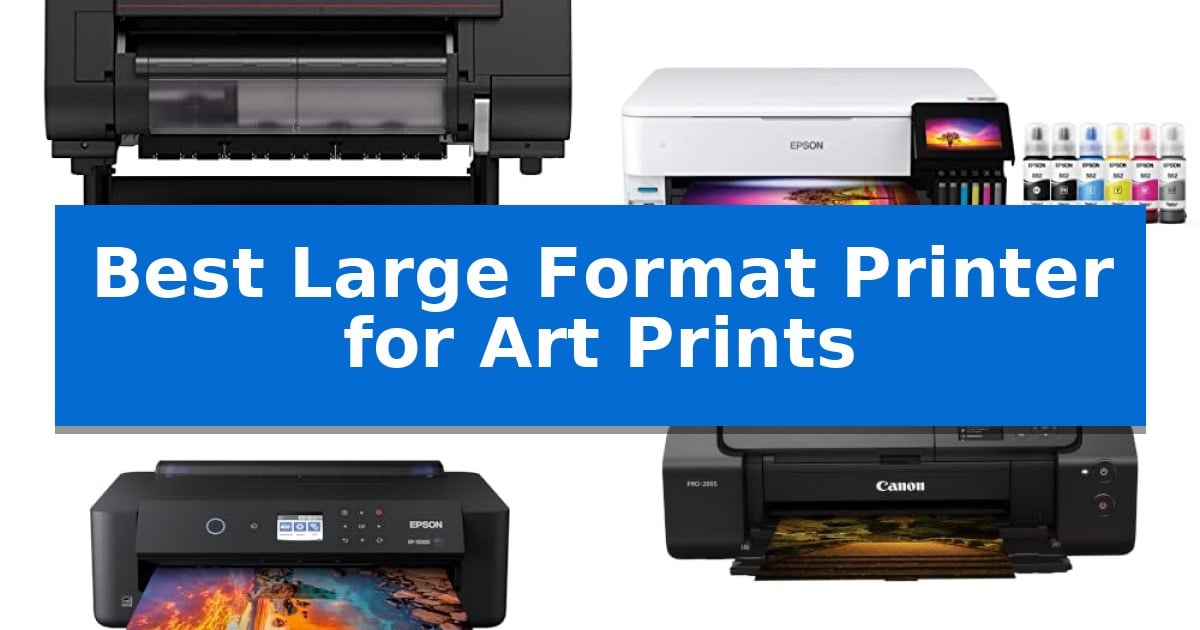
Achieving gallery-quality results at home requires a machine that balances color gamut, media handling, and long-term reliability. Finding the Best Large Format Printer for Art Prints involves navigating complex ink systems and paper compatibility to ensure your creative vision translates perfectly from screen to physical media.
Whether you are a professional photographer or a studio artist, selecting the right hardware is essential for consistent output. We have evaluated the latest wide-format solutions to help you identify which printer matches your specific production volume, space constraints, and color fidelity requirements.
Best Large Format Printer for Art Prints in 2026
Quick Comparison
| Product | Best For | Key Strength | Score |
|---|---|---|---|
| Canon imagePROGRAF PRO-2100 Fine Art Printer | Best Overall | Professional 24-inch wide-format output capacity. | 4.9 |
| Epson EcoTank Photo ET-8550 Printer | Lowest Cost Per Art Print | Cartridge-free printing significantly reduces long-term ink costs. | 4.3 |
| Epson Expression Photo HD XP-15000 Printer | Compact Choice for Home Studios | 6-color Claria Photo HD ink system with dedicated red and gray for superior color accuracy. | 4.5 |
| Canon PIXMA PRO-200S Photo Printer | Vibrant Eight-Color Dye System | 8-color dye-based ink system for vibrant color reproduction. | 4.3 |
| Canon imagePROGRAF TC-21 Printer | Space-Saving Desktop Roll Printing | High-capacity ink supply with 280 ml included in the box. | 4.9 |
How We Chose
- Color Gamut and Ink System: Assessing the number of ink channels and dye versus pigment-based systems for depth and longevity.
- Media Handling: Evaluating the printer's ability to manage various paper weights, textures, and roll-fed versus cut-sheet requirements.
- Footprint and Workflow: Considering the physical dimensions and ease of maintenance for home or professional studio environments.
- Cost Efficiency: Analyzing ink consumption and maintenance costs to determine the long-term value of each unit.
- Connectivity and Setup: Reviewing the integration options for seamless communication with professional design software.
1 Canon imagePROGRAF PRO-2100 Fine Art Printer — Professional Gallery-Grade Color Accuracy
Achieving gallery-grade color accuracy requires a specialized tool designed for high-resolution output. The Canon imagePROGRAF PRO-2100 Fine Art Printer is built to handle professional-level demands, offering a robust 24-inch wide-format printing capability that serves as a cornerstone for artists and studios requiring precise color reproduction.
This printer is engineered for reliability in demanding environments, evidenced by its inclusion of a 1-year on-site warranty by Canon. This support structure ensures that professional workflows remain uninterrupted, providing peace of mind for those managing high-volume or critical art print projects.
Measuring 49 inches in length and 35 inches in width, the unit is designed to integrate into dedicated studio spaces. Its physical footprint reflects its industrial-grade construction, prioritizing stability and consistent performance over portability. The Canon imagePROGRAF PRO-2100 Fine Art Printer is a specialized piece of equipment that demands a permanent, stable location within a workspace.
For those sourcing equipment through authorized channels, the CES Imaging is a Canon Platinum Reseller status associated with this model highlights its position within the professional imaging ecosystem. This ensures that buyers are receiving authentic hardware backed by manufacturer-authorized support channels.
Best for: Professional artists and print studios requiring high-precision, 24-inch wide-format color reproduction with on-site support.
Skip if: Home users or those with limited workspace who do not require wide-format professional gallery-grade printing capabilities.
PROS
- Professional 24-inch wide-format output capacity.
- Includes a 1-year on-site warranty for professional support.
- Backed by Canon Platinum Reseller distribution for authentic hardware.
CONS
- Large physical footprint requires a dedicated studio space.
- Industrial-grade design is not intended for portable or casual use.
2 Epson EcoTank Photo ET-8550 Printer — Lowest Cost Per Art Print
Producing high-quality art prints at home requires a system that balances color precision with long-term ink economy. The Epson EcoTank Photo ET-8550 Printer distinguishes itself by utilizing a cartridge-free 6-color ink system, which significantly lowers the cost per print compared to traditional cartridge-based models. By using high-yield ink bottles, this unit allows creators to produce vibrant, lab-quality photos and graphics on media up to 13 x 19 inches without the constant interruption of replacing small, expensive ink cartridges.
Designed for home studios and creative workflows, the Epson EcoTank Photo ET-8550 Printer features the Claria ET Premium 6-color ink set, which is engineered to deliver sharp text and accurate color reproduction. The inclusion of up to 2 years of ink in the box provides a substantial initial value, reducing the frequency of maintenance and supply management. This all-in-one device also incorporates scanning and copying capabilities, making it a versatile tool for digitizing artwork or managing administrative studio tasks.
The printer is built to support sustainable practices by eliminating cartridge waste, as each replacement ink bottle set is equivalent to approximately 100 individual ink cartridges. With a print speed of up to 16 ppm, it balances efficiency with the high-resolution requirements of art reproduction. Its wireless connectivity ensures seamless integration into modern digital workspaces, allowing for direct printing from various devices without cumbersome cabling.
While the Epson EcoTank Photo ET-8550 Printer offers significant advantages in ink longevity and media versatility, users should note its physical footprint. Measuring 29.8 inches in length and 20.6 inches in width, it requires a dedicated workspace. However, for artists and photographers who prioritize consistent, cost-effective, wide-format output, the trade-off in desk space is often outweighed by the convenience of the high-capacity tank system.
Best for: Artists and photographers who require frequent, high-quality, wide-format printing and want to minimize long-term ink costs.
Skip if: Users with extremely limited desk space or those who only print documents occasionally and do not require wide-format photo capabilities.
PROS
- Cartridge-free printing significantly reduces long-term ink costs.
- Supports wide-format printing up to 13 x 19 inches.
- Includes 6-color Claria ET Premium inks for high-accuracy color reproduction.
- High-yield ink bottles reduce the frequency of replacements and landfill waste.
CONS
- Large physical footprint requires significant dedicated desk space.
- Initial setup involves manual ink filling which is more involved than swapping cartridges.
3 Epson Expression Photo HD XP-15000 Printer — Compact Choice for Home Studios
Achieving professional-grade reproduction at home requires a printer capable of handling specialized media and expansive color gamuts. The Epson Expression Photo HD XP-15000 Printer addresses this by utilizing a 6-color Claria Photo HD ink system that incorporates dedicated red and gray inks, specifically engineered to produce an ultra-wide color gamut and refined black-and-white tonal depth.
This wide-format device supports borderless printing up to 13 inches by 19 inches, making it a practical solution for photographers and artists needing to produce high-quality prints in a home studio environment. Despite its large-format capabilities, the unit is designed with an ultra-compact footprint, measuring 30 percent smaller than its predecessor to ensure it fits comfortably on standard desktop surfaces.
Versatility is a core component of its design, featuring a 50-sheet rear tray dedicated to specialty media such as cardstock, alongside a 200-sheet front tray for standard document handling. The inclusion of auto 2-sided printing adds efficiency for multi-page projects, while the printer's integration with Dash Replenishment helps manage ink levels by automatically ordering supplies when usage is tracked.
To maintain consistent output quality, the system is designed to operate exclusively with Epson Genuine Cartridges. Users should note that the use of non-genuine ink may result in damage not covered under the manufacturer's limited warranty. This focused approach ensures the print heads and ink delivery system remain calibrated for the intended professional results.
Best for: Photographers and artists requiring a compact, wide-format printer for high-quality, borderless art prints up to 13 x 19 inches.
Skip if: Users who require high-volume, continuous office printing or those who prefer using third-party ink alternatives, as this system is optimized for genuine Epson cartridges.
PROS
- 6-color Claria Photo HD ink system with dedicated red and gray for superior color accuracy.
- Ultra-compact design that is 30% smaller than previous models, ideal for home studios.
- Specialized 50-sheet rear tray for handling heavy cardstock and various art papers.
- Borderless printing capability up to 13 x 19 inches for professional presentation.
CONS
- Exclusive reliance on genuine Epson ink to maintain warranty coverage and print quality.
- Limited to specific ink system which may not suit users seeking third-party or bulk ink options.
4 Canon PIXMA PRO-200S Photo Printer — Vibrant Eight-Color Dye System
Achieving professional-grade color accuracy and detail in large-scale prints requires a specialized approach to ink management and paper handling. The Canon PIXMA PRO-200S Professional 13" Wireless Inkjet Photo Printer addresses this need through its sophisticated 8-color dye-based ink system, which is engineered to produce vibrant, high-quality results suitable for gallery-level art reproduction.
Designed for versatility in the studio, this printer supports borderless printing across a wide range of sizes, from small 3.5" x 3.5" squares up to large 13" x 19" formats. This flexibility allows artists to produce everything from proofing sheets to final exhibition-ready pieces without the need for manual trimming.
Efficiency is a core component of the hardware design, with the unit capable of producing a bordered A3+ print in approximately 90 seconds. To maintain a smooth workflow, the integrated 3.0-inch color LCD monitor provides immediate visual feedback on ink levels and printer status, ensuring that settings can be adjusted quickly between print jobs.
Measuring 28.7" in length and weighing 32 pounds, the device is built for a permanent spot in a creative workspace. It balances its high-speed output capabilities with a robust build, providing a reliable solution for those who require consistent color reproduction and professional finishing options for their creative work.
Best for: Artists and photographers who require high-speed, vibrant, large-format printing up to 13" x 19" with precise color control.
Skip if: Users who require pigment-based inks for extreme archival longevity or those with limited desk space for a 32-pound, 28-inch wide printer.
PROS
- 8-color dye-based ink system for vibrant color reproduction.
- Supports borderless printing up to 13" x 19".
- High-speed output capable of A3+ prints in 90 seconds.
- Integrated 3.0-inch color LCD for easy status monitoring.
CONS
- Large physical footprint requires significant dedicated workspace.
- Heavy 32-pound design limits portability.
5 Canon imagePROGRAF TC-21 Printer — Space-Saving Desktop Roll Printing
Achieving professional-grade output in a compact footprint is a primary challenge for artists and designers working in limited studio spaces. The Canon imagePROGRAF TC-21 Printer addresses this by offering a 24-inch desktop design that supports both roll and cut-sheet media, providing the versatility needed for high-quality posters and detailed art prints.
This printer is engineered for efficiency, featuring an automatic roll and cut sheet paper feeder that simplifies media management. It arrives with a full set of ink totaling 280 ml, which is the highest capacity in its class, ensuring that users can begin production immediately without needing separate ink purchases.
Usability is a core focus of the Canon imagePROGRAF TC-21 Printer, which incorporates an intuitive tiltable touchscreen control panel. Animated installation guides assist with setup, while the design allows for convenient top and front access, making it straightforward to refill ink tanks or replace paper rolls during busy creative sessions.
Connectivity options include high-speed USB, Ethernet, and built-in Wi-Fi, enabling seamless printing from computers, tablets, or smartphones. The unit is both ENERGY STAR and EPEAT Gold rated, reflecting a design that balances performance with power efficiency for professional environments.
Best for: Artists and designers who require a space-saving, 24-inch large-format printing solution for posters and art prints in a home or small office studio.
Skip if: Users who require specialized archival ink sets or print widths exceeding 24 inches will need a more robust, professional-grade production printer.
PROS
- High-capacity ink supply with 280 ml included in the box.
- Compact 24-inch desktop footprint suitable for small studios.
- Versatile media handling via automatic roll and sheet feeders.
- Flexible connectivity including Wi-Fi, Ethernet, and USB.
CONS
- Limited to 24-inch width, which may not suit all large-format art projects.
- 4-color ink system may lack the extended color gamut required for specific fine art applications.
Best Large Format Printer for Art Prints Buying Guide
Understanding Ink Systems
The choice between dye-based and pigment-based inks is the most critical decision for art printing. Dye inks often provide vibrant, saturated colors that are ideal for high-gloss photo prints, while pigment inks offer superior archival quality and resistance to fading over time.
Professional printers often utilize an 8-color or 12-color system to expand the color gamut, allowing for more accurate reproduction of subtle gradients and deep blacks. Ensure your chosen printer supports the specific ink type required for your target media.
Media Compatibility and Paper Path
Art prints require a variety of substrates, ranging from thin photo papers to thick, textured fine art cotton rag. A printer with a straight-through paper path is essential to prevent jamming or creasing when using heavier, specialized media.
Check for support for borderless printing in your desired dimensions, as this eliminates the need for manual trimming and provides a cleaner, more professional finish for gallery displays.
Managing Print Costs
Large format printing can become expensive due to the high volume of ink required for high-resolution images. Look for models that offer high-yield ink tanks or refillable systems to reduce the cost per print significantly.
Consider the maintenance cycle of the printer, including the replacement of print heads and maintenance cartridges, which are ongoing costs that should be factored into your long-term budget.
Space and Ergonomics
Wide-format printers are physically demanding, often requiring a dedicated, stable surface. Before purchasing, measure your available workspace, including the clearance needed for the rear paper tray or front-loading mechanisms.
Some models feature desktop-friendly designs that maximize output while minimizing the footprint, which is ideal for smaller home studios where space is at a premium.
Connectivity and Software Integration
Reliable wireless connectivity and Ethernet support are vital for modern studios, allowing for efficient file transfers from multiple workstations. Ensure the printer is compatible with your preferred color management software and ICC profiles.
An intuitive touchscreen interface can simplify the setup process and provide quick access to ink levels and maintenance alerts, reducing downtime during critical print runs.
Frequently Asked Questions
What is the primary difference between dye and pigment inks?
Dye inks are typically more vibrant and cost-effective, while pigment inks are preferred for archival art prints due to their superior lightfastness and longevity.
Can I use third-party paper with these printers?
Yes, most professional printers allow for custom ICC profiles, enabling you to use a wide range of third-party fine art papers, provided you configure the settings correctly.
How often do I need to perform maintenance on a large format printer?
Maintenance frequency depends on usage, but regular nozzle checks and cleaning cycles are recommended to prevent clogging, especially if the printer sits idle for extended periods.
Is a 24-inch printer necessary for most art prints?
A 24-inch printer is ideal for large-scale posters and gallery wraps, but if your work is primarily 13×19 inches or smaller, a compact wide-format printer may be more space-efficient.
Do these printers support wireless printing from tablets?
Many modern models include built-in Wi-Fi, allowing you to print directly from computers, smartphones, or tablets, though professional color management is best handled via a desktop workstation.
Conclusion: Our Top Pick
For artists and photographers demanding the highest level of color fidelity and archival reliability, the Canon imagePROGRAF PRO-2100 Fine Art Printer stands out as the premier choice. Its professional-grade ink system and robust build quality ensure that every print meets the rigorous standards required for gallery display and long-term preservation.
While other models offer specific advantages in terms of cost or footprint, this unit provides the most consistent and accurate output for serious creative work. Investing in this system allows you to bring your production in-house with confidence, knowing that your final prints will accurately reflect your original digital files.