
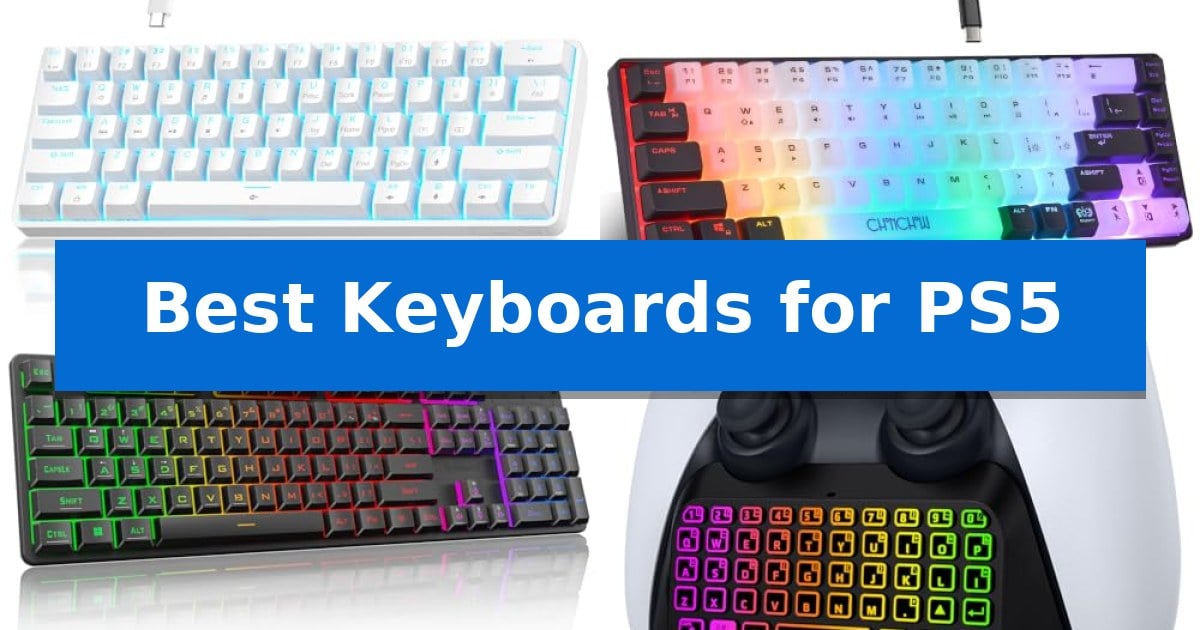
Navigating the PlayStation 5 interface and typing messages to teammates can be cumbersome using only a standard controller. Integrating one of the Best Keyboards for PS5 into your setup significantly improves your ability to manage social features, search the store, and communicate during intense multiplayer sessions.
Whether you prefer a dedicated chatpad that attaches directly to your controller or a compact mechanical keyboard for your desk, finding the right hardware depends on your specific gaming environment. We have evaluated several options to help you determine which device best fits your console workflow and space requirements.
Best Keyboards for PS5 in 2026: Streamline Chat and Gameplay
Quick Comparison
| Product | Best For | Key Strength | Score |
|---|---|---|---|
| TMKB 60% Mechanical Gaming Keyboard | Best Overall | Compact 60% layout maximizes available desk space. | 4.9 |
| CHONCHOW 60% Gaming Keyboard | Space-Saving Design for Desktop Freedom | Compact 68-key 60% layout saves significant desk space. | 4.6 |
| Redragon K521 Gaming Keyboard | Full-Size Layout with Multimedia Controls | 19-key anti-ghosting for accurate input during complex gaming commands. | 4.5 |
| MoKo PS5 Controller Keyboard | Integrated Chatpad for Controller Use | Integrated 3.5mm audio jack and built-in speaker for seamless chat. | 4.5 |
| RedThunder 60% Gaming Keyboard Combo | Includes Lightweight Honeycomb Mouse | Ultra-compact 61-key layout saves significant desk space. | 4.3 |
How We Chose
- Compatibility with the PS5 USB and Bluetooth protocols.
- Physical dimensions and layout efficiency for limited gaming spaces.
- Ease of installation and integration with existing controller hardware.
- Build quality and key responsiveness for reliable text entry.
- Additional features like backlighting or integrated audio support.
1 TMKB 60% Mechanical Gaming Keyboard — Compact Layout for Minimalist Setups
The TMKB 60% Mechanical Gaming Keyboard utilizes a space-saving 61-key ANSI layout, making it a functional choice for users looking to maximize desk real estate while maintaining essential typing control. Its compact footprint is designed to fit easily into varied gaming environments, supported by foldable feet that offer an ergonomic tilt for comfortable extended use.
Equipped with Ultra-Responsive Linear Red Switches, this keyboard provides a smooth, low-resistance typing experience with a 45g actuation force. These switches are rated for 50 million keystrokes, emphasizing durability for frequent gaming sessions. The inclusion of double-shot keycaps ensures that the legends remain visible and resistant to fading, while the anti-ghosting technology supports 61-key rollover to help maintain accuracy during rapid inputs.
Customization is handled through 15 dynamic LED lighting modes, allowing users to adjust both brightness and lighting speed to suit their preference. The detachable USB-C cable design facilitates easy storage and replacement, contributing to the keyboard's portability. Its plug-and-play functionality ensures compatibility across Windows, Linux, and macOS systems without requiring complex driver installations.
While the 60% form factor is efficient for space, it omits the dedicated number pad and function row, which may require users to rely on function-layer shortcuts for specific commands. This design trade-off is central to its minimalist aesthetic and portable nature, making it a specialized tool for those prioritizing desk space over full-sized layout convenience.
Best for: Gamers and typists who prioritize a compact, minimalist desk setup and require a portable, responsive mechanical input device.
Skip if: Users who rely heavily on a dedicated number pad or a full-sized function row for productivity tasks or specific game bindings will find the 60% layout restrictive.
PROS
- Compact 60% layout maximizes available desk space.
- Linear Red switches offer smooth, low-resistance actuation.
- Detachable USB-C cable enhances portability and cable management.
- Double-shot keycaps provide long-term durability and backlight clarity.
CONS
- Lack of dedicated number pad and function keys limits direct input options.
- Wired-only connection requires a physical cable at all times.
2 CHONCHOW 60% Gaming Keyboard — Space-Saving Design for Desktop Freedom
Maximizing desktop real estate while maintaining a reliable connection to your console is a priority for many players, and the CHONCHOW 60% Gaming Keyboard addresses this with a compact 68-key layout. By removing the traditional number pad and navigation cluster, this keyboard provides significantly more room for mouse movement, which is particularly beneficial during intense gaming sessions on a PS5.
The keyboard features an ergonomic design with a stepped layout and curved keycaps to support comfortable typing. It includes foldable feet that allow users to adjust the typing angle, while the crater keys are designed to improve keystroke accuracy. The construction utilizes high-quality ABS material for durability, and the characters are laser-engraved to prevent fading over time.
For those who prioritize aesthetics, the device offers 10 lighting modes with adjustable brightness and speed. Users can customize seven colors across six distinct blocks to match their gaming setup. The detachable 1.5-meter cable uses a USB Type-C interface, ensuring a stable connection for data transmission when plugged into a console or PC.
Compatibility is straightforward, as the keyboard is designed for plug and play functionality without the need for additional drivers. It is compatible with PS3, PS4, PS5, Xbox, and various PC operating systems, making it a versatile peripheral for users who switch between multiple gaming platforms.
Best for: Gamers who need a compact, space-saving keyboard for PS5 and PC setups that prioritizes desk space and simple plug-and-play connectivity.
Skip if: Users who require a full-sized layout with a dedicated number pad or those who prefer a wireless connection for their console setup.
PROS
- Compact 68-key 60% layout saves significant desk space.
- Customizable RGB lighting with 10 distinct modes.
- Stable USB Type-C wired connection ensures reliable performance.
- Ergonomic design featuring foldable feet and curved keycaps.
CONS
- Lacks a dedicated number pad and navigation keys.
- Wired-only connection limits placement flexibility.
3 Redragon K521 Gaming Keyboard — Full-Size Layout with Multimedia Controls
The Redragon K521 Gaming Keyboard offers a full-size layout designed for users who prioritize efficiency, featuring 12 dedicated multimedia combination keys that streamline both gaming and office tasks. Its mechanical-feeling keys are engineered for fast tapping, providing a tactile response that aims to enhance precision during competitive play.
This wired keyboard stands out with its upgraded LED backlight design, which utilizes a more penetrating light source to create a vibrant visual effect. Users can easily manage the lighting through a one-touch on/off button, with the added flexibility of three-position breathing modes and four-position brightness adjustments to suit different environments.
Reliability during intense sessions is supported by 19-key anti-ghosting technology, ensuring that complex key combinations are registered accurately. This feature is particularly useful for executing specific skills or commands without input errors, helping to maintain performance consistency.
Designed for broad compatibility, the Redragon K521 Gaming Keyboard functions as a plug-and-play device across multiple platforms, including PS4, PS5, Xbox, and various PC operating systems. Because it requires no additional drivers, it offers a straightforward setup for console gamers looking to integrate a keyboard into their existing hardware configuration.
Best for: Console gamers and PC users seeking a full-size, plug-and-play keyboard with integrated multimedia controls and customizable lighting.
Skip if: Users who require a wireless connection or a compact, tenkeyless form factor for limited desk space.
PROS
- 19-key anti-ghosting for accurate input during complex gaming commands.
- Plug-and-play compatibility with PS4, PS5, Xbox, and PC platforms.
- 12 multimedia keys to improve workflow and gaming efficiency.
- Adjustable LED lighting with multiple brightness and breathing modes.
CONS
- Wired-only connection limits placement flexibility compared to wireless models.
- Full-size footprint may be too large for users with restricted desk space.
4 MoKo PS5 Controller Keyboard — Integrated Chatpad for Controller Use
The MoKo RGB Backlight Keyboard for PS5 Controller integrates directly into your gaming setup, featuring a 47-key layout with silicone keys designed to improve typing accuracy in low-light environments. This compact accessory attaches to your controller, providing a dedicated interface for instant messaging and team communication without requiring an external device.
Equipped with 7 lighting modes, including 4 multicolor and 3 monochrome options, the keyboard ensures visibility during extended gaming sessions. The built-in speaker and 3.5mm audio jack allow for clear game audio and chat output, which can be managed directly through the console's sound settings. Its lightweight design maintains the ergonomics of the controller, ensuring that button access remains unobstructed.
Power management is handled by a 500 mAh battery capable of supporting up to 80 hours of playback. The device connects via Bluetooth, following a straightforward pairing process through the console's accessory menu. To maintain optimal performance, the manufacturer notes that the battery level should remain above 20% during use.
This keyboard is specifically engineered for the standard PlayStation 5 controller. It is important to note that it is not compatible with the PS5 DualSense Edge controller. Additionally, the package does not include a charging cable, so users must provide their own for the initial and subsequent charging cycles.
Best for: Players who frequently use in-game chat or messaging and want an integrated, backlit typing solution for their standard PS5 controller.
Skip if: Users who own a PS5 DualSense Edge controller or those who prefer not to manage an additional battery-powered peripheral.
PROS
- Integrated 3.5mm audio jack and built-in speaker for seamless chat.
- 7 RGB lighting modes for improved visibility in dark rooms.
- 80-hour battery life on a single charge.
- Compact, ergonomic design that does not interfere with controller buttons.
CONS
- Not compatible with the PS5 DualSense Edge controller.
- Charging cable not included in the package.
5 RedThunder 60% Gaming Keyboard Combo — Includes Lightweight Honeycomb Mouse
Maximizing desk space while ensuring precise control during intense gaming sessions is a priority for many console players. The RedThunder 60% Gaming Keyboard Combo addresses this by utilizing an ultra-compact 61-key layout, which removes the number pad to provide more surface area for mouse movements. This design choice is particularly beneficial for players who prefer a minimalist setup without sacrificing essential gaming inputs.
The included mouse features an ultra-light honeycomb shell that weighs approximately 65 grams, promoting comfortable, fatigue-free movement during extended play. It is equipped with a high-precision optical sensor capable of reaching 7200 DPI, alongside a 1000Hz polling rate and 400IPS tracking speed to support responsive navigation and input.
Durability and stability are central to this set's construction. The keyboard incorporates a water-resistant, triple-protection design to guard against accidental spills, while the connection is reinforced by an anti-interference magnet ring and a waterproof braided USB cable. These features work together to ensure consistent data transmission during gameplay.
Customization is handled through integrated RGB backlighting with multiple modes, including breathing and permanent lighting effects. Users can adjust both the brightness and the speed of the lighting effects to suit their environment, making it a functional addition to gaming setups that operate in low-light conditions.
Best for: FPS gamers who require a compact footprint to maximize mouse movement space on their desk.
Skip if: Users who rely heavily on a dedicated number pad for data entry or specific in-game macros will find the 60% layout restrictive.
PROS
- Ultra-compact 61-key layout saves significant desk space.
- Lightweight 65g honeycomb mouse reduces wrist fatigue.
- Water-resistant keyboard design provides protection against spills.
- Braided USB cable with an anti-interference magnet ring ensures durability.
CONS
- Lack of a dedicated number pad may hinder non-gaming productivity tasks.
- Wired-only connectivity limits placement flexibility compared to wireless alternatives.
Best Keyboards for PS5 Buying Guide
Understanding Connectivity Options
The PS5 supports both wired and wireless input devices. Wired keyboards typically use a standard USB-A or USB-C connection, offering a simple plug-and-play experience without the need for batteries. This is often the most reliable choice for stationary desk setups where the console is within reach.
Wireless options, particularly Bluetooth-based chatpads, provide greater freedom of movement. These devices connect directly to the console or the controller, allowing you to type without being tethered to the console. Ensure that any wireless device you choose is specifically compatible with the PlayStation Bluetooth accessory pairing process.
Layout and Form Factor
For console gaming, a 60% or compact layout is often superior to a full-sized keyboard. These smaller boards remove the number pad and navigation cluster, freeing up valuable desk space for your mouse or controller. This minimalist approach is ideal for gamers who want the benefits of a mechanical keyboard without the bulk.
If you primarily use your controller, a dedicated chatpad is the most space-efficient solution. These devices attach directly to the bottom of your controller, keeping your hands in their natural position while providing a full QWERTY layout for quick message entry.
Mechanical vs. Membrane Switches
Mechanical keyboards offer distinct tactile feedback and durability, which can be beneficial if you also use the keyboard for PC gaming or heavy typing tasks. The linear switches found in many gaming-focused 60% boards provide a smooth, consistent feel that is responsive for rapid inputs.
Membrane or silicone-based keyboards, often found in controller chatpads, are designed for portability and low-profile use. While they lack the mechanical click, they are generally quieter and lighter, making them better suited for handheld gaming sessions where weight and balance are critical.
Ergonomics and Comfort
When choosing a keyboard for your console, consider how it fits into your existing setup. If you play from a couch, a wired keyboard with a long cable or a wireless controller-mounted keyboard is essential. If you play at a desk, look for keyboards with adjustable feet to provide an ergonomic tilt.
Reduced fatigue is a key benefit of using a keyboard designed for your specific setup. Features like curved keycaps or a lightweight build can make extended gaming sessions more comfortable, allowing you to focus on the game rather than the hardware.
Key Features to Look For
Look for anti-ghosting technology if you intend to use the keyboard for competitive games, as this ensures that simultaneous key presses are registered accurately. Backlighting is another useful feature, especially in dimly lit gaming rooms, as it helps you identify keys quickly without needing external light.
Check for additional multimedia keys or audio pass-throughs if you want to control your console's volume or media playback directly from the keyboard. These small additions can streamline your experience and keep you immersed in your game.
Frequently Asked Questions
Do all USB keyboards work with the PS5?
Most standard USB keyboards are compatible with the PS5. The console recognizes them as HID (Human Interface Device) peripherals, allowing for basic typing and navigation immediately upon connection.
Can I use a wireless keyboard with my PS5?
Yes, the PS5 supports Bluetooth keyboards. You can pair them through the console's 'Accessories' menu under 'Bluetooth Accessories'.
Do I need special software to use a keyboard on PS5?
No, the PS5 does not require any additional drivers or software. It is a plug-and-play system for standard keyboards.
Are mechanical keyboards better for PS5?
Mechanical keyboards offer better tactile feedback and durability, which can be preferred by gamers, but they are not strictly necessary for basic console navigation.
Will a keyboard work in all PS5 games?
Keyboard support depends on the game developer. While most games allow keyboard input for typing, not all games support keyboard-and-mouse controls for gameplay.
Conclusion: Our Top Pick
Selecting the right input device for your console can transform how you interact with your games and social circles. For those seeking a balance of performance, space-saving design, and tactile feedback, the TMKB 60% Mechanical Gaming Keyboard stands out as the most versatile option for a dedicated gaming setup.
While it offers a high-quality mechanical experience, keep in mind that as a wired device, it is best suited for desk-based play. If you require a wireless solution or a controller-integrated chatpad, consider the other specialized options listed above to ensure your hardware matches your specific seating and gaming style.