
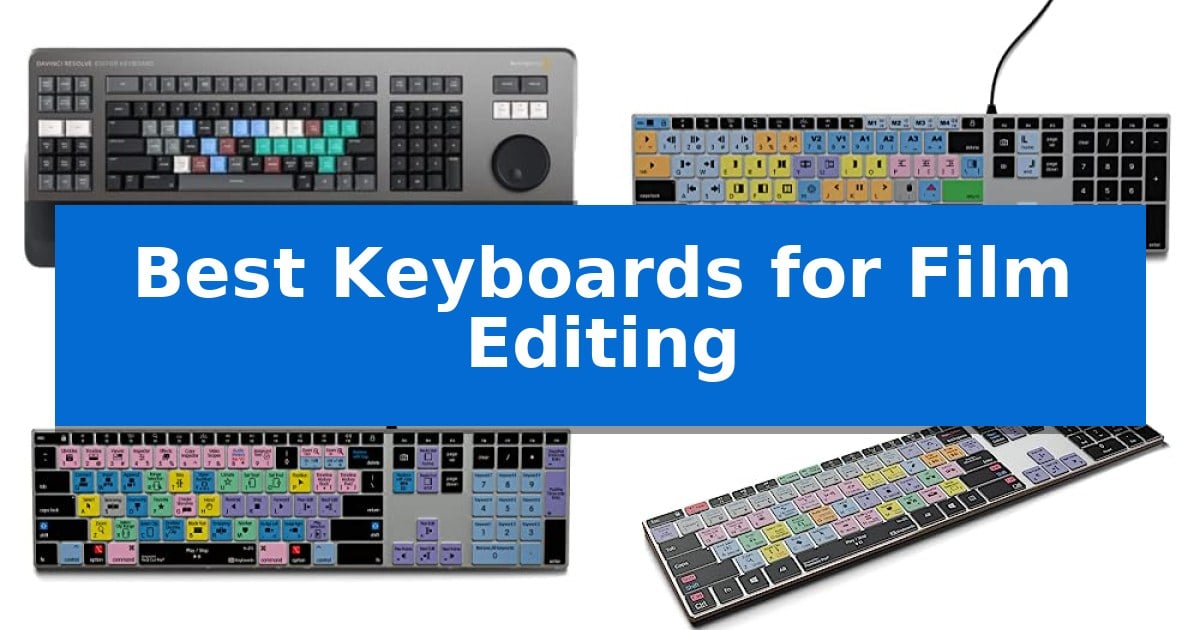
Video editing requires precision, and the right hardware can significantly reduce the time spent navigating complex software timelines. Finding the Best Keyboards for Film Editing means identifying tools that prioritize shortcut accessibility and ergonomic efficiency to keep your creative momentum flowing.
Whether you are trimming clips in DaVinci Resolve or managing multi-cam sequences in Adobe Premiere Pro, a dedicated keyboard can eliminate the need to memorize obscure hotkeys. We have evaluated several specialized input devices to help you determine which layout and feature set best matches your specific post-production environment.
Best Keyboards for Film Editing in 2026: Streamline Your Timeline
Quick Comparison
| Product | Best For | Key Strength | Score |
|---|---|---|---|
| Blackmagic Design DaVinci Resolve Editor Keyboard | Best Overall | Integrated search wheel for precise timeline navigation. | 4.9 |
| KB Covers Avid Media Composer Keyboard | Color-coded shortcuts for faster trimming | Color-coded shortcuts for Avid Media Composer improve editing speed. | 4.3 |
| KB Covers Final Cut Pro Keyboard | Optimized layout for Mac workflows | 150+ color-coded shortcuts specifically for Final Cut Pro. | 4.6 |
| KB Covers Adobe Premiere Pro Keyboard | Essential commands at a glance | 150+ color-coded shortcuts printed directly on the keys for faster navigation. | 4.4 |
| KB Covers DaVinci Resolve Keyboard | Dedicated grading and editing keys | Color-coded shortcuts for DaVinci Resolve functions. | 4.3 |
How We Chose
- Software-specific shortcut mapping and labeling for reduced cognitive load.
- Hardware build quality, focusing on aluminum frames and backlit keys for dim studio environments.
- Interface reliability, prioritizing wired connections to ensure zero latency during critical frame-by-frame adjustments.
- Ergonomic layout and key responsiveness for high-volume input tasks.
- Compatibility with specific operating systems and professional editing software suites.
1 Blackmagic Design DaVinci Resolve Editor Keyboard — Integrated search wheel for speed
Precision in professional video production often hinges on the ability to navigate timelines and trim clips with speed. The Blackmagic Design USB Davinci Resolve Editor Keyboard is engineered specifically for this purpose, featuring an integrated search wheel that allows editors to scrub through footage and set in/out points with tactile control, minimizing reliance on a mouse.
Designed for DaVinci Resolve 16, this hardware interface is built for professionals who need to work faster and turn over projects quickly. The keyboard layout prioritizes efficiency, placing critical editing functions directly at the user's fingertips to streamline intensive cutting sessions.
Measuring approximately 25 inches in length and weighing over 6.6 pounds, the unit provides a substantial, stable footprint on a desk. Its construction is focused on the specific demands of a professional editing suite, ensuring that the controls remain stationary during rapid search wheel adjustments.
While this keyboard offers specialized functionality for DaVinci Resolve users, it is a dedicated tool rather than a general-purpose peripheral. Its design is optimized for a specific software ecosystem, making it a highly focused investment for those committed to that workflow.
Best for: Professional video editors who use DaVinci Resolve and require a dedicated hardware interface for faster timeline navigation and trimming.
Skip if: Users who require a general-purpose keyboard for typing or those who do not use DaVinci Resolve as their primary editing software.
PROS
- Integrated search wheel for precise timeline navigation.
- Dedicated layout optimized for DaVinci Resolve 16.
- Sturdy, heavy-duty build ensures stability during use.
- Designed to increase editing speed and workflow efficiency.
CONS
- Software-specific design limits utility in other applications.
- Large physical footprint requires significant desk space.
2 KB Covers Avid Media Composer Keyboard — Color-coded shortcuts for faster trimming
The KB Covers Avid Media Composer Keyboard streamlines post-production workflows by featuring color-coded, application-specific shortcuts printed directly onto the keys. This design allows editors to execute trimming, timeline navigation, and editing commands instantly without needing to memorize complex hotkey combinations or rely on external control panels.
Designed specifically for Windows PC environments, this full-size US layout keyboard integrates seamlessly into existing setups. It connects via a reliable USB-C wired interface, ensuring a stable, lag-free connection that avoids the connectivity issues or battery maintenance associated with wireless peripherals. A USB-C to USB-A adapter is included to ensure compatibility with a wide range of desktop and laptop ports.
The hardware features a solid aluminum frame that provides a durable foundation for intensive editing sessions. Integrated backlit keys enhance visibility, making it a practical choice for editors working in dim lighting or late-night studio environments. Because it functions as a standard keyboard, users can type normally while simultaneously utilizing the printed Avid shortcuts.
This device is a plug-and-play solution that requires no additional software, drivers, or complex configuration. By keeping essential commands visible at a glance, it serves as a dedicated tool for film and television professionals, newsroom teams, and students who prioritize efficiency in their editing suite.
Best for: Professional film and television editors who require a dedicated, wired interface for Avid Media Composer on a Windows PC.
Skip if: Users who require a wireless connection, a compact tenkeyless form factor, or support for non-Windows operating systems.
PROS
- Color-coded shortcuts for Avid Media Composer improve editing speed.
- Backlit keys provide visibility in dim studio environments.
- Wired USB-C connection ensures a stable, lag-free experience.
- Solid aluminum frame offers a durable, professional build.
CONS
- Wired-only design lacks the portability of wireless alternatives.
- Full-size layout occupies significant desk space.
3 KB Covers Final Cut Pro Keyboard — Optimized layout for Mac workflows
Efficient video editing often relies on muscle memory and rapid access to software commands, which is where the KB Covers Final Cut Pro Keyboard for Mac provides a distinct advantage. By featuring over 150 Final Cut Pro shortcuts printed directly on the keys and color-coded by function, this peripheral allows editors to identify trimming, playback, and timeline commands at a glance without navigating complex menus.
Designed specifically for the macOS ecosystem, this keyboard maintains a standard US layout with familiar Command, Option, and Control keys. It connects via a USB-C wired interface, ensuring a stable, lag-free connection that eliminates the need for Bluetooth pairing or battery management. This plug-and-play functionality makes it a straightforward addition to any workstation, including MacBook Pro, MacBook Air, iMac, Mac mini, or Mac Studio setups.
The build quality centers on a backlit aluminum frame, which is particularly useful for creators working in dim studios or during late-night editing sessions. Because it functions as a standard keyboard, users can type normally while simultaneously utilizing the printed shortcut icons. This dual-purpose design ensures that the device remains a practical tool for everyday tasks beyond just video production.
This keyboard is intended for YouTubers, filmmakers, and students who want to streamline their Final Cut Pro workflow. As a wired device, it prioritizes reliability and consistent performance, making it a functional choice for professional or educational environments where minimizing setup time is a priority.
Best for: Video editors and content creators who want to increase their speed in Final Cut Pro using dedicated, color-coded shortcut keys.
Skip if: Users who require a wireless keyboard or those who do not use Final Cut Pro as their primary editing software.
PROS
- 150+ color-coded shortcuts specifically for Final Cut Pro.
- Backlit keys for visibility in low-light editing environments.
- USB-C wired connection for stable, battery-free operation.
- Solid aluminum frame for a durable build.
CONS
- Wired-only connection limits desk placement flexibility.
- Software-specific layout may be less useful for non-Final Cut Pro tasks.
4 KB Covers Adobe Premiere Pro Keyboard — Essential commands at a glance
Streamlining complex video projects requires more than just a standard peripheral; it demands a tool that keeps essential commands visible and accessible. The KB Covers Adobe Premiere Pro Keyboard features over 150 shortcuts printed directly on the keys, color-coded by function to help editors manage cuts, trims, and timeline navigation without needing to memorize every hotkey.
Designed for a professional workflow, this keyboard utilizes a full-size US layout with dedicated Windows keys. It functions as a standard typing device while providing specialized functionality, meaning you can switch between editing and general tasks without needing to swap hardware. The backlit keys are particularly useful for maintaining visibility in dim studio environments or during late-night editing sessions.
The hardware is built with a solid aluminum frame that provides a stable, durable feel on the desk. Because it is a USB-C wired device, it offers a reliable, lag-free connection that avoids the complexities of battery management or Bluetooth pairing. The inclusion of a USB-C to USB-A adapter ensures broad compatibility with both modern and legacy Windows workstations.
This keyboard is a practical choice for those who want to reduce the cognitive load of navigating software interfaces. By keeping the most frequent Premiere Pro commands within immediate sight, it allows creators to focus their attention on the timeline rather than searching through menus.
Best for: Video editors and content creators using Adobe Premiere Pro on Windows who want to speed up their workflow with visual shortcut references.
Skip if: Users who prefer a wireless setup or those who do not use Adobe Premiere Pro as their primary editing software.
PROS
- 150+ color-coded shortcuts printed directly on the keys for faster navigation.
- Backlit keys improve visibility in low-light editing environments.
- Solid aluminum frame provides a durable and stable typing experience.
- USB-C wired connection ensures a reliable, lag-free link with no batteries to charge.
CONS
- Wired-only design limits desk flexibility compared to wireless alternatives.
- Software-specific layout makes it less versatile for users who frequently switch between different non-linear editing applications.
5 KB Covers DaVinci Resolve Keyboard — Dedicated grading and editing keys
Navigating complex video timelines requires precision, and the KB Covers DaVinci Resolve Keyboard simplifies this by placing essential editing commands directly onto the keycaps. By utilizing color-coded shortcuts specifically mapped for DaVinci Resolve, this peripheral allows editors to execute functions for color grading, visual effects, and general timeline management without relying solely on software menus.
Designed specifically for macOS users, this keyboard integrates into professional workstations with a premium aluminum build that provides a stable, slim profile. The inclusion of frequently used shortcuts printed on the keys is intended to reduce the learning curve for beginners while helping experienced editors maintain a faster, more efficient workflow.
The hardware is engineered for reliability in professional environments, offering a comfortable typing experience suitable for long editing sessions. Because it is a dedicated tool, it functions as a specialized interface that turns a standard Mac setup into a more capable editing suite.
Before integrating this into your setup, it is important to verify compatibility with your specific Mac model. The keyboard is built to be a direct, zero-latency input device, ensuring that every command is registered immediately during critical editing tasks.
Best for: Video editors using DaVinci Resolve on macOS who want to speed up their workflow with dedicated, color-coded shortcut keys.
Skip if: Users who require a wireless connection or those who do not use DaVinci Resolve as their primary editing software.
PROS
- Color-coded shortcuts for DaVinci Resolve functions.
- Durable aluminum frame for professional use.
- Directly supports macOS workflows.
- Zero latency wired connection.
CONS
- Limited compatibility requires checking specific Mac models before purchase.
- Software-specific design may not be useful for other applications.
Best Keyboards for Film Editing Buying Guide
Shortcut Integration and Efficiency
The primary advantage of a specialized editing keyboard is the visual representation of software commands. By having color-coded shortcuts printed directly on the keycaps, editors can perform complex operations like ripple edits or color grading adjustments without relying on menus or manual hotkey lookups.
This integration is particularly beneficial for students or professionals transitioning between different software platforms. When commands are visible at a glance, the learning curve for new tools is significantly flattened, allowing for a more intuitive editing experience.
Connectivity and Latency
In professional film editing, input lag can disrupt the flow of precise trimming and playback control. Most dedicated editing keyboards utilize USB-C wired connections to provide a stable, lag-free signal that does not require battery management or Bluetooth pairing.
Wired setups are generally preferred in studio environments where reliability is paramount. By eliminating wireless interference, editors can ensure that every keystroke or search wheel movement is registered instantly by the software.
Build Quality and Ergonomics
Editing sessions often last for several hours, making the physical build of the keyboard a critical factor. Keyboards featuring a solid aluminum frame provide a stable base that resists movement during intense editing sessions.
Additionally, backlit keys are essential for editors working in darkened rooms or color-grading suites. The illumination ensures that shortcut labels remain legible regardless of ambient lighting conditions, reducing eye strain during late-night projects.
Operating System Compatibility
Compatibility is the most important technical consideration when selecting an editing keyboard. Because shortcut layouts are often specific to either macOS or Windows, choosing the correct version is vital for ensuring that modifier keys like Command, Option, or Windows function as intended.
Always verify the layout of the keyboard against your specific computer setup. Some manufacturers include adapters to bridge the gap between USB-C and USB-A ports, but the internal mapping remains tied to the operating system for which it was designed.
Hardware-Specific Controls
Beyond standard typing, some advanced editing keyboards incorporate hardware-specific controls like an integrated search wheel. These tools allow for rapid scrubbing through timelines, which is significantly faster than using a mouse or standard arrow keys for frame-accurate navigation.
For editors who handle high volumes of footage, these dedicated hardware interfaces can be the difference between a sluggish workflow and a high-turnover production environment.
Frequently Asked Questions
Do I need special software to use these keyboards?
Most dedicated editing keyboards are plug-and-play devices. They do not require custom drivers or software to function, as the shortcuts are mapped to standard system commands recognized by the editing software.
Can I use an editing keyboard for regular typing?
Yes. These are full-size keyboards that include standard letter and number keys. You can use them for daily tasks like email and documentation while still having your editing shortcuts available for your creative work.
How do I know if a keyboard is compatible with my software?
Check the product specifications to ensure the layout matches your specific software, such as DaVinci Resolve, Avid Media Composer, or Adobe Premiere Pro. Also, confirm whether the keyboard is designed for Windows or macOS.
Why choose a wired keyboard over a wireless one for editing?
Wired keyboards offer a stable, zero-latency connection and do not require batteries. This is crucial for professional environments where consistent, reliable input is necessary for precision editing.
Are the shortcut labels durable?
Professional editing keyboards are designed for high-volume use. The shortcut labels are typically printed or etched onto the keys to withstand long-term use in demanding post-production workflows.
Conclusion: Our Top Pick
Selecting the right tool depends heavily on your primary editing software and your operating system. For those deeply integrated into the Blackmagic ecosystem, the Blackmagic Design DaVinci Resolve Editor Keyboard stands out due to its unique hardware integration, specifically the integrated search wheel that allows for rapid, frame-accurate timeline navigation that standard keyboards cannot replicate.
While this specialized unit offers the highest level of control for DaVinci Resolve users, those working in other environments or on different platforms should prioritize the KB Covers series for their specific software. These backlit aluminum keyboards provide the necessary shortcut visibility and reliable wired connectivity to improve your daily editing efficiency without requiring a complete change to your existing hardware setup.