
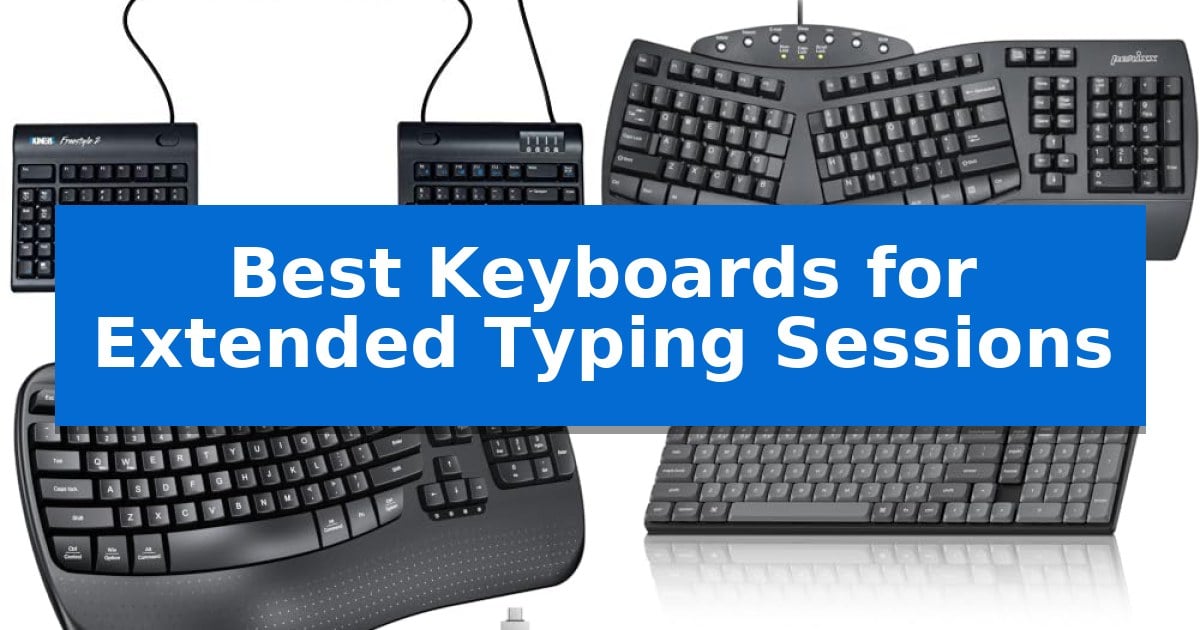
Finding the right hardware is essential when you spend hours at your desk every day. The Best Keyboards for Extended Typing Sessions must prioritize physical comfort and long-term reliability to help you maintain focus without the distraction of wrist fatigue or finger strain.
Whether you prefer the tactile feedback of mechanical switches or the gentle support of a split ergonomic layout, choosing the right tool can significantly impact your daily productivity. We have analyzed five distinct models to help you identify which design features best align with your specific typing habits and workspace requirements.
Best Keyboards for Extended Typing Sessions in 2026
Quick Comparison
| Product | Best For | Key Strength | Score |
|---|---|---|---|
| Kinesis Freestyle2 Ergonomic Keyboard | Best Overall | Adjustable split design allows for personalized ergonomic positioning. | 4.9 |
| Perixx PERIBOARD-512B Ergonomic Keyboard | Curved Design Reduces Wrist Strain | Split-key ergonomic layout reduces wrist bending and strain. | 4.5 |
| MEETION Ergonomic Wave Wireless Keyboard | Comfortable Wave Layout for Wrists | Scientific wave key design for natural finger movement. | 4.4 |
| Keychron K17 Max Mechanical Keyboard | Slim Profile with Tactile Response | Ultra-slim aluminum body reduces wrist fatigue. | 4.3 |
| X9 Wired Ergonomic Keyboard | Integrated Rest for Added Support | Integrated wrist rest for enhanced support during long typing sessions. | 4.5 |
How We Chose
- Ergonomic design and adjustability for natural hand positioning.
- Key switch type and actuation force to minimize finger fatigue.
- Layout efficiency including standard sizing and dedicated shortcut keys.
- Connectivity options and compatibility with major operating systems.
- Build quality and integrated support features like wrist rests.
1 Kinesis Freestyle2 Ergonomic Keyboard — Adjustable Split for Natural Posture
The Kinesis Freestyle2 Ergonomic Keyboard distinguishes itself through a unique split design that allows users to separate the two key modules by up to 20 inches. By utilizing the included detachable pivot tether, typists can adjust the splay of the keyboard to align with their natural shoulder width and forearm orientation, which is essential for maintaining comfort during extended typing sessions.
Designed for high-volume input, the keyboard utilizes low-force key switches that provide tactile feedback while requiring minimal activation force. This design choice aims to reduce the physical impact on fingers and wrists over long periods of use. The unit features a standard Windows layout, complete with dedicated hotkeys for common tasks like Cut, Copy, and Paste, as well as an embedded numeric 10-key for efficient data entry.
Compatibility is straightforward, as the Kinesis Freestyle2 Ergonomic Keyboard is a plug-and-play device that requires no special drivers or additional software. It is compatible with Windows 7 through 10, Linux, and Chrome operating systems. The package includes the USB wired keyboard with an integrated 20-inch linking cable, ensuring a reliable connection without the need for battery management.
While the split configuration offers significant ergonomic benefits, the physical footprint is larger than standard compact keyboards due to the modular nature of the device. Users should ensure they have sufficient desk space to accommodate the 20-inch separation if they intend to utilize the full range of the split design.
Best for: Users seeking a customizable, split-keyboard layout to reduce wrist and forearm strain during long hours of typing.
Skip if: Users who require a compact, single-piece keyboard or those with limited desk space who cannot accommodate a split-module setup.
PROS
- Adjustable split design allows for personalized ergonomic positioning.
- Low-force key switches reduce finger fatigue during heavy use.
- Plug-and-play functionality eliminates the need for software or driver installation.
- Includes dedicated hotkeys for improved productivity.
CONS
- Larger physical footprint requires more desk space than traditional keyboards.
- Wired-only connection limits placement flexibility compared to wireless models.
2 Perixx PERIBOARD-512B Ergonomic Keyboard — Curved Design Reduces Wrist Strain
Maintaining a natural hand position during long hours of data entry or creative writing is essential for preventing strain. The Perixx PERIBOARD-512B Wired Ergonomic Keyboard addresses this through a distinct split-key ergonomic design that separates the keys into dedicated left and right zones, effectively reducing wrist bending and promoting a more neutral posture.
Beyond its split layout, this keyboard features an old-school curved row design with stepped keys to further align with the natural arc of your fingers. The inclusion of ergonomic curved keycaps with flatter tops and back edges ensures that your fingertips rest comfortably, providing improved control during extended typing sessions.
Performance is supported by long key travel of 4.2 mm, which offers tactile feedback and audible confirmation similar to brown mechanical switches. Built for longevity, the membrane switches are rated for up to 20 million keystrokes, making this a durable choice for high-volume users who prefer a classic, responsive feel.
While the ergonomic shape is designed to minimize fatigue, it does involve a natural learning curve. Most users find they adapt to the split layout within one to two weeks of consistent use. Once acclimated, the design helps reduce wrist pressure, allowing for more comfortable typing over long periods.
Best for: Users seeking a split-layout ergonomic keyboard to reduce wrist strain during high-volume, extended typing tasks.
Skip if: Users who require a compact, minimalist footprint or those who prefer low-profile, silent laptop-style keys will find this full-sized, high-travel keyboard less suitable.
PROS
- Split-key ergonomic layout reduces wrist bending and strain.
- Long 4.2 mm key travel provides satisfying tactile feedback.
- Durable membrane switches rated for 20 million keystrokes.
- Stepped, curved key rows promote a natural typing posture.
CONS
- Requires an adjustment period of 1–2 weeks for new users.
- Large, full-sized footprint occupies significant desk space.
3 MEETION Ergonomic Wave Wireless Keyboard — Comfortable Wave Layout for Wrists
Maintaining a comfortable posture during long hours of work is essential for productivity, and the MEETION Ergonomic Wave Wireless Keyboard addresses this with a scientific wave key design. By mimicking the natural movement trajectory of your fingers, this layout allows for a more relaxed hand position, helping to reduce strain during extended typing sessions.
This keyboard features standard membrane keys that provide consistent, reliable feedback, ensuring each keystroke feels familiar. Unlike complex split-style ergonomic boards, this model retains a traditional layout, meaning you can transition to it immediately without a steep learning curve. The built-in hard plastic wrist rest offers a structured, stable surface to keep your wrists properly aligned throughout the day.
Connectivity is handled via a 2.4GHz wireless receiver, providing a plug-and-play experience that avoids the setup complexities of Bluetooth. The package includes both a USB-A receiver and a USB-C adapter, ensuring compatibility with a wide range of modern devices. For power efficiency, the keyboard utilizes an auto-sleep mode that engages after 20 minutes of inactivity, helping to extend the life of the required 2 AAA batteries.
Designed for versatility, the MEETION Ergonomic Wave Wireless Keyboard includes a dual system layout that supports both Windows and macOS. Users can easily toggle between operating systems using simple function key commands, making it a practical choice for mixed-environment workspaces.
Best for: Users seeking an ergonomic, wave-style keyboard that maintains a familiar layout for improved comfort during long typing sessions.
Skip if: Users who prefer a full-sized keyboard layout or those who require a soft, padded wrist rest for their comfort.
PROS
- Scientific wave key design for natural finger movement.
- Plug-and-play 2.4GHz wireless connectivity with USB-C adapter included.
- Dual system support for seamless switching between Windows and macOS.
- Auto-sleep functionality to optimize battery consumption.
CONS
- Hard plastic wrist rest may not provide the cushioning some users prefer.
- Compact design lacks the full-sized layout some professionals require.
4 Keychron K17 Max Mechanical Keyboard — Slim Profile with Tactile Response
Maintaining comfort during long hours at a desk requires a tool that balances physical ergonomics with responsive input. The Keychron K17 Max Mechanical Keyboard addresses this by utilizing an ultra-slim aluminum frame and low-profile switches, which are 31% thinner than standard mechanical alternatives to reduce wrist strain during extended use.
This keyboard offers a versatile 96% layout, providing a full set of keys including a number pad while maintaining a compact footprint. It supports tri-mode connectivity, allowing users to switch between 2.4 GHz wireless, Bluetooth 5.1, and wired connections. The 2.4 GHz mode features a 1000 Hz polling rate for high-performance responsiveness, while Bluetooth allows for seamless toggling between up to three devices.
Built for longevity and a consistent feel, the unit includes double-shot PBT keycaps that are designed to resist oil and shine over time. The internal architecture is powered by QMK open-source firmware, enabling users to customize their experience via the Keychron Launcher web app. This software integration ensures that users can update and configure their layout to suit specific workflows.
Visual customization is managed through RGB backlighting with over 22 effects, including a static white option for a cleaner aesthetic. While the legends are non-shine-through, the board remains highly functional for those who prioritize a low-profile tactile response and a durable, customizable typing platform.
Best for: Users seeking a compact, low-profile mechanical keyboard with multi-device connectivity and high-level customization for long typing sessions.
Skip if: Users who prefer the deep travel and specific sound profiles of standard-height mechanical switches or those who require shine-through keycaps for low-light visibility.
PROS
- Ultra-slim aluminum body reduces wrist fatigue.
- Tri-mode connectivity supports 2.4 GHz, Bluetooth, and wired setups.
- Hot-swappable low-profile Gateron switches.
- QMK/VIA support for deep customization via web-based software.
CONS
- Non-shine-through keycaps may limit visibility in dark environments.
- Low-profile switches offer less travel distance than traditional mechanical switches.
5 X9 Wired Ergonomic Keyboard — Integrated Rest for Added Support
Maintaining physical comfort during long hours at a desk requires equipment that prioritizes ergonomic support. The X9 Wired Ergonomic Keyboard addresses this need by incorporating an integrated wrist rest, which provides essential support to reduce strain during extended typing sessions.
This full-size keyboard features a 114-key layout that includes a dedicated number pad and 10 multimedia keys for efficient workflow management. Users can adjust the typing angle using the adjustable kickstand, allowing for a more customized and comfortable posture while working.
Designed for simplicity, the device utilizes a plug and play connection via a 5ft USB-A cable, ensuring immediate compatibility with laptops, desktops, and Chromebooks without the need for additional software. The inclusion of 14 shortcut keys further streamlines navigation and task execution.
The X9 Wired Ergonomic Keyboard is built for reliability in office environments, backed by a 2-year warranty. Its combination of quiet keys and ergonomic design elements makes it a practical choice for those who spend significant time typing throughout the day.
Best for: Office professionals and home users who require a full-size, wired keyboard with built-in wrist support for long-duration typing comfort.
Skip if: Users who require wireless connectivity, mechanical switches, or a compact, space-saving form factor will find this wired, full-size model less suitable for their needs.
PROS
- Integrated wrist rest for enhanced support during long typing sessions.
- Plug and play USB-A connectivity requires no software installation.
- Full-size layout with dedicated multimedia and shortcut keys for increased productivity.
- Adjustable kickstand allows for customized typing angles.
CONS
- Wired-only connection limits desk placement flexibility compared to wireless models.
- Full-size footprint occupies more desk space than compact or tenkeyless alternatives.
Best Keyboards for Extended Typing Sessions Buying Guide
Understanding Ergonomic Layouts
The primary goal of an ergonomic keyboard is to reduce the unnatural bending of wrists and forearms. Split designs, such as those found on the Kinesis Freestyle2, allow you to separate the key modules to match your shoulder width, which helps keep your wrists in a neutral, relaxed position.
Alternatively, curved or wave-shaped layouts offer a more subtle approach to ergonomics. These designs guide your fingers to a more natural resting position without requiring the steep learning curve often associated with fully split or tented keyboard systems.
Switch Types and Tactile Feedback
Mechanical switches are favored by many for their consistent tactile response and durability. Switches like the Gateron red options found in the Keychron K17 Max provide a satisfying feel that can reduce the need to bottom out keys, potentially lowering impact on your fingertips over time.
Membrane switches, often used in more budget-friendly or office-focused models, typically offer a softer, quieter typing experience. These are ideal for shared office environments where noise reduction is as important as physical comfort.
Integrated Support Features
An integrated wrist rest is a crucial component for any keyboard intended for long sessions. By providing a stable surface for your palms to rest on, these supports help maintain proper alignment and prevent your wrists from hovering or resting on hard desk edges.
When evaluating these features, consider the material and firmness. Hard plastic rests provide consistent, structured support, while some users may prefer the addition of aftermarket padding if their specific keyboard model does not include a soft-touch surface.
Connectivity and Compatibility
For modern workflows, the ability to connect via 2.4GHz wireless or Bluetooth is a significant advantage. Wireless options reduce cable clutter, giving you more freedom to position your keyboard modules exactly where they feel most comfortable on your desk.
Always verify that your chosen keyboard supports your specific operating system. While most are plug-and-play for Windows, some models require specific key combinations or software to fully enable multimedia keys and layout switching for macOS users.
Key Travel and Durability
Key travel refers to the distance a key moves when pressed. A longer travel distance can provide better tactile feedback, which helps confirm each keystroke, while ultra-slim, low-profile keyboards offer a faster, lighter feel that some users find less taxing over time.
Durability is equally important for heavy users. Look for high-quality ABS or PBT keycaps that resist oil and shine, ensuring that your keyboard remains legible and comfortable even after millions of keystrokes.
Frequently Asked Questions
Do I need to learn a new way to type with an ergonomic keyboard?
While split keyboards may require a short adjustment period, many curved or wave-style keyboards retain a traditional layout, allowing you to maintain your existing typing speed while benefiting from improved wrist alignment.
Are wireless keyboards reliable for professional work?
Yes, modern 2.4GHz wireless connections offer low-latency performance that is indistinguishable from wired connections, making them highly reliable for daily office tasks and professional drafting.
What is the benefit of a 96% layout?
A 96% layout provides the functionality of a full-sized keyboard, including a numeric keypad, but in a more compact footprint. This saves desk space and allows you to keep your mouse closer to your body, reducing shoulder strain.
Can I use a Windows-layout keyboard on a Mac?
Most keyboards are compatible with both systems. Many models include specific key combinations to switch between Windows and macOS modes, ensuring that your modifier keys function correctly.
How do I clean my keyboard to keep it comfortable?
Regularly using compressed air to remove debris from between the keys and wiping the keycaps with a slightly damp, lint-free cloth will help maintain the tactile feel and hygiene of your device.
Conclusion: Our Top Pick
Choosing the right keyboard is a personal decision that depends on your specific workspace and physical needs. For those seeking maximum adjustability and a proven design to support natural posture, the Kinesis Freestyle2 Ergonomic Keyboard stands out as the most versatile option. Its ability to separate up to 20 inches allows for a truly customized setup that accommodates various body types and desk configurations.
While other models offer excellent features like wireless connectivity or tactile mechanical switches, the split design of the Kinesis remains a benchmark for reducing strain during long hours of work. By investing in a keyboard that prioritizes your physical alignment, you can significantly improve your comfort and maintain productivity throughout your daily typing sessions.