
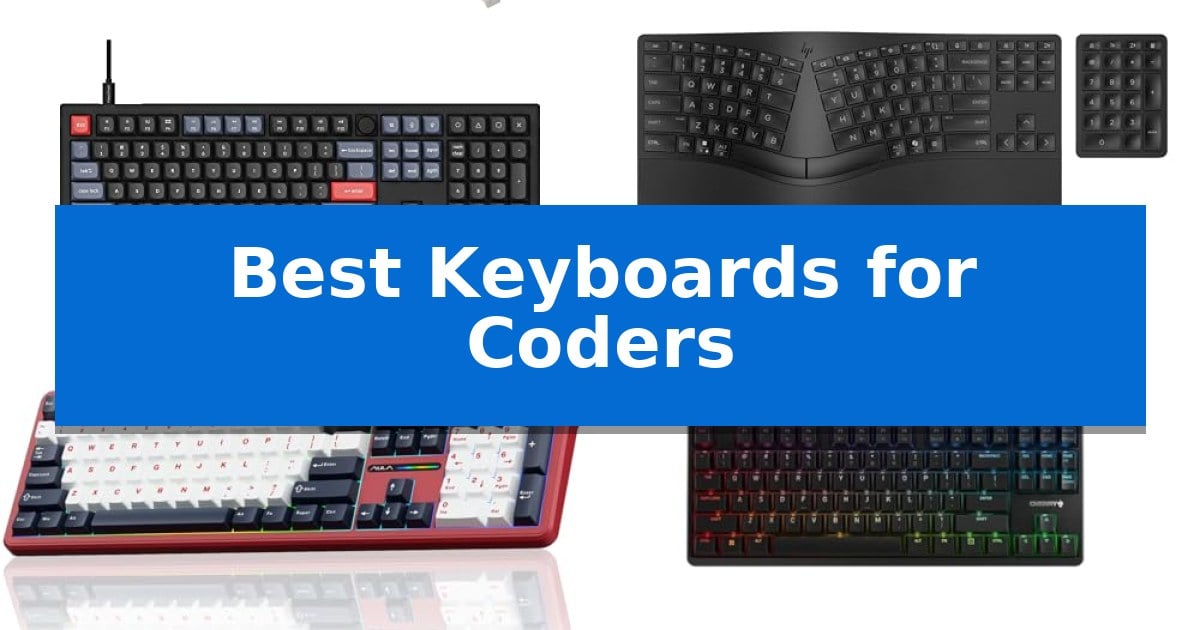
Finding the right tool for long programming sessions is essential for maintaining focus and preventing strain. The Best Keyboards for Coders must balance tactile feedback, layout efficiency, and long-term reliability to support your daily workflow.
Whether you prioritize deep mechanical customization or ergonomic support for extended hours, selecting the right hardware can significantly impact your productivity. This guide evaluates five distinct options to help you identify which features align with your specific coding environment.
Best Keyboards for Coders in 2026
Quick Comparison
| Product | Best For | Key Strength | Score |
|---|---|---|---|
| Keychron V6 Mechanical Keyboard | Best Overall | Full QMK/VIA programmability for custom key mapping and macros. | 4.9 |
| HP 960 Ergonomic Wireless Keyboard | Best for Extended Coding Comfort | Split-zone layout and negative tilt reduce wrist and forearm strain. | 4.8 |
| AULA F108 Pro Mechanical Keyboard | Best for Macro Efficiency | Tri-mode connectivity supports up to five devices simultaneously. | 4.9 |
| Cherry G80-3000N RGB Keyboard | Best for Precision Typing | Original German-made CHERRY MX switches for high reliability. | 4.5 |
| X9 Slim Mechanical Keyboard | Best for Low-Profile Portability | Triple-mode connectivity allows instant switching between four devices. | 4.3 |
How We Chose
- Switch type and tactile feedback quality for precision typing.
- Programmability and support for custom key mapping or macros.
- Ergonomic features and physical layout for long-term comfort.
- Connectivity options including wired, Bluetooth, and multi-device support.
- Build quality and material durability for daily high-volume use.
1 Keychron V6 Mechanical Keyboard — Best for QMK/VIA Customization
The Keychron V6 Mechanical Keyboard distinguishes itself through a fully modular design that allows users to swap out keycaps, switches, gaskets, and even the case foam to suit specific typing preferences. This 108-key full-sized layout provides a dedicated knob for macro control and volume adjustment, making it a versatile tool for complex coding environments.
Built with QMK and VIA support, this keyboard offers deep programmability, enabling developers to remap keys, create custom shortcuts, and manage backlight effects through open-source firmware. The inclusion of pre-lubed mechanical tactile brown switches provides consistent responsiveness, while the hot-swappable PCB allows for the installation of almost any 3-pin or 5-pin MX mechanical switch without the need for soldering.
Designed for long-term comfort, the Keychron V6 features double-shot PBT keycaps in an OSA profile, which are resistant to oil buildup and provide a textured feel. The south-facing RGB lighting is specifically engineered to prevent interference with Cherry-profile keycaps, ensuring consistent illumination from the typist's perspective.
Compatibility is a core strength, as the keyboard includes a system toggle to switch between macOS and Windows layouts, complete with dedicated keycaps for both operating systems. The internal construction, featuring an acoustic silicone pad and screw-in stabilizers for larger keys, is designed to minimize wobbliness and improve overall typing stability during extended coding sessions.
Best for: Developers who require a full-sized, highly programmable layout with the flexibility to customize switches and keycaps.
Skip if: Users who prioritize a compact, tenkeyless, or wireless form factor for their workspace.
PROS
- Full QMK/VIA programmability for custom key mapping and macros.
- Hot-swappable PCB supports 3-pin and 5-pin MX switches.
- Double-shot PBT keycaps offer high durability and oil resistance.
- Dedicated knob for customizable macro or volume control.
CONS
- Wired-only connectivity lacks Bluetooth or 2.4GHz wireless options.
- Full-sized footprint occupies significant desk space.
2 HP 960 Ergonomic Wireless Keyboard — Best for Extended Coding Comfort
Long coding sessions demand equipment that prioritizes physical well-being without sacrificing utility. The HP 960 Ergonomic Wireless Keyboard addresses this through a specialized split-zone layout and negative tilt design, which work together to reduce forearm muscle activity and minimize lateral wrist deviation during extended typing tasks.
Beyond its ergonomic foundation, the keyboard offers significant customization for developers. It features 20 programmable keys that allow for personalized shortcut mapping, alongside a dedicated Copilot Key for streamlined workflow integration. The inclusion of a detached numeric keypad provides flexibility, enabling users to arrange their workspace to suit specific desk configurations and ergonomic preferences.
Connectivity is handled through a versatile system that supports up to three devices. Users can switch between connected hardware using Bluetooth with Swift Pair or the included HP Unifying Dongle for a secure, reliable connection. The device is also designed with sustainability in mind, constructed using at least 60% post-consumer recycled materials.
For those who type for hours, the high-density foam wrist rest provides essential support, while the finger-fit keycaps are engineered to enhance comfort. While the split design requires an adjustment period for those accustomed to traditional rectangular layouts, the combination of programmable controls and ergonomic features makes it a highly functional tool for professional coding environments.
Best for: Coders seeking a split-layout ergonomic keyboard with programmable shortcuts and multi-device connectivity.
Skip if: Users who prefer a traditional, compact, or non-split keyboard layout will likely find the ergonomic design and detached keypad cumbersome.
PROS
- Split-zone layout and negative tilt reduce wrist and forearm strain.
- 20 programmable keys allow for custom workflow shortcuts.
- Multi-device connectivity supports up to three devices via Bluetooth or dongle.
- High-density foam wrist rest provides comfort during long sessions.
CONS
- Split design requires an adjustment period for touch typists.
- Detached numeric keypad increases the total desk footprint.
3 AULA F108 Pro Mechanical Keyboard — Best for Macro Efficiency
Efficient coding workflows often depend on hardware that minimizes friction, and the AULA F108 Pro Mechanical Keyboard addresses this by integrating a smart TFT color display screen and a multi-function knob. These tools allow for real-time monitoring of connection modes, battery status, and system settings, providing a centralized interface for managing complex setups without leaving the keyboard environment.
Designed for versatility, this 104-key full-size mechanical keyboard utilizes a tri-mode connection system, supporting BT5.0, 2.4GHz wireless, and USB-C wired connectivity. This enables users to toggle between up to five devices, making it a practical choice for developers who switch between multiple machines or operating systems throughout the day.
The typing experience is refined through an advanced five-layer filling structure that includes an integrated silicone pad and PCB single-key slotting to reduce cavity noise. The board comes with pre-lubricated switches and stabilizers, delivering a consistent tactile feel. Furthermore, the hot-swappable base supports both 3-pin and 5-pin switches, allowing for hardware-level customization without the need for soldering.
For productivity-focused users, the AULA F108 Pro Mechanical Keyboard offers macro customization via dedicated software, enabling the automation of repetitive tasks. The chassis is built with durable two-colour injection-moulded PBT keycaps and houses a large 8000mAh battery, ensuring the device remains functional during long coding sessions or high-intensity work periods.
Best for: Developers who prioritize macro automation, multi-device connectivity, and a customized tactile typing experience.
Skip if: Users who require a compact, tenkeyless, or 60% layout to save desk space or those who primarily use Linux, as the driver software is Windows-exclusive.
PROS
- Tri-mode connectivity supports up to five devices simultaneously.
- Hot-swappable PCB allows for easy switch replacement without soldering.
- Integrated TFT display provides real-time system and connection status.
- Five-layer sound-dampening structure minimizes cavity noise for a smoother feel.
CONS
- Software and driver features are limited to Windows systems.
- Full-size 104-key layout occupies significant desk space.
4 Cherry G80-3000N RGB Keyboard — Best for Precision Typing
Precision and reliability define the Cherry G80-3000N RGB Keyboard, a mechanical board built on the foundation of the original Cherry design. It integrates state-of-the-art electronics into a compact housing, making it a focused tool for those who prioritize tactile consistency and build quality in their workspace.
At the core of this keyboard are the original CHERRY MX switches, manufactured in Germany using Gold Crosspoint precision technology. These switches are engineered for long-term reliability and consistent performance. The board features Full-N-Key rollover and anti-ghosting capabilities, ensuring that every keystroke is registered accurately, even during rapid input sessions common in programming or intensive typing tasks.
The design emphasizes durability with lasered key buttons that are abrasion-resistant, maintaining legibility over extended use. Users can customize their environment with RGB lighting that supports over 16 million colors, allowing for visual feedback or aesthetic preference. The keyboard is available in both Full Size and TenKeyLess (TKL) configurations, providing options for different desk space requirements.
This keyboard is a straightforward, cable-connected mechanical solution. It avoids unnecessary complexity, focusing instead on the mechanical feel and structural integrity that the brand is known for. With a weight of approximately 1.46 pounds and a height of 1.5 inches, it offers a stable footprint for any desk setup.
Best for: Coders and typists who prioritize mechanical switch precision and a durable, no-nonsense design.
Skip if: Users who require wireless connectivity or dedicated macro keys for complex software workflows.
PROS
- Original German-made CHERRY MX switches for high reliability.
- Full-N-Key rollover ensures every input is captured accurately.
- Abrasion-resistant lasered keycaps built for long-term durability.
- Compact TKL option available to maximize desk space.
CONS
- Wired-only connection limits desk placement flexibility.
- Lacks dedicated programmable macro keys for specialized software shortcuts.
5 X9 Slim Mechanical Keyboard — Best for Low-Profile Portability
The X9 Slim Mechanical Keyboard features a low-profile design that mimics the tactile, quiet feel of a premium laptop keyboard while providing the consistent, linear response of mechanical red switches. This combination allows for rapid, fatigue-free input during long coding sessions, ensuring that each keystroke is both precise and unobtrusive in a shared workspace.
Engineered for high-output environments, the keyboard offers a versatile triple-mode wireless connection, allowing you to switch instantly between two Bluetooth devices, a 2.4GHz wireless connection, and a wired USB-C mode. This multi-device capability eliminates the need for constant re-pairing when moving between workstations or testing across different operating systems.
The full-size 107-key layout is specifically tailored for productivity, incorporating a dedicated number pad, 15 shortcut keys, and a built-in volume knob. The inclusion of a dedicated Copilot key and a solid aluminum top case provides a stable, flex-free typing surface that remains professional and distraction-free, complemented by white backlighting with three brightness levels.
Power management is handled by a 2000mAh rechargeable battery, designed to support days of wireless operation without the need for disposable batteries. This focus on reliability and build quality makes it a practical choice for developers who require a stable, wired-or-wireless interface for complex data entry and media control tasks.
Best for: Developers and office professionals who require a quiet, low-profile mechanical typing experience with seamless multi-device connectivity.
Skip if: Users who prefer high-profile, clicky switches or a compact tenkeyless (TKL) footprint for limited desk space.
PROS
- Triple-mode connectivity allows instant switching between four devices.
- Low-profile red switches provide a quiet, linear typing experience.
- Solid aluminum top case ensures a stable, wobble-free typing surface.
- Full-size layout includes a dedicated volume knob and shortcut keys.
CONS
- Full-size footprint may be too large for minimalist desk setups.
Best Keyboards for Coders Buying Guide
Mechanical Switches and Typing Feel
The choice of mechanical switches is the most critical factor for coders, as it dictates the physical response of every keystroke. Tactile switches, such as brown variants, provide a noticeable bump without the excessive noise of clicky switches, making them ideal for shared office spaces.
Linear switches offer a smooth, consistent press that many developers prefer for rapid typing. When selecting a board, consider whether you prefer a low-profile design for a laptop-like feel or a traditional high-profile switch that offers more travel distance.
Layout and Programmability
A full-size layout provides a dedicated number pad, which is beneficial for data-heavy tasks, while TenKeyLess (TKL) or compact layouts save desk space and bring your mouse closer to your hands. Many modern boards now include QMK/VIA support, allowing you to remap keys or create complex macros.
Programmability is a significant advantage for developers who frequently use specific IDE shortcuts or terminal commands. Being able to assign these functions to dedicated keys or layers can drastically reduce the time spent reaching for a mouse.
Ergonomics and Wrist Support
Coding often involves hours of continuous typing, making ergonomic design a vital consideration. Features like split-zone layouts, negative tilt, and integrated wrist rests help maintain a neutral wrist position and reduce forearm muscle activity.
If you experience discomfort during long sessions, look for keyboards that prioritize wrist alignment. A high-density foam wrist rest or an adjustable tilt mechanism can provide the necessary support to prevent fatigue and potential strain.
Connectivity and Multi-Device Use
Modern coding setups often involve multiple machines, such as a primary workstation and a laptop. Keyboards with multi-device connectivity allow you to switch between systems instantly via Bluetooth or a dedicated dongle, streamlining your workflow.
While wired connections offer the lowest latency and eliminate battery concerns, wireless options provide a cleaner desk aesthetic. Ensure that any wireless board you choose has a reliable battery life or a convenient charging method to avoid interruptions.
Build Quality and Keycaps
The materials used in a keyboard's construction affect both its longevity and the typing experience. Double-shot PBT keycaps are highly recommended for their oil resistance and durability, ensuring that legends do not fade over time.
A solid chassis, often reinforced with aluminum or high-quality plastics, prevents deck flex and provides a stable base. Investing in a well-built keyboard ensures that your primary tool remains consistent and reliable throughout years of intense development work.
Frequently Asked Questions
What is the benefit of hot-swappable switches?
Hot-swappable sockets allow you to replace mechanical switches without soldering. This enables you to experiment with different switch types to find your preferred feel or replace a faulty switch easily.
Are mechanical keyboards better for coding than membrane keyboards?
Many coders prefer mechanical keyboards because they offer consistent tactile feedback, higher durability, and the ability to customize layouts, which can improve typing accuracy and speed.
Does QMK/VIA support require technical expertise?
While QMK/VIA offers advanced customization, the software interfaces are designed to be user-friendly. You can remap keys and create macros through a web-based or desktop interface without needing to write complex code.
How do I choose between a full-size and a compact keyboard?
Choose a full-size keyboard if you frequently use a numeric keypad for data entry. Choose a compact or TKL layout if you want to save desk space and improve your ergonomic posture by reducing the distance between your keyboard and mouse.
Is a wrist rest necessary for coding?
A wrist rest is highly recommended for long coding sessions to help keep your wrists in a neutral position. It reduces the angle of your wrists, which can help prevent discomfort and strain over time.
Conclusion: Our Top Pick
For developers seeking the most versatile and customizable tool, the Keychron V6 Mechanical Keyboard stands out as the top choice. Its robust support for QMK/VIA customization, combined with a full-size layout and hot-swappable switches, provides the flexibility needed to tailor your input experience to your specific coding habits.
While other options offer specialized ergonomic or low-profile benefits, the Keychron V6 offers a comprehensive balance of build quality and programmability. It is an excellent foundation for any professional setup, though users who require extreme portability or specific ergonomic splits may want to consider the other specialized models in this guide.