
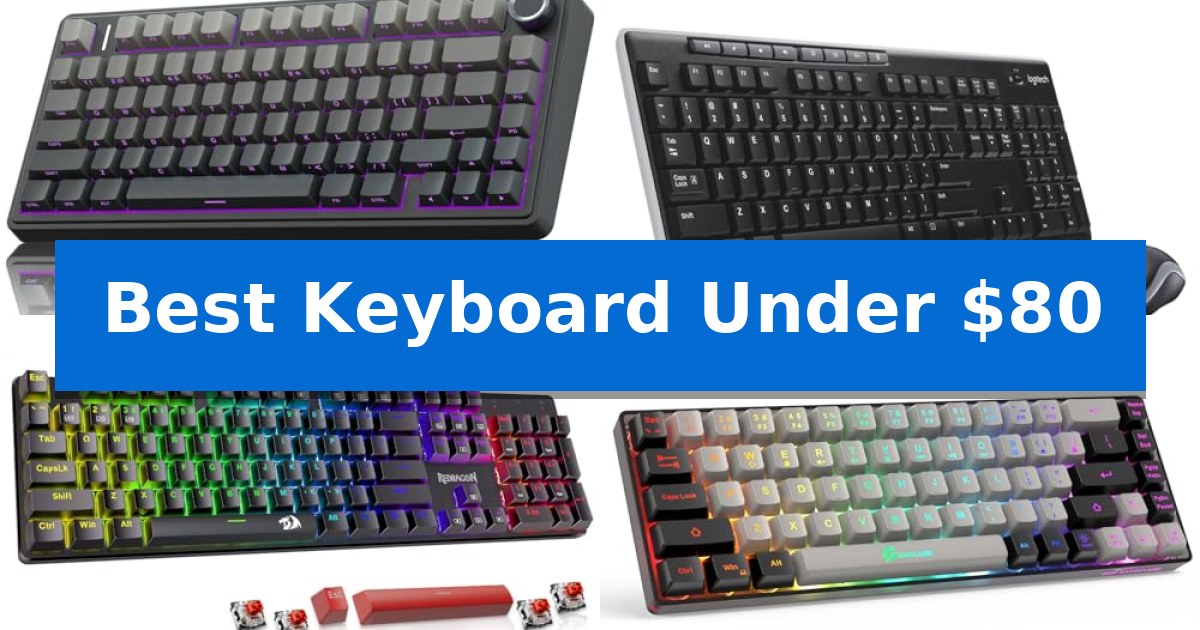
Finding a reliable input device doesn't require a massive investment. Whether you are upgrading your home office or building a new gaming rig, the Best Keyboard Under $80 offers a surprising range of features, from mechanical switches to seamless wireless connectivity.
We have evaluated several models to help you identify which features—such as hot-swappable switches, compact layouts, or spill-resistant designs—best align with your daily needs. This guide highlights the trade-offs between wired precision and wireless flexibility to ensure you make an informed choice.
Best Keyboard Under $80 in 2026
Quick Comparison
| Product | Best For | Key Strength | Score |
|---|---|---|---|
| AULA F75 Pro Mechanical Keyboard | Best Overall | Tri-mode connectivity supports up to five devices. | 4.9 |
| Logitech MK270 Wireless Keyboard Combo | Reliable Wireless Convenience | Long battery life with up to 36 months for the keyboard and 12 months for the mouse. | 4.3 |
| Redragon K671 Mechanical Gaming Keyboard | Hot-Swappable Switch Customization | Hot-swappable switches for easy maintenance and customization. | 4.3 |
| GEODMAER 65% Gaming Keyboard | Space-Saving Compact Layout | 65% compact layout saves significant desk space. | 4.7 |
| Logitech K120 Wired Keyboard | Durable Spill-Resistant Design | USB plug-and-play setup requires no software installation. | 4.3 |
How We Chose
- Switch type and mechanical feedback mechanisms.
- Connectivity options including wired, 2.4GHz wireless, and Bluetooth.
- Layout efficiency and physical footprint on the desk.
- Build quality, including keycap material and spill resistance.
- Customization features like hot-swappability and programmable keys.
1 AULA F75 Pro Mechanical Keyboard — Premium Thocky Feel
The AULA F75 Pro Mechanical Keyboard distinguishes itself by integrating a high-capacity 4000mAh battery within a compact 75% layout, providing a balance of portability and extended wireless utility. This keyboard utilizes a specialized internal structure featuring an extended integrated silicone pad and five layers of filling silencer, which work together to minimize cavity noise and provide a consistent, cushioned typing feel.
Designed for versatility, the device supports a tri-mode connection via Bluetooth 5.0, 2.4GHz wireless, and USB-C wired interfaces. Users can manage up to five connected devices simultaneously, switching between them using dedicated shortcuts. The inclusion of a multi-function control knob allows for real-time adjustments to lighting brightness or volume, depending on whether the user has toggled the device into gaming or office mode.
The keyboard features hot-swappable PCB compatibility for both 3-pin and 5-pin switches, enabling users to customize their typing experience without soldering. It comes equipped with pre-lubricated stabilizers and LEOBOG reaper switches, which are paired with durable side-printed PBT keycaps that resist fading and sweat buildup while allowing RGB lighting to shine through the fonts.
For gaming enthusiasts, the AULA F75 Pro Mechanical Keyboard offers N-key rollover and a WIN key lock function to prevent accidental interruptions during intense sessions. The 16.8 million color RGB system includes 16 pre-set lighting effects and supports music rhythm synchronization via the provided driver, ensuring the hardware remains both functional and visually customizable.
Best for: Users seeking a compact, customizable mechanical keyboard that offers versatile wireless connectivity and a dampened, quiet typing experience.
Skip if: Users who require a full-sized layout with a dedicated number pad for data entry or those who prefer a wired-only connection.
PROS
- Tri-mode connectivity supports up to five devices.
- Hot-swappable base allows for easy switch customization.
- Advanced sound dampening with five layers of silencer material.
- Multi-function knob for intuitive media and lighting control.
CONS
- 75% layout lacks a dedicated numeric keypad.
- 6-month warranty period is relatively short.
2 Logitech MK270 Wireless Keyboard Combo — Reliable Wireless Convenience
The Logitech MK270 Wireless Keyboard Combo provides a reliable desktop solution by utilizing a single USB-A Nano Receiver to connect both the keyboard and mouse, ensuring a clutter-free workspace. This combo is designed for longevity and ease of use, featuring a spill-resistant keyboard layout that includes full-size F-keys, a number pad, and dedicated multimedia hotkeys for quick access to volume and playback controls.
Performance is centered on consistent connectivity and power efficiency. The keyboard is rated for a 36-month battery life, while the included compact mouse offers a 12-month lifespan, both supported by individual on/off switches to conserve energy. The wireless connection remains stable up to 33 feet, allowing for flexible placement away from the computer.
Ergonomics and durability are addressed through the keyboard's adjustable tilt legs and low-profile, quiet keys, which facilitate a comfortable typing experience. The accompanying ambidextrous mouse is shaped to accommodate both left- and right-handed users, providing smooth cursor navigation across most surfaces. Furthermore, the construction incorporates recycled plastic, with 54% in the keyboard and 49% in the mouse.
This setup is a practical choice for users seeking a straightforward, plug-and-play experience without the complexity of software installation. While it serves general productivity needs effectively, those requiring advanced customization or specialized ergonomic features like scooped keys and palm rests may consider upgrading to the Logitech MK540 model.
Best for: Users seeking a reliable, plug-and-play wireless keyboard and mouse solution for standard office or home productivity tasks.
Skip if: Users who require advanced features like customizable shortcut keys, integrated palm rests, or ergonomic key shapes.
PROS
- Long battery life with up to 36 months for the keyboard and 12 months for the mouse.
- Reliable wireless connectivity via a single USB-A Nano Receiver.
- Spill-resistant design and durable key construction.
- Multimedia hotkeys for instant control over volume and media playback.
CONS
- Basic feature set lacks advanced customization or ergonomic enhancements found in higher-tier models.
3 Redragon K671 Mechanical Gaming Keyboard — Hot-Swappable Switch Customization
Finding a reliable mechanical keyboard that fits a modest budget often involves compromising on build quality or customization. The Redragon K671 Mechanical Gaming Keyboard addresses this by offering a hot-swappable design, allowing users to replace switches without soldering, which significantly extends the lifespan of the device.
Equipped with linear red switches, this keyboard provides a smooth, low-resistance typing experience that is well-suited for fast-paced gaming sessions. The inclusion of full-key anti-ghosting ensures that every input is registered accurately, even during complex key combinations, while the 12 multimedia shortcuts offer quick control over volume and media playback.
Customization is a core focus of the Redragon K671 Mechanical Gaming Keyboard, featuring 11 programmable backlit modes with adjustable brightness and speed. Users can utilize the dedicated software to perform macro editing, remapping keys or creating shortcuts to streamline both productivity tasks and gaming workflows.
Durability and maintenance are supported by the double-shot PBT keycaps, which are designed for clarity and longevity. The package includes spare switches and keycap pullers, making it a practical choice for those who want a customizable setup without exceeding their budget.
Best for: Gamers and typists looking for a budget-friendly, hot-swappable mechanical keyboard with macro support.
Skip if: Users who require a wireless connection or a full-sized layout with a dedicated number pad will find this wired, compact-style board limiting.
PROS
- Hot-swappable switches for easy maintenance and customization.
- Macro editing support via software for workflow efficiency.
- Full-key anti-ghosting for reliable input during gaming.
- Double-shot PBT keycaps for improved durability and backlight clarity.
CONS
- Wired-only connectivity restricts placement options.
- Fixed color backlighting cannot be changed to different hues.
4 GEODMAER 65% Gaming Keyboard — Space-Saving Compact Layout
Finding a reliable peripheral that balances cost and functionality is a common challenge for PC users. The GEODMAER 65% Gaming Keyboard addresses this by offering a space-saving, 65% compact design that removes the number pad while retaining essential navigation keys, making it an ideal candidate for those seeking the Best Keyboard Under $80.
This wired keyboard connects via a detachable Type-C cable, ensuring a stable connection with ultra-low input latency. Designed for both gaming and productivity, it features 26-key anti-ghosting to prevent input conflicts during intensive use. The imitation mechanical technology provides a tactile feel similar to mechanical switches while maintaining the quiet operation characteristic of a membrane keyboard.
Durability and aesthetics are prioritized through two-color injection molding keycaps that feature transparent, luminous characters. The LED backlighting is fully adjustable, allowing users to toggle between constant and breathing modes, as well as customize brightness and breathing frequency. Each key is rated for a 10,000,000+ keystroke lifespan and treated with a UV coating to resist fading over time.
The layout includes 11 dedicated media buttons and an FN+Win lock function to prevent accidental interruptions during gameplay. Its compact footprint is specifically engineered to free up desktop space, and the ergonomic keycap height is designed to provide comfort during extended typing sessions, helping to reduce wrist strain.
Best for: Users who need a compact, quiet, and space-saving keyboard for gaming and office tasks on a budget.
Skip if: Users who require a full-sized layout with a dedicated number pad or those who prefer the distinct tactile and audible feedback of genuine mechanical switches.
PROS
- 65% compact layout saves significant desk space.
- Detachable Type-C cable ensures a reliable, low-latency wired connection.
- Adjustable LED backlighting with multiple modes and brightness levels.
- 10,000,000+ keystroke lifespan with UV-coated keycaps for longevity.
CONS
- Membrane-based imitation mechanical feel may not satisfy users seeking authentic mechanical switch feedback.
- Lacks a dedicated number pad, which may limit efficiency for data-heavy workflows.
5 Logitech K120 Wired Keyboard — Durable Spill-Resistant Design
Reliability in a workspace often comes down to the simplicity of your tools, and the Logitech K120 Wired Keyboard focuses on providing a straightforward, durable typing experience. This full-size peripheral features a standard layout complete with a dedicated number pad and function keys, ensuring that you have all the necessary controls for daily productivity without needing to install any additional software. It is a practical Best Keyboard Under $80 for those who prioritize consistent, no-nonsense performance.
Setting up the device is instantaneous thanks to its USB plug-and-play connectivity, which works across various Windows-based desktops and laptops. The hardware is built for longevity, incorporating a spill-resistant design and anti-fade keys that help maintain legibility over time. For those who prefer a specific typing angle, the keyboard includes sturdy tilt legs that allow for adjustable height, catering to personal comfort preferences during long sessions.
Beyond its functional design, the keyboard reflects a commitment to material sourcing, as its plastic components contain 51% certified post-consumer recycled plastic. With a two-year warranty, this full-size keyboard serves as a dependable solution for home or office environments where consistent performance is required. The deep-profile keys provide a familiar tactile feel, making it well-suited for high-volume data entry or standard document creation.
While the Logitech K120 Wired Keyboard excels in simplicity and durability, it is important to note that it is a wired-only device. This design choice removes the need for batteries or charging, ensuring the keyboard is always ready for use, though it does tether you to your workstation. It lacks the specialized features found in gaming-oriented boards, such as programmable macro keys or mechanical switches, focusing instead on the essential needs of professional and home office users.
Best for: Users seeking a reliable, full-size, plug-and-play wired keyboard for standard office or home productivity tasks.
Skip if: Users who require wireless connectivity, mechanical switches, or specialized programmable macro keys for advanced gaming or professional workflows.
PROS
- USB plug-and-play setup requires no software installation.
- Spill-resistant design enhances durability against accidental liquid contact.
- Full-size layout includes a number pad and function keys for efficient data entry.
- Adjustable tilt legs allow for customized typing angles.
CONS
- Wired-only connection limits desk placement flexibility.
- Standard membrane switches lack the tactile feedback of mechanical alternatives.
Best Keyboard Under $80 Buying Guide
Understanding Switch Types
Mechanical switches are the foundation of your typing experience. They determine the tactile feel and the sound profile of every keystroke. Linear switches, often found in gaming-focused models, offer a smooth, consistent press without a bump, while tactile or clicky switches provide physical feedback that can improve typing accuracy.
If you prefer a quieter environment, membrane or specialized low-profile switches are often the better choice. These are typically found in office-oriented keyboards and provide a softer, more muted sound that is less disruptive in shared workspaces.
Connectivity and Latency
The choice between wired and wireless connectivity depends on your workspace setup. Wired connections via USB-C or USB-A provide a constant, latency-free link, which is ideal for competitive gaming where every millisecond counts. They also eliminate the need for battery management.
Wireless keyboards, utilizing Bluetooth or 2.4GHz receivers, offer a cleaner, cable-free desk. Modern wireless technology has significantly reduced input lag, making these options viable for most users. Always check if your device supports multi-device pairing if you frequently switch between a laptop, tablet, and desktop.
Layout and Form Factor
Keyboard size is measured in percentages relative to a standard full-size layout. A 65% or 75% layout removes the numeric keypad to save space, bringing your mouse closer to your center line for better ergonomics. This is particularly beneficial for gamers who need more room for large mouse movements.
Full-size keyboards remain the standard for data entry tasks. If your workflow involves heavy spreadsheet use or frequent number input, the dedicated number pad is an essential feature that justifies the larger physical footprint on your desk.
Build Quality and Keycaps
The material used for keycaps significantly affects durability and feel. PBT (polybutylene terephthalate) keycaps are highly regarded for their resistance to shine and wear over time, offering a textured, premium feel. ABS plastic is more common in budget models and may develop a glossy finish after extended use.
Structural integrity also matters. Look for keyboards with reinforced plates or internal dampening materials. These features help reduce hollow-sounding vibrations and provide a more solid, stable typing platform that feels more expensive than it actually is.
Customization and Programmability
Many modern keyboards allow you to remap keys or create macros through software. This functionality is a major productivity booster, allowing you to trigger complex commands or shortcuts with a single press. Some models even feature physical control knobs for volume or lighting adjustments.
Hot-swappable sockets are a standout feature for enthusiasts. They allow you to pull out and replace switches without soldering, giving you the freedom to experiment with different switch types to find your ideal sound and resistance without buying an entirely new keyboard.
Frequently Asked Questions
What is a hot-swappable keyboard?
A hot-swappable keyboard features sockets that allow you to remove and replace mechanical switches without soldering. This makes it easy to repair a broken switch or customize the feel of your keyboard.
Are wireless keyboards good for gaming?
Yes, modern 2.4GHz wireless technology provides a stable, low-latency connection comparable to wired keyboards, making them suitable for most gaming scenarios.
Why choose a 65% or 75% layout?
These compact layouts save desk space and improve ergonomics by reducing the distance between your keyboard and mouse, which can help reduce shoulder strain.
What is the benefit of PBT keycaps?
PBT keycaps are more durable than standard ABS plastic. They resist developing a shiny appearance over time and generally provide a more textured, satisfying typing feel.
Do I need special software for my keyboard?
While many keyboards are plug-and-play, some models offer optional software to customize RGB lighting, remap keys, or record macros to improve your workflow.
Conclusion: Our Top Pick
Choosing the right keyboard involves balancing your specific needs for space, connectivity, and tactile feedback. For those seeking a versatile and high-quality experience, the AULA F75 Pro Mechanical Keyboard stands out as the most well-rounded option in this price range.
With its tri-mode connectivity, hot-swappable switch support, and advanced internal dampening for a premium sound, it provides a level of customization rarely found at this price point. While compact, the 75% layout retains essential keys, making it an excellent choice for both productivity and gaming.