
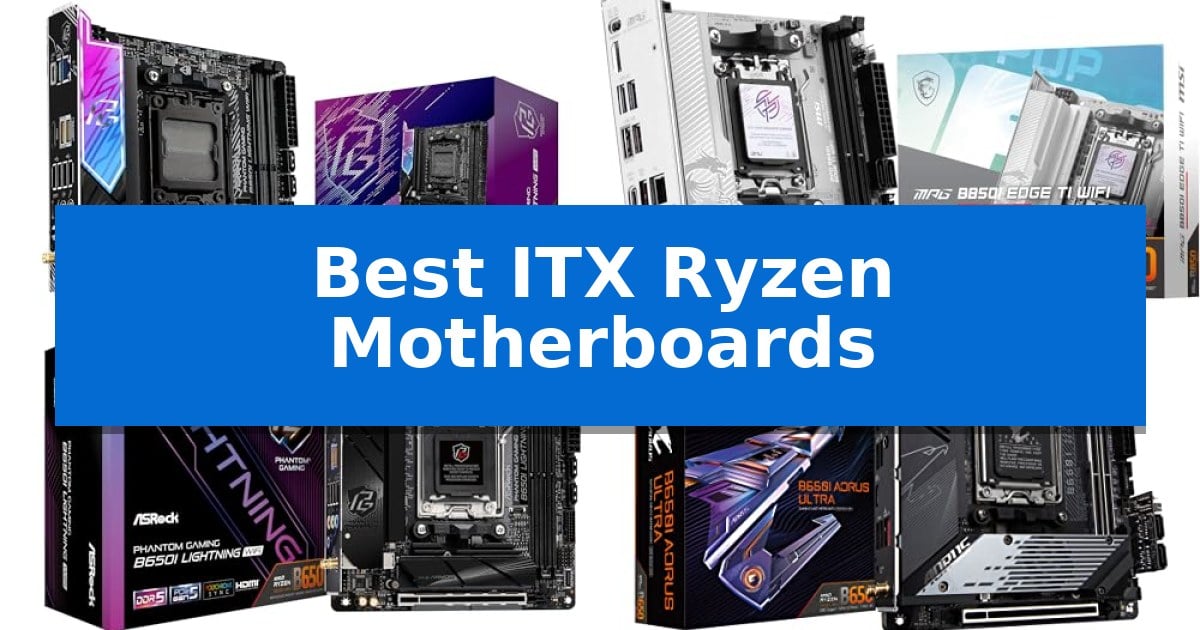
Building a high-performance PC in a compact chassis requires careful planning, especially when selecting the foundation of your system. The Best ITX Ryzen Motherboards must balance robust power delivery for modern processors with the physical constraints of a Mini-ITX form factor, ensuring that your thermal and space requirements are met without sacrificing functionality.
Whether you are prioritizing extreme memory overclocking, high-speed storage, or versatile networking, choosing the right board is essential for a stable build. We have analyzed the latest AM5 options to help you identify which motherboard aligns with your specific hardware goals and small form factor constraints.
Best ITX Ryzen Motherboards in 2026: Compact Power for AM5 Builds
Quick Comparison
| Product | Best For | Key Strength | Score |
|---|---|---|---|
| ASRock B850I Lightning WiFi Motherboard | Best Overall | 10+1+1 phase power design with 110A SPS for stable power delivery | 4.9 |
| MSI MPG B850I Edge TI WiFi Motherboard | Advanced Thermal Cooling Design | Robust 8-phase 90A VRM design for stable power delivery. | 4.8 |
| ASRock B650I Lightning WiFi Motherboard | Reliable AM5 Foundation | Compact Mini-ITX form factor ideal for space-constrained builds. | 4.8 |
| GIGABYTE B650I AORUS Ultra Motherboard | Enhanced Active Thermal Cooling | Enhanced Active Thermal Cooling with heatpipe and active M.2 cooling. | 4.4 |
| ASRock A620AI WiFi Motherboard | Dual LAN for Flexible Networking | 8+2+1 phase power design with 80A Dr.MOS for stable power delivery | 4.7 |
How We Chose
- Power Delivery: Assessment of VRM phases and amperage to ensure stable operation for high-end Ryzen processors.
- Thermal Management: Evaluation of heatsink design, active cooling solutions, and thermal pad quality.
- Connectivity and Expansion: Analysis of PCIe generation, M.2 slot configuration, and high-speed networking options.
- Memory Compatibility: Review of DDR5 support and overclocking potential for high-frequency RAM kits.
- Form Factor Integration: Verification of Mini-ITX dimensions and layout for compatibility with compact chassis.
1 ASRock B850I Lightning WiFi Motherboard — Premium Power for Compact Builds
Building a high-performance small form factor PC requires a foundation that does not compromise on power or connectivity. The ASRock B850I Lightning WiFi Motherboard is engineered specifically for this challenge, utilizing a compact 170x170mm Mini-ITX form factor while integrating a robust 10+1+1 phase power design with 110A Smart Power Stage (SPS) components to ensure stable operation under load.
This board is built to handle the latest hardware, featuring a PCIe 5.0 x16 slot for modern graphics cards and dual M.2 storage slots, including a Blazing M.2 (PCIe Gen5x4) interface for high-speed data access. Memory enthusiasts can take advantage of two DDR5 DIMM slots that support extreme overclocked speeds up to 8200+ (OC) MHz, providing significant headroom for memory-intensive tasks.
Connectivity is a primary focus, with Killer 2.5G LAN and WiFi 6E providing reliable networking options. The rear I/O includes a high-speed USB 3.2 Gen2 Type-C port capable of up to 40Gb/s, alongside flexible display outputs via HDMI and USB Type-C with DisplayPort Alt-mode support. These features make it a versatile choice for users looking to maximize utility within a restricted chassis footprint.
When planning a build with this motherboard, it is essential to verify that your chosen small form factor case and CPU cooler provide sufficient clearance for the board's layout. The ASRock B850I Lightning WiFi Motherboard includes BIOS Flashback for simplified updates, ensuring that users can maintain compatibility with the latest AMD Ryzen 9000, 8000, and 7000 series processors without needing a pre-installed CPU.
Best for: Enthusiasts building a high-performance, compact PC who require PCIe 5.0 support and high-speed DDR5 memory overclocking capabilities.
Skip if: Users who require more than two DIMM slots for memory capacity or those whose specific small form factor case layout conflicts with the board's component placement.
PROS
- 10+1+1 phase power design with 110A SPS for stable power delivery
- Support for DDR5 8200+ (OC) MHz memory
- Includes PCIe 5.0 x16 and Blazing M.2 (PCIe Gen5x4) slots
- Advanced WiFi 6E and Killer 2.5G LAN connectivity
CONS
- Limited to two DIMM slots due to the Mini-ITX form factor
- Requires careful chassis and cooler clearance verification
2 MSI MPG B850I Edge TI WiFi Motherboard — Advanced Thermal Cooling Design
Building a high-performance compact PC requires a foundation that does not compromise on power delivery or connectivity. The MSI MPG B850I Edge TI WiFi Motherboard addresses these needs by integrating a robust Direct 8-phase power (90A, SPS) VRM design, specifically engineered to handle the latest AMD Ryzen 9000, 8000, and 7000 series processors.
Thermal management is a priority in the confined space of a Mini-ITX build, and this board utilizes the Frozr Guard system. This includes an Extended Heatsink paired with 7W/mK MOSFET thermal pads and dedicated choke thermal pads to ensure stability during intensive tasks. The inclusion of an M.2 Shield Frozr further protects high-speed storage from thermal throttling.
For users prioritizing future-ready components, the board features a PCIe 5.0 x16 Steel Armor II slot, providing the necessary bandwidth for modern graphics cards. Memory performance is equally emphasized, with two DDR5 DIMM slots supporting extreme overclocking speeds of 8200+ MT/s via Memory Boost architecture.
Connectivity options are extensive for a small-form-factor board, featuring a Wi-Fi 7 module with Bluetooth 5.4 and a 5Gbps LAN port for high-speed networking. Storage expansion is managed through a dual M.2 connector layout, offering one Gen5 x4 slot and one Gen4 x4 slot to accommodate high-performance NVMe drives.
Best for: Enthusiasts building a high-performance, compact Mini-ITX system who require support for the latest Ryzen processors and high-speed DDR5 memory.
Skip if: Users who require more than two DIMM slots for memory expansion or those who need additional PCIe expansion slots beyond the single x16 interface.
PROS
- Robust 8-phase 90A VRM design for stable power delivery.
- PCIe 5.0 x16 and M.2 Gen5 support for cutting-edge component compatibility.
- Advanced Frozr Guard cooling with high-conductivity thermal pads.
- Modern Wi-Fi 7 and 5Gbps LAN for high-speed connectivity.
CONS
- Limited to two DIMM slots, restricting total memory capacity compared to larger boards.
- Single PCIe x16 slot configuration limits additional expansion card options.
3 ASRock B650I Lightning WiFi Motherboard — Reliable AM5 Foundation
Building a high-performance system in a restricted chassis requires a foundation that balances density with capability. The ASRock B650I Lightning WiFi Motherboard is engineered specifically for this challenge, utilizing a compact 170mm x 170mm Mini-ITX form factor that fits into the most space-constrained environments without compromising on core hardware support.
At the heart of this board is the AMD AM5 platform, providing full compatibility with Ryzen 9000, 8000, and 7000 Series processors. To maintain stability under load, it features an 8+2+1 phase power design utilizing premium Dr.MOS components. This power delivery system is designed to handle the thermal and electrical demands of modern multi-core CPUs in a small-footprint build.
Memory and storage performance remain a priority despite the reduced size. The board includes dual DDR5 DIMM slots capable of supporting overclocked speeds up to 7200+ (OC). For data-heavy tasks, it offers a PCIe 5.0 x4 M.2 slot, enabling the use of high-speed NVMe storage, complemented by an additional PCIe 4.0 M.2 slot and two SATA3 ports for flexible storage configurations.
Connectivity is handled through a comprehensive suite that includes Phantom Gaming 2.5G LAN and Intel WiFi 6E for reliable networking. The rear and front I/O panels are equipped with multiple USB 3.2 Gen2 ports, including Type-C connectors, ensuring compatibility with modern peripherals. The integration of BIOS Flashback and an Auto Driver Installer further simplifies the initial system configuration and maintenance process for the end-user.
Best for: Enthusiasts building high-performance, small-form-factor PCs who require PCIe 5.0 storage and high-speed DDR5 memory support.
Skip if: Users who require more than two DIMM slots or an extensive array of PCIe expansion slots for multi-GPU or specialized add-in card configurations.
PROS
- Compact Mini-ITX form factor ideal for space-constrained builds.
- PCIe 5.0 M.2 support for next-generation NVMe storage speeds.
- 8+2+1 phase power design for stable CPU performance.
- High-speed DDR5 memory support up to 7200+ (OC).
CONS
- Limited expansion capacity due to the single PCIe slot and two DIMM slots.
- Restricted physical space for complex cable management or large cooling solutions.
4 GIGABYTE B650I AORUS Ultra Motherboard — Enhanced Active Thermal Cooling
Building a high-performance small-form-factor system requires a foundation that balances thermal management with component density, and the GIGABYTE B650I AORUS Ultra Motherboard addresses this through its Enhanced Active Thermal Cooling design. This ITX board integrates an extended VRM heatsink with a heatpipe and M.2 Thermal Guard III featuring active cooling to maintain stability under load within the confined space of a compact chassis.
The board is built for modern processing needs, supporting AMD Ryzen 9000, 8000, and 7000 Series processors on the AMD Socket AM5 platform. Power delivery is handled by a Direct 8+2+1 Phases Digital VRM Solution mounted on a 12-layer 2X Copper PCB, providing the necessary electrical overhead for high-performance CPUs in a miniature footprint.
Memory and storage expansion are optimized for current standards, utilizing two SMD DIMM slots that support AMD EXPO and Intel XMP memory modules for DDR5 compatibility. The board includes PCIe 5.0 support for future-ready graphics and a PCIe 4.0 NVMe x4 M.2 slot to ensure high-speed storage performance.
Connectivity and usability are prioritized through a suite of integrated features, including USB 3.2 Gen 2 Type-C with DP-Alt mode for versatile peripheral and display output. Maintenance is simplified by the EZ-Latch mechanism for components and Q-Flash for BIOS updates, while WIFI 6E and 2.5GbE provide robust networking options for both wireless and wired environments.
Best for: Users building a high-performance, compact ITX system who require advanced thermal management and support for the latest AMD Ryzen processors.
Skip if: Users who require more than two DIMM slots or need additional PCIe expansion slots beyond what is physically possible on an ITX form factor.
PROS
- Enhanced Active Thermal Cooling with heatpipe and active M.2 cooling.
- Direct 8+2+1 Phases Digital VRM for stable power delivery.
- PCIe 5.0 support for next-generation hardware compatibility.
- EZ-Latch and Q-Flash for simplified assembly and maintenance.
CONS
- ITX form factor limits expansion to two DIMM slots and a single PCIe slot.
5 ASRock A620AI WiFi Motherboard — Dual LAN for Flexible Networking
Building a high-performance small form factor system requires hardware that balances thermal efficiency with connectivity, and the ASRock A620AI WiFi Motherboard is engineered specifically for this constraint. Measuring 170x170mm, this Mini-ITX board provides a stable foundation for AMD Ryzen 9000, 8000, and 7000 series processors, ensuring that power delivery remains consistent through its 8+2+1 phase design with 80A Dr.MOS components.
For users prioritizing memory throughput, the board supports dual-channel DDR5 configurations with overclocked speeds reaching 8200+ (OC). The integration of a PCIe 4.0 x16 slot allows for the installation of modern graphics cards, making it a viable choice for compact gaming builds. Storage expansion is managed via two M.2 slots—one PCIe Gen4x4 and one PCIe Gen3x4—alongside two SATA3 ports, providing flexibility for varied drive setups.
Networking and peripheral connectivity are handled by a robust suite of features, including dual LAN ports—a Realtek 2.5G controller and a Gigabit port—facilitating flexible network configurations. Wireless connectivity is provided via integrated WiFi 6E and Bluetooth, while the rear I/O includes a USB 3.2 Gen2 Type-C port. The inclusion of BIOS Flashback simplifies maintenance by allowing updates without a CPU installed.
System builders should note that the Mini-ITX form factor necessitates careful planning regarding chassis dimensions and CPU cooler clearance. With its three-year manufacturer warranty, the ASRock A620AI WiFi Motherboard offers a focused feature set for those seeking to maximize performance within a restricted physical footprint.
Best for: The ASRock A620AI WiFi Motherboard is best for users building a high-performance, compact AMD Ryzen system who require dual LAN connectivity and high-speed DDR5 memory support.
Skip if: Skip this motherboard if you require more than two DIMM slots or need additional PCIe expansion slots beyond the single x16 interface provided by the Mini-ITX form factor.
PROS
- 8+2+1 phase power design with 80A Dr.MOS for stable power delivery
- Dual LAN ports including 2.5G and Gigabit for flexible networking
- BIOS Flashback support for convenient updates without a CPU
- WiFi 6E and Bluetooth integration for modern wireless connectivity
CONS
- Mini-ITX form factor limits expansion to a single PCIe slot and two DIMM slots
- Requires specific chassis and cooler clearance verification due to compact dimensions
Best ITX Ryzen Motherboards Buying Guide
Understanding Mini-ITX Compatibility
The Mini-ITX form factor is strictly defined by its 170mm x 170mm dimensions. When selecting a motherboard, you must ensure your chosen case supports this standard and provides adequate clearance for your CPU cooler and graphics card.
Because space is limited, motherboard manufacturers often use daughterboards or vertical mounting for components like M.2 drives and audio circuitry. Always verify the physical layout to ensure your specific cooling solution does not interfere with these components.
Power Delivery and VRM Design
Modern Ryzen processors, particularly the higher-core-count models, demand consistent power. A robust VRM (Voltage Regulator Module) design with high-amperage power stages is crucial for maintaining stability under heavy workloads.
Look for boards that feature high-quality power stages and effective heatsinks. In a small case, airflow is often restricted, so efficient power delivery also helps in reducing unnecessary heat generation.
Storage and PCIe Standards
The transition to PCIe 5.0 allows for significantly faster NVMe storage and future-proof graphics card support. If you plan to use the latest Gen5 SSDs, ensure your motherboard includes a dedicated, cooled M.2 slot for these drives.
Most ITX boards offer limited expansion slots, so the integrated storage options are usually the only ones available. Prioritize boards with dual M.2 slots if you need to manage multiple drives without relying on SATA cables.
Networking and Wireless Connectivity
In a compact build, you may not always have easy access to wired Ethernet. High-quality WiFi 6E or WiFi 7 modules are standard on premium ITX boards, providing reliable wireless performance.
Check for 2.5G or 5G LAN ports if you require high-speed wired networking. Some boards also offer dual LAN configurations, which can be beneficial for specific networking setups or home server applications.
Memory Overclocking Potential
DDR5 memory performance is highly dependent on the motherboard's signal integrity. Boards that support high-frequency DDR5 (OC) profiles can significantly improve system responsiveness and gaming frame rates.
Ensure the board supports the memory speeds you intend to use. While most users will be satisfied with standard speeds, enthusiasts should look for boards with optimized memory trace layouts to achieve maximum stability at higher frequencies.
Frequently Asked Questions
Can I use an ATX power supply with these ITX motherboards?
Yes, but you must ensure your chosen Mini-ITX case has the physical space to accommodate an ATX power supply. Many SFF cases require SFX or SFX-L power supplies for better cable management.
Do I need to update the BIOS for new Ryzen processors?
It is often recommended to check if your board supports BIOS Flashback. This feature allows you to update the firmware without needing a CPU installed, which is helpful if you are using a newer processor on an older chipset revision.
Are these boards compatible with all AM5 coolers?
Most AM5 motherboards use the standard AM4/AM5 mounting hole spacing. However, you should verify that your specific cooler's height and width do not conflict with the motherboard's VRM heatsinks or RAM slots.
Why are ITX motherboards more expensive than ATX models?
Mini-ITX boards require complex multi-layer PCB designs to pack the same features as larger boards into a smaller footprint, which often increases manufacturing costs.
Is WiFi 7 necessary for a gaming build?
WiFi 7 offers lower latency and higher throughput compared to previous standards. While not strictly necessary for gaming, it provides a more stable wireless connection if you cannot use a wired Ethernet cable.
Conclusion: Our Top Pick
Selecting the right motherboard is the most critical step in your small form factor journey. After reviewing the options, the ASRock B850I Lightning WiFi Motherboard stands out as the most balanced choice for most users.
With its 10+1+1 phase power design, support for high-speed DDR5 memory, and comprehensive storage options including PCIe 5.0, it provides a reliable foundation for any modern Ryzen build. Its compact design and thoughtful layout make it an excellent fit for those who do not want to compromise on performance despite the limited space.