
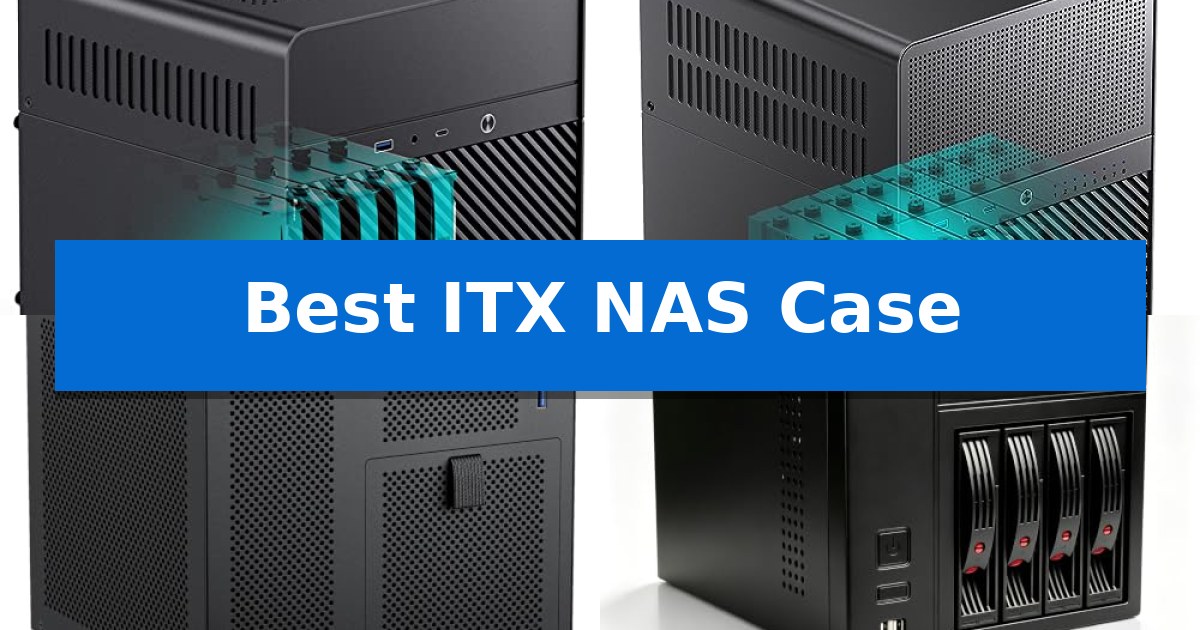
Building a custom network-attached storage system requires a chassis that balances drive density with the strict constraints of a Mini-ITX motherboard. Finding the Best ITX NAS Case means navigating the trade-offs between physical footprint, cooling efficiency, and the number of hot-swap bays available for your hard drives.
Whether you are setting up a private cloud for family photos or a high-capacity media server, the right enclosure ensures your components remain cool and accessible. We have analyzed five distinct models to help you identify which chassis aligns with your specific hardware requirements and spatial limitations.
Best ITX NAS Case in 2026: Maximize Storage in Minimal Space
Quick Comparison
| Product | Best For | Key Strength | Score |
|---|---|---|---|
| Jonsbo N2 NAS Case | Best Overall | Five 3.5-inch drive bays for high storage density | 4.9 |
| Jonsbo N3 NAS Case | High Capacity for Media Servers | 8-bay hot-swap storage capacity for high-density data management. | 4.9 |
| RGEEK PS101 NAS Case | Budget Friendly Storage Build | 4 hot-swappable 3.5" drive bays for easy storage management. | 4.7 |
| AUDHEID K3 NAS Case | Simple Setup for Beginners | Four hot-swap drive bays for 3.5-inch or 2.5-inch drives. | 4.6 |
| AUDHEID 8-Bay NAS Case | Dual Airflow for Cooler Drives | 8 hot-swap drive bays for easy drive maintenance without system downtime. | 4.5 |
How We Chose
- Drive bay capacity and hot-swap accessibility for easy maintenance.
- Compatibility with Mini-ITX motherboards and specific power supply standards like SFX or Flex.
- Thermal management capabilities, including fan placement and airflow channels for drive longevity.
- Physical dimensions to ensure the unit fits within your specific home or office workspace.
- Build material and structural integrity to protect sensitive data storage components.
1 Jonsbo N2 NAS Case — Compact Pick for Tight Spaces
The Jonsbo N2 NAS Case provides a dedicated, compact solution for home server enthusiasts by integrating five 3.5-inch drive bays alongside a single 2.5-inch SSD mount within a minimal footprint. Measuring just 8.86 x 8.86 x 8.82 inches, this aluminum chassis is engineered to maximize storage density for ITX-based builds without occupying excessive desk or shelf space.
Designed for efficiency, the internal layout supports ITX motherboards and includes a pre-installed 12cm fan to maintain airflow across the drive array. The enclosure accommodates an SFX power supply (up to 150mm) and allows for a 65mm CPU cooler height, ensuring compatibility with standard low-profile components required for a quiet, always-on storage server.
Connectivity is managed via a front-facing interface that features a USB 3.2 Gen2 Type-C port, a USB 3.0 port, and a combined audio/mic jack. The design prioritizes accessibility with an integrated removable upper cover, simplifying the installation of drives and internal hardware during the initial build or subsequent maintenance.
For those integrating a display output or specialized expansion, the case supports a single low-profile PCI expansion slot for cards up to 197mm in length. This makes the Jonsbo N2 NAS Case a balanced choice for users who need a high-capacity storage server that remains compact enough to fit into tight home office or media center environments.
Best for: Users building a compact, high-capacity home storage server using an ITX motherboard and multiple 3.5-inch hard drives.
Skip if: Users requiring support for full-height expansion cards, ATX power supplies, or more than one 2.5-inch drive bay.
PROS
- Five 3.5-inch drive bays for high storage density
- Compact aluminum chassis design
- Includes 12cm cooling fan
- Modern USB 3.2 Gen2 Type-C front interface
CONS
- Limited to low-profile PCI expansion cards
- Requires SFX power supply
2 Jonsbo N3 NAS Case — High Capacity for Media Servers
Building a high-density home server in a compact footprint requires a chassis that balances storage capacity with thermal management. The Jonsbo N3 Mini-ITX NAS PC Chassis addresses this by offering an 8-bay hot-swap storage configuration within a footprint measuring just 9.17 by 10.31 by 11.73 inches.
The internal architecture utilizes a split top and bottom compartment structure to isolate heat sources, aided by two built-in 10cm fans dedicated to the HDD compartment for direct airflow. This design supports a standard server-grade hot-swap backplane with dual D-type and SATA power inputs, facilitating easier drive maintenance for home or enterprise storage setups.
Despite its small form factor, the case accommodates an ITX motherboard and provides two PCI expansion slots. Hardware compatibility includes support for a CPU cooler up to 130mm in height and a GPU length of up to 280mm, while the power supply requirement is limited to the SFX105mm standard. The front panel includes a USB 3.0 port, a USB 3.2 Gen 2 Type-C port, and a combined audio/mic jack for convenient connectivity.
Constructed with an aluminum exterior and a steel plate frame, the Jonsbo N3 Mini-ITX NAS PC Chassis offers a robust build for users prioritizing storage density. The removable top cover and pull-out drive structure simplify the assembly process, making it a practical choice for those building a dedicated network storage server.
Best for: Users looking to build a high-density, 8-drive NAS server within a compact, space-saving ITX form factor.
Skip if: Users who require ATX motherboard support, standard ATX power supply compatibility, or space for more than two PCI expansion cards.
PROS
- 8-bay hot-swap storage capacity for high-density data management.
- Dedicated cooling with dual 10cm fans for the HDD compartment.
- Compact footprint suitable for home office or small server environments.
- Modern connectivity including a front-facing USB 3.2 Gen 2 Type-C port.
CONS
- Limited power supply support restricted to SFX105mm units.
- ITX motherboard constraint limits overall system expansion options.
3 RGEEK PS101 NAS Case — Budget Friendly Storage Build
The RGEEK PS101 NAS Case provides a specialized 9.9L enclosure for users looking to build a compact, high-density storage server. Its primary utility lies in the 4 hot-swappable 3.5" HDD bays paired with an additional 1 dedicated 2.5" SSD slot, allowing for significant storage capacity within a footprint measuring only 222x223x201mm.
Engineered for efficiency, the chassis utilizes a 1.0mm galvanized steel inner frame and a 0.8mm cold-rolled steel outer frame to ensure structural integrity. The design includes a magnetic 1.5mm steel front panel, which simplifies access to the drive bays while maintaining a clean aesthetic for home office or small business environments.
Compatibility is centered around Mini-ITX motherboards and SFX or SFX-L power supplies. The internal layout accommodates low-profile CPU coolers up to 70mm tall and supports basic expansion via a half-height PCIe slot, limited to 190mm in length. Cooling is managed through a dedicated 120mm fan position, supported by ventilated side panels to maintain airflow across the storage drives.
For connectivity and control, the front panel features a power switch and a USB 3.0 port. The inclusion of a SATA backplane with 4 connectors simplifies the wiring process for the hot-swap bays, reducing cable clutter within the confined space of the ITX build.
Best for: DIY enthusiasts and home office users who need a compact, hot-swappable storage solution for a Mini-ITX NAS build.
Skip if: Users requiring full-height PCIe expansion cards or support for standard ATX power supplies will find the internal dimensions too restrictive.
PROS
- 4 hot-swappable 3.5" drive bays for easy storage management.
- Compact 9.9L form factor ideal for space-constrained setups.
- Durable steel construction with a magnetic front panel.
- Includes SATA backplane for streamlined drive connectivity.
CONS
- Limited to half-height PCIe cards and specific power supply form factors.
- Cooling fan compatibility may require specific thin-wire models for 12025 fans.
4 AUDHEID K3 NAS Case — Simple Setup for Beginners
Building a compact home server requires a chassis that balances drive density with a small physical footprint. The AUDHEID K3 NAS Case addresses this by offering a dedicated four-bay enclosure specifically designed for Mini-ITX motherboards, providing a stable foundation for private cloud or media server projects.
Constructed from 1mm-thick SGCC steel, the case is engineered to resist vibrations and prevent deformation, which is essential for protecting mechanical hard drives during 24/7 operation. The internal layout supports four 3.5-inch or 2.5-inch drives, utilizing tool-free trays for straightforward installation and maintenance. A large 12cm rear silent cooling fan is included to manage thermal output, supported by dense side ventilation to ensure consistent airflow across the drives and motherboard.
For practical daily use, the front panel features two USB 2.0 ports and a power button, allowing for quick data transfers without needing access to the rear of the unit. The case is designed to be paired with a Flex power supply, maintaining a compact profile of 26.5x19x18 cm. This configuration is suitable for users looking to deploy TrueNAS, OpenMediaVault, or software router configurations in a space-constrained environment.
The package includes all necessary mounting brackets, a full set of screws, and SATA data cables, simplifying the assembly process for those new to DIY NAS builds. By focusing on essential storage utility and structural integrity, this enclosure provides a reliable housing for high-capacity storage arrays.
Best for: Users building a compact, four-drive home NAS or media server using a Mini-ITX motherboard and Flex power supply.
Skip if: Users requiring support for larger ATX motherboards, standard ATX power supplies, or more than four internal hard drives.
PROS
- Four hot-swap drive bays for 3.5-inch or 2.5-inch drives.
- 1mm-thick SGCC steel construction for vibration resistance.
- 12cm silent cooling fan included for thermal management.
- Compact Mini-ITX form factor ideal for space-saving setups.
CONS
- Requires a Flex power supply, which may limit component selection.
- USB 2.0 ports only, limiting potential front-panel transfer speeds.
5 AUDHEID 8-Bay NAS Case — Dual Airflow for Cooler Drives
Managing high-density storage within a limited workspace requires a chassis that effectively balances component density with thermal management. The AUDHEID 8-Bay NAS Case addresses this challenge by implementing a dual independent air duct design, which physically separates the heat-generating hard drives from the motherboard area. This isolation prevents thermal cross-contamination, ensuring that sensitive components remain within safe operating temperatures during continuous, high-load tasks like media streaming or file archiving.
Built for versatility, this enclosure supports both Mini-ITX and Micro-ATX motherboards, providing a flexible foundation for custom server builds. It is engineered to accommodate 1U or FLEX small power supplies and supports CPU coolers up to 58mm in height. These specifications allow users to select compact, efficient components tailored to their specific storage needs, whether they are building a private cloud or a surveillance array.
Data integrity is supported by a sturdy steel chassis that provides a stable, shockproof environment for your drives. The 8 hot-swap drive bays are a standout feature, allowing for drive maintenance or replacement without requiring system downtime. Each bay includes dedicated power and read/write indicator lights, enabling users to monitor disk activity at a glance without needing to access the internal hardware.
Designed for long-term reliability, the system incorporates 3 temperature-controlled silent fans to maintain consistent airflow while keeping noise levels low. The front panel is equipped with a USB 3.0 port and a power button, ensuring that essential controls and peripheral access are conveniently located for desktop or rack-adjacent setups.
Best for: Users building a high-capacity, custom-configured home media server or small business storage array who require hot-swap functionality in a compact form factor.
Skip if: Users who require support for full-size ATX motherboards, standard ATX power supplies, or large tower-style CPU coolers that exceed the 58mm clearance limit.
PROS
- 8 hot-swap drive bays for easy drive maintenance without system downtime.
- Dual independent air channels to isolate heat between drives and the motherboard.
- Wide compatibility with Mini-ITX and Micro-ATX motherboards and FLEX/1U power supplies.
- Integrated indicator lights for real-time monitoring of disk activity.
CONS
- Strict 58mm height limit for CPU coolers restricts high-performance cooling options.
- Requires specific 1U or FLEX power supplies, which may be less common than standard ATX units.
Best ITX NAS Case Buying Guide
Understanding Drive Density and Form Factor
The primary appeal of a Mini-ITX build is its compact size, but this often limits how many hard drives you can install. When selecting a case, consider whether you need a high-density 8-bay setup for massive media libraries or a more modest 4-bay configuration for basic backups.
Ensure the case supports the physical dimensions of your drives. Most NAS-specific ITX cases are designed for 3.5-inch HDDs, but check if they also provide dedicated 2.5-inch SSD slots for your operating system or cache drives to maximize your storage efficiency.
Power Supply Compatibility
Small-form-factor cases rarely accommodate standard ATX power supplies. You will likely need an SFX or Flex power supply unit. Always verify the maximum length supported by the case, as some compact chassis have very tight clearance for cables.
Using the correct power supply is vital for stability. Ensure your chosen PSU has enough SATA power connectors to reach all your drive bays without requiring excessive cable splitters, which can clutter the internal airflow path.
Thermal Management for 24/7 Operation
NAS systems often run continuously, making heat dissipation a top priority. Look for cases that feature dedicated fan mounts for the drive cage. A direct airflow path over the hard drives is essential to prevent premature drive failure.
Consider the CPU cooler clearance as well. While many NAS builds use low-power CPUs, you must ensure your cooler height does not exceed the case specifications, as restricted airflow around the processor can lead to thermal throttling.
Motherboard and Expansion Limitations
Since these cases are built for Mini-ITX, you are limited to a single PCIe slot in most instances. If you plan to add a 10GbE network card or a dedicated RAID controller, verify that the case provides enough clearance for low-profile expansion cards.
Check the front panel I/O options. Having accessible USB ports and power buttons on the front of the case simplifies daily maintenance and peripheral connections, especially if the NAS is tucked away on a shelf or under a desk.
Build Quality and Accessibility
A sturdy steel or aluminum chassis helps dampen vibrations from spinning hard drives, which can reduce noise and protect the mechanical components. Look for cases with tool-less or easy-access drive trays if you anticipate frequent drive upgrades.
The ease of assembly is a major factor for DIY builders. Cases with removable top covers or modular internal brackets significantly reduce the frustration of routing cables in a cramped environment.
Frequently Asked Questions
Can I use a standard ATX power supply in these ITX NAS cases?
Most ITX NAS cases are specifically designed for SFX or Flex power supplies due to their compact internal volume. Always check the specifications, as a standard ATX unit will likely be too large to fit.
Are these cases compatible with Micro-ATX motherboards?
Most are strictly for Mini-ITX, though some larger 8-bay models may offer compatibility with Micro-ATX. Always verify the motherboard support list in the product specifications before purchasing.
Do I need a special backplane for hot-swapping drives?
Many NAS-specific cases include a built-in SATA or SAS backplane that allows for hot-swapping. If the case does not include one, you will need to connect cables directly to each drive.
How do I keep my hard drives cool in such a small case?
Ensure the case has dedicated fan mounts for the drive cage and that the fans are oriented to pull cool air across the drives. Maintaining a clear, unobstructed airflow path is crucial.
Can I install a dedicated graphics card in these cases?
Most of these cases are designed for low-profile cards or have no space for a GPU at all. If you need a GPU for transcoding, check the specific PCIe slot clearance and height limitations.
Conclusion: Our Top Pick
Choosing the right enclosure is the foundation of a reliable home server. For those prioritizing a balance of space-saving design and functional storage, the Jonsbo N2 NAS Case stands out as an excellent choice for compact builds.
Its thoughtful layout, support for multiple drive bays, and dedicated cooling make it a versatile option for users who need to fit a powerful NAS into a tight workspace without compromising on build quality or component accessibility.