
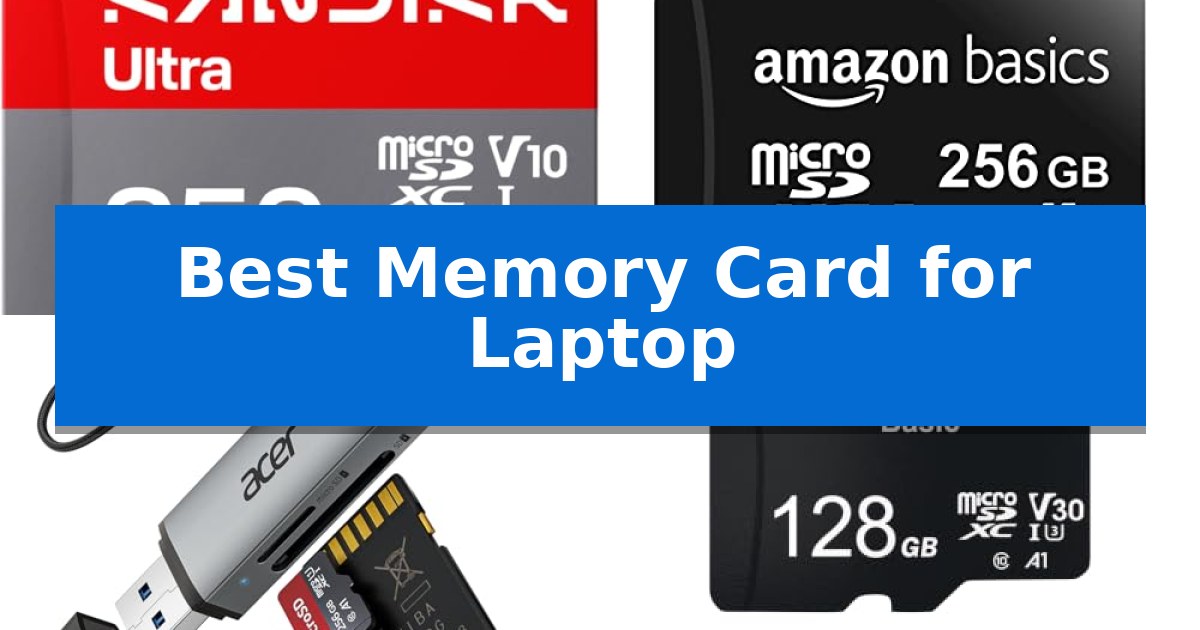
Finding the Best Memory Card for Laptop storage expansion requires balancing your device's specific card slot type with your actual data needs. Whether you are offloading high-resolution media or simply need extra room for documents and applications, the right card ensures your workflow remains seamless and your files stay accessible.
Our guide focuses on identifying reliable storage solutions that integrate smoothly with modern hardware. By evaluating read speeds, capacity options, and physical compatibility, we help you navigate the technical specifications to select a card that effectively upgrades your laptop's internal storage limitations.
You may also want to compare Best Memory Card for Kodak Pixpro FZ45, Best Memory Card for Kodak Pixpro Camera, and Best Memory Card for Kodak FZ55.
Best Memory Card for Laptop
Quick Comparison
| Product | Best For | Key Strength | Score |
|---|---|---|---|
| SanDisk Ultra microSD Card | Best Overall | Massive storage capacity options up to 1.5TB. | 4.9 |
| Amazon Basics microSDXC Memory Card | Reliable Daily Storage Expansion | A2 application performance class for improved app responsiveness | 4.7 |
| Acer USB-C SD Card Reader | Instant Laptop Connectivity | Dual-header design supports both USB-C and USB-A connections. | 4.3 |
| Teknostone Basic MicroSDXC Card | Versatile Multi-Device Use | Includes an SD adapter for seamless laptop compatibility. | 4.4 |
| SanDisk Ultra SDXC Memory Card | Standard Full-Size Compatibility | Fast transfer speeds up to 100MB/s for efficient data management. | 4.5 |
How We Chose
- Interface Compatibility: Verifying support for microSD and full-size SD slots.
- Data Transfer Efficiency: Analyzing rated read and write speeds for file offloading.
- Application Performance: Checking for A1 or A2 ratings that indicate suitability for running apps directly from the card.
- Durability Standards: Assessing resistance to environmental factors like temperature and shock.
- Capacity Versatility: Ensuring a range of storage sizes to meet different user requirements.
1 SanDisk Ultra microSD Card — Fast Offloading for Laptops
Managing digital content across multiple devices requires reliable storage that integrates seamlessly with your existing hardware. The SANDISK 256GB Ultra microSD UHS-I Card provides a versatile solution for expanding storage on laptops, tablets, and smartphones, offering up to 1.5TB of capacity in a compact form factor.
Designed for efficiency, this card supports read speeds up to 195MB/s when paired with the SanDisk QuickFlow microSD UHS-I Card USB-A Reader. This capability allows for rapid offloading of large files, such as Full HD video, photos, and music, directly to your laptop. The card is also A1-rated, which optimizes it for faster app launching and improved performance when used in compatible devices.
The included SanDisk Memory Zone app simplifies content management by providing tools to back up, organize, and transfer files between your mobile devices and desktop. With its 10-year limited warranty, this card is built for long-term use, ensuring your stored media remains accessible and secure across your various digital platforms.
While this card is highly capable for general storage expansion and media transfer, users should note that the maximum read speeds are specifically achieved using the dedicated SanDisk QuickFlow reader. It serves as a practical, high-capacity tool for those who frequently move data between mobile devices and laptops.
Best for: Users needing a high-capacity, portable storage expansion for laptops, Android devices, and cameras with fast file offloading capabilities.
Skip if: Users who require extreme write speeds for professional 4K/8K cinema production or those who do not have a compatible microSD slot or USB-A reader.
PROS
- Massive storage capacity options up to 1.5TB.
- Fast read speeds up to 195MB/s with compatible reader.
- A1-rated for improved app performance.
- 10-year limited warranty for long-term reliability.
CONS
- Maximum read speeds require the specific SanDisk QuickFlow USB-A reader.
2 Amazon Basics microSDXC Memory Card — Reliable Daily Storage Expansion
The Amazon Basics microSDXC Memory Card is engineered for versatility, featuring an A2 application performance class that enables faster app loading and smoother operation when utilized as expanded storage for tablets and smartphones. This card provides 256GB of storage capacity, offering substantial space for high-resolution images and 4K video files, with an available capacity exceeding 232GB.
Designed for reliable operation in diverse environments, the card is built with lasting durability features including being shockproof, IPX6 waterproof, temperature-proof from -10° to 80°, as well as X-ray and magnetic-proof. These specifications ensure data protection across various conditions, whether you are using the card in a camera, tablet, or laptop via the included full-size adapter.
For data management, the card utilizes UHS, U3, and Class 10 speed classes, supporting read speeds up to 100MB/s and write speeds up to 90MB/s. These metrics facilitate efficient file transfers, making it a functional choice for users who frequently move large media files between devices.
Compatibility is a primary focus, as the card is designed to integrate with a wide range of hardware, including smartphones, cameras, and tablets. Users should verify that their specific host device supports the MicroSDXC capacity standard to ensure full functionality.
Best for: Users needing reliable, durable storage expansion for tablets, cameras, and mobile devices with high-speed transfer requirements.
Skip if: Users requiring specialized high-end professional cinema-grade write speeds or those whose devices do not support the MicroSDXC format.
PROS
- A2 application performance class for improved app responsiveness
- Comprehensive durability including waterproof and shockproof ratings
- High-speed data transfers with U3 and Class 10 ratings
- Includes full-size adapter for broader laptop and camera compatibility
CONS
- Capacity variance due to OS measurement standards
3 Acer USB-C SD Card Reader — Instant Laptop Connectivity
Managing high-resolution media files across multiple devices requires a reliable bridge, and the Acer USB-C SD Card Reader provides this through its dual-header design. Featuring both USB-C and USB-A connectors, this adapter integrates directly with modern laptops, tablets, and smartphones without needing extra cables or adapters.
The device supports simultaneous dual-card reading, allowing users to access data from both microSD and SD cards at the same time. This capability streamlines file management for photographers and creators who frequently move content between cameras and workstations. It utilizes a 5Gbps data transfer rate, ensuring that large photo and video files are handled efficiently.
Designed for portability, the reader is built from heat-resistant aluminum and features a slim, lightweight profile that fits easily into laptop sleeves or camera bags. Protective covers are included for both ports to guard against dust and liquid ingress, while an attached cord helps prevent loss during travel.
Compatibility is a core strength, as the unit is plug-and-play on Windows, macOS, and most Android devices, requiring no driver installations. It is compatible with a wide range of hardware, including MacBook Pro/Air, iPad Pro, and various PC models, making it a versatile tool for professionals who switch between different computing environments.
Best for: Professionals and creators who need to transfer files simultaneously between SD/microSD cards and multiple devices using USB-C or USB-A ports.
Skip if: Users who require support for specialized formats like CFexpress, XQD, or Memory Stick cards, or those using devices with Lightning ports.
PROS
- Dual-header design supports both USB-C and USB-A connections.
- Simultaneous dual-card reading and writing capability.
- Plug-and-play functionality requires no drivers.
- Heat-resistant aluminum construction for durability.
CONS
- Incompatible with Lightning port devices.
- Thick cases may interfere with full port insertion.
- Does not support specialized cards like CFexpress, XQD, or MS.
4 Teknostone Basic MicroSDXC Card — Versatile Multi-Device Use
The Teknostone Basic MicroSDXC Card provides a versatile storage solution for users needing to expand capacity across a wide range of hardware. By including an SD adapter, this card bridges the gap between mobile devices and laptops, ensuring you can easily transfer files or access media directly on your computer.
Engineered for reliability, the card features UHS-I Class 10, U3, V30, and A1 speed ratings. These specifications support consistent performance for tasks ranging from HD video recording to rapid application launches. The design is built to withstand challenging conditions, being waterproof, shockproof, temperature-proof, X-ray-proof, and magnet-proof, which helps protect your data during travel or in demanding environments.
With capacity options up to 256GB, this card accommodates various storage needs, such as storing thousands of photos or hours of high-definition video. It is important to note that actual usable storage may appear smaller than the labeled capacity due to the difference between decimal and binary system calculations used by manufacturers and operating systems, respectively.
Whether you are managing files on a drone, dashcam, or a laptop, the Teknostone Basic MicroSDXC Card offers a practical, multi-device approach to data management. Its inclusion of an adapter makes it a convenient choice for those who frequently move data between different electronic platforms.
Best for: Users who need a versatile, durable memory card that can switch between mobile devices, cameras, and laptops using the included adapter.
Skip if: Users requiring extreme read/write speeds for professional 4K/8K cinema production or high-speed burst photography, as this card is designed for standard HD and general application use.
PROS
- Includes an SD adapter for seamless laptop compatibility.
- Features V30 and A1 ratings for reliable video and app performance.
- Highly durable with waterproof, shockproof, and magnet-proof construction.
- Versatile compatibility across drones, cameras, consoles, and tablets.
CONS
- Maximum capacity may be limited for users with massive high-resolution media libraries.
- Performance is optimized for standard HD tasks rather than professional high-bitrate workflows.
5 SanDisk Ultra SDXC Memory Card — Standard Full-Size Compatibility
Expanding the storage capacity of a laptop for high-definition media requires reliable hardware that balances speed with consistent data integrity. The SanDisk 128GB Ultra SDXC UHS-I Memory Card is engineered to handle the demands of Full HD video recording and high-resolution photography, making it a practical addition for users who frequently transfer large files between devices.
This memory card features a Class 10 rating and UHS Speed Class 1 (U1), which are established standards for supporting real-time video recording on compatible host devices. With quick transfer speeds up to 100MB/s, the card minimizes the time spent moving data from the card to a laptop, facilitating a more efficient workflow for creators and casual users alike.
Designed for versatility, the SanDisk 128GB Ultra SDXC UHS-I Memory Card is well-suited for compact to mid-range point-and-shoot cameras. The 128GB capacity provides ample space for extensive photo libraries and long-form video, ensuring that users do not need to swap cards frequently during a project.
The card is built to withstand varied usage conditions and includes a 10-year limited manufacturer warranty, providing long-term assurance for stored data. Its compact form factor ensures it fits seamlessly into standard SD card slots found on many laptops and camera systems, maintaining a low profile during use.
Best for: Users who need reliable, high-capacity storage for Full HD video recording and photography on point-and-shoot cameras or laptops with SD slots.
Skip if: Users requiring professional-grade 4K or 8K video recording speeds or those whose devices lack a full-size SD card slot.
PROS
- Fast transfer speeds up to 100MB/s for efficient data management.
- UHS Speed Class 1 (U1) and Class 10 ratings support stable Full HD video recording.
- 10-year limited manufacturer warranty provides long-term reliability.
- High capacity options up to 128GB allow for extensive media storage.
CONS
- Performance may vary based on the specific host device and usage conditions.
- Write speeds are lower than the maximum read speed, which may impact burst-mode photography.
Best Memory Card for Laptop Buying Guide
Understanding Card Form Factors
The most critical step in selecting a memory card is identifying whether your laptop uses a microSD slot or a full-size SD slot. Many modern ultrabooks feature microSD slots to save space, while larger workstations often include full-size SD card readers. Using an adapter can allow a microSD card to function in a full-size slot, but you cannot use a full-size SD card in a microSD slot.
Always check your laptop's technical manual to confirm the maximum storage capacity it supports. While some newer devices handle cards up to 1.5TB, older hardware may be limited to 128GB or 256GB. Exceeding these limits can result in the card not being recognized by your operating system.
Speed Ratings and Performance
Memory cards are categorized by speed classes, such as UHS-I, U3, and V30, which dictate their ability to handle sustained data writes. If you plan to record 4K video or transfer large batches of high-resolution photos, look for cards with higher V-class ratings, as these guarantee the minimum write speeds necessary for consistent video capture.
For users who intend to run software or store active applications on the card, the A1 or A2 Application Performance Class is essential. These ratings indicate that the card is optimized for the random read/write operations required to launch apps smoothly, preventing the lag often associated with slower storage media.
The Role of External Card Readers
If your laptop lacks a built-in card slot or features an outdated interface, an external USB-C or USB-A card reader is a practical solution. These devices often support faster data transfer protocols, such as USB 3.0, which can significantly reduce the time spent moving files from your camera or drone to your computer.
When choosing an external reader, look for models that offer simultaneous dual-card access. This feature allows you to manage files from both a microSD and a full-size SD card at the same time, which is particularly beneficial for photographers and video editors who work with multiple media sources.
Durability and Data Protection
Since laptops are often used in various environments, the durability of your storage media matters. Many modern cards are engineered to be waterproof, shockproof, temperature-proof, and X-ray-proof. These features protect your data from common hazards encountered during travel or outdoor use.
While these protections are robust, they are not a substitute for regular backups. Always maintain a secondary copy of your critical files on an external hard drive or cloud storage service, as memory cards can fail due to physical damage or controller errors over time.
Managing Your Storage
Software tools provided by manufacturers, such as memory management apps, can help you organize and back up your files. These applications often provide a visual interface to monitor how much space is used by different file types, making it easier to identify which data should be moved to your laptop's main drive.
Remember that the actual usable capacity of a card is often slightly less than the labeled capacity due to the way operating systems calculate storage. This is standard industry practice and should be factored in when choosing the right size for your specific storage needs.
Frequently Asked Questions
Can I use a microSD card in a laptop that only has a full-size SD slot?
Yes, provided you use a microSD-to-SD adapter. Most microSD cards come with this adapter, which allows them to fit physically into a standard SD card slot.
What does the A1 or A2 rating mean for my laptop?
These ratings indicate that the card is optimized for running applications. If you intend to install programs or store active files on the card, an A1 or A2 rated card will provide faster load times and better performance.
Will a high-speed card make my laptop run faster?
A memory card primarily affects the speed at which you can open, save, or transfer files stored on that specific card. It will not improve the performance of your laptop's internal operating system or main drive.
How do I know if my laptop supports a 1TB or larger memory card?
You should consult your laptop's manufacturer specifications or user manual. Look for the section on 'Storage' or 'Card Reader' to find the maximum supported capacity.
Are external card readers better than built-in ones?
External readers can be better if they support newer, faster USB standards (like USB 3.0 or 3.1) that your laptop's built-in reader might lack. They also provide flexibility if your laptop has no built-in slot at all.
Conclusion: Our Top Pick
For most users seeking a reliable and versatile storage expansion, the SanDisk Ultra microSD Card stands out as the top choice. Its combination of high read speeds, A1 app performance optimization, and compatibility across various devices makes it an excellent fit for modern laptops.
While other options like the Amazon Basics card offer great value for daily storage, or the Acer USB-C reader provides necessary connectivity for laptops without slots, the SanDisk Ultra remains the most well-rounded solution. Always ensure your specific device supports the capacity you select to get the best results.