
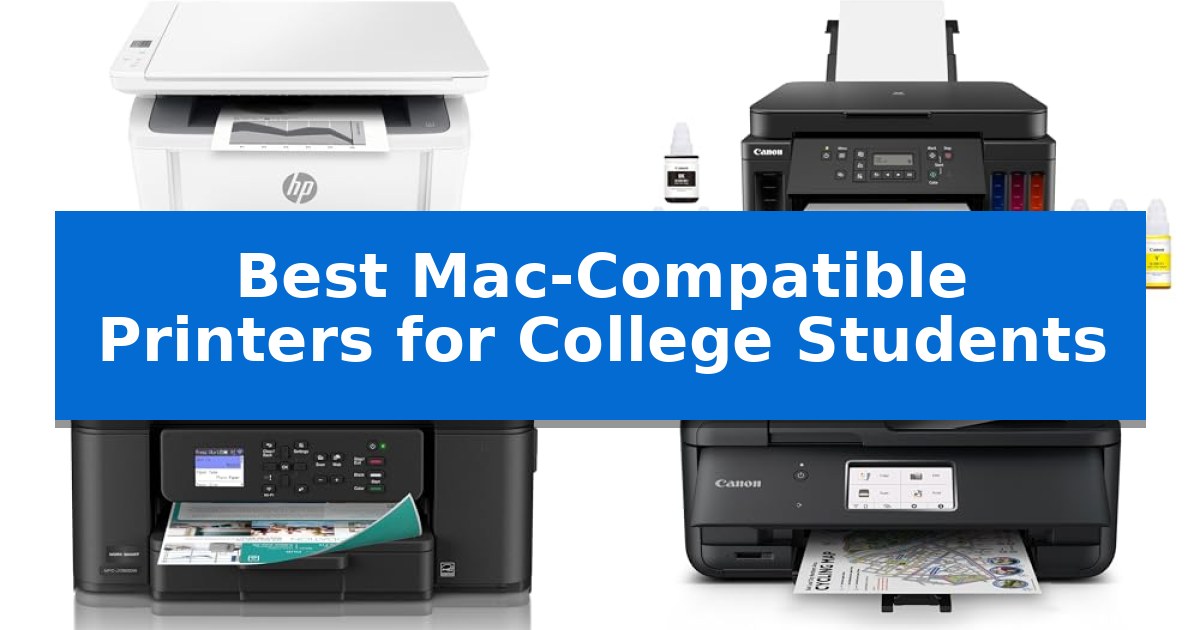
Finding the right printer for a dorm room or shared apartment requires balancing limited desk space with the need for reliable, high-quality document output. As a student, you need a device that integrates effortlessly with your macOS ecosystem, ensuring that your research papers, assignments, and study guides are ready exactly when you need them.
We have analyzed the Best Mac-Compatible Printers for College Students to identify models that excel in wireless connectivity, compact footprints, and overall ease of use. Whether you are looking for a high-speed laser printer for text-heavy coursework or an all-in-one inkjet for versatile scanning and color printing, our guide highlights the most practical options for your academic needs.
You may also want to compare Best Mac-Compatible Printers, Best Mac-Compatible Portable Hard Drives, and Best Mac-Compatible Portable External Hard Drive.
Best Mac-Compatible Printers for College Students
Quick Comparison
| Product | Best For | Key Strength | Score |
|---|---|---|---|
| HP LaserJet MFP M140w Printer | Best Overall | Extremely compact footprint ideal for small desks and dorm rooms. | 4.9 |
| Canon PIXMA G6020 Supertank Printer | Lowest Cost Per Page | High-capacity ink tanks provide up to 2 years of ink based on typical student usage. | 4.3 |
| Brother Work Smart 1360 Printer | Easiest Cloud App Integration | Automatic duplex printing reduces paper waste. | 4.8 |
| Canon PIXMA TR8620a Printer | Best All-in-One for Dorms | 4-in-1 functionality saves space by combining printing, scanning, copying, and faxing. | 4.8 |
| Canon PIXMA TR160 Portable Printer | Ultimate Compact Travel Design | Ultra-compact and lightweight design fits easily into bags for travel. | 4.4 |
How We Chose
- macOS Compatibility: We prioritized printers that support AirPrint and native macOS drivers for seamless, driver-free setup.
- Physical Footprint: We assessed the dimensions of each unit to ensure they fit comfortably on standard dorm desks or in tight shelving.
- Connectivity Features: We examined wireless capabilities, including mobile app support and direct printing, to accommodate multi-device environments.
- Functional Versatility: We evaluated the balance between printing, scanning, and copying to meet the diverse needs of student projects.
- Operating Costs: We considered ink or toner efficiency to help students manage long-term supply expenses.
1 HP LaserJet MFP M140w Printer — Fastest Laser for Small Desks
Dorm room space is at a premium, making the HP LaserJet MFP M140w Printer a practical choice for students who need to handle printing, scanning, and copying without sacrificing their entire desk. As the world's smallest laser printer in its class, this compact device measures just 7.8 inches high and 10.4 inches wide, fitting easily into tight study environments.
For students juggling multiple assignments, the printer offers fast print speeds of up to 21 pages per minute for single-sided black-and-white documents. It is designed for seamless integration with modern workflows, featuring wireless connectivity with self-reset capabilities to maintain a stable connection to your network.
The HP LaserJet MFP M140w Printer is built for versatility, supporting printing from a wide range of devices including Mac, PC, Chromebook, and mobile platforms. Students can leverage the HP Smart app to streamline repetitive tasks, scan documents directly to the cloud, or initiate prints and copies directly from a smartphone.
A standout feature for academic use is the ability to easily copy both sides of ID cards or other small documents onto a single sheet of paper, simplifying the process of creating reference materials. The unit is intended for use with original HP cartridges, ensuring consistent operation through the use of original chips and circuitry.
Best for: College students living in small dorms or shared spaces who need a compact, reliable laser printer for high-volume black-and-white text documents.
Skip if: Students who require color printing for charts, photos, or creative projects will need an inkjet or color laser alternative.
PROS
- Extremely compact footprint ideal for small desks and dorm rooms.
- Fast 21 ppm print speed for efficient document production.
- Versatile mobile printing via the HP Smart app and wireless support for Mac and other devices.
- Convenient ID card copying feature for academic administrative tasks.
CONS
- Monochrome only, limiting its use for color-coded assignments or graphics.
- Requires original HP cartridges with specific chips for operation.
2 Canon PIXMA G6020 Supertank Printer — Lowest Cost Per Page
Managing heavy course loads and constant printing needs requires a reliable solution that minimizes maintenance. The Canon PIXMA G6020 All-in-One Supertank Wireless Printer addresses this by utilizing a high-capacity ink tank system, which allows students to print up to 6,000 black-and-white or 7,700 color pages from a single set of inks. This design choice significantly reduces the frequency of ink replacements, making it a practical choice for long semesters.
Beyond its ink capacity, this model offers wireless print, copy, and scan functionality, providing the flexibility needed for modern academic workflows. The integration of a 2-line LCD display simplifies navigation through settings and status updates, ensuring that students can quickly manage their documents without complex software hurdles. Its compact footprint, measuring approximately 15.9 inches in width and 14.6 inches in length, allows it to fit on crowded dorm desks or shared study spaces.
The Canon PIXMA G6020 Supertank Printer is built to handle high-volume document needs while offering long-term cost efficiency. By eliminating the need for frequent cartridge changes, it helps students avoid the common frustration of running out of ink during critical deadlines. Its combination of wireless connectivity and all-in-one utility provides a streamlined experience for those juggling research papers, assignments, and study materials.
Best for: College students who require a high-volume, low-maintenance printing solution for frequent academic document production.
Skip if: Students with extremely limited desk space or those who only need to print a few pages per semester may find the supertank system unnecessary compared to smaller, cartridge-based alternatives.
PROS
- High-capacity ink tanks provide up to 2 years of ink based on typical student usage.
- Wireless connectivity enables convenient printing from mobile devices and laptops.
- All-in-one functionality combines printing, scanning, and copying in a single unit.
CONS
- 90-day limited warranty is relatively short for a hardware investment.
- Physical footprint of 23.86 pounds may be heavy for frequent relocation.
3 Brother Work Smart 1360 Printer — Easiest Cloud App Integration
Managing academic deadlines requires reliable hardware, and the Brother Work Smart 1360 Printer provides a streamlined solution for students who need to handle printing, scanning, and copying within a limited dorm or apartment space. Its compact design ensures it fits on crowded desks, while the automatic duplex printing feature helps conserve paper during long research projects.
Connectivity is a priority for modern workflows, and this model supports both wireless networking and USB connections. Students can utilize the Brother Mobile Connect app to manage device settings, check ink levels via the Page Gauge feature, and initiate print jobs directly from their mobile devices, reducing the need to transfer files to a computer first.
The printer simplifies document management through its 1.8-inch color display, which allows for direct interaction with popular cloud services like Google Drive, Dropbox, and OneDrive. This integration enables students to print study materials or scan completed assignments directly to their preferred cloud storage without needing a PC interface.
Efficiency is supported by a 20-sheet Automatic Document Feeder (ADF), which assists with multi-page scanning or copying tasks. With print speeds reaching up to 16 ppm in black and 9 ppm in color, it balances the need for quick document production with the space-saving requirements of a student environment.
Best for: College students who need a compact, cloud-connected all-in-one printer for daily assignments and document scanning in limited living spaces.
Skip if: Users who require high-volume professional photo printing or a large-capacity paper tray for heavy-duty office environments.
PROS
- Automatic duplex printing reduces paper waste.
- Cloud app integration allows direct printing and scanning to services like Google Drive and Dropbox.
- Compact footprint is ideal for dorms and small home offices.
- Brother Mobile Connect app enables convenient mobile device management.
CONS
- 150-sheet paper tray capacity is limited for high-volume printing needs.
- 1.8-inch display is functional but smaller than some full-sized office counterparts.
4 Canon PIXMA TR8620a Printer — Best All-in-One for Dorms
Managing academic assignments and administrative tasks requires a reliable printing solution that integrates seamlessly with a macOS environment. The Canon PIXMA TR8620a Printer offers a versatile 4-in-1 wireless design, functioning as a printer, scanner, copier, and fax machine, which helps consolidate desk space in a crowded dorm room.
Efficiency is supported by a 200-sheet total capacity, split between a 100-sheet cassette and a 100-sheet rear feed, allowing students to switch between photo paper and standard documents without constant reloading. The device features auto 2-sided printing, which assists in reducing paper consumption during long research papers or reading assignments.
Connectivity is a primary focus, with support for AirPrint for direct printing from Apple devices. The printer also integrates with Alexa, allowing for voice-activated commands and smart reordering of ink supplies. This ensures that students can monitor their ink levels through notifications, preventing mid-project interruptions.
Designed for moderate academic workloads, the unit maintains a 1,000-page monthly duty cycle and provides a print speed of 15 ipm for black and 10 ipm for color documents. Its compact footprint and inclusion of a Micro SD slot make it a practical choice for students who need a functional, multi-purpose tool that fits into limited living areas.
Best for: College students who need a compact, multi-functional device for printing, scanning, and copying in a dormitory setting.
Skip if: Students requiring high-volume professional-grade printing or those who prefer a laser printer for faster text-only output.
PROS
- 4-in-1 functionality saves space by combining printing, scanning, copying, and faxing.
- Wireless connectivity with AirPrint support ensures easy integration with Mac devices.
- Auto 2-sided printing helps manage paper usage for academic reports.
- Smart reordering via Alexa helps maintain ink supplies without manual tracking.
CONS
- Moderate print speeds may be slower than dedicated high-volume office laser printers.
- 1,000-page duty cycle limits the device to light-to-moderate academic use.
5 Canon PIXMA TR160 Portable Printer — Ultimate Compact Travel Design
Efficiency in a dorm room often comes down to footprint, and the Canon PIXMA TR160 Portable Printer addresses this by packing full-sized document capabilities into a frame measuring just 12.7 x 7.3 x 2.6 inches. Designed for students who need to print on the move or in tight quarters, this device weighs only 4.5 pounds, allowing it to slide into a backpack without consuming valuable desk space.
Beyond its compact form, the printer utilizes a 5-Color Hybrid Ink System capable of producing sharp black text for academic papers and vibrant color for photos or charts. It supports media up to 8.5 x 11 inches, including borderless and square prints, providing flexibility for creative projects or standard coursework.
Connectivity is streamlined for modern workflows, featuring Apple AirPrint, Mopria Print Service, and the Canon PRINT app. For environments where a stable Wi-Fi network is unavailable, the Wireless Direct Mode allows for a direct connection between a Mac or mobile device and the printer. Users can monitor ink levels and system status through the integrated 1.44-inch monochrome OLED display.
While this printer excels in portability, it is optimized for occasional or mobile printing rather than high-volume, continuous production. The 50-sheet paper tray capacity is sufficient for typical student assignments but requires more frequent reloading than a standard desktop laser printer. It remains a specialized tool for those prioritizing mobility and ease of storage over heavy-duty output speeds.
Best for: College students living in dorms or apartments who require a highly portable, space-saving printing solution for occasional coursework and documents.
Skip if: Students who frequently print high volumes of long academic papers or textbooks will find the 50-sheet tray capacity and portable ink system less efficient than a dedicated desktop laser printer.
PROS
- Ultra-compact and lightweight design fits easily into bags for travel.
- Wireless Direct Mode enables printing without a local router.
- Versatile connectivity via AirPrint and Mopria for seamless Mac integration.
- 5-Color Hybrid Ink System supports high-quality photo and document printing.
CONS
- Limited 50-sheet paper capacity requires frequent reloading for large projects.
- Portable design is not intended for high-volume, daily printing tasks.
Best Mac-Compatible Printers for College Students Buying Guide
Understanding Wireless Connectivity
For most students, wireless printing is a necessity rather than a luxury. Printers that support AirPrint allow you to send documents directly from your MacBook, iPad, or iPhone without needing to install complex driver software. This is particularly useful in dorm environments where you may be switching between multiple devices throughout the day.
Look for models that offer Wi-Fi Direct or Self-Reset wireless features. These technologies ensure that your printer maintains a stable connection to your network, reducing the frustration of having to troubleshoot connectivity issues right before a deadline.
Laser vs. Inkjet for Coursework
The choice between laser and inkjet technology depends largely on your specific academic requirements. Laser printers are generally faster and produce crisper text, making them ideal for students who primarily print long essays, research papers, and text-heavy reports.
Conversely, inkjet printers are often more versatile for students who need to print charts, diagrams, or occasional photos in color. While inkjets may have a lower initial purchase price, it is important to consider the long-term cost of ink cartridges compared to the toner used in laser models.
Space-Saving Design
Dorm rooms are notoriously short on surface area. A printer with a compact footprint is essential to ensure you still have room for your laptop, textbooks, and other study materials. Many modern printers are designed to be narrow or low-profile, allowing them to fit on shelves or in corners.
Consider models that offer all-in-one functionality (printing, scanning, and copying) in a single chassis. This eliminates the need for separate devices, saving you both money and precious desk space.
Scanning and Copying Needs
Beyond printing, the ability to scan and copy is vital for digitizing handwritten notes, signing forms, or archiving physical handouts. An Automatic Document Feeder (ADF) can significantly speed up the process of scanning multi-page documents, saving you time during busy exam weeks.
Check if the printer supports cloud scanning features. Being able to scan a document directly to a service like Google Drive or Dropbox via a mobile app can streamline your workflow and keep your digital files organized.
Maintenance and Supplies
Managing printer supplies is a common pain point for students. Look for printers that feature ink or toner monitoring systems, such as page gauges or mobile app alerts, which help you track your remaining supplies so you aren't caught off guard.
Some printers offer high-yield cartridges or supertank systems that significantly reduce the frequency of replacements. While these may have a higher upfront cost, they often provide a much lower cost-per-page, which can be more economical over the course of an entire academic year.
Frequently Asked Questions
Do I need to install special software to use these printers with a Mac?
Most of the printers listed support Apple AirPrint, which allows your Mac to detect and use the printer automatically without the need for additional driver software.
Can I print from my smartphone or tablet?
Yes, all the printers featured in this guide support mobile printing via dedicated apps or standard mobile printing protocols, allowing you to print directly from your phone or tablet.
Which type of printer is better for printing long essays?
Laser printers are generally preferred for long essays because they offer faster print speeds and produce sharper, more professional-looking black-and-white text.
How can I save money on ink and toner?
Opting for printers with high-yield cartridges or supertank systems can lower your cost-per-page. Additionally, using draft mode for non-essential documents can help extend the life of your supplies.
Are these printers suitable for small dorm desks?
Yes, we have selected models specifically for their compact designs, including some of the smallest laser printers in their class, to ensure they fit well in limited spaces.
Conclusion: Our Top Pick
Choosing the right printer can make a significant difference in your academic efficiency. After reviewing the options, the HP LaserJet MFP M140w Printer stands out as the best choice for most students. Its combination of a compact, space-saving design, fast black-and-white print speeds, and reliable wireless connectivity makes it an excellent fit for small dorm desks.
While other models offer specific advantages like color printing or supertank ink systems, the HP LaserJet MFP M140w provides the most consistent performance for the text-heavy documents common in college coursework. Its ease of setup with macOS and mobile printing capabilities ensure that you can focus on your studies rather than troubleshooting your hardware.