
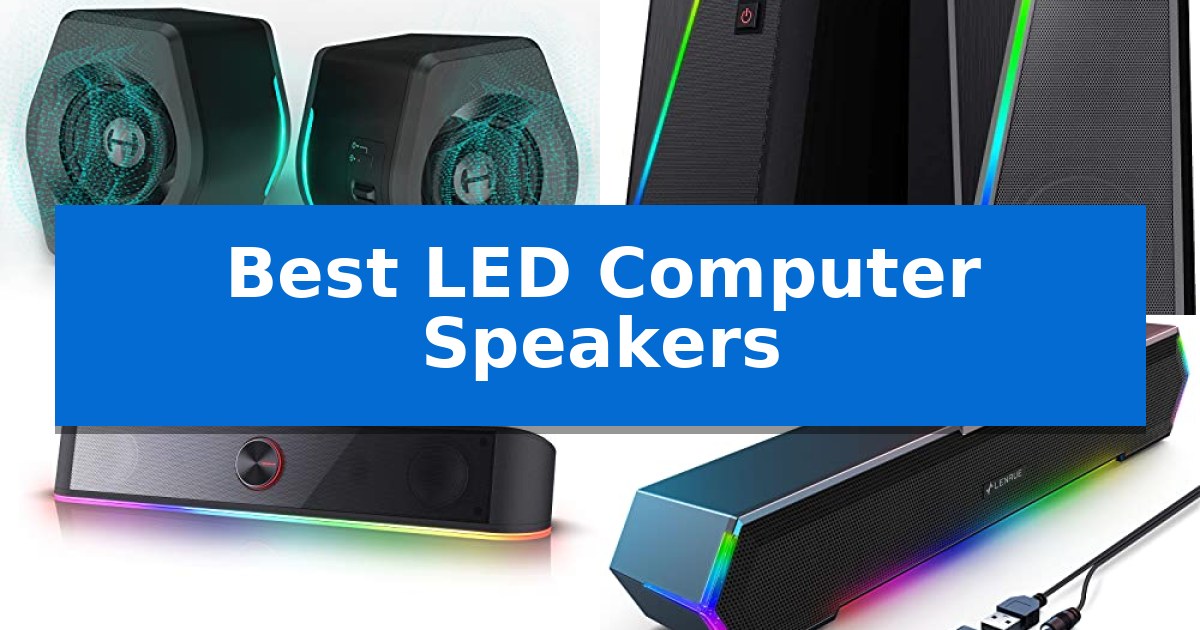
Finding the right audio setup for your desk involves balancing sound quality with the visual aesthetic of your workspace. The Best LED Computer Speakers offer a way to integrate immersive audio with dynamic lighting, turning a standard workstation into a more engaging environment for gaming, movies, or music.
Selecting the right pair requires looking beyond the glow. We have analyzed various models to help you understand how different designs, connectivity options, and sound profiles fit into your specific setup, ensuring you get both the performance and the visual flair you need.
You may also want to compare Best LED Computer Monitors for Gaming, Best LED Computer Monitors, and Best LED Computer Monitor.

Best LED Computer Speakers
Quick Comparison
| Product | Best For | Key Strength | Score |
|---|---|---|---|
| Edifier G2000 Gaming Speakers | Best Overall | Versatile connectivity options including Bluetooth, USB, and 3.5mm AUX. | 4.9 |
| Redragon GS520 Desktop Speakers | Touch-Controlled Lighting Modes | Touch-controlled RGB lighting with 6 selectable modes. | 4.3 |
| Redragon GS560 Desktop Soundbar | Syncs Lighting to Your Music | Compact 16-inch design fits easily under most monitors. | 4.4 |
| LENRUE G11 Computer Speakers | Space-Saving Under-Monitor Design | Space-saving under-monitor design that reduces desktop clutter. | 4.5 |
| OROROW 10W PC Speakers | Minimalist Toggleable Lighting | Heavier driver mass for improved soundstage and vocal clarity | 4.4 |
How We Chose
- Audio performance including driver size and total power output.
- Lighting customization options and control interfaces.
- Physical footprint and compatibility with monitor setups.
- Connectivity versatility across USB, 3.5mm AUX, and Bluetooth.
- Ease of use regarding volume and lighting adjustments.
1 Edifier G2000 Gaming Speakers — Premium Sound with RGB Customization
Desktop audio setups often require a balance between compact dimensions and clear sound reproduction. The Edifier G2000 Gaming Speakers address this by utilizing a 2.75-inch full-range driver unit housed within a 0.65L isometric cavity, designed to deliver 16W RMS power with a 32W total peak output. This specific engineering allows the speakers to produce robust sound without demanding significant desk real estate.
These speakers feature a distinct 10-degree elevation in their column-shaped cabinet, which helps direct audio toward the listener for a more immersive experience. To accommodate various media, the system includes three dedicated EQ modes—Game, Music, and Movie—tuned by a professional acoustic team to adjust the sound profile for specific content types. This allows users to quickly toggle between settings depending on whether they are gaming, listening to music, or watching films.
Connectivity is handled through multiple inputs, including a 3.5mm AUX port, Bluetooth, and a USB sound card interface, allowing for integration with PCs, consoles, and mobile devices. The system also includes a dedicated subwoofer output interface for users looking to expand their low-frequency performance, providing a clear upgrade path for those who desire deeper bass response later.
Aesthetic customization is provided through integrated RGB lighting, which offers 12 different effects to coordinate with a desktop environment. The build quality incorporates a matte panel finish with metal laser engraving and anti-slip foot pads to ensure stability on various surfaces, ensuring the speakers remain secure during intense gaming sessions.
Best for: Gamers and desktop users who need a compact, multi-input speaker system with integrated RGB lighting and EQ presets.
Skip if: Users who require a dedicated external subwoofer included in the box or those seeking high-fidelity studio monitoring equipment.
PROS
- Versatile connectivity options including Bluetooth, USB, and 3.5mm AUX.
- Dedicated EQ modes for gaming, music, and movies.
- Compact design with a 10-degree elevation for improved sound projection.
- Integrated RGB lighting with 12 selectable effects.
CONS
- Subwoofer output interface requires a separate external subwoofer purchase for enhanced bass.
2 Redragon GS520 Desktop Speakers — Touch-Controlled Lighting Modes
The Redragon GS520 Desktop Speakers prioritize visual customization and desk aesthetics through an integrated lighting bar featuring 6 distinct touch-controlled RGB modes. Designed with a minimalist urban aesthetic and a brushed material finish, these speakers serve as a compact audio solution for users looking to coordinate their desk setup with dynamic lighting. The system allows users to toggle the RGB lighting off entirely if a more understated look is preferred, providing a functional balance between gaming-oriented design and standard desktop utility.
Engineered with a full-range 2.0 channel stereo core, the system utilizes an advanced sound drive unit to deliver audio output. The hardware includes dedicated volume up and volume down buttons, allowing for direct adjustment without needing to navigate through software menus. This tactile control scheme provides a practical advantage for users who need to quickly modulate sound levels during media playback or gaming sessions.
Connectivity is handled via a standard 3.5mm audio and microphone cable configuration, making the system compatible with PCs, laptops, and televisions. The unit is powered through a USB connection, which simplifies cable management by eliminating the need for a separate wall adapter. The speakers provide a 31-inch (80 cm) cable length between the two units, offering flexibility for placement on wider desk surfaces.
These speakers are well-suited for those who prioritize a streamlined, plug-and-play setup. By utilizing a USB-powered interface, the system integrates easily into existing workstation configurations without consuming additional power outlets. While the compact footprint is ideal for smaller desks, users should note the fixed cable length between the two speakers, which may limit placement options on exceptionally wide monitor setups.
Best for: Users seeking a compact, USB-powered speaker system with integrated touch-controlled RGB lighting for a coordinated desk setup.
Skip if: Users requiring high-fidelity audio, dedicated subwoofer support, or advanced professional-grade acoustic performance.
PROS
- Touch-controlled RGB lighting with 6 selectable modes.
- USB-powered design for simplified connectivity.
- Dedicated volume buttons for quick and accurate adjustments.
- Minimalist brushed material aesthetic.
CONS
- Limited cable length of 31 inches between speakers may restrict placement on very wide desks.
- No dedicated subwoofer for enhanced low-frequency output.
3 Redragon GS560 Desktop Soundbar — Syncs Lighting to Your Music
Elevating your desk setup with a dynamic visual experience, the Redragon GS560 RGB Desktop Soundbar integrates a reactive lightshow that synchronizes directly with your audio output. This 2.0 channel speaker system features a compact 16-inch footprint, allowing it to fit unobtrusively under most monitors or laptops to maintain a clean, organized workspace.
The soundbar offers four distinct backlit modes, providing flexibility to switch between dynamic and static LED illumination patterns. Beyond its aesthetic appeal, the device utilizes an upgraded driver engineered to deliver clear audio with enhanced bass response. Users can manage volume levels through a dedicated, tactile knob that also functions as an on/off switch, ensuring precise control without the need for software menus.
Connectivity is streamlined through a plug-and-play approach, utilizing a standard USB connection for power and a 3.5mm cable for audio input. This configuration ensures broad compatibility across various platforms, including PCs, laptops, smartphones, and televisions. The combination of its slim profile and straightforward interface makes it a practical choice for those looking to upgrade their audio setup without complex installation requirements.
Best for: Users seeking a space-saving, USB-powered audio solution with integrated RGB lighting for desktop or laptop environments.
Skip if: Users who require high-fidelity professional studio audio or those who lack a 3.5mm auxiliary port on their primary playback device.
PROS
- Compact 16-inch design fits easily under most monitors.
- Audio-synced RGB lighting with four distinct modes.
- Plug-and-play compatibility via USB and 3.5mm jack.
- Tactile volume knob for quick and precise adjustments.
CONS
- Wired-only connectivity relies on a 3.5mm audio cable.
- USB-powered limitations may restrict placement based on cable length.
4 LENRUE G11 Computer Speakers — Space-Saving Under-Monitor Design
The LENRUE G11 Computer Speakers feature a slim, space-saving profile designed to fit perfectly under a monitor, helping to declutter your workspace by consolidating cables into an all-in-one unit. This setup is built for those who need a straightforward audio solution without the complexity of external amplifiers or bulky satellite speakers.
Equipped with four amplifier IC horns, these speakers are engineered to deliver Surge Stereo Sound for a clear, distortion-free audio experience during media playback or gaming. The design prioritizes ease of use, featuring a top-mounted volume knob for quick adjustments and a plug-and-play interface that requires only a USB connection for power and a 3.5mm AUX cable for audio input.
A distinctive aesthetic element is the Touch Angular Game Lights system, which provides a dynamic atmosphere. Users can toggle these lights on or off with a single touch, replacing traditional, cumbersome mechanical switches. The unit is compatible with Windows, Mac OS, and Chrome OS, and includes a Type-C adapter to accommodate various modern laptop and desktop configurations.
While these speakers offer a compact footprint, they are strictly a wired solution. They do not support Bluetooth connectivity, nor do they include a dedicated microphone input or a headphone jack, making them best suited for stationary desktop use rather than setups requiring private listening or voice communication.
Best for: Desktop users seeking a compact, under-monitor audio solution with integrated lighting and simple wired connectivity.
Skip if: Users who require Bluetooth wireless connectivity, a private headphone output, or a built-in microphone for voice calls.
PROS
- Space-saving under-monitor design that reduces desktop clutter.
- Plug-and-play functionality with no driver installation required.
- Touch-controlled lighting for a dynamic visual aesthetic.
- Surge Stereo Sound powered by four amplifier IC horns.
CONS
- No Bluetooth connectivity for wireless audio streaming.
- Lacks headphone and microphone ports for private listening or communication.
5 OROROW 10W PC Speakers — Minimalist Toggleable Lighting
Achieving a balanced audio profile on a desktop often requires hardware that prioritizes driver mass over mere footprint. The OROROW 10W PC Speakers utilize heavier 420g drivers per unit, totaling 840g for the pair, which is engineered to provide a stronger magnetic force for improved vocal clarity and deeper bass response compared to lighter alternatives.
These speakers feature a 2.0 stereo sound configuration with independent left and right channels, designed to deliver precise audio imaging for gaming or media consumption. The housing is constructed with a high-quality ABS varnish finish, ensuring durability while maintaining a compact, modern aesthetic that fits easily alongside monitors or laptops.
Usability is centered on a single, intuitive control knob located on the right speaker. This interface allows for quick volume adjustments and acts as a toggle for the dynamic RGB lighting. For users who prefer a minimalist workspace, the lighting can be completely deactivated, providing flexibility for different environments.
Setup is streamlined through a plug-and-play design that relies on a USB connection for power and a standard 3.5mm AUX cable for audio input. This configuration eliminates the need for an external wall adapter, making it compatible with a wide range of devices including PCs, laptops, tablets, and smartphones.
Best for: Users seeking a compact, USB-powered audio solution with integrated RGB lighting and simple, unified controls.
Skip if: Users who require high-fidelity professional studio monitors or those who prefer wireless Bluetooth connectivity.
PROS
- Heavier driver mass for improved soundstage and vocal clarity
- Toggleable RGB lighting for customizable desk aesthetics
- USB-powered convenience eliminates the need for wall outlets
- Integrated volume and light control in a single knob
CONS
- Wired-only connectivity lacks Bluetooth or wireless options
- USB power dependency may occupy a port on the host device
Best LED Computer Speakers Buying Guide
Audio Fidelity and Driver Size
The sound quality of your speakers is primarily determined by the driver size and the power output. Larger drivers generally move more air, which can lead to a fuller sound profile and better bass response. Look for speakers that specify their RMS power, as this provides a more accurate representation of consistent output than peak power ratings.
Consider whether the speakers include dedicated ports for bass enhancement. Features like a backward mega bass port can significantly improve the depth of your audio, making them more suitable for immersive gaming or cinematic experiences compared to basic flat-response drivers.
Lighting Controls and Aesthetics
LED integration serves both functional and aesthetic purposes. Some models offer simple static lighting, while others provide dynamic modes that can sync with your music or offer multiple color spectrums. Check if the lighting can be toggled off, which is a useful feature if you prefer a minimalist look during work hours.
Interface design matters when managing your lighting. Touch-sensitive controls are often more convenient than physical buttons, allowing you to switch modes or turn off the lights quickly without disrupting your workflow or gaming session.
Connectivity and Compatibility
Before purchasing, verify the input options to ensure they match your devices. A 3.5mm AUX input is the standard for most PCs and laptops, but Bluetooth connectivity offers additional flexibility for mobile devices. USB-powered speakers are generally the most convenient for desk setups as they eliminate the need for an extra wall outlet.
If you are using a specific setup like a gaming console or a TV, ensure the speakers support the necessary inputs. Some speakers act as a USB sound card, which can simplify the connection process by handling both power and audio through a single cable.
Space Constraints and Form Factor
The physical dimensions of your speakers should align with your available desk space. Under-monitor soundbars are excellent for users with limited surface area, as they tuck neatly beneath a display. Conversely, traditional 2.0 channel stereo speakers provide better separation for a wider soundstage but require more room on either side of your monitor.
Consider the elevation of the speakers. A slight upward tilt, such as a 10-degree elevation, can direct sound more effectively toward your ears, improving clarity and reducing the impact of desk surface reflections.
Ease of Adjustment
Accessibility to volume and power controls is vital for daily use. A dedicated volume knob is often more precise and easier to reach than software-based controls or small buttons hidden on the back of a speaker cabinet.
Look for designs that consolidate cables or offer intuitive placement of controls. A well-designed speaker system should feel like an extension of your computer, requiring minimal effort to adjust during use.
Frequently Asked Questions
Do all LED speakers require a separate power source?
Most modern desktop speakers are USB-powered, meaning they draw power directly from your computer's USB port, eliminating the need for a separate wall adapter.
Can I turn off the LED lights on these speakers?
Yes, most models listed include a feature to toggle the lighting off or switch between different modes, allowing you to use them in professional or low-light environments.
Are these speakers compatible with gaming consoles?
Compatibility depends on the input. Speakers with a 3.5mm AUX input can often connect to controllers or monitors, but always check the specific device requirements.
What is the difference between a soundbar and 2.0 stereo speakers?
A soundbar is a single unit designed for space-saving, while 2.0 stereo speakers consist of two separate units that can be spaced apart to create a wider, more immersive soundstage.
Do I need to install drivers for these speakers?
Most of these speakers are plug-and-play devices, meaning they do not require any specialized software or driver installation to function with your operating system.
Conclusion: Our Top Pick
When selecting the right audio for your workstation, the Edifier G2000 Gaming Speakers stand out for their combination of high-fidelity sound and versatile connectivity. With 32W peak power and multiple EQ modes, they provide a balanced audio experience that adapts well to various media types, from gaming to music.
While other options like soundbars offer excellent space-saving benefits, the Edifier G2000 provides a superior soundstage through its dedicated stereo separation and robust driver construction. If you prioritize audio clarity and flexible input options, including Bluetooth and USB, this model is a highly effective choice for a modern desktop setup.