
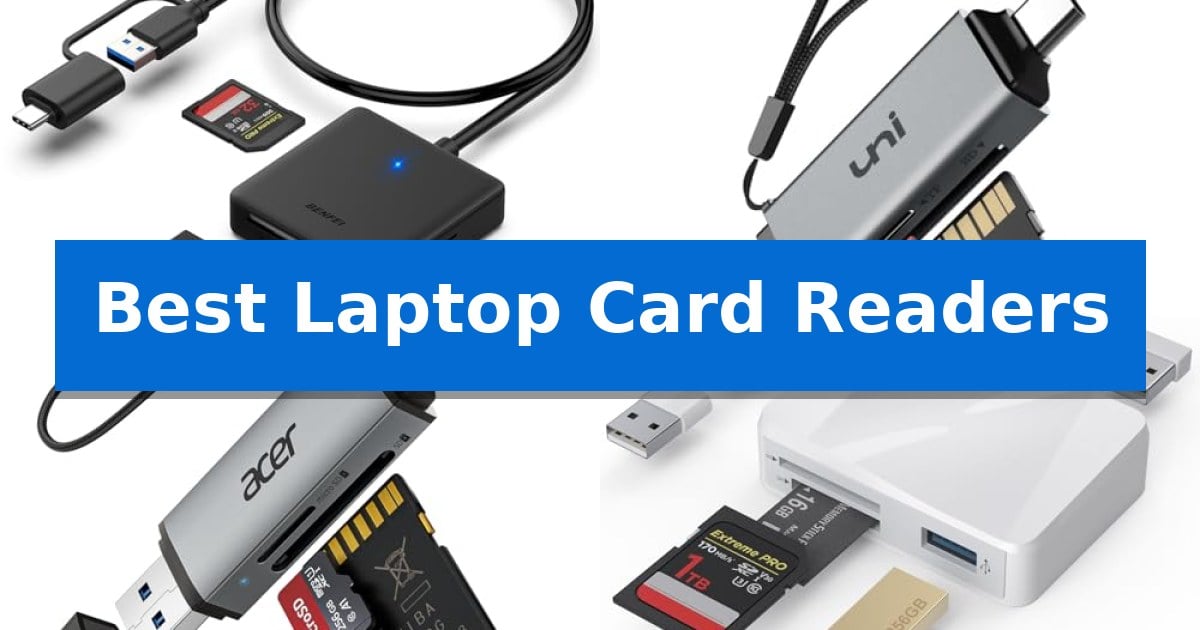
Managing high-resolution photos and video files from cameras or security devices requires a reliable bridge between your memory cards and your computer. The Best Laptop Card Readers provide the necessary interface to ensure your data moves quickly and securely without the need for cumbersome proprietary software.
Whether you are a professional photographer needing to offload massive RAW files or a casual user looking to view footage from a dash cam, choosing the right adapter is essential. We have analyzed the latest hardware to help you find a solution that fits your specific port configuration and card format requirements.
Best Laptop Card Readers in 2026: Simplify Your File Transfers
Quick Comparison
| Product | Best For | Key Strength | Score |
|---|---|---|---|
| BENFEI 4-in-1 Card Reader | Best Overall | Simultaneous read and write capability across four card slots. | 4.9 |
| uni USB-C SD Card Reader | Fast Dual-Slot Data Transfers | Simultaneous dual-slot access for SD and microSD cards. | 4.5 |
| Acer USB-C SD Card Reader | Compact Travel-Friendly Design | Simultaneous dual-card reading and writing for improved productivity. | 4.3 |
| Xoqby 5-in-1 Card Adapter | Versatile Multi-Port Connectivity | Versatile 5-in-1 connectivity with SD, MicroSD, MS, and dual USB-A ports. | 4.4 |
| Wansurs USB 3.0 Card Reader | High-Speed Photography Workflow | 5Gbps transfer speed for rapid file management. | 4.5 |
How We Chose
- Interface versatility, focusing on USB-C and USB 3.0 connectivity.
- Support for multiple card formats such as SD, MicroSD, and CompactFlash.
- Data transfer efficiency and the ability to read multiple cards simultaneously.
- Physical design, including durability and portability for travel.
- Plug-and-play functionality across major operating systems like Windows and macOS.
1 BENFEI 4-in-1 Card Reader — Reads Four Cards Simultaneously
Managing multiple memory cards across different devices requires a versatile interface, and the BENFEI 4-in-1 Card Reader addresses this by providing simultaneous access to SD, Micro SD, MS, and CF cards. This adapter features an integrated design that bridges the gap between legacy hardware and modern connectivity standards.
The device utilizes a 2-in-1 USB-C and USB 3.0 connector, allowing it to function with a wide range of laptops, smartphones, and tablets. By incorporating an advanced IC chip, the reader supports high-speed data transfer signals, enabling efficient file management for users working with large media files.
Performance is optimized through UHS-I mode, which supports transfer rates up to 160MB/sec depending on the card and host port specifications. The unit is designed to read and write to all four card slots at the same time, streamlining workflows for those who frequently swap between different storage media.
Compatibility is broad, covering various operating systems and devices including the MacBook Pro, iPad Pro, and multiple USB-C enabled smartphones. Users should note that exFAT formatting is required for SDXC cards with capacities of 64GB or larger, and the reader is not compatible with standard Memory Stick, M2, or CF Type I cards.
Best for: Users who need to transfer data from multiple card formats simultaneously across both USB-A and USB-C devices.
Skip if: Users who specifically require compatibility with CF Type I, standard Memory Stick, or Memory Stick Micro (M2) cards.
PROS
- Simultaneous read and write capability across four card slots.
- Dual-interface design featuring both USB-C and USB 3.0 connectors.
- Broad compatibility with modern laptops, tablets, and smartphones.
- Includes an 18-month unconditional warranty.
CONS
- Incompatible with CF Type I, standard Memory Stick, and M2 cards.
- Performance is dependent on the host port and card type.
2 uni USB-C SD Card Reader — Fast Dual-Slot Data Transfers
Managing multiple memory cards across different devices requires a reliable bridge, and the uni USB-C SD Card Reader simplifies this by offering dual card slots that function simultaneously. This adapter allows users to read and write to both SD and microSD cards at the same time, eliminating the need to constantly swap cards when transferring files between cameras, drones, or security monitors.
Engineered for versatility, the device features both USB-C and USB 3.0 interfaces, supporting data transfer speeds up to 5 Gbps. This high-speed connectivity ensures that large files, such as high-resolution photos or video footage, move quickly between your memory cards and your laptop or smartphone. It is designed for a plug-and-play experience, requiring no additional drivers or external power supplies to function on modern operating systems.
The physical design prioritizes portability and protection, featuring a slim profile that fits easily into camera bags and handy covers at both ends to shield the connectors from dust and liquid. A built-in cord helps prevent the reader from being misplaced, making it a practical accessory for mobile workflows. The unit is compatible with a wide range of devices, including iPhone 15 Pro models, modern MacBooks, and various Windows laptops.
By connecting directly to a phone or computer, this reader allows for immediate management of media without needing Wi-Fi or proprietary camera software. This direct access is useful for users who need to review or share footage on the go. The product is backed by an 18-month warranty, providing long-term support for the hardware.
Best for: Users who need to transfer data between multiple SD or microSD cards and USB-C or USB-A devices simultaneously.
Skip if: Users who require compatibility with Lightning port devices or need to read specialized formats like CFexpress, XQD, or Memory Stick cards.
PROS
- Simultaneous dual-slot access for SD and microSD cards.
- High-speed data transfer up to 5 Gbps via USB 3.0 and USB-C.
- Broad compatibility with modern smartphones, tablets, and laptops.
- Protective covers and slim design for enhanced portability.
CONS
- Not compatible with devices using Lightning ports.
- Limited card support as it excludes CFexpress, XQD, and Memory Stick formats.
3 Acer USB-C SD Card Reader — Compact Travel-Friendly Design
Managing high-resolution media files across multiple devices requires a reliable bridge between your memory cards and your hardware. The Acer USB-C SD Card Reader simplifies this workflow by offering a dual-header design that connects directly to both USB-C and USB-A ports, ensuring compatibility with everything from modern smartphones and tablets to traditional desktop PCs.
Built with a focus on efficiency, this reader supports 5Gbps data transfer speeds via its USB 3.0 interface. Its standout feature is the simultaneous dual-card capability, which allows you to read and write to both microSD and SD cards at the same time. This is particularly useful for creators who need to move footage from cameras or drones without swapping cards repeatedly.
The device is housed in a heat-resistant aluminum chassis, designed to maintain performance during extended file management sessions. Its compact, lightweight form factor includes protective covers for both ends, making it a practical addition to a camera bag or laptop sleeve for professionals working in the field.
Installation is entirely plug-and-play, requiring no additional software or drivers across Windows, macOS, and Android platforms. While it offers broad compatibility, users should note that the design may be obstructed by thick device cases, and it does not support specialized formats like CFexpress or proprietary memory sticks.
Best for: Photographers and content creators who need to transfer files quickly between cameras, smartphones, and laptops using a single, portable adapter.
Skip if: Users who require support for specialized memory formats like CFexpress, XQD, or Memory Stick, as this reader is limited to standard SD and microSD cards.
PROS
- Simultaneous dual-card reading and writing for improved productivity.
- USB-C and USB-A dual header design for broad device compatibility.
- Heat-resistant aluminum construction for enhanced durability.
- Plug-and-play operation with no driver installation required.
CONS
- Thick device cases may prevent the connector from fully seating.
- Limited card support as it does not read CFexpress, XQD, or MS cards.
4 Xoqby 5-in-1 Card Adapter — Versatile Multi-Port Connectivity
Managing multiple memory cards across various devices often requires a versatile interface that bridges the gap between legacy hardware and modern USB-C ports. The Xoqby 5-in-1 Card Adapter simplifies this workflow by integrating SD, MicroSD, and MS card slots alongside dual USB-A ports into a single, portable hub.
Designed for cross-platform utility, this adapter features a detachable USB-C to USB adapter, allowing it to connect seamlessly to both modern USB-C smartphones, tablets, and laptops, as well as older computer systems. It supports large capacity cards up to 2TB, providing ample room for high-resolution photography and video archives. The inclusion of full OTG support ensures that users can transfer files directly between mobile devices and external storage without needing a computer as an intermediary.
The device is built for efficiency, enabling the simultaneous use of one memory card and two USB-A peripherals, such as a keyboard, mouse, or flash drive. This makes it a practical accessory for expanding the connectivity of devices like the MacBook Pro, iPad Pro, or various Android tablets. With plug-and-play functionality, it requires no driver installation across major operating systems including Windows, macOS, Chrome, and Linux.
Safety and compatibility are prioritized through the integration of over-current and short-circuit protection to safeguard data during transfers. Its compact dimensions of 5.91 x 2.62 x 0.65 inches make it a portable solution for photographers and creators who need to move media from cameras to their devices while on the go.
Best for: Photographers and mobile professionals who need to transfer media between legacy USB-A devices and modern USB-C smartphones, tablets, or laptops.
Skip if: Users requiring high-speed UHS-II performance or Thunderbolt-level data transfer rates for professional-grade 8K video workflows.
PROS
- Versatile 5-in-1 connectivity with SD, MicroSD, MS, and dual USB-A ports.
- Detachable USB-C to USB adapter for broad cross-platform compatibility.
- Plug-and-play design requires no drivers for immediate use.
- Simultaneous read/write capability for memory cards and USB peripherals.
CONS
- No dedicated high-speed interface specified for professional-grade data throughput.
- Physical size may occupy adjacent ports on some ultra-thin laptops.
5 Wansurs USB 3.0 Card Reader — High-Speed Photography Workflow
Managing high-resolution photography and video files requires a reliable bridge between your memory cards and your workstation. The Wansurs USB 3.0 Card Reader simplifies this workflow by offering a dual-slot design that accommodates both SD and Micro SD cards, ensuring you can quickly offload large media files without needing multiple adapters.
Engineered for efficiency, this device utilizes a USB 3.0 interface capable of reaching 5Gbps transfer speeds. This bandwidth is specifically beneficial for photographers and creative professionals who need to process massive amounts of data from high-capacity cards, significantly reducing wait times during post-retouching tasks.
The reader features a compact and portable form factor, making it an ideal accessory for laptop users working on location or in studio environments. It is designed for plug-and-play functionality, requiring no additional drivers for operation across Windows, Mac OS, Linux, and Android systems, which ensures broad compatibility with various hardware setups.
Beyond simple file transfers, the device supports large screen playback by allowing you to connect your memory card directly to a TV or projector. While it provides versatile connectivity, it is important to note that the unit does not support simultaneous use of the SD and Micro SD slots, meaning only one card can be accessed at a time.
Best for: Photographers and content creators who require a fast, portable solution for transferring media files between SD/Micro SD cards and a laptop or desktop.
Skip if: Users who need to transfer data between two different memory cards simultaneously, as the device does not support concurrent slot usage.
PROS
- 5Gbps transfer speed for rapid file management.
- Dual-slot design supporting a wide range of SD and Micro SD formats.
- Plug-and-play compatibility across major operating systems.
- Compact, lightweight build suitable for travel.
CONS
- Cannot read two cards simultaneously due to hardware limitations.
Best Laptop Card Readers Buying Guide
Understanding Interface Compatibility
The most critical factor when selecting a reader is ensuring it matches your laptop's available ports. Modern devices predominantly use USB-C or Thunderbolt ports, while older machines rely on USB-A. Many high-quality readers now feature dual-interface designs, allowing you to switch between these standards without needing extra dongles.
Always check if your laptop supports the specific USB generation of the reader. While most are backward compatible, using a USB 3.0 reader in a USB 2.0 port will significantly limit your transfer speeds, potentially causing bottlenecks during large file migrations.
Card Format Support
Not all readers handle the same variety of memory cards. While SD and MicroSD are standard, professionals working with high-end DSLRs may require CompactFlash (CF) support. Ensure the device you choose explicitly lists the specific card types you use regularly.
Some advanced readers offer multi-slot functionality, which is a major advantage if you frequently move data between different camera systems. Be aware that some budget-friendly models may not allow you to read from multiple slots at the same time, which can slow down your workflow.
Transfer Speeds and Performance
Transfer speed is determined by both the reader's internal controller and the memory card itself. Look for readers that support UHS-I or higher standards to take full advantage of modern high-speed cards. A reader with an advanced IC chip can maintain signal stability, which is vital for transferring large HD video files without corruption.
Remember that the advertised maximum speed is often a theoretical limit. Your actual performance will depend on the card's write speed and the specific USB port version on your laptop. For the best results, always connect the reader directly to your computer rather than through a secondary hub.
Design and Portability
If you work in the field, the physical build of the reader matters. Look for compact, lightweight designs that can easily slide into a camera bag or laptop sleeve. Aluminum housings often provide better heat dissipation, which helps maintain performance during long, intensive transfer sessions.
Consider the inclusion of protective covers or tethered cables. These small design choices prevent dust and debris from entering the slots and ensure you do not lose the adapter while traveling between locations.
Plug-and-Play vs. Driver Requirements
A truly convenient card reader should be plug-and-play, meaning it requires no additional software or drivers to function on Windows, macOS, or Android. This is especially important if you need to quickly view footage on a smartphone or tablet while on the go.
Avoid devices that require proprietary camera software for basic file management. The best readers act as simple mass storage devices, allowing your operating system to treat the memory card like any other external hard drive or flash storage.
Frequently Asked Questions
Can I use these readers with my smartphone?
Yes, if your smartphone has a USB-C port and supports OTG (On-The-Go) functionality, most USB-C card readers will allow you to view and transfer files directly.
Do I need to install drivers for these card readers?
Most modern card readers are plug-and-play and do not require any drivers. They are designed to be recognized automatically by Windows, macOS, and Android systems.
Why is my transfer speed slower than advertised?
Actual transfer speeds are limited by the slowest component in the chain, which could be the memory card's speed rating, the USB port version on your laptop, or the file system format.
Can I read from multiple cards at once?
Some multi-slot readers support simultaneous reading, while others only allow one card to be active at a time. Check the product specifications to confirm if simultaneous access is supported.
Are these readers compatible with all SD card sizes?
Most readers support standard SD and MicroSD cards. However, they may not support specialized formats like CFexpress or older, proprietary memory stick formats unless explicitly stated.
Conclusion: Our Top Pick
Selecting the right hardware for your data management needs can significantly improve your productivity. After reviewing the available options, the BENFEI 4-in-1 Card Reader stands out as the most versatile choice for users who need to handle multiple card formats simultaneously.
Its integrated design and dual-interface capability make it a reliable companion for both laptop and mobile users. While it is an excellent all-around solution, ensure that your specific memory card formats are supported before purchase to guarantee it meets your unique workflow requirements.