
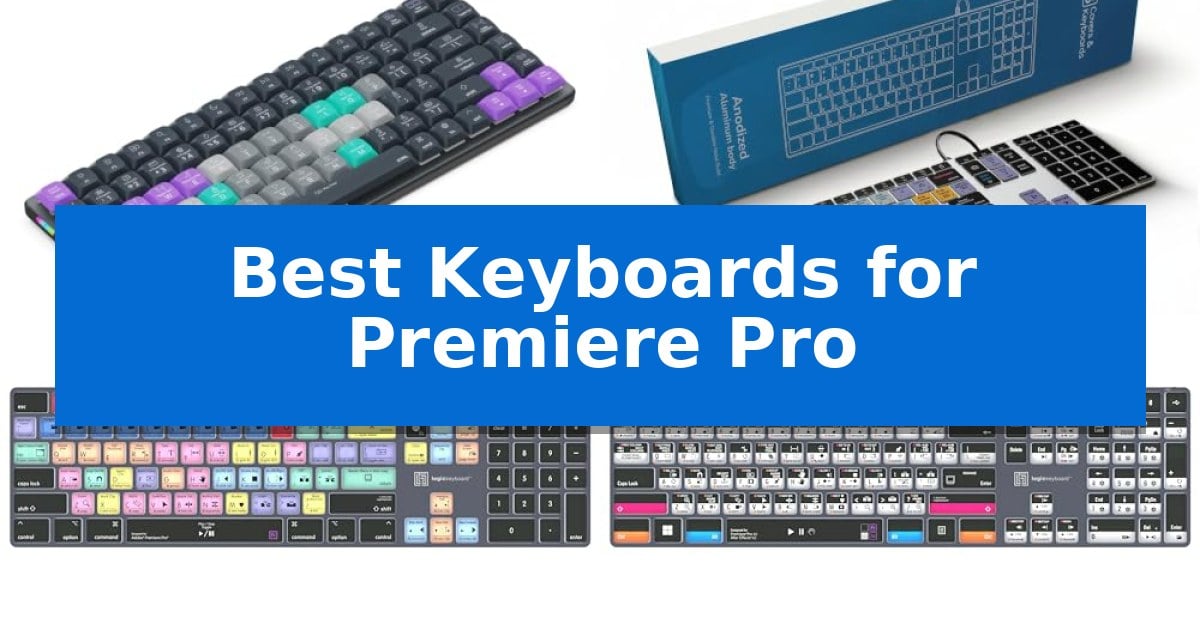
Video editing requires precision and speed, yet navigating complex software menus can often slow down your creative process. Finding the Best Keyboards for Premiere Pro is a practical way to minimize mouse movement and keep your focus on the timeline where it belongs.
Whether you are a professional filmmaker or a content creator, the right hardware can make a significant difference in your daily output. By integrating dedicated shortcut keys directly into your workspace, you can execute complex commands with a single press, allowing for a more fluid and intuitive editing experience.
Best Keyboards for Premiere Pro in 2026
Quick Comparison
| Product | Best For | Key Strength | Score |
|---|---|---|---|
| JCPAL Dash Shortcut Keyboard | Best Overall | Pre-mapped, color-coded keys for immediate Premiere Pro command access. | 4.9 |
| KB Covers Backlit Aluminum Keyboard | Durable wired choice for Mac | 150+ color-coded shortcuts printed directly on keys for faster workflow navigation. | 4.7 |
| Logickeyboard Titan Wireless Keyboard | Backlit wireless freedom for Mac | Visual keyboard shortcuts printed directly on keys for faster command execution. | 4.4 |
| Logickeyboard Titan Wireless Backlit Keyboard for Adobe After Effects/Premiere Pro – Windows | Backlit wireless freedom for Windows | Visual keyboard shortcuts specifically mapped for Adobe Premiere Pro and After Effects. | 4.4 |
| KB Covers Adobe Premiere Pro Keyboard for Windows PC | Durable wired choice for Windows | Color-coded shortcuts for over 150 Premiere Pro commands. | 4.9 |
How We Chose
- Shortcut Mapping: We prioritized keyboards that feature pre-mapped, color-coded keys specifically for Premiere Pro commands.
- Connectivity Options: We assessed whether a model offers wired stability for studio environments or wireless flexibility for versatile desk setups.
- Build and Ergonomics: We looked for durable materials like aluminum and low-profile designs that support comfortable, extended editing sessions.
- Customization Potential: We considered the ability to remap keys or adjust layouts to suit individual editing styles and specific project needs.
- Compatibility: We verified that each model supports the necessary operating systems, ensuring plug-and-play functionality for Mac or Windows users.
1 JCPAL Dash Shortcut Keyboard — Programmable keys for faster editing
The JCPAL Dash Adobe Premiere Pro Wireless Shortcut Keyboard for Mac/PC streamlines video editing workflows by featuring pre-mapped, color-coded keys that correspond directly to essential Premiere Pro commands. This design allows editors to identify and execute functions visually, reducing the time spent navigating software menus.
Beyond its pre-configured layout, the keyboard offers extensive customization through the browser-based KeyStudio tool. This utility enables users to remap any key according to their specific editing style, with the configuration saved directly to the device's onboard memory. This ensures that custom shortcuts remain consistent across different workstations without requiring additional software installations.
The hardware is built for versatility and desk efficiency, featuring a compact, low-profile design that optimizes workspace. It supports tri-mode connectivity, allowing users to switch between Bluetooth for up to three devices, 2.4GHz wireless, or a wired USB-C connection. The internal 3500mAh battery is rated for up to 450 hours of operation, supporting extended editing sessions.
To accommodate diverse editing preferences, the package includes 20 spare shortcut keycaps. These allow users to physically rearrange the key layout to match their unique cutting and grading habits. The unit is designed for broad compatibility, functioning across Mac, PC, iOS, iPadOS, Android, and Linux environments.
Best for: Video editors who want a dedicated, customizable hardware interface to accelerate their Premiere Pro workflow across multiple devices.
Skip if: Users who prefer a full-sized keyboard with a dedicated number pad or those who do not use Adobe Premiere Pro as their primary editing software.
PROS
- Pre-mapped, color-coded keys for immediate Premiere Pro command access.
- KeyStudio browser-based tool for easy, portable key remapping.
- Tri-mode connectivity including Bluetooth, 2.4GHz, and USB-C.
- 20 spare keycaps included for personalized layout configuration.
CONS
- Compact, low-profile form factor lacks a dedicated number pad.
- Shortcut-specific keycaps may be less intuitive for general typing tasks.
2 KB Covers Backlit Aluminum Keyboard — Durable wired choice for Mac
Streamlining a video editing workflow often begins with physical tools that reduce reliance on complex software menus, and the KB Covers Adobe Premiere Pro Keyboard for Mac addresses this by integrating over 150 Premiere Pro shortcuts directly onto the keycaps. By color-coding these commands by function, the layout allows editors to identify cut, trim, timeline, and playback tools at a glance, potentially reducing the need to memorize every hotkey combination.
Designed specifically for the macOS ecosystem, this keyboard features the standard Command, Option, and Control keys, ensuring a familiar typing experience. It connects via a USB-C wired connection, which provides a stable, lag-free interface for workstations like the Mac Studio or MacBook Pro. Because it is a plug-and-play device, it requires no additional drivers or software to function immediately upon connection.
The hardware is built with a solid aluminum frame and includes backlit keys, which are useful for visibility in dim editing suites or during late-night sessions. Unlike dedicated control panels, this remains a standard typing keyboard, meaning users can perform regular typing tasks and execute software shortcuts on the same device without switching hardware.
This keyboard is a practical choice for editors who prefer a tactile, permanent reference for their software commands. Since it relies on a wired connection, it eliminates the need for battery management or Bluetooth pairing, offering a consistent, always-ready input method for professional and student creators.
Best for: Video editors and content creators using Adobe Premiere Pro on Mac who want a permanent, tactile reference for software shortcuts.
Skip if: Users who require a wireless keyboard or those who prefer a compact, minimalist desk setup without full-sized shortcut labeling.
PROS
- 150+ color-coded shortcuts printed directly on keys for faster workflow navigation.
- Backlit keys and a solid aluminum frame for durability and visibility in dark environments.
- Wired USB-C connection ensures a stable, lag-free experience with no batteries to charge.
- Plug-and-play compatibility for macOS without the need for drivers or complex software setup.
CONS
- Wired-only design limits desk placement compared to wireless alternatives.
- Full-sized layout occupies more desk space than compact or tenkeyless keyboards.
3 Logickeyboard Titan Wireless Keyboard — Backlit wireless freedom for Mac
The Logickeyboard Titan Wireless Backlit Keyboard for Adobe Premiere Pro – Mac streamlines editing workflows by integrating dedicated visual keyboard shortcuts directly onto the keycaps. This design allows editors to identify and execute commands in Premiere Pro CC without relying on memory or external reference sheets, significantly reducing the time spent navigating menus.
Designed specifically for Mac environments, this keyboard utilizes Bluetooth connectivity to maintain a clean, cable-free workspace. The integrated backlit keys provide visibility in low-light editing suites, ensuring that the specialized color-coded shortcuts remain legible during long sessions. Its slim profile, measuring approximately 0.51 inches in height, keeps the device unobtrusive on a desk.
Power management is handled by a rechargeable battery, eliminating the need for frequent battery replacements. The keyboard is built with a focus on professional utility, backed by a 2-year warranty to support long-term use. Its layout is optimized for the specific interface of Adobe Premiere Pro, making it a specialized tool for video professionals who prioritize efficiency.
While the keyboard offers significant advantages for Premiere Pro users, it is a dedicated tool. The layout is tailored for specific software, which may make it less versatile for general-purpose typing or use with other creative applications where the shortcut mapping does not align.
Best for: Video editors using Adobe Premiere Pro on macOS who want to increase efficiency through dedicated, backlit shortcut keys.
Skip if: Users who require a multi-purpose keyboard for general typing or those who frequently switch between different non-Adobe software applications.
PROS
- Visual keyboard shortcuts printed directly on keys for faster command execution.
- Backlit keys improve visibility in dim editing environments.
- Bluetooth connectivity supports a clutter-free wireless setup.
- Rechargeable battery removes the need for disposable batteries.
CONS
- Software-specific layout limits its utility for general typing or other applications.
- Mac-only design restricts compatibility with Windows-based workstations.
4 Logickeyboard Titan Wireless Backlit Keyboard for Adobe After Effects/Premiere Pro – Windows — Backlit wireless freedom for Windows
The Logickeyboard Titan Wireless Backlit Keyboard for Adobe After Effects/Premiere Pro – Windows is engineered to optimize professional video editing workflows by featuring visual keyboard shortcuts printed directly onto the keycaps. This design allows editors to execute complex commands in Adobe Premiere Pro and After Effects without needing to memorize secondary key functions or consult external reference guides, significantly reducing the time spent navigating software menus.
Designed for a clean and efficient workspace, this wireless Windows keyboard utilizes Bluetooth connectivity to eliminate cable clutter. The integration of backlit keys is particularly beneficial for editors working in dim environments or late-night sessions, ensuring that the specialized shortcut legends remain clearly visible at all times. This lighting feature supports consistent productivity regardless of ambient light levels in the editing suite.
The hardware is built for longevity and convenience, featuring a rechargeable battery that removes the need for disposable battery replacements. With a footprint of 18 by 6.45 inches and a height of 1.2 inches, the keyboard maintains a standard, stable form factor weighing 2.13 pounds. This sturdy build provides a reliable tactile experience for high-volume editing tasks.
Backed by a 2-year warranty, this specialized tool is a dedicated solution for Windows-based editors who prioritize a labeled interface to accelerate their interaction with Adobe creative software. The keyboard offers a direct, hardware-based approach to software mastery, making it a practical addition to any professional post-production setup.
Best for: Professional video editors using Windows who want to speed up their workflow with dedicated, color-coded Adobe shortcut keys.
Skip if: Users who require a compact, tenkeyless form factor or those who prefer a mechanical switch feel.
PROS
- Visual keyboard shortcuts specifically mapped for Adobe Premiere Pro and After Effects.
- Backlit keys for improved visibility in dim editing suites.
- Wireless Bluetooth connectivity for a clutter-free desk.
- Rechargeable battery eliminates the need for disposable batteries.
CONS
- Full-size layout may be too large for compact workstations.
- Windows-specific design limits compatibility with macOS-based editing systems.
5 KB Covers Adobe Premiere Pro Keyboard for Windows PC — Durable wired choice for Windows
Efficiency in video editing often hinges on how quickly you can access essential tools without breaking your creative flow. The KB Covers Adobe Premiere Pro Keyboard for Windows PC addresses this by featuring over 150 color-coded shortcuts printed directly onto the keys, allowing editors to identify commands for cutting, trimming, and timeline navigation at a glance.
Designed specifically for the Windows environment, this full-size keyboard includes standard layout keys like Ctrl, Alt, and Windows. It connects via a reliable USB-C wired interface, ensuring a stable, lag-free connection that avoids the connectivity interruptions often associated with wireless peripherals. A USB-C to USB-A adapter is included in the box to ensure compatibility with a wide range of desktop and laptop setups.
The hardware is built with a solid aluminum frame, providing a durable foundation for heavy daily use. It also incorporates backlit keys, which are particularly beneficial for filmmakers and content creators working in dim studio environments or during late-night editing sessions. Because it functions as a standard keyboard rather than a specialized control panel, it requires no software or drivers to operate.
This device is a practical choice for those who want to streamline their workflow without the steep learning curve of programmable macro pads. By keeping standard letter keys alongside the shortcut icons, it remains fully functional for everyday typing tasks, making it a versatile addition to any professional or student editing suite.
Best for: Video editors and content creators using Adobe Premiere Pro on Windows who want to speed up their workflow with visual shortcut references.
Skip if: Users who prefer a wireless setup or those who require a compact, tenkeyless keyboard for limited desk space.
PROS
- Color-coded shortcuts for over 150 Premiere Pro commands.
- Backlit keys for visibility in low-light editing environments.
- Stable USB-C wired connection with no batteries or charging required.
- Solid aluminum frame for increased durability.
CONS
- Wired-only design limits desk cable management options.
- Full-size layout may be too large for minimalist workstations.
Best Keyboards for Premiere Pro Buying Guide
Understanding Shortcut Keyboards
A dedicated shortcut keyboard is designed to replace the need for memorizing complex key combinations. By having color-coded icons printed directly on the keycaps, you can quickly identify the function you need, such as trimming, ripple edits, or playback control, without looking away from your monitor.
These keyboards are not just about labels; they are about workflow optimization. When your most-used tools are mapped to specific keys, you reduce the cognitive load of editing, allowing you to focus entirely on the story and pacing of your video project.
Wired vs. Wireless Connectivity
Choosing between wired and wireless depends on your studio environment. USB-C wired connections provide a stable, lag-free experience that never requires charging, making them ideal for high-pressure editing suites where reliability is paramount.
Conversely, wireless keyboards offer a cleaner desk aesthetic and the freedom to move your workspace. Modern wireless options often include multi-device support, allowing you to switch between your editing station and other devices with ease.
Ergonomics and Desk Space
Video editing sessions can last for hours, making ergonomic design a critical factor. A low-profile design helps maintain a natural wrist position, reducing strain during long days spent in the timeline.
Additionally, the physical footprint of your keyboard matters. A compact layout keeps your mouse closer to your primary typing area, which can improve your overall posture and reduce the distance your hand travels between the keyboard and the mouse.
Customization and Flexibility
Every editor has a unique style. Keyboards that offer programmable keys or remapping software allow you to tailor the layout to your specific needs. This flexibility ensures that the keyboard grows with your skills rather than limiting you to a factory-set configuration.
Some models even include spare shortcut keycaps, enabling you to physically rearrange your layout. This is particularly useful if you frequently use specific tools that aren't part of the standard default mapping.
Build Quality and Backlighting
Durability is essential for a tool used daily. Aluminum frames provide a sturdy, premium feel that resists wear and tear, while backlit keys are indispensable for editors working in dim lighting or late-night sessions.
When selecting your keyboard, ensure the backlighting is adjustable so it does not distract from your color-grading work. A well-built, backlit keyboard is a long-term investment in your professional setup.
Frequently Asked Questions
Do I need special software to use these keyboards?
Many shortcut keyboards are designed for plug-and-play functionality, meaning they work immediately without extra software. However, some programmable models may offer optional tools for remapping keys to your specific preferences.
Can I use a Mac-specific keyboard on a Windows PC?
Generally, it is best to choose a keyboard designed for your specific operating system. Mac and Windows layouts differ in key placement, such as Command versus Control, which can affect your shortcut muscle memory.
Are these keyboards only for Premiere Pro?
While these keyboards are optimized for Premiere Pro, they function as standard keyboards for typing. Some models also support shortcuts for other creative applications, especially if they feature programmable key capabilities.
How do I clean a keyboard with printed shortcut labels?
Use a soft, dry microfiber cloth to wipe the keys. Avoid harsh chemicals or abrasive cleaners, as these can wear down the printed shortcut labels and icons over time.
Does backlighting affect battery life on wireless models?
Yes, using backlighting will consume more battery power. Most wireless keyboards allow you to adjust the brightness or turn the backlighting off entirely to extend battery life between charges.
Conclusion: Our Top Pick
Selecting the right hardware is a vital step in refining your post-production process. For most editors, the JCPAL Dash Shortcut Keyboard stands out as the top choice due to its versatile tri-mode connectivity, programmable key features, and compact, award-winning design that fits perfectly into any professional or home studio.
While this model offers excellent flexibility, ensure you verify your specific operating system requirements before purchasing. Investing in a tool that aligns with your unique editing habits will ultimately save time and help you maintain a more consistent creative flow.