
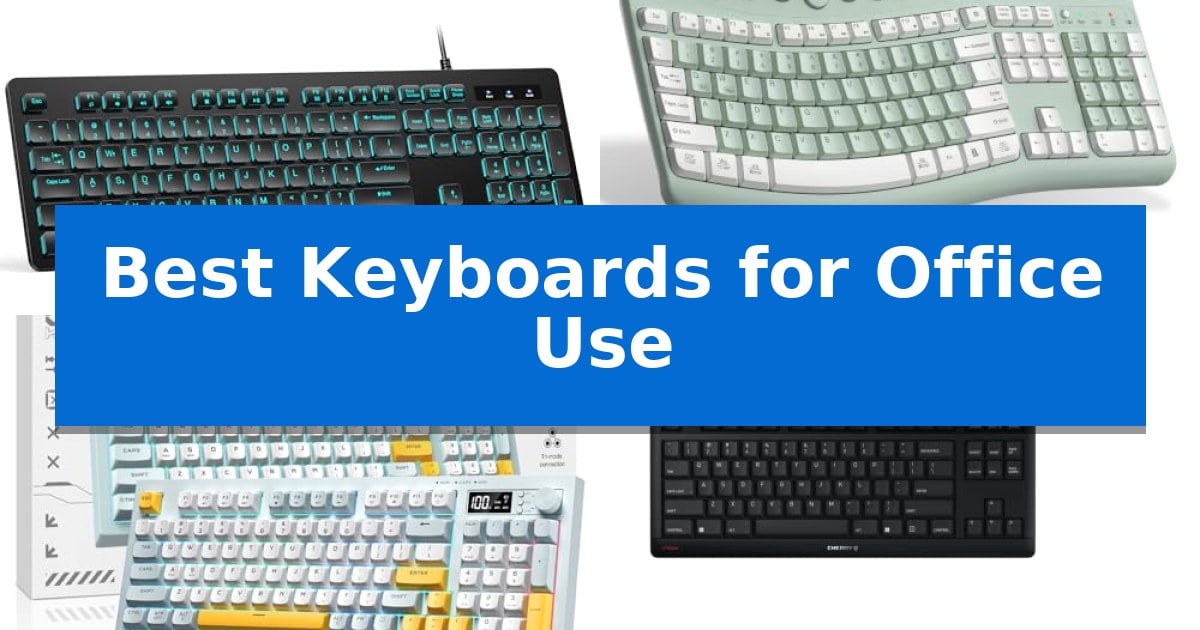
Finding the right tool for your daily tasks can significantly impact your comfort and output. When searching for the Best Keyboards for Office Use, the primary focus should be on how the device integrates into your specific workspace, whether you require silent operation for shared areas or ergonomic layouts to reduce strain during long hours.
Our selection highlights diverse options ranging from compact wired models to versatile wireless combos. By evaluating key features like switch type, connectivity, and physical footprint, we help you identify a keyboard that supports your professional needs without unnecessary complexity.
Best Keyboards for Office Use in 2026: Quiet Typing for Shared Desks
Quick Comparison
| Product | Best For | Key Strength | Score |
|---|---|---|---|
| TECKNET Wired Keyboard | Best Overall | Quiet low-profile membrane keys reduce typing noise for shared workspaces. | 4.9 |
| RECCAZR Wireless Keyboard and Mouse Combo | Ergonomic Layout for Natural Typing | Silent membrane keys and quiet mouse clicks minimize workspace noise. | 4.9 |
| ONIKUMA GAMING Tri-Mode Wireless Keyboard | Versatile Connectivity for Multi-Device Use | Ultra-silent membrane keys reduce noise in shared workspaces. | 4.7 |
| Cherry Stream TKL Wired Keyboard | Compact Design for Improved Posture | Compact tenkeyless design improves ergonomic posture by allowing closer mouse placement. | 4.5 |
| Amazon Basics Wired QWERTY Keyboard | Simple Setup for Standard Tasks | Plug and play functionality via USB connection. | 4.6 |
How We Chose
- Typing acoustics and switch feel for office environments
- Layout efficiency and ergonomic support features
- Connectivity options including wired and multi-device wireless
- Compatibility with major operating systems
- Durability and build quality for long-term use
1 TECKNET Wired Keyboard — Quiet Keys for Shared Workspaces
Maintaining a quiet and organized workspace is essential for productivity, and the TECKNET Wired Keyboard is engineered specifically for these environments. Featuring low-profile membrane keys, this keyboard provides a soft, tactile typing experience that significantly minimizes noise compared to traditional mechanical alternatives, making it an ideal choice for shared offices or late-night work sessions.
The TECKNET Wired Keyboard utilizes a full-size 104-key layout that includes a dedicated number pad, supporting efficient data entry and complex multitasking. For added comfort, the unit is equipped with adjustable tilt feet and anti-slip pads, allowing users to customize the typing angle to suit their desk setup and reduce strain during extended periods of use.
Functionality is enhanced through 12 FN+F multimedia shortcuts, which offer immediate control over volume, media playback, and essential system tasks like opening a calculator or email. The keyboard also features 7-color RGB backlighting with four brightness levels and two distinct modes, ensuring visibility in low-light conditions while allowing for subtle desk personalization.
Built for longevity and resilience, the keyboard features a spill-resistant conductive film and a sturdy frame. Each key is rated for up to 80 million keystrokes, providing consistent performance over years of daily operation. As a plug-and-play device, it connects via USB without requiring any drivers, ensuring broad compatibility with Windows, Mac OS, and Raspberry Pi systems.
Best for: Office professionals and students who require a quiet, full-size keyboard with reliable wired connectivity for daily productivity.
Skip if: Users who prefer the tactile feedback of mechanical switches or those who require a wireless, space-saving compact layout.
PROS
- Quiet low-profile membrane keys reduce typing noise for shared workspaces.
- Spill-resistant design protects internal components from accidental liquid exposure.
- 12 integrated multimedia shortcuts streamline workflow and system control.
- Plug-and-play USB connectivity eliminates the need for batteries or charging.
CONS
- Limited multimedia key functionality when used with Mac OS systems.
- Wired-only connection may not suit users looking for a cable-free desk setup.
2 RECCAZR Wireless Keyboard and Mouse Combo — Ergonomic Layout for Natural Typing
Maintaining a comfortable posture during long work sessions is essential for productivity, and the RECCAZR Wireless Keyboard and Mouse Combo addresses this with a scientific curved keys design. This layout promotes a more natural typing position, helping to reduce strain during extended office hours. The set includes a silent wireless mouse and a keyboard that utilizes soft membrane keys to ensure a quiet environment, making it suitable for shared office spaces or home setups where minimizing noise is a priority.
The combo offers significant flexibility through its front and back double adjustable tilt legs, which allow users to customize the keyboard angle to match their specific desk height and typing habits. Connectivity is streamlined via a single nano USB receiver that pairs both devices, saving valuable ports on your computer. This plug-and-play system is compatible with a wide range of operating systems, including Windows, Mac OS, Chrome OS, and Linux, requiring no additional software for setup.
For precision and control, the included optical mouse features three adjustable DPI settings—800, 1200, and 1600—allowing users to tailor cursor sensitivity to their tasks. Its symmetrical, contoured shape is designed to accommodate both left-handed and right-handed users comfortably. With nine independent shortcut keys, the system provides quick access to essential functions, further enhancing workflow efficiency in professional environments.
The RECCAZR Wireless Keyboard and Mouse Combo provides a reliable wireless connection up to 10 meters, ensuring consistent performance across your workspace. The silent operation of both the keys and the mouse buttons ensures that your typing and clicking remain unobtrusive, while the lightweight, ergonomic construction supports all-day use.
Best for: Office professionals seeking a quiet, ergonomic, and space-saving input solution that works across multiple operating systems.
Skip if: Users who require mechanical switches for tactile feedback or those who prefer a full-sized, non-curved keyboard layout.
PROS
- Silent membrane keys and quiet mouse clicks minimize workspace noise.
- Double adjustable tilt legs allow for personalized typing ergonomics.
- Single nano USB receiver connects both devices to save port space.
- Adjustable DPI settings (800/1200/1600) provide flexible mouse sensitivity.
CONS
- Membrane key switches may lack the tactile feedback preferred by some typists.
- Shared USB receiver requires a free USB-A port on the host device.
3 ONIKUMA GAMING Tri-Mode Wireless Keyboard — Versatile Connectivity for Multi-Device Use
Maintaining focus in a busy workspace requires equipment that minimizes distractions, and the ONIKUMA GAMING Tri-Mode Wireless Keyboard addresses this by utilizing Ultra-Silent Membrane Keys. These switches are engineered to provide responsive feedback while significantly reducing typing noise, making the device suitable for shared office environments or quiet home setups where loud mechanical clicks are undesirable.
Connectivity is a core strength of this model, offering Tri-Mode Wireless Connectivity that includes Bluetooth 5.0, 2.4G wireless, and a wired USB-C option. This flexibility allows users to switch between a PC, laptop, or tablet seamlessly, helping to eliminate cable clutter on the desk. The inclusion of a 94-key compact layout ensures that the keyboard maintains full functionality while occupying less space than a standard full-sized unit.
Practicality is enhanced through a built-in Display Screen and a Multifunction Control Knob. The screen provides real-time visibility into the battery level and connection status, removing the need for guesswork. Meanwhile, the knob allows for direct adjustments to volume and RGB lighting effects, providing a tactile and intuitive way to manage settings without navigating through software menus.
Designed for extended use, the keyboard features an ergonomic angle to support comfortable hand positioning during long work sessions. It is powered by a 2000mAh battery, which supports long-lasting operation between charges. The device also includes dynamic RGB backlighting, which can be adjusted via the control knob to suit personal preferences or the surrounding environment.
Best for: Professionals and gamers who require a quiet, space-saving keyboard with versatile connectivity options for multiple devices.
Skip if: Users who prefer the distinct tactile click and actuation feel of mechanical switches will likely find the membrane-based typing experience less satisfying.
PROS
- Ultra-silent membrane keys reduce noise in shared workspaces.
- Tri-mode connectivity allows for easy switching between multiple devices.
- Integrated display screen provides instant status updates on battery and connection.
- Multifunction knob enables quick control over volume and lighting.
CONS
- Membrane switches lack the mechanical feel some users prefer for intensive typing.
- Delete key functionality is restricted when the number section is active.
4 Cherry Stream TKL Wired Keyboard — Compact Design for Improved Posture
Maintaining a comfortable and efficient workspace often begins with the tools directly under your hands. The CHERRY Stream Keyboard TKL addresses the physical demands of constant typing by utilizing an 87% reduced-sized, tenkeyless design. This compact footprint allows for a closer hand-to-hand position when using your mouse, which can help improve overall posture and reduce strain during long hours at the desk.
Engineered for the professional environment, this keyboard prioritizes a quiet experience through its specialized CHERRY SX scissor mechanism. This technology ensures that keystrokes remain silent, allowing you and your colleagues to maintain focus without the distraction of loud clicking sounds. The flat key profile is designed to provide a precise, tactile stroke that minimizes the effort required for each input.
Durability is a core component of the CHERRY Stream Keyboard TKL, with the scissor mechanism rated for over 20 million actuations per key. This high endurance ensures consistent performance over time, reducing the likelihood of input delays or mechanical wear. The inclusion of on-key status LEDs provides immediate visual feedback, keeping you informed of your settings without requiring extra software.
By choosing a tenkeyless layout, you gain valuable desk space while maintaining the essential functionality required for daily office tasks. This model balances German engineering with a practical, streamlined design that fits seamlessly into professional or industrial setups where reliability and quiet operation are paramount.
Best for: Office professionals and industrial users who need a quiet, compact keyboard to improve desk ergonomics and maintain a distraction-free environment.
Skip if: Users who rely heavily on a dedicated numeric keypad for data entry or accounting tasks will find the tenkeyless design limiting.
PROS
- Compact tenkeyless design improves ergonomic posture by allowing closer mouse placement.
- Silent SX scissor mechanism ensures quiet operation suitable for shared office spaces.
- High durability with a rating of over 20 million actuations per key.
- On-key status LEDs provide clear, immediate visual feedback.
CONS
- Lacks a numeric keypad, which may hinder specific data-heavy workflows.
5 Amazon Basics Wired QWERTY Keyboard — Simple Setup for Standard Tasks
Reliability in a professional environment often comes down to the simplicity of your tools, and the Amazon Basics Wired QWERTY Keyboard provides a straightforward, no-nonsense approach to daily computing. By utilizing a standard USB wired connection, this keyboard eliminates the need for batteries or complex pairing processes, ensuring it is ready to function the moment it is plugged into your workstation.
Designed with a full-sized QWERTY layout, the device offers a familiar typing experience that is well-suited for both intensive professional tasks and general office use. The inclusion of dedicated hot keys allows for quick access to essential functions such as Media controls, Mute, Volume adjustment, and the Calculator, which can help streamline common administrative workflows.
The Amazon Basics Wired QWERTY Keyboard features a sleek black finish that integrates cleanly into most office aesthetics. With dimensions of approximately 17.39 inches in length and 5.01 inches in width, it maintains a standard footprint that fits comfortably on most desk surfaces without requiring specialized software or driver installations for basic operation.
Compatibility is a primary focus for this model, as it is engineered to work across multiple versions of the Windows operating system, including Vista, 7, 8, and 10. This broad support makes it a practical choice for offices utilizing a variety of hardware configurations, ensuring that the keyboard remains a functional asset regardless of the specific Windows environment.
Best for: Office professionals who prioritize a reliable, plug-and-play wired connection and a standard full-sized layout for daily productivity.
Skip if: Users who require a wireless setup, mechanical switches, or a compact, space-saving form factor for their workspace.
PROS
- Plug and play functionality via USB connection.
- Integrated hot keys for media and calculator access.
- Standard full-sized QWERTY layout for familiar typing.
- Broad Windows compatibility across multiple versions.
CONS
- Wired-only connection limits desk placement flexibility.
- Lacks advanced features like backlighting or programmable macro keys.
Best Keyboards for Office Use Buying Guide
Understanding Keyboard Layouts
The layout of a keyboard dictates how you interact with your computer. A full-size layout includes a dedicated number pad, which is essential for data entry and accounting tasks. This design provides a familiar experience but requires more desk space.
Alternatively, TenKeyLess (TKL) or compact layouts remove the number pad to reduce the distance between your keyboard and mouse. This setup can improve posture by allowing a more natural hand-to-hand position, potentially reducing shoulder and wrist strain during extended work sessions.
Wired vs. Wireless Connectivity
Wired keyboards offer a reliable, plug-and-play experience that never requires batteries or charging. They are ideal for stationary workstations where cable management is not a primary concern and where consistent, lag-free input is critical.
Wireless keyboards provide a cleaner desk aesthetic and the flexibility to move your input device as needed. Many modern wireless options use a single USB receiver for both keyboard and mouse, saving valuable ports on your laptop or desktop.
The Importance of Ergonomics
Ergonomic features are designed to align your wrists and hands in a more neutral position. Look for keyboards with adjustable tilt feet, which allow you to change the typing angle to match your desk height and personal preference.
Some designs incorporate curved key layouts or contoured surfaces to minimize the reach required for keys. These features are particularly beneficial for users who spend the majority of their day typing, as they help distribute pressure more evenly across the fingers.
Switch Types and Typing Noise
In a shared office, the sound profile of your keyboard is a key consideration. Membrane switches are generally quieter than mechanical alternatives, making them a popular choice for open-plan offices where silence is valued.
If you prefer a more tactile feel, look for scissor-mechanism keys. These provide a shorter, more precise stroke that balances responsiveness with a relatively low noise output, ensuring you can type quickly without disturbing colleagues.
Essential Office Features
Modern office keyboards often include multimedia shortcuts that allow you to control volume, playback, and common applications with a single press. These FN-key combinations can save time and streamline your workflow.
Additionally, consider the build quality, such as spill-resistant designs. Accidents happen, and a keyboard protected against minor liquid splashes can save you from the cost and inconvenience of a sudden replacement.
Frequently Asked Questions
Which keyboard layout is best for data entry?
A full-size 104-key layout is generally preferred for data entry because it includes a dedicated numeric keypad, which speeds up the input of numerical information.
Are mechanical keyboards too loud for an office?
Some mechanical keyboards can be loud, but many models now offer 'silent' switches or dampening features. Membrane or scissor-switch keyboards are typically the quietest options for shared workspaces.
Can I use a wireless keyboard with multiple devices?
Some keyboards support multi-device connectivity via Bluetooth or 2.4G wireless, allowing you to switch between a laptop, desktop, or tablet easily. Check the specifications of your chosen model for multi-device support.
Do I need special software for these keyboards?
Most office keyboards are 'plug and play,' meaning they work immediately upon connection without the need for additional drivers or software.
How do I clean my keyboard?
For most membrane keyboards, you can use compressed air to remove debris from between the keys. If the keyboard is spill-resistant, you can wipe the surface with a lightly dampened cloth, but ensure it is completely dry before plugging it back in.
Conclusion: Our Top Pick
Choosing the right keyboard depends on your specific workspace requirements and typing habits. If you prioritize a quiet environment and a reliable, full-size layout, the TECKNET Wired Keyboard stands out as an excellent choice for most office settings.
This model offers a spill-resistant design and low-profile membrane keys that minimize noise, making it highly suitable for shared workspaces. While it requires a wired connection, this ensures constant power and consistent input without the need for battery management, providing a dependable foundation for your daily tasks.