
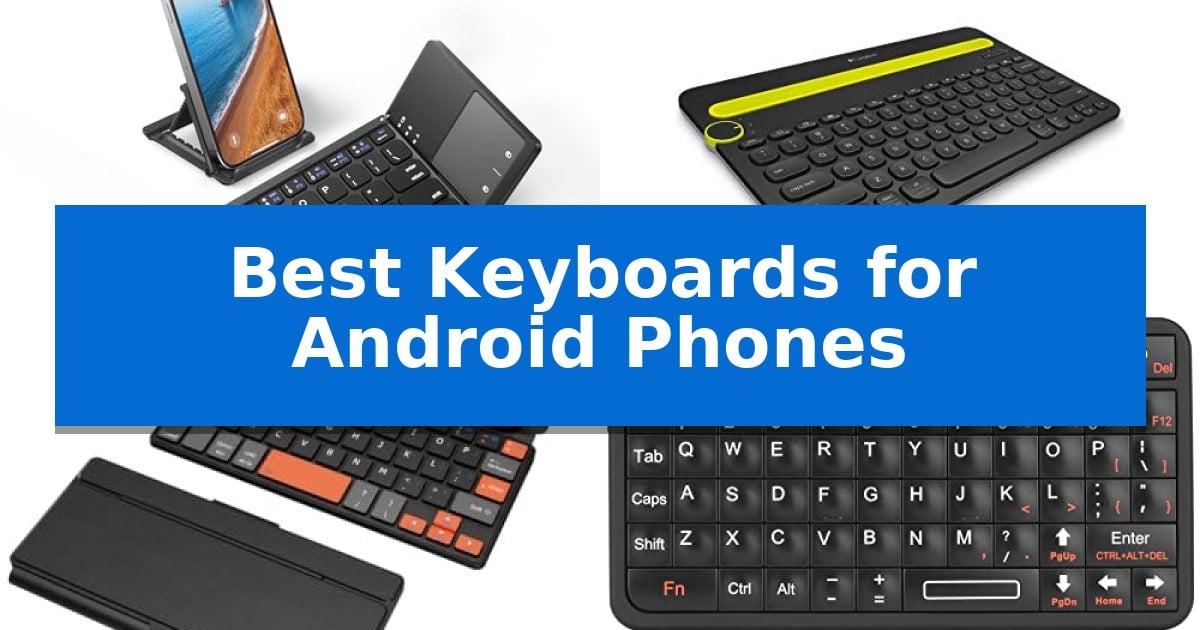
Typing long emails or documents on a touchscreen can be frustrating and prone to errors. Whether you are a student, a professional on the go, or a creative writer, finding the right external input device can transform your mobile experience. The Best Keyboards for Android Phones offer a tactile, responsive alternative that turns your device into a capable workstation.
Selecting the right keyboard depends on your specific needs, such as portability, multi-device support, or integrated mouse controls. We have analyzed several top-rated options to help you identify which model best aligns with your workflow and travel requirements. From ultra-slim folding designs to robust multi-device hubs, these tools provide the precision and comfort necessary for extended typing sessions on any Android smartphone or tablet.
Best Keyboards for Android Phones in 2026
Quick Comparison
| Product | Best For | Key Strength | Score |
|---|---|---|---|
| Samsers Foldable Bluetooth Keyboard | Best Overall | Integrated multi-touch trackpad eliminates the need for an external mouse. | 4.9 |
| Logitech K480 Multi-Device Keyboard | Built-in Cradle for Phone Stability | Integrated cradle holds phones and tablets securely at a readable angle. | 4.6 |
| Doohoeek Universal Bluetooth Mini Keyboard | Dual-Device Switching for Multitasking | Foldable, travel-friendly design with a slim 0.6-inch profile. | 4.5 |
| Rii Bluetooth Mini Keyboard | Ultra-Compact Pocketable Design | Ultra-compact and pocketable design for maximum portability. | 4.4 |
| OMOTON Bluetooth Tablet Keyboard | Oversized Keys for Comfortable Typing | Oversized keycaps minimize typing errors. | 4.3 |
How We Chose
- Compatibility with Android OS and Bluetooth standards.
- Portability and weight for travel-friendly use.
- Battery life and charging convenience via USB-C or standard cells.
- Ergonomic features such as key size, layout, and integrated stands.
- Value-added functionality like multi-device switching or built-in touchpads.
1 Samsers Foldable Bluetooth Keyboard — Integrated Touchpad for Mouse Control
The Samsers Foldable Bluetooth Keyboard integrates a multi-touch trackpad directly into its chassis, providing a mouse-free navigation experience that is particularly useful for mobile users. By combining a keyboard and a trackpad in a pocket-sized, foldable form factor, this device allows for efficient interaction with Android, Windows, iOS, and Mac OS interfaces without requiring extra peripherals.
Designed for portability, the device features a matte ABS+PC exterior and weighs only 5.53 ounces. When unfolded, the layout mimics a near-standard size, which supports comfortable typing during travel. The package also includes a phone stand holder, which helps maintain an optimal viewing angle for smartphones or tablets, effectively turning a mobile device into a compact workstation.
Connectivity is handled via Bluetooth with a stable operating range of up to 10 meters. Power is managed by a built-in rechargeable battery that provides up to 48 hours of active use, with energy replenishment facilitated by a modern USB-C interface. This setup ensures that the keyboard remains ready for business trips or extended sessions away from a power source.
While highly versatile, users should be aware of specific compatibility requirements. The multi-touch trackpad functionality is not supported on Android versions 3.0 and below, nor on iOS versions 13.4 and below. This makes the device a specialized tool for modern mobile environments, prioritizing current operating systems over legacy hardware.
Best for: Travelers and mobile professionals who require a compact, all-in-one typing and navigation solution for their modern Android or mobile devices.
Skip if: Users who operate on legacy systems like Android 3.0 or older, or those who prefer the rigid, full-sized feel of a traditional desktop mechanical keyboard.
PROS
- Integrated multi-touch trackpad eliminates the need for an external mouse.
- Ultra-slim foldable design ensures maximum portability for travel.
- USB-C charging provides a modern and convenient power replenishment method.
- Includes a dedicated phone stand holder for improved ergonomics.
CONS
- Trackpad incompatibility with older software versions like Android 3.0 and below.
- Folding hinge design lacks the absolute rigidity of a non-folding desktop keyboard.
2 Logitech K480 Multi-Device Keyboard — Built-in Cradle for Phone Stability
The Logitech K480 Multi-Device Keyboard simplifies mobile productivity by featuring an integrated cradle that holds your smartphone or tablet at an optimal viewing angle while you type. This design choice eliminates the need for separate stands, allowing you to create a stable, desktop-like workspace for your Android device anywhere.
Equipped with an Easy-Switch Dial, this keyboard allows you to toggle between three paired Bluetooth devices instantly. Whether you are switching from your Android phone to a tablet or a computer, the transition is seamless. The unit is designed with a familiar layout that includes essential shortcut keys, ensuring you can navigate your mobile interface efficiently.
Portability and durability are core to its construction, as the Logitech K480 Multi-Device Keyboard is built to be spill-resistant to handle minor accidents. It offers a wireless range of over 10 meters, providing flexibility in how you position your devices. The keyboard is powered by two pre-installed AAA batteries, which are rated for up to 24 months of use, minimizing the need for frequent maintenance.
Compatibility extends across major operating systems, including Android, iPadOS, Windows, macOS, and Chrome OS. The integrated cradle accommodates devices up to 0.4 inches thick and 10 inches wide, making it a versatile choice for users who frequently switch between different mobile hardware.
Best for: Users who need a stable, integrated stand for their Android phone or tablet while typing across multiple Bluetooth devices.
Skip if: Users who require a full-sized mechanical keyboard or a ultra-slim, lightweight device for frequent travel in small bags.
PROS
- Integrated cradle holds phones and tablets securely at a readable angle.
- Easy-Switch Dial enables quick toggling between three paired devices.
- Spill-resistant design adds durability for daily desk use.
- Long battery life of up to 24 months with included AAA batteries.
CONS
- Compact footprint may feel cramped for users accustomed to full-sized desktop keyboards.
- Heavier build compared to ultra-portable folding keyboards.
3 Doohoeek Universal Bluetooth Mini Keyboard — Dual-Device Switching for Multitasking
The Doohoeek Universal Bluetooth Mini Keyboard is built for high-mobility productivity, featuring a flexible hinge design that collapses into a slim 0.6-inch profile. Weighing only 6oz, this device is specifically engineered to fit into compact travel gear, allowing users to establish a functional workstation in environments like coffee shops or on flights.
To enhance typing precision during mobile sessions, the keyboard incorporates orange navigation keys. This color-coded visual distinction is designed to assist speed typists in positioning their hands accurately, which helps minimize mistyping when working on smaller mobile displays.
Managing multiple devices is streamlined through dual-device Bluetooth connectivity. Users can perform single-tap transitions between two paired Android, iOS, or Windows devices using the Fn+"1" or "2" keys. This functionality allows for rapid switching between a phone and tablet without needing to re-pair the hardware.
The package includes an any-angle stand to support phones or tablets, ensuring a stable viewing position while typing. The keyboard is designed for broad compatibility across major mobile operating systems, providing a versatile interface for various mobile setups.
Best for: Travelers and mobile professionals who need a compact, foldable keyboard to switch between two different mobile devices.
Skip if: Users who require a full-sized mechanical keyboard layout or those who prefer a rigid, non-folding chassis for desk-bound typing.
PROS
- Foldable, travel-friendly design with a slim 0.6-inch profile.
- Dual-device Bluetooth switching for efficient multitasking.
- Color-coded orange navigation keys to assist with typing accuracy.
- Includes an any-angle stand for mobile devices.
CONS
- Compact form factor may require an adjustment period for users accustomed to full-sized keyboards.
4 Rii Bluetooth Mini Keyboard — Ultra-Compact Pocketable Design
The Rii Bluetooth Mini Keyboard offers a distinct solution for users needing a tactile input device that fits in a pocket, measuring just 4.1 x 2.3 x 0.4 inches. Its ultra-compact form factor and 66-key layout make it a specialized tool for those who require a physical keyboard for Android phones, tablets, or even IoT development projects where standard peripherals are too cumbersome.
Equipped with Bluetooth 5.0, this device provides a stable, long-range wireless connection for mobile devices. The inclusion of a white LED backlight ensures usability in low-light environments, such as bedside typing or emergency scenarios. Its design, reminiscent of classic mobile devices, allows for efficient text entry without the need for a full-sized desktop keyboard.
The unit is USB-C rechargeable, eliminating the need for frequent battery replacements and supporting a more sustainable workflow. Weighing only 0.18 lbs, it is designed for high portability, fitting easily into travel cases or small bags. This makes it a practical accessory for developers and hobbyists working with Raspberry Pi or Arduino projects on the go.
While highly versatile, the device is a specialized mini-keyboard and requires users to adapt to its smaller key spacing. It is compatible with Android, Windows, and iOS, though users on Apple devices should note the requirement to enable AssistiveTouch. This keyboard serves as an efficient bridge between mobile productivity and compact hardware control.
Best for: Users needing an ultra-portable, pocket-sized physical keyboard for Android devices, IoT projects, or mobile development.
Skip if: Users who require a full-sized typing experience or ergonomic layout for extended document creation will find the small key spacing restrictive.
PROS
- Ultra-compact and pocketable design for maximum portability.
- Bluetooth 5.0 connectivity for stable and efficient wireless pairing.
- USB-C rechargeable battery reduces waste and maintenance.
- Built-in white LED backlight for visibility in dark environments.
CONS
- Small key size requires an adjustment period for touch typists.
- Limited physical dimensions may not suit users with larger hands.
5 OMOTON Bluetooth Tablet Keyboard — Oversized Keys for Comfortable Typing
The OMOTON Bluetooth Tablet Keyboard streamlines mobile typing through its 27% larger oversized keycaps, which are specifically engineered to reduce accidental inputs and improve accuracy during extended typing sessions on Android devices. This ultra-slim peripheral integrates a foldable stand that offers five adjustable viewing angles, allowing users to position their smartphone or tablet for optimal ergonomics while working on the go.
Designed for cross-platform versatility, the keyboard features a dedicated system-switching function. By using the FN + D command, users can quickly optimize the layout for Android, while FN + A and FN + S provide native support for iOS and Windows respectively. This ensures that media keys and shortcuts function as intended across different mobile operating systems.
For environments with varying light levels, the device includes a versatile backlight with seven color options and three brightness settings. The internal rechargeable battery supports Type-C fast charging, requiring only 2–3 hours for a full charge. When the backlight is disabled, the keyboard provides up to 200 hours of operation, while active use with lighting enabled lasts between 3–5 hours.
The compact, lightweight frame measures 9.7 by 5.9 by 0.2 inches, making it a portable solution for users who require a physical typing interface without the bulk of a traditional desktop keyboard. The inclusion of an auto-sleep mode helps manage power consumption during periods of inactivity, extending the time between charges for frequent travelers.
Best for: Mobile professionals and students who need a portable, backlit typing solution for Android tablets and smartphones.
Skip if: Users who require a full-sized mechanical keyboard with a dedicated number pad or those who prefer a wired connection for their devices.
PROS
- Oversized keycaps minimize typing errors.
- Five adjustable angles for improved ergonomic viewing.
- Multi-system compatibility with dedicated Android, iOS, and Windows modes.
- Type-C fast charging with long battery life when the backlight is off.
CONS
- Limited battery life of 3–5 hours when using the backlight feature.
- Compact form factor lacks a dedicated numeric keypad.
Best Keyboards for Android Phones Buying Guide
Connectivity and Compatibility
Most modern mobile keyboards utilize Bluetooth technology to connect wirelessly to your Android device. It is essential to ensure the keyboard supports your specific Android version, as some advanced features like touchpads may have OS-level requirements. Always check for seamless pairing capabilities, such as auto-reconnection to previously paired devices.
Some models offer multi-device switching, allowing you to toggle between your phone, tablet, and laptop with a single button or dial. This is a critical feature for users who manage multiple workflows simultaneously and want to maintain a clean, cable-free desk environment.
Portability vs. Typing Comfort
The trade-off between size and comfort is significant. Foldable keyboards are incredibly portable, fitting easily into pockets or small bags, but they often feature non-standard layouts that require an adjustment period. These are ideal for emergency typing or light travel.
Conversely, full-sized or compact desktop-style keyboards provide a more familiar typing experience with larger keycaps and better spacing. While they occupy more space in your bag, they significantly reduce fatigue during long writing sessions, making them better suited for dedicated mobile offices.
Integrated Features for Mobile Productivity
Look for keyboards that include integrated phone or tablet cradles. These stands hold your device at an optimal viewing angle, effectively turning your smartphone into a mini-laptop. This eliminates the need to carry a separate stand, saving space and weight.
Keyboards with built-in touchpads allow you to navigate your Android interface without reaching for the screen. This is particularly useful for text selection, scrolling through documents, or managing apps, providing a more desktop-like navigation experience.
Battery Life and Charging Standards
Power management is vital for mobile accessories. Many modern keyboards feature rechargeable lithium batteries that charge via USB-C, offering convenience and reducing the need for disposable batteries. Check the manufacturer's rating for hours of continuous use to ensure it meets your travel needs.
Some traditional models still use AAA batteries, which can offer exceptionally long runtimes—sometimes lasting up to two years. While this requires carrying spares, it eliminates the need to find a power source during extended trips away from home.
Build Quality and Durability
Since these devices are meant for travel, the materials used in construction matter. ABS and PC plastics are common for their balance of lightweight portability and impact resistance. Matte finishes are often preferred as they resist fingerprints and minor scratches better than glossy surfaces.
Consider the hinge design on foldable models. A robust, flexible hinge is necessary to withstand repeated opening and closing. Additionally, look for spill-resistant designs if you frequently work in coffee shops or other public spaces where accidents can happen.
Frequently Asked Questions
Do all Bluetooth keyboards work with Android?
Most Bluetooth keyboards are compatible with Android devices. However, specialized features like multi-touch gestures on touchpads may require specific Android versions or might be limited by the OS's native support.
Can I use a mouse with these keyboards?
Yes, many Android devices support Bluetooth mice. Alternatively, if you choose a keyboard with an integrated touchpad, you can control the cursor directly through the keyboard without needing a separate mouse.
How do I know if my phone fits in the keyboard stand?
Check the product specifications for the stand's width and thickness capacity. Most universal cradles are designed to accommodate standard smartphones and tablets up to a certain thickness, usually around 0.4 inches.
Is there a lag when typing on Bluetooth keyboards?
Modern Bluetooth 5.0 and higher standards have significantly reduced latency. Most users will not notice any delay, though it is always best to ensure your keyboard is fully charged to maintain a stable connection.
What is the benefit of a backlit keyboard?
Backlit keys are essential for typing in low-light conditions, such as on airplanes or in dimly lit rooms. They allow you to see the key labels clearly without needing external light sources.
Conclusion: Our Top Pick
Choosing the right accessory for your mobile workflow depends on balancing your need for extreme portability against the desire for a comfortable, desktop-like typing experience. For most users, the Samsers Foldable Bluetooth Keyboard stands out as the most versatile option. Its combination of a foldable, pocketable design and an integrated touchpad provides a comprehensive mobile solution that eliminates the need for a separate mouse.
While other models offer unique benefits like multi-device switching or larger keycaps, the convenience of the Samsers unit makes it an excellent companion for travel and business. Ensure you verify your device's OS version to fully utilize the touchpad features, and you will find it to be a significant upgrade for your mobile productivity.