
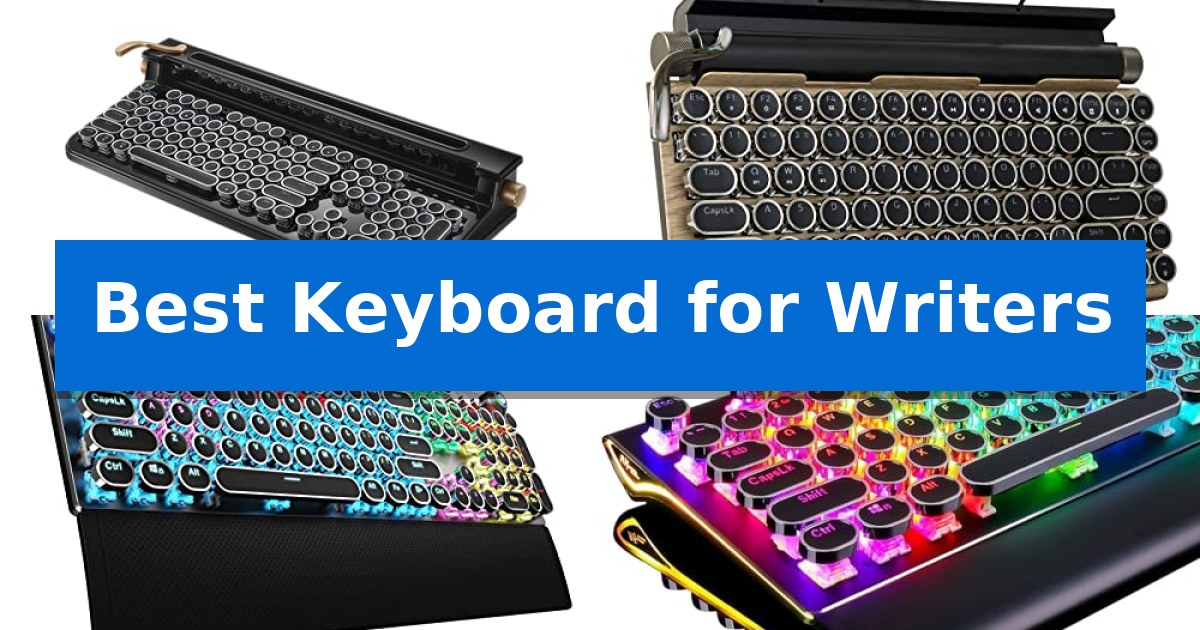
Finding the Best Keyboard for Writers requires balancing tactile feedback with long-term comfort. For those who spend hours drafting, the physical act of typing becomes a central part of the creative process, making the choice of switches and layout vital to maintaining flow.
Our guide focuses on mechanical options that prioritize a satisfying, typewriter-inspired experience. We have analyzed five distinct models to help you determine which features—from wireless connectivity to ergonomic support—best align with your specific writing environment and desk setup.
Best Keyboard for Writers in 2026: Elevate Your Typing Experience
Quick Comparison
| Product | Best For | Key Strength | Score |
|---|---|---|---|
| FINEDAY Keyboard 2.0 Plus | Best Overall | Multi-device support for up to 5 devices via Bluetooth, 2.4G, and USB. | 4.9 |
| Adventurers Retro Mechanical Keyboard | Compact Portable Vintage Style | Tactile blue shaft mechanical switches for a satisfying typing feel. | 4.3 |
| AULA F2088 Mechanical Keyboard | Ergonomic Wrist Support Included | Mechanical blue switches provide precise, tactile feedback. | 4.4 |
| RK ROYAL KLUDGE S108 Keyboard | Full Size Tactile Precision | Tactile blue switches provide precise, audible feedback for confident typing. | 4.4 |
| YSCP Typewriter Style Keyboard | Classic Clicky Typing Feel | Tactile blue switches provide satisfying, clear feedback for precise typing. | 4.4 |
How We Chose
- Switch Type and Tactile Feedback: Assessing the responsiveness and auditory satisfaction of blue switches.
- Ergonomic Design: Evaluating wrist support, typing angles, and keycap profiles for long-term comfort.
- Connectivity and Compatibility: Checking for multi-device support, wireless stability, and OS integration.
- Build Quality and Materials: Reviewing the durability of the chassis and the quality of the keycaps.
- Customization and Media Controls: Considering the utility of dedicated knobs, levers, or programmable keys.
1 FINEDAY Keyboard 2.0 Plus — Premium Wireless Retro Experience
The FINEDAY Keyboard 2.0 Plus brings a tactile, nostalgic experience to modern workflows by blending a classic typewriter aesthetic with contemporary wireless connectivity. This mechanical keyboard features Blue switch keys that provide a distinct, clicky feel, designed to offer satisfying feedback for long-form writing sessions.
Beyond its retro appearance, the device is built for heavy-duty productivity. It houses a 5000mAh built-in battery to support extended use without frequent recharging. The layout includes thoughtful physical controls, such as a solid aluminum left lever that functions as an Enter key and dedicated aluminum wheels for precise control over LED backlight brightness and system volume.
Compatibility is a core strength of this model, as it supports multi-device connectivity across five platforms simultaneously. Users can pair up to three devices via Bluetooth, one through a 2.4G receiver, and one via a wired USB connection. The integrated stand provides a 9.22-degree cradling angle, which helps maintain an ergonomic posture while keeping phones or tablets securely in view.
This keyboard is a specialized tool for those who prioritize a specific tactile typing experience and a unique desk aesthetic. While it offers robust connectivity and build quality, the mechanical nature and retro-inspired design are tailored for users who value the deliberate, audible feedback of a typewriter-style layout over low-profile or silent alternatives.
Best for: Writers and professionals who prefer a tactile, clicky typing experience and need to manage multiple devices from a single, retro-styled workstation.
Skip if: Users who require a silent typing environment or those who prefer a compact, low-profile keyboard for travel will find the size and audible nature of this mechanical unit less suitable.
PROS
- Multi-device support for up to 5 devices via Bluetooth, 2.4G, and USB.
- Tactile Blue switches provide a classic, audible typewriter feel.
- High-capacity 5000mAh battery ensures long-lasting performance.
- Integrated device stand and ergonomic 9.22-degree typing angle.
CONS
- Large physical footprint may occupy significant desk space.
- Audible clicky switches may be disruptive in shared or quiet office environments.
2 Adventurers Retro Mechanical Keyboard — Compact Portable Vintage Style
The Adventurers Retro Mechanical Keyboard offers a distinct 1940s typewriter aesthetic, blending vintage style with modern functionality. Designed for writers who value tactile feedback, it utilizes a blue shaft mechanical design that provides a satisfying, clicky response during long typing sessions. Its compact 83-key layout is specifically engineered to minimize desk footprint without sacrificing the essential keys required for daily productivity.
Ergonomics remain a priority, as the keyboard features round keycaps optimized for comfort, helping to reduce fatigue during extended use. To ensure visibility in various lighting conditions, the unit includes a white LED backlight, which improves key legibility during late-night writing tasks. The build quality is further supported by high-definition laser engraving on the keycaps, a design choice intended to prevent fading and maintain the keyboard's aesthetic over time.
Versatility is a core feature, as the keyboard supports Bluetooth 5.0 connectivity, allowing users to pair up to 3 devices simultaneously. This multi-device capability extends across a broad range of platforms, including iOS, Android, Windows, and Mac, making it a practical choice for writers who frequently switch between tablets, smartphones, and desktop computers. The anti-collision button layout ensures that the device can register multiple simultaneous key presses, providing consistent response capabilities even for fast typists.
While the compact design is ideal for saving space, it does necessitate an adjustment period for those accustomed to full-sized layouts. The absence of a dedicated numeric keypad is a trade-off that prioritizes portability and desk space, making it better suited for creative writing or general office tasks rather than heavy numerical data entry.
Best for: Writers who desire a tactile, vintage-inspired typing experience and need to switch between multiple mobile and desktop devices.
Skip if: Users who require a dedicated numeric keypad or a full-sized layout for heavy data entry tasks.
PROS
- Tactile blue shaft mechanical switches for a satisfying typing feel.
- Multi-device Bluetooth 5.0 connectivity for up to three devices.
- Compact 83-key design that saves valuable desk space.
- White LED backlight for improved visibility in dim lighting.
CONS
- Lack of a dedicated numeric keypad may limit efficiency for spreadsheet-heavy work.
- Compact 83-key layout requires adjustment if you are accustomed to full-sized keyboards.
3 AULA F2088 Mechanical Keyboard — Ergonomic Wrist Support Included
The AULA F2088 Mechanical Keyboard features a distinctive retro typewriter aesthetic, utilizing steampunk round keycaps that offer a unique tactile experience for writers. Its mechanical blue switches provide a crisp, audible click and precise feedback, which can assist in maintaining a rhythmic typing cadence during long writing sessions.
Designed with a top-grade aluminium alloy panel, this keyboard offers a sturdy, matte-finish base that resists scratches and provides a stable typing surface. The inclusion of a magnetic wrist rest made of ergonomic ABS material helps alleviate pressure on the wrists, supporting a more comfortable posture during extended periods of input.
Functionality is enhanced by a dedicated multimedia and backlight control knob, allowing for quick adjustments to lighting effects, brightness, and media playback without needing to navigate software menus. The board supports 104-key anti-ghosting, ensuring that rapid keystrokes are registered accurately, which is beneficial for maintaining focus during intense drafting.
This keyboard is a plug-and-play device compatible with Windows, Linux, and Mac OS, requiring no additional drivers. Its suspended key layout is engineered to reduce hand fatigue, making it a practical tool for office environments where consistent, high-volume typing is required.
Best for: Writers who prefer the tactile, audible feedback of blue switches and a retro aesthetic with integrated wrist support.
Skip if: Users who require a silent typing environment or those who prefer low-profile, membrane-style keys for their writing workflow.
PROS
- Mechanical blue switches provide precise, tactile feedback.
- Magnetic wrist rest improves ergonomic comfort.
- Dedicated control knob for easy media and lighting adjustments.
- Durable aluminium alloy panel ensures long-term stability.
CONS
- Clicky blue switches produce significant noise that may not suit shared office spaces.
4 RK ROYAL KLUDGE S108 Keyboard — Full Size Tactile Precision
The RK ROYAL KLUDGE S108 Keyboard features a distinct retro typewriter aesthetic with round keycaps that provide a tactile, nostalgic typing experience. Designed for those who appreciate both form and function, this full-size mechanical keyboard utilizes blue switches to deliver medium resistance and an audible click with every keystroke, ensuring precise feedback during long writing sessions.
Built for durability and stability, the unit features a top-grade aluminium alloy panel with a matte-finish texture. The inclusion of a detachable wrist rest helps alleviate pressure on the wrists, making it a practical choice for writers who spend extended hours at their desks. The 108-key anti-ghosting technology ensures that every input is registered accurately, even during rapid typing.
Customization is a central component of this model, offering dynamic RGB backlighting with 168 modes and customizable transparent sidelights to suit your workspace environment. For added versatility, the keyboard supports universal keycap compatibility, allowing users to swap between the included vintage-style caps and standard keycaps depending on their preference.
Compatibility is straightforward, as the device is plug-and-play across Windows, Linux, and Mac OS systems without the need for additional drivers. Whether you are drafting a manuscript or managing daily correspondence, the combination of a sturdy metal frame and responsive mechanical switches provides a reliable foundation for your writing setup.
Best for: Writers who prefer a tactile, clicky typing experience combined with a vintage aesthetic and full-size layout.
Skip if: Users who require a silent typing environment or those who prefer a low-profile, wireless, or compact tenkeyless design.
PROS
- Tactile blue switches provide precise, audible feedback for confident typing.
- Durable aluminium alloy panel offers a robust and stable base.
- Detachable wrist rest improves ergonomics during long writing sessions.
- Universal keycap compatibility allows for personalized aesthetic and feel.
CONS
- Wired-only connection limits desk placement options.
- Audible click sound may be disruptive in shared or quiet office environments.
5 YSCP Typewriter Style Keyboard — Classic Clicky Typing Feel
The YSCP Typewriter Style Mechanical Gaming Keyboard brings a distinct aesthetic to the workspace by merging the visual charm of vintage typewriters with the responsiveness of modern mechanical blue switches. This wired keyboard provides a tactile and audible typing experience, featuring medium resistance that offers clear feedback with every keystroke.
Designed for both productivity and immersive environments, the keyboard includes multi-mode RGB backlighting with adjustable brightness and speed settings. The build incorporates a stepped layout and concave keycaps, which are engineered to promote a comfortable typing angle. The keycaps themselves are dual-color injection-molded, and the design allows for interchanging with standard keycaps if a different feel is preferred.
Performance-focused features include 26-key anti-ghosting technology, ensuring that multiple inputs are registered accurately during rapid typing sessions. As a plug-and-play device, it connects via USB and maintains broad compatibility across Windows, Mac, Android, and Linux systems, making it a versatile addition to various desktop setups.
While the keyboard offers a unique retro aesthetic, users should note that the mechanical blue switches produce a distinct, audible click that may not be ideal for shared or noise-sensitive environments. The wired-only connection ensures a consistent, lag-free link, though it lacks the cable-free convenience of wireless alternatives.
Best for: Writers and typists who prefer a tactile, clicky mechanical switch feel paired with a vintage-inspired aesthetic.
Skip if: Users who require a silent typing experience or a wireless connection for their workspace.
PROS
- Tactile blue switches provide satisfying, clear feedback for precise typing.
- Retro typewriter design with concave keycaps offers a unique aesthetic and ergonomic angle.
- 26-key anti-ghosting ensures reliable registration of fast keystrokes.
- Plug-and-play compatibility across multiple operating systems including Windows, Mac, and Linux.
CONS
- Audible click sound from blue switches may be disruptive in quiet or shared offices.
- Wired-only connection limits desk placement compared to wireless models.
Best Keyboard for Writers Buying Guide
Understanding Mechanical Switches
Mechanical switches are the heart of a writer's keyboard. Most models in this category utilize blue switches, which are known for their distinct tactile bump and audible clicky sound. This feedback helps writers confirm keystrokes without needing to bottom out the key, potentially increasing typing speed and accuracy.
While clicky switches are favored for their rhythmic quality, they are louder than linear or tactile alternatives. Writers should consider their work environment; if you share an office or work in quiet spaces, the sound profile of a mechanical keyboard may be a significant factor in your decision.
Ergonomics and Typing Comfort
Extended writing sessions demand attention to ergonomics. Features like an ergonomic cradling angle or a removable wrist rest can significantly reduce strain on your wrists and forearms. A proper angle ensures your hands remain in a neutral position, preventing fatigue during marathon drafting sessions.
The shape of the keycaps also plays a role. Many retro-style keyboards feature round, concave keycaps that are designed to fit the curvature of your fingertips. This design can help with precise positioning and reduce the occurrence of accidental key presses.
Connectivity for Modern Workflows
Modern writers often switch between multiple devices, such as a desktop, laptop, and tablet. Keyboards offering Bluetooth 5.0 or 2.4G wireless connectivity allow for seamless transitions between these platforms. Look for models that support pairing with multiple devices simultaneously.
Battery life is another critical consideration for wireless users. A high-capacity built-in battery ensures that your workflow remains uninterrupted, reducing the need for frequent charging and keeping your desk free of unnecessary cables.
Build Quality and Aesthetics
The construction of your keyboard affects both its longevity and stability. Keyboards featuring a solid aluminum panel provide a sturdy, heavy base that prevents the unit from sliding during intense typing. This build quality often translates to a more premium feel and better resistance to daily wear and tear.
Aesthetics, while subjective, can influence your creative environment. Retro-inspired designs, often called NEWTRO (New Retro), combine the nostalgic charm of vintage typewriters with modern reliability. These designs often include unique elements like mechanical levers or control wheels that add a tactile dimension to your workspace.
Customization and Media Control
Dedicated media controls can streamline your workflow by allowing you to adjust volume, brightness, or playback without leaving your document. Aluminum control wheels or dedicated buttons provide quick access to these functions, keeping your focus on the screen.
Anti-ghosting technology is also essential for fast typists. It ensures that every keystroke is registered accurately, even when multiple keys are pressed in rapid succession, preventing missed characters and ensuring your thoughts are captured as quickly as you type them.
Frequently Asked Questions
Are mechanical keyboards better for writing than membrane keyboards?
Many writers prefer mechanical keyboards because they provide consistent tactile feedback and a satisfying click, which can help improve typing rhythm and accuracy compared to the softer feel of membrane keyboards.
Will a blue switch keyboard be too loud for my office?
Blue switches are among the loudest mechanical switches due to their clicky mechanism. If you work in a shared space, you may want to consider if the audible feedback will be distracting to others.
Can I use these keyboards with my Mac or tablet?
Most modern mechanical keyboards, especially those with Bluetooth connectivity, are designed to be compatible with Windows, macOS, iOS, and Android, making them versatile for multi-device users.
What is the benefit of a wrist rest?
A wrist rest provides support that keeps your wrists in a neutral, elevated position, which helps alleviate pressure and reduce the risk of strain during long hours of typing.
How do I clean a mechanical keyboard with round keycaps?
Many mechanical keyboards come with a keycap puller, which allows you to safely remove the keys. Once removed, you can clean the keycaps and the keyboard surface with compressed air or a soft cloth.
Conclusion: Our Top Pick
For writers seeking the ultimate blend of vintage aesthetics and modern functionality, the FINEDAY Keyboard 2.0 Plus stands out as the premier choice. Its high-capacity 5000mAh battery, robust aluminum construction, and unique typewriter-style levers provide a premium, tactile experience that is hard to match in a modern workspace.
While other options offer excellent portability or budget-friendly features, the FINEDAY Keyboard 2.0 Plus excels in providing a cohesive, high-quality typing environment. Its ability to connect to multiple devices simultaneously and its dedicated control wheels make it a reliable partner for any serious writer looking to enhance their daily output.