
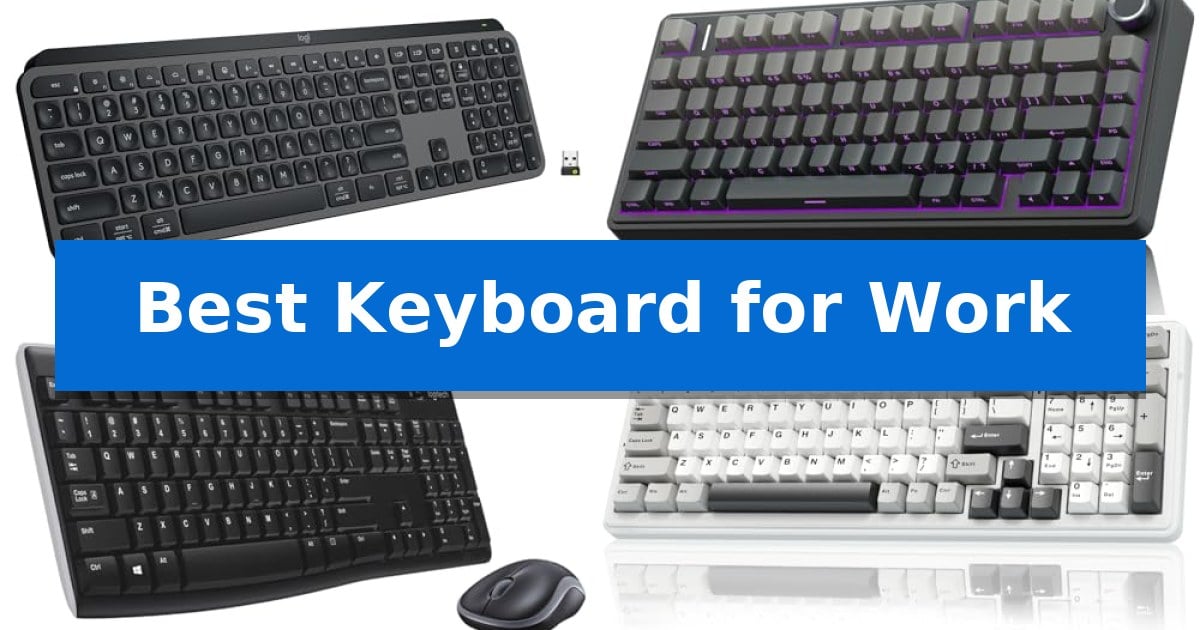
Finding the Best Keyboard for Work requires balancing your specific typing style with the demands of your daily tasks. Whether you need a quiet, low-profile design for an open office or a tactile mechanical board for heavy data entry, the right tool can significantly reduce fatigue and improve your focus.
Our selection focuses on connectivity, build quality, and ergonomic features that directly impact your productivity. By evaluating how these keyboards integrate with your existing devices and workflow, we help you cut through the marketing noise to identify the hardware that truly supports your professional goals.
Best Keyboard for Work in 2026: Maximize Your Daily Efficiency
Quick Comparison
| Product | Best For | Key Strength | Score |
|---|---|---|---|
| Logitech MX Keys S Wireless Keyboard | Best Overall | Spherically-dished keys for a comfortable, laptop-like typing feel. | 4.9 |
| AULA F75 Pro Mechanical Keyboard | Compact Layout with Dedicated Control Knob | Tri-mode connectivity allows for seamless switching between up to five devices. | 4.4 |
| Logitech MK270 Wireless Keyboard Combo | Reliable Plug-and-Play Office Essential | Long battery life with up to 36 months for the keyboard and 12 months for the mouse. | 4.7 |
| AULA F99 Wireless Mechanical Keyboard | Extended Battery Life for Heavy Users | Tri-mode connectivity supporting up to five simultaneous devices. | 4.9 |
| Redragon K668 Mechanical Keyboard | Dedicated Shortcut Keys for Productivity | Dedicated shortcut keys for quick access to essential desktop functions. | 4.8 |
How We Chose
- Connectivity: We prioritized devices offering multi-device pairing and stable wireless protocols like Bluetooth and 2.4GHz.
- Switch and Key Feel: We evaluated the typing experience, distinguishing between low-profile membrane-style keys and mechanical switches for different tactile preferences.
- Ergonomics and Layout: We assessed physical dimensions and key spacing to ensure the boards support natural wrist posture and efficient navigation.
- Customization: We looked for programmable shortcuts and software support that allow users to automate repetitive tasks.
- Build Quality: We considered material durability and battery performance to ensure the hardware can withstand daily professional use.
1 Logitech MX Keys S Wireless Keyboard — Fluid Typing for Multi-Device Workflows
The Logitech MX Keys S Wireless Keyboard centers on a low-profile, laptop-like typing experience designed for sustained comfort during long work sessions. Its spherically-dished keys are engineered to match the shape of your fingertips, promoting a fluid and precise typing feel that remains quieter than traditional mechanical alternatives.
Efficiency is a core focus, supported by the Logi Options+ app which allows users to create and share Smart Actions. These shortcuts enable the execution of multiple tasks with a single keystroke, helping to automate repetitive workflows. The keyboard also features smarter illumination that detects your hands as they approach, automatically adjusting the backlighting to suit your current environment.
Designed for versatility, this keyboard pairs with up to three devices across various operating systems, including Windows, macOS, Linux, and Googlebook OS. Connectivity is handled via Bluetooth Low Energy or the included Logi Bolt USB receiver. When paired with a compatible Logitech mouse, users can seamlessly transfer text and files between multiple computers.
The hardware is built for longevity and sustainability, featuring a solid construction with an optimized angle for improved wrist posture. It is USB-C rechargeable, offering up to 10 days of battery life with backlighting enabled, or up to 5 months with the lighting turned off. Furthermore, the device incorporates certified post-consumer recycled plastic in its build.
Best for: Professionals and creators who require a multi-device, low-profile keyboard that integrates with automated software workflows.
Skip if: Users who prefer the tactile feedback and deep key travel of mechanical switches or those who require a full-sized layout with dedicated macro keys.
PROS
- Spherically-dished keys for a comfortable, laptop-like typing feel.
- Smart Actions automation via Logi Options+ to streamline repetitive tasks.
- Multi-device connectivity supporting up to three devices simultaneously.
- Proximity-sensing backlighting that adapts to ambient conditions.
CONS
- Fixed low-profile design lacks the mechanical switch feel some users prefer.
- Battery life is significantly reduced when backlighting is enabled.
2 AULA F75 Pro Mechanical Keyboard — Compact Layout with Dedicated Control Knob
The AULA F75 Pro Mechanical Keyboard streamlines desk organization with its compact 75% layout, which retains essential arrow keys while freeing up valuable workspace. This model features a versatile multi-function knob that allows users to toggle between office and gaming modes, providing tactile control over volume, media playback, and lighting brightness.
Built for a refined typing experience, the keyboard incorporates an advanced structure with an integrated silicone pad and PCB single key slotting. These elements, combined with five layers of sound-dampening material, work to minimize cavity noise and provide a stable, elastic feel. The pre-lubricated LEOBOG reaper switches and stabilizers contribute to a smooth, consistent keystroke suitable for extended work sessions.
Connectivity is a primary strength, offering tri-mode flexibility via Bluetooth 5.0, 2.4GHz wireless, or a wired USB-C connection. The internal 4000mAh battery supports prolonged use, and the hot-swappable base allows for easy customization with 3-pin or 5-pin switches without the need for soldering. The side-printed PBT keycaps utilize double-injection molding and heat sublimation, ensuring durability and resistance to wear over time.
For those who prefer a personalized aesthetic, the keyboard includes 16.8 million RGB lighting colors with 16 pre-set effects. Users can further customize key functions and macros through the dedicated driver, enhancing productivity by tailoring the layout to specific professional workflows.
Best for: Professionals seeking a compact, customizable, and highly versatile mechanical keyboard that supports multiple device connections.
Skip if: Users who require a full-sized keyboard with a dedicated number pad for intensive data entry tasks.
PROS
- Tri-mode connectivity allows for seamless switching between up to five devices.
- Hot-swappable PCB supports easy switch replacement without soldering.
- Multi-function knob provides quick, physical control over media and settings.
- Durable PBT keycaps with side-printed legends offer a clean look and long-lasting texture.
CONS
- 75% compact layout lacks a dedicated numeric keypad.
- Software-dependent customization requires the use of the AULA driver for advanced macro programming.
3 Logitech MK270 Wireless Keyboard Combo — Reliable Plug-and-Play Office Essential
Maintaining a clutter-free workspace often begins with minimizing cable management, and the Logitech MK270 Wireless Keyboard Combo addresses this by pairing a full-size keyboard with an ambidextrous mouse through a single USB-A Nano Receiver. This setup provides a reliable wireless connection up to 33 feet, allowing for a clean desk environment without the typical constraints of wired peripherals.
The keyboard is designed for daily utility, featuring a standard layout that includes a full-size number pad, arrow keys, and dedicated F-keys. To support extended typing sessions, it incorporates low-profile, quiet keys and sturdy tilt legs that allow for adjustable height. The build is also resilient, utilizing a spill-resistant design to protect against minor accidents during the workday.
Efficiency is further supported by eight integrated multimedia hotkeys, which provide instant access to volume controls, play/pause functions, email, and internet navigation. The included compact mouse is designed for universal comfort, catering to both left- and right-handed users while maintaining smooth cursor control across various surfaces.
Longevity is a primary focus of this combo, with the keyboard rated for 36 months of battery life and the mouse for 12 months. Both devices include dedicated on/off switches to preserve power when not in use. Additionally, the construction reflects a commitment to sustainable materials, with 49% of the mouse's plastic parts and 54% of the keyboard's plastic parts consisting of certified post-consumer recycled plastic.
Best for: Users seeking a reliable, clutter-free, and long-lasting wireless input solution for standard office tasks.
Skip if: Users who require advanced ergonomic features like scooped keys, dedicated palm rests, or highly customizable shortcut programming.
PROS
- Long battery life with up to 36 months for the keyboard and 12 months for the mouse.
- Single USB-A Nano Receiver simplifies connectivity by using only one port for both devices.
- Spill-resistant design adds a layer of durability against accidental liquid exposure.
- Full-size layout includes a number pad and dedicated multimedia hotkeys for increased productivity.
CONS
- Basic ergonomic design lacks the advanced comfort features found in higher-tier models like the MK540.
- USB-A connectivity requires an adapter for computers that only feature USB-C ports.
4 AULA F99 Wireless Mechanical Keyboard — Extended Battery Life for Heavy Users
The AULA F99 Wireless Mechanical Keyboard prioritizes desk efficiency through its compact 96% layout, which retains essential navigation and number keys while minimizing the overall footprint. This design choice makes it a practical solution for professionals who require a full-featured input device without sacrificing valuable workspace.
Connectivity versatility is a core strength of this model, offering tri-mode functionality via Bluetooth 5.0, 2.4GHz wireless, and a USB-C wired connection. Users can pair and switch between up to five devices, facilitating seamless transitions between different workstations or mobile devices. The inclusion of a high-capacity 8000mAh battery supports extended usage periods, reducing the frequency of required charging.
Typing comfort is addressed through a gasket structure and an integrated silicone pad, which work in tandem with five layers of internal silencer filling to dampen cavity noise and provide a softer, more elastic feel. The keyboard features pre-lubed linear switches that are hot-swappable, allowing for customization with 3-pin or 5-pin switches without the need for soldering. The double-shot PBT keycaps are engineered for durability, ensuring that characters remain clear and resistant to fading over time.
For those who integrate lighting into their workflow or gaming sessions, the keyboard includes 16 RGB lighting effects and supports macro customization via driver software. The N-key rollover capability ensures that simultaneous key presses are registered accurately, maintaining responsiveness during intensive tasks.
Best for: Professionals and gamers who need a compact, multi-device mechanical keyboard with long battery life and a dampened, quiet typing experience.
Skip if: Users who require a full-sized 100% layout with dedicated spacing between the navigation cluster and the main typing area.
PROS
- Tri-mode connectivity supporting up to five simultaneous devices.
- Gasket structure and multi-layer silencer filling for a quiet, stable typing feel.
- Hot-swappable PCB for easy switch customization without soldering.
- 8000mAh high-capacity battery for extended wireless operation.
CONS
- 96% compact layout may require an adjustment period for users accustomed to traditional full-sized spacing.
5 Redragon K668 Mechanical Keyboard — Dedicated Shortcut Keys for Productivity
The Redragon K668 Mechanical Keyboard streamlines your workflow by incorporating four dedicated hotkeys that default to mute, calculator, screen lock, and desktop access. This full-size 108-key layout ensures that every input is captured accurately, even during rapid multi-key combinations, thanks to its anti-ghosting technology.
Designed for versatility in shared office environments, the keyboard features a hot-swap socket that accepts most 3-pin or 5-pin switches. It comes equipped with linear switches that provide a smooth, quiet typing experience, while the internal cushioned noise dampening helps produce a satisfying, muted sound profile. The inclusion of two sets of mixed-color keycaps allows for aesthetic customization to suit your workspace.
Ergonomics remain a priority with the integrated 2-stage adjustable feet, which help maintain a comfortable wrist position during extended typing sessions. For those who enjoy a personalized setup, the keyboard offers 19 preset RGB lighting modes, including a music-sync feature that reacts to desktop audio, all manageable via dedicated pro software.
The software also enables deeper productivity customization, allowing you to reassign the four dedicated hotkeys to your preferred shortcuts, create complex macros, and design custom lighting effects. With a 1-year warranty and a robust build, this keyboard serves as a functional tool for users seeking a balance of tactile feedback and quiet operation.
Best for: Users who require a quiet, full-size mechanical keyboard with dedicated shortcut keys for improved office productivity.
Skip if: Users who prefer a compact 60% or tenkeyless form factor, or those who require wireless connectivity for a clutter-free desk.
PROS
- Dedicated shortcut keys for quick access to essential desktop functions.
- Hot-swap PCB allows for easy switch customization without soldering.
- Cushioned noise dampening provides a quieter typing experience suitable for shared spaces.
- Pro software enables full macro and lighting customization.
CONS
- Wired-only connection limits desk placement options compared to wireless models.
Best Keyboard for Work Buying Guide
Understanding Switch Types
The switch type is the most critical factor in your typing experience. Mechanical switches provide distinct tactile feedback and audible clicks, which many users prefer for accuracy and speed. These switches often feature hot-swappable sockets, allowing you to customize the feel without soldering.
Alternatively, low-profile or membrane keyboards offer a quieter, more subtle typing experience. These are often preferred in shared workspaces where noise reduction is a priority. They typically feature a shorter travel distance, which can be less taxing on the fingers during long typing sessions.
Connectivity and Multi-Device Support
For professionals who juggle multiple computers or tablets, multi-device pairing is essential. Look for keyboards that support both Bluetooth and dedicated USB receivers, as this provides a backup if wireless interference occurs in your office.
Seamless switching between operating systems like Windows, macOS, and Linux is another key consideration. Ensure the keyboard you choose has clear key mapping or software support to maintain consistent functionality across different platforms.
Ergonomics and Desk Space
The physical footprint of your keyboard affects your overall desk ergonomics. Compact layouts (75% or 96%) save valuable desk space, allowing for a closer mouse position, which can help reduce shoulder strain.
However, if your work involves heavy numerical data entry, a full-size layout with a dedicated number pad remains the most efficient choice. Always consider the keyboard angle and whether the unit includes adjustable feet to help maintain a neutral wrist position.
Customization and Productivity Shortcuts
Modern work keyboards often include programmable keys or control knobs that can be mapped to specific software functions. These features allow you to trigger macros or adjust system settings like volume and brightness without leaving your primary application.
Software integration, such as proprietary apps for remapping keys, can turn a standard keyboard into a powerful productivity tool. Check if the manufacturer provides robust software that allows you to save profiles for different workflows.
Battery Life and Power Management
Wireless keyboards rely on internal batteries or replaceable cells. For heavy users, a high-capacity battery is vital to avoid frequent recharging. Look for models that offer USB-C fast charging to minimize downtime.
Smart power management, such as automatic sleep modes or proximity-sensing backlighting, can significantly extend the time between charges. Always check the manufacturer's claims regarding battery life with and without backlighting enabled.
Frequently Asked Questions
What is the benefit of a hot-swappable keyboard?
A hot-swappable keyboard allows you to replace individual switches without soldering. This is ideal if you want to experiment with different tactile feels or if a single switch fails over time.
Are mechanical keyboards too loud for an office?
While some mechanical switches are clicky and loud, many modern options use linear or silent tactile switches designed to be quiet enough for office environments.
Why would I choose a 75% layout over a full-size keyboard?
A 75% layout removes the number pad and rearranges navigation keys to save desk space. It is a great choice if you want a more ergonomic mouse position and do not frequently use a number pad.
Can I use a wireless keyboard with multiple computers?
Yes, many modern wireless keyboards support multi-device pairing. You can switch between connected computers using dedicated shortcut keys or software.
What is the advantage of PBT keycaps?
PBT keycaps are more durable and resistant to the shine that develops on standard ABS plastic over time. They also offer a more textured, premium feel.
Conclusion: Our Top Pick
For those seeking the most reliable and versatile typing experience, the Logitech MX Keys S Wireless Keyboard stands out as the premier choice. Its laptop-like profile, combined with smart backlighting and seamless multi-device switching, makes it an ideal companion for high-paced professional environments.
While mechanical options like the AULA series offer superior tactile customization, the Logitech remains the most consistent performer for general office tasks. Its ability to integrate across different operating systems and its long-lasting battery life ensure that it remains a stable, low-maintenance foundation for your daily workflow.