
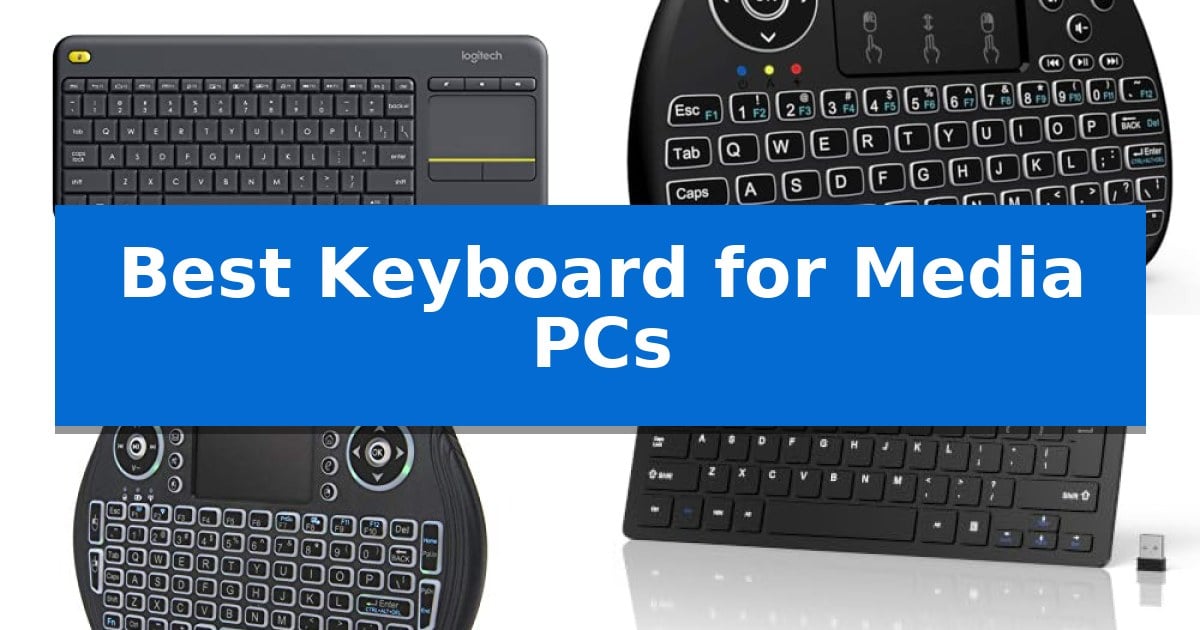
Navigating a media PC from the comfort of your couch requires a specific set of tools that go beyond a standard desktop setup. When your computer is connected to a television, the Best Keyboard for Media PCs must bridge the gap between traditional typing and intuitive remote-like navigation.
The ideal solution integrates a pointing device, such as a touchpad, to eliminate the need for a separate mouse. Whether you are browsing streaming services or managing local media files, finding a reliable, compact, and responsive input device is essential for a clutter-free living room experience.
Best Keyboard for Media PCs in 2026
Quick Comparison
| Product | Best For | Key Strength | Score |
|---|---|---|---|
| Logitech K400 Plus Wireless Keyboard | Best Overall | Integrated touchpad eliminates the need for a separate mouse. | 4.9 |
| REIIE H9+ Mini Wireless Keyboard | Handheld Control for Media Centers | Integrated touchpad with multi-finger gesture support for mouse-like navigation. | 4.5 |
| EASYTONE Backlit Mini Wireless Keyboard | Compact Navigation in Low Light | Integrated multi-finger touchpad for mouse-free navigation | 4.8 |
| TECKNET 2.4G Wireless Compact Keyboard | Space-Saving Design for Media PCs | Compact 11.5-inch design saves space in living room environments. | 4.3 |
| SR Mini Wired Keyboard | Minimalist Footprint for Tight Spaces | Compact 11-inch footprint ideal for small media centers. | 4.5 |
How We Chose
- Integrated pointing device functionality for mouse-free navigation.
- Wireless range and signal stability for living room environments.
- Compact form factor to ensure ease of use on laps or small surfaces.
- Compatibility with common operating systems like Windows, Android, and Chrome OS.
- Battery efficiency and power management for long-term reliability.
1 Logitech K400 Plus Wireless Keyboard — Integrated Touchpad for Living Rooms
Managing a home theater PC setup often requires a balance between desktop-grade control and living room convenience. The Logitech K400 Plus Wireless Keyboard addresses this by integrating a built-in touchpad directly into the chassis, effectively replacing the need for a separate mouse and keyboard cluttering your coffee table.
Designed for plug-and-play simplicity, this device connects via a single Unifying receiver that plugs into any standard USB port. It offers a reliable wireless range of up to 33 ft, ensuring consistent connectivity from across the room. The inclusion of quiet keys and a large, responsive touchpad makes navigating media menus or browsing the web intuitive from a relaxed, seated position.
Durability and efficiency are core to its design, featuring a spill-resistant build to protect against minor accidents and an on/off button to maximize the 18-month battery life. It is compatible with a wide range of operating systems, including Windows 7, 8, 10 and later, Android 7 or later, and Chrome OS, providing flexibility for various HTPC configurations.
While it excels at media navigation, the compact layout is optimized for space rather than heavy data entry. For users who prioritize advanced features like illuminated keys or Bluetooth connectivity, the manufacturer suggests exploring the K830 model. However, for a straightforward, reliable solution for PC-connected TVs, this keyboard provides a functional and streamlined experience.
Best for: Users seeking a compact, all-in-one keyboard and touchpad solution for navigating media PCs from a distance.
Skip if: Users who require a full-sized layout for intensive typing or those who prefer backlit keys and Bluetooth connectivity.
PROS
- Integrated touchpad eliminates the need for a separate mouse.
- 33 ft wireless range provides reliable control from across the room.
- Spill-resistant design adds durability for living room use.
- Up to 18 months of battery life reduces maintenance frequency.
CONS
- Compact layout may feel cramped for extended typing sessions.
- Lacks backlighting for use in darkened home theater environments.
2 REIIE H9+ Mini Wireless Keyboard — Handheld Control for Media Centers
The REIIE H9+ Mini Wireless Keyboard provides a compact, handheld solution for managing media PCs, smart TVs, and Android TV boxes. This 3-in-1 device integrates a 73-key QWERTY keyboard, a multi-finger touchpad, and LED backlighting into a single portable unit designed for navigation from a distance.
Equipped with 2.4GHz wireless technology, the device uses a USB receiver for connectivity. The touchpad supports multi-finger gestures, allowing single-finger clicks for left-click functions, two-finger clicks for right-click actions, and two-finger dragging for scrolling. This layout aims to replicate standard mouse and keyboard inputs in a handheld form factor.
The integrated white soft backlight is intended to assist with visibility in low-light environments, such as during movie playback. The device is powered by a rechargeable battery, which requires an initial one-hour charge to ensure stable 2.4G pairing and consistent connection performance.
Measuring 7.17 by 4.13 inches, the REIIE H9+ Mini Wireless Keyboard is designed for portability. It is compatible with systems that support standard USB input, including Windows PCs, Raspberry Pi, and various smart TV platforms. Users must ensure their host device has an available USB port for the receiver, as this model does not support Bluetooth.
Best for: Users needing a compact, handheld input device with an integrated touchpad for controlling media centers and smart TVs.
Skip if: Users who require Bluetooth connectivity or who do not have an available USB port for the required 2.4GHz receiver.
PROS
- Integrated touchpad with multi-finger gesture support for mouse-like navigation.
- LED backlight functionality for improved visibility in dark rooms.
- Portable, handheld design optimized for living room media setups.
- Plug and play 2.4GHz wireless connectivity via USB receiver.
CONS
- No Bluetooth support, requiring a dedicated USB port.
- Requires initial charging before first use to ensure connection stability.
3 EASYTONE Backlit Mini Wireless Keyboard — Compact Navigation in Low Light
Navigating a media PC setup from the comfort of a couch requires a compact, all-in-one control solution that eliminates the need for a full-sized desktop keyboard and mouse. The EASYTONE Backlit Mini Wireless Keyboard addresses this by integrating a multi-finger touchpad and a full QWERTY layout into a single handheld device, allowing for seamless web browsing and media navigation.
This device connects via a USB receiver providing a wireless range of up to 10 meters, enabling a simple plug-and-play experience across various platforms including HTPC, Android TV boxes, and gaming consoles. Its handheld design is specifically engineered to minimize space, making it a practical alternative to bulky peripherals when managing entertainment systems.
For low-light environments, the keyboard features multi-color backlit keys, ensuring visibility without the need to illuminate the entire room. The unit is powered by a rechargeable Li-ion battery and includes an auto sleep and wake-up function to help preserve power during periods of inactivity.
Beyond basic typing, the inclusion of 8 dedicated hotkeys and a sensitive touchpad allows for more accurate manipulation of on-screen cursors and media playback controls. While it is highly portable, users should note that connecting to devices without a standard USB port may require an additional OTG cable.
Best for: Users seeking a compact, all-in-one wireless controller for media PCs, smart TVs, and gaming consoles in low-light environments.
Skip if: Users who require a full-sized, ergonomic keyboard for extensive document typing or professional productivity tasks.
PROS
- Integrated multi-finger touchpad for mouse-free navigation
- Multi-color backlit keys for clear visibility in dark rooms
- Rechargeable Li-ion battery with power-saving auto sleep mode
- Compact handheld form factor ideal for couch-based media control
CONS
- Requires OTG cable for devices lacking a standard USB port
- Small key size may not be suitable for high-speed touch typing
4 TECKNET 2.4G Wireless Compact Keyboard — Space-Saving Design for Media PCs
Managing a home theater setup often requires a compact interface that does not clutter the living space, which is where the TECKNET 2.4G Wireless Compact Keyboard excels. Measuring just 11.5 by 4.9 inches, this device provides a minimalist footprint that fits easily on a coffee table or couch armrest, making it a practical choice for controlling media PCs or smart TVs from a distance.
The keyboard utilizes a 2.4GHz USB receiver to maintain a stable connection up to 32.8 feet away from the host device. This plug-and-play functionality ensures immediate compatibility with Windows, Mac, Chrome OS, and Linux systems without the need for complex software installation. Users should note that the device requires a USB-A port and does not support Bluetooth, so checking your hardware interface is essential before purchase.
Typing comfort is addressed through a chocolate keycap design that promotes quiet operation and reduced key travel, which helps minimize finger fatigue during extended use. The layout is intentionally compact, meaning the Enter key configuration differs from standard full-size keyboards, which may require a brief adjustment period for those accustomed to traditional desktop setups.
Designed for long-term reliability, the unit is backed by a 36-month warranty upon registration. It operates on two AAA batteries, and the included USB receiver is conveniently stored on the back of the keyboard next to the battery compartment, ensuring it remains secure when not in use.
Best for: Users seeking a compact, reliable wireless input device for media PCs and smart TVs that prioritize a small footprint over full-size keyboard layouts.
Skip if: Users who require Bluetooth connectivity or those who are strictly accustomed to the layout and key spacing of standard full-size desktop keyboards.
PROS
- Compact 11.5-inch design saves space in living room environments.
- Stable 2.4GHz wireless connection with a range of up to 32.8 feet.
- Quiet chocolate keycap design reduces noise and finger fatigue.
- 36-month warranty provides long-term support.
CONS
- No Bluetooth support, requiring a dedicated USB-A port.
- Non-standard Enter key layout may require an adjustment period.
5 SR Mini Wired Keyboard — Minimalist Footprint for Tight Spaces
Navigating a home entertainment setup often requires a compact input device that does not clutter the living room, and the SR Mini Wired Keyboard addresses this with a slim, minimalist footprint measuring just 11 by 5.2 inches. Designed for users who prioritize space-saving hardware, this device integrates multimedia composite keys that allow for quick adjustments during media playback, making it a functional choice for PC-connected home theater systems.
The keyboard features a lightweight build at approximately 0.62 pounds, ensuring it remains portable and easy to handle on a couch or coffee table. Its character laser print is intended for durability, ensuring key labels remain legible over time. The wired connection provides a straightforward plug-and-play experience, eliminating concerns regarding battery life or wireless signal interference in busy home environments.
Compatibility is a primary strength of this model, as it supports a wide range of systems including PC, Mac, PS3, and Xbox360, as well as various Windows versions from XP through 8. This broad support makes it a versatile peripheral for users who switch between different media sources or gaming consoles frequently. With a height of only 0.8 inches, the SR Mini Wired Keyboard maintains a low profile that fits easily into tight storage spaces when not in use.
While the wired nature of this keyboard ensures constant connectivity, it does tether the user to the device's cable length. However, for those seeking a reliable, no-fuss input method for a media PC, the combination of its small form factor and multimedia functionality provides a practical solution without the complexity of advanced software drivers.
Best for: Users needing a compact, reliable wired keyboard for media PCs and gaming consoles where space is limited.
Skip if: Users who require wireless freedom or a full-sized layout with a dedicated number pad will find this compact model too restrictive.
PROS
- Compact 11-inch footprint ideal for small media centers.
- Multimedia composite keys for convenient media control.
- Broad compatibility across PC, Mac, and gaming consoles.
- Lightweight and thin design for easy storage.
CONS
- Wired-only connection limits placement distance from the PC.
- Small form factor lacks a dedicated numeric keypad.
Best Keyboard for Media PCs Buying Guide
Integrated Pointing Devices
The most critical feature for a media PC keyboard is an integrated touchpad. Because you are likely using the device from a couch, you do not have a flat surface for a traditional mouse. A built-in trackpad allows you to control the cursor, click, and scroll without needing extra hardware.
When selecting a model, ensure the touchpad is large enough for comfortable gestures. Some mini keyboards offer smaller touch areas that may be difficult to use for precise navigation, while larger integrated pads provide a more natural experience similar to a laptop.
Wireless Connectivity and Range
Media PCs are often tucked away in cabinets or placed several feet from where you sit. A reliable 2.4GHz wireless connection is generally preferred over Bluetooth for these setups, as it often provides a more stable, plug-and-play experience without the need for pairing procedures.
Always check the rated wireless range. Most quality media keyboards offer a range of at least 30 feet, which is sufficient for most living room configurations. Ensure your PC has an accessible USB port to house the wireless receiver for the best signal strength.
Form Factor and Ergonomics
Since you will be holding the keyboard on your lap, weight and size are significant factors. A compact, lightweight design is easier to manage than a full-sized mechanical keyboard. Look for models that balance a full QWERTY layout with a slim profile.
Consider the layout of the keys and the inclusion of dedicated media hotkeys. These buttons allow you to adjust volume, play, pause, and skip tracks instantly, which is much more convenient than navigating through software menus with a cursor.
Compatibility and OS Support
Before purchasing, verify that the keyboard is compatible with your specific media PC operating system. While most keyboards work with Windows, support for Android TV boxes or Chrome OS can vary depending on the device's driver requirements.
Some keyboards are designed specifically for plug-and-play functionality, meaning they do not require custom software to work. This is ideal for media PCs that are used by multiple family members who may not want to manage complex settings.
Battery Life and Power Management
Nobody wants to deal with frequent charging or battery swaps for a device that is used intermittently. Look for keyboards with long battery life or power-saving features like automatic sleep modes that trigger when the device is not in use.
Some models use standard AAA batteries, while others feature rechargeable internal lithium-ion batteries. Both have trade-offs: standard batteries are easy to replace, while rechargeable units eliminate the need for spares but require occasional downtime for charging.
Frequently Asked Questions
Do I need a separate mouse if I have a media PC keyboard?
If you choose a keyboard with an integrated touchpad, you do not need a separate mouse. These devices are designed to handle both typing and cursor control, making them perfect for couch use.
Is 2.4GHz better than Bluetooth for media PCs?
For media PCs, 2.4GHz is often more reliable as it uses a dedicated USB receiver, providing a stable, instant connection without the need for complex software pairing.
Can I use these keyboards with my Smart TV?
Compatibility depends on your TV's operating system. Most keyboards that work with Windows or Android will function with many Smart TVs, but it is best to check if your TV supports USB input devices.
What should I do if the connection is unstable?
If you experience connection issues, ensure the USB receiver is not blocked by metal objects or the PC chassis itself. Using a short USB extension cable to move the receiver into a clear line of sight can often resolve signal interference.
Are these keyboards spill-resistant?
Some models are designed with spill-resistant features to protect against minor accidents, but this varies by product. Always check the specific features of the model you are considering.
Conclusion: Our Top Pick
For most users, the Logitech K400 Plus Wireless Keyboard stands out as the most reliable option for media PC setups. Its combination of a large, responsive touchpad and a comfortable, compact layout makes it the most intuitive choice for living room navigation.
While other mini-keyboards offer extreme portability, the Logitech K400 Plus provides the best balance of typing comfort and media control. Its long battery life and simple plug-and-play setup ensure that it remains a dependable tool for your home entertainment system.