
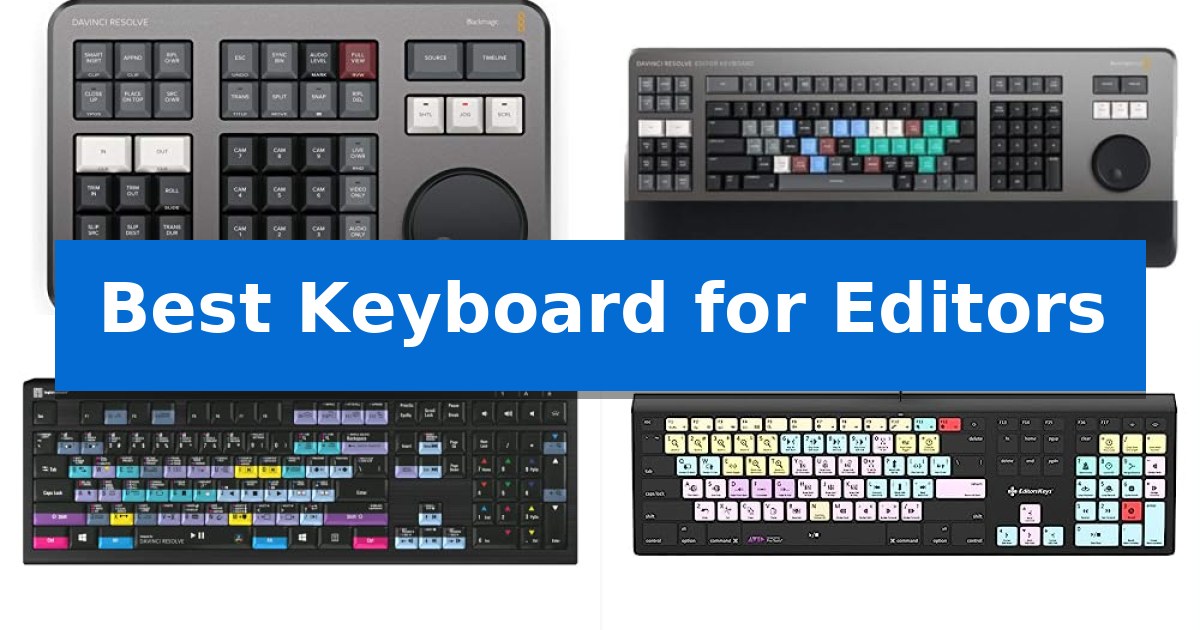
Finding the Best Keyboard for Editors requires moving beyond standard typing peripherals to tools designed specifically for non-linear editing software. Whether you are cutting high-resolution video or mixing complex audio tracks, the right interface can significantly reduce the time spent navigating menus and searching for obscure commands.
Our selection focuses on hardware that integrates directly with professional software suites like DaVinci Resolve, Avid Pro Tools, and Media Composer. By prioritizing dedicated search wheels, color-coded shortcut keys, and tactile feedback, these tools help you maintain focus on your creative output rather than the mechanics of your software.
Best Keyboard for Editors in 2026: Tactile Control for Faster Editing
Quick Comparison
| Product | Best For | Key Strength | Score |
|---|---|---|---|
| Blackmagic Design DaVinci Resolve Speed Editor | Best Overall | Tactile search dial for rapid timeline navigation. | 4.9 |
| Blackmagic Design DaVinci Resolve Editor Keyboard | Professional Full-Size Editing Console | Integrated search wheel for precise and fast timeline scrubbing. | 4.7 |
| Logickeyboard ASTRA2 DaVinci Resolve Keyboard | Backlit Shortcuts for Low-Light Studios | Dedicated DaVinci Resolve shortcuts printed directly on keys | 4.8 |
| Editors Keys Avid Pro Tools Keyboard | Streamlined Audio Editing Commands | Color-coded keys with dedicated Pro Tools shortcuts and icons. | 4.8 |
| Editors Keys Avid Media Composer Keyboard | Optimized Workflow for Avid Editors | Color-grouped shortcuts for faster command identification | 4.3 |
How We Chose
- Software Integration: We prioritized devices with native support for specific editing platforms to ensure seamless command mapping.
- Tactile Feedback: We assessed the presence of physical controls like jog wheels and dedicated function keys that replace repetitive mouse movements.
- Build and Ergonomics: We examined the physical construction, including backlighting for low-light environments and overall durability for long editing sessions.
- Connectivity Standards: We verified the interface requirements, such as USB-C or USB-A, to ensure compatibility with modern workstation setups.
- Portability and Footprint: We evaluated the physical size of each unit to determine its suitability for both fixed studio desks and mobile editing rigs.
1 Blackmagic Design DaVinci Resolve Speed Editor — Tactile Control for Faster Editing
The Blackmagic Design DaVinci Resolve Speed Editor centers its design around a tactile search dial and dedicated transport keys, providing a physical interface specifically engineered to accelerate the editing and color grading process. By shifting common operations from keyboard shortcuts to a physical controller, it aims to streamline post-production workflows for editors who rely on high-frequency adjustments.
This hardware controller features a compact, portable design measuring 9.64 x 6.14 x 1.73 inches and weighing 27.5 ounces, allowing it to fit into mobile setups without significant bulk. It connects via a USB Type-C port, which handles both data and power, ensuring a stable connection to your workstation.
Compatibility is straightforward, as the device integrates with both macOS (10.15 Catalina or later) and Windows 10 (64-bit) environments. The layout is optimized for precision editing, with buttons mapped to common functions that allow for rapid navigation through timelines and detailed color corrections.
While it offers a specialized interface for professional-grade software, users should note that its functionality is tied to the DaVinci Resolve ecosystem. It serves as a dedicated tool for those looking to replace mouse-heavy navigation with a more tactile, hardware-based approach to video assembly.
Best for: Professional video editors and colorists who use DaVinci Resolve and want to replace mouse-based navigation with a tactile, hardware-driven workflow.
Skip if: Editors who use software other than DaVinci Resolve or those who prefer a standard QWERTY keyboard layout for all their editing commands.
PROS
- Tactile search dial for rapid timeline navigation.
- Compact and lightweight form factor for portability.
- USB Type-C connectivity for stable power and data transfer.
- Dedicated controls for faster editing and color grading.
CONS
- Limited to DaVinci Resolve software compatibility.
- Requires learning a new hardware-specific interface.
2 Blackmagic Design DaVinci Resolve Editor Keyboard — Professional Full-Size Editing Console
The Blackmagic Design DaVinci Resolve Editor Keyboard is engineered specifically for professional editors who need to accelerate their workflow and increase output speed. By integrating a dedicated search wheel directly into the hardware, this console allows for precise navigation through timelines and clips, moving beyond the limitations of standard peripheral inputs.
This full-size keyboard is purpose-built for DaVinci Resolve 16, ensuring that the layout and integrated controls align with the software's specific editing architecture. The inclusion of the integrated search wheel provides a tactile method for scrubbing through footage, which is a significant departure from mouse-based timeline management.
Measuring approximately 25 inches in length and weighing over 6 pounds, the unit occupies a substantial footprint on a workstation. Its physical design prioritizes a professional editing environment where quick turnaround times are a primary requirement. The build reflects a focus on high-volume editing tasks rather than general-purpose computing.
While it offers a specialized interface for DaVinci Resolve users, the keyboard requires a dedicated space on the desk due to its size and weight. It serves as a dedicated tool for those deeply embedded in the Blackmagic ecosystem who require a physical interface to streamline complex editing sequences.
Best for: Professional video editors who use DaVinci Resolve and require a dedicated hardware interface for faster timeline navigation.
Skip if: Users who require a compact keyboard for general office tasks or those who do not use DaVinci Resolve as their primary editing software.
PROS
- Integrated search wheel for precise and fast timeline scrubbing.
- Optimized layout specifically designed for DaVinci Resolve 16.
- Professional-grade construction built for high-volume editing workflows.
CONS
- Large physical footprint requires significant desk space.
- Limited utility outside of the DaVinci Resolve software environment.
3 Logickeyboard ASTRA2 DaVinci Resolve Keyboard — Backlit Shortcuts for Low-Light Studios
Workflow efficiency in post-production often hinges on the ability to execute complex commands without navigating nested software menus. The Logickeyboard ASTRA2 Backlit Keyboard for Davinci Resolve addresses this by integrating application-specific shortcuts directly into the keycaps, providing visual cues that streamline the editing process for Windows users.
Designed specifically for the DaVinci Resolve environment, this Windows USB keyboard features a dedicated layout that maps essential functions to individual keys. The inclusion of backlit keys is a significant functional addition, allowing editors to maintain high visibility and precision in low-light studio environments where ambient lighting is kept to a minimum.
The hardware is built with a focus on professional utility, measuring 17.625 inches in length and 6 inches in width. Its construction includes a 2-year warranty, reflecting a commitment to durability for daily workstation use. The wired USB connection ensures a consistent, latency-free link between the input device and the editing machine, which is critical for time-sensitive production tasks.
While this device is highly specialized, its utility is tied directly to the DaVinci Resolve software ecosystem. It serves as a dedicated tool for those who prioritize tactile, labeled control over generic input devices, effectively reducing the learning curve for complex software commands through its intuitive, color-coded interface.
Best for: Professional video editors using DaVinci Resolve on Windows who require visual shortcut references and backlighting for low-light studio environments.
Skip if: Users who require a multi-purpose keyboard for general typing or those who do not use DaVinci Resolve as their primary editing software.
PROS
- Dedicated DaVinci Resolve shortcuts printed directly on keys
- Backlit keys for improved visibility in dark editing suites
- Reliable wired USB connection
- Includes a 2-year warranty
CONS
- Highly specialized layout limits use for general-purpose typing
- Requires Windows compatibility
4 Editors Keys Avid Pro Tools Keyboard — Streamlined Audio Editing Commands
Navigating complex audio timelines requires precision, and the Editors Keys Avid Pro Tools Keyboard simplifies this by placing essential software shortcuts directly on the keycaps. Designed specifically for the Mac ecosystem, this peripheral eliminates the need to memorize intricate command sequences, allowing for a more fluid editing experience.
The keyboard features backlit keys, which provide enhanced visibility in dim studio environments. Each key is clearly marked with Pro Tools icons and text, utilizing a color-coded layout to group related functions. This visual organization is intended to reduce the time spent searching through menus, keeping the focus on the audio project.
Built with an elegant and durable design, the unit features a sleek black finish that integrates well with professional workstations. The keys are engineered for longevity, ensuring they can withstand the repetitive input required during long editing sessions.
Installation is straightforward with plug-and-play convenience. There is no requirement for additional software or complex configuration; the keyboard is ready to function immediately upon connection to a Mac, making it a practical addition to any existing audio production setup.
Best for: Audio editors and sound engineers using Avid Pro Tools on a Mac who want to accelerate their workflow through dedicated shortcut keys.
Skip if: Users who require a wireless connection or those who do not use Avid Pro Tools as their primary editing software.
PROS
- Color-coded keys with dedicated Pro Tools shortcuts and icons.
- Backlit keys for improved visibility in low-light conditions.
- Plug-and-play setup requiring no additional software.
- Durable construction designed for intensive editing use.
CONS
- Wired connection only, which may not suit all desk setups.
- Software-specific layout limits utility for general-purpose tasks.
5 Editors Keys Avid Media Composer Keyboard — Optimized Workflow for Avid Editors
The Editors Keys Avid Media Composer Keyboard is engineered to accelerate professional editing workflows through its integrated colour-grouped shortcut keys. By color-coding specific functions, this keyboard allows editors to locate essential commands instantly, which the manufacturer claims can help users edit over 40% faster compared to standard layouts. This design choice removes the cognitive load of searching for complex key combinations, allowing for a more fluid interaction with the software.
Designed specifically for Mac users, the hardware features three levels of backlighting, providing visibility in low-light editing suites or late-night sessions. The layout is purpose-built for Avid Media Composer, ensuring that every key corresponds to the software's native command set without the need for custom mapping or external overlays. This native integration ensures that the keyboard is ready for use immediately upon connection.
Beyond its specialized keycaps, the unit maintains a standard full-sized form factor, measuring approximately 20.47 inches in length and weighing 2.2 pounds. This provides a stable typing experience suitable for long-term use in professional post-production environments where reliability and consistent tactile feedback are required.
While this keyboard offers significant efficiency gains for Avid users, it is a dedicated tool. Its primary trade-off is its specialized nature; the layout is optimized strictly for one software suite, which may limit its utility for editors who frequently switch between different non-linear editing platforms or those who require a more versatile, multi-purpose input device.
Best for: Professional video editors who work extensively in Avid Media Composer and require a dedicated, backlit shortcut interface to improve speed and accuracy.
Skip if: Editors who frequently switch between multiple software platforms like Adobe Premiere Pro or DaVinci Resolve, as the specialized keycaps are specific to Avid.
PROS
- Color-grouped shortcuts for faster command identification
- Three levels of backlighting for low-light environments
- Dedicated Avid Media Composer layout eliminates the need for manual mapping
CONS
- Software-specific layout limits versatility for other applications
Best Keyboard for Editors Buying Guide
Understanding Specialized Editing Interfaces
Unlike standard office keyboards, editing-specific hardware often includes dedicated search wheels or jog-shuttle controls. These components allow for frame-by-frame navigation, which is essential for precise video cutting and audio alignment. When choosing a device, consider whether you need a full-sized keyboard replacement or a secondary controller to sit alongside your existing setup.
Compatibility is the primary constraint. Many of these devices are hard-coded for specific software suites. Ensure that the device you select is explicitly designed for the version of the software you use, as shortcut mappings can vary significantly between different releases and platforms.
The Importance of Shortcut Mapping
The primary benefit of a dedicated editing keyboard is the color-coded key layout. These keyboards feature icons and text printed directly on the keys, representing specific software commands. This visual aid reduces the cognitive load required to memorize complex key combinations, allowing for a more intuitive editing experience.
For editors working in dimly lit studios, backlit keys are a critical feature. They ensure that your shortcuts remain visible during late-night sessions without requiring additional desk lighting that could interfere with your monitor's color accuracy.
Connectivity and Integration
Most professional editing consoles utilize USB connectivity to ensure a stable, low-latency connection. While wireless options exist in the general market, wired connections are preferred in professional environments to avoid potential interference or battery-related downtime during critical export or rendering tasks.
Check your workstation's available ports. While many modern devices use USB Type-C, some legacy or specialized consoles may still rely on USB-A. Using a high-quality hub or adapter is possible, but a direct connection is always the most reliable method for hardware controllers.
Ergonomics for Long Sessions
Editing can involve hours of repetitive motion. A keyboard with a comfortable key travel distance and a stable base is essential for preventing fatigue. Some professional consoles are designed with a specific incline to keep your wrists in a neutral position, which is vital for long-term comfort.
Consider the footprint of the device. A full-sized console provides more dedicated keys but takes up significant desk space. If you have a smaller workspace, a compact controller that focuses on the most frequently used functions may be a more practical choice.
Durability and Build Quality
Professional editing gear is an investment. Look for devices constructed with durable materials that can withstand the rigors of daily use. Keys should be rated for a high number of actuations, and any moving parts, such as search wheels, should feel robust and precise.
Warranty support is another factor to consider. Since these are specialized tools, having a manufacturer that offers a multi-year warranty provides peace of mind, ensuring that your workflow remains uninterrupted by hardware failure.
Frequently Asked Questions
Can I use an editing keyboard for general typing?
Yes, most editing keyboards function as standard QWERTY keyboards, but the extra icons and color-coding may be distracting for everyday tasks.
Do I need special drivers for these keyboards?
Many of these devices are plug-and-play, but some may require specific software updates or configuration within your editing application to enable all shortcut functions.
Are these keyboards compatible with both Mac and Windows?
Compatibility varies by model. Always check the product specifications to ensure the device supports your specific operating system, as some are tailored exclusively for one platform.
What is the benefit of a search wheel?
A search wheel allows for precise, analog-style control over timeline scrubbing, making it much faster to find specific frames compared to using a mouse or keyboard arrows.
Are these keyboards worth the investment for beginners?
If you are learning an editing suite, these keyboards can significantly speed up the learning process by keeping shortcuts visible at all times.
Conclusion: Our Top Pick
For editors seeking the most significant improvement in their post-production speed, the Blackmagic Design DaVinci Resolve Speed Editor stands out as the most effective tool. Its combination of a high-quality search wheel and dedicated function keys provides a tactile experience that standard keyboards cannot replicate, effectively offloading repetitive navigation tasks from your mouse.
While it is designed specifically for DaVinci Resolve, its compact, portable design makes it an excellent addition to any professional's desk. If your workflow relies heavily on this software, this controller offers a direct path to more efficient editing, provided you are prepared to integrate its specific layout into your daily routine.