
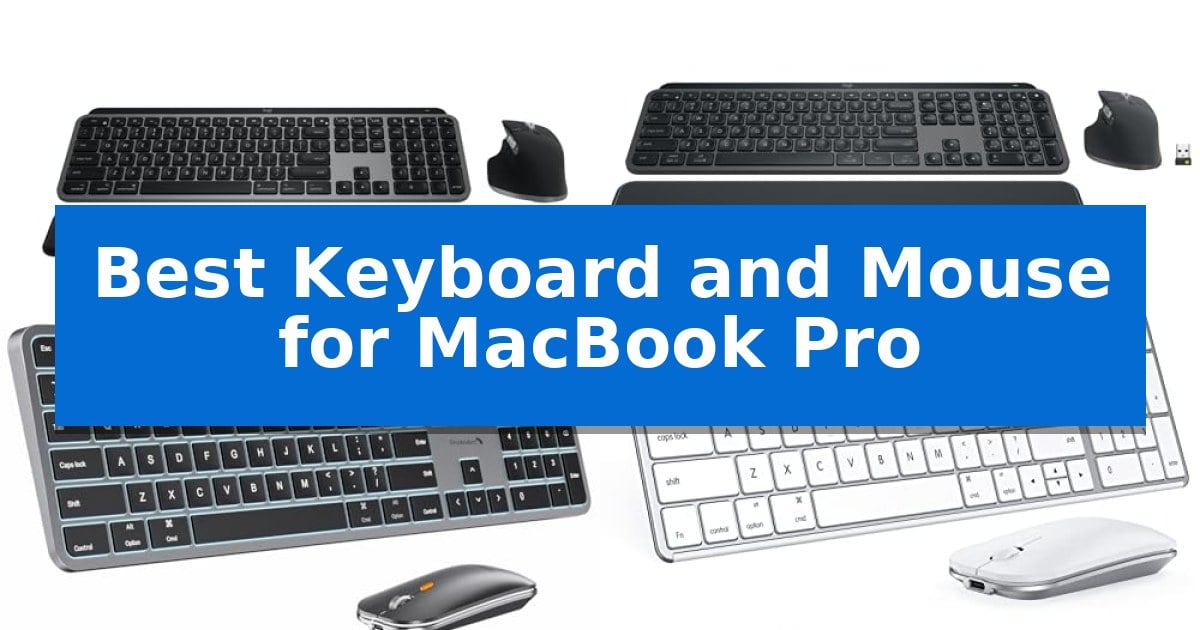
Finding the Best Keyboard and Mouse for MacBook Pro requires balancing native macOS integration with the physical comfort needed for long work sessions. Because Apple devices often utilize specific function keys and Bluetooth protocols, selecting peripherals that support these features out of the box is essential for a seamless desktop experience.
Whether you prioritize a compact footprint for travel or a full-size layout for data entry, the right input devices can significantly improve your daily workflow. We have evaluated several leading wireless combos to help you identify which setup aligns best with your specific desk space and productivity requirements.
Best Keyboard and Mouse for MacBook Pro in 2026
Quick Comparison
| Product | Best For | Key Strength | Score |
|---|---|---|---|
| Logitech MX Keys S Combo Mac | Best Overall | Mac-specific layout and Space Gray finish for seamless Apple integration | 4.9 |
| Logitech MX Keys S Combo | Fast Scrolling and Precision Tracking | MagSpeed scroll wheel for rapid, precise navigation. | 4.6 |
| ProtoArc KM100-A Keyboard and Mouse | Backlit Keys for Dim Environments | Full-size Mac layout with a dedicated numeric keypad for increased efficiency. | 4.5 |
| seenda SKM64-2 Keyboard and Mouse | Ultra-Slim Design for Portability | Multi-device Bluetooth switching across three channels. | 4.7 |
| Macally Bluetooth Keyboard and Mouse | Full-Size Layout with Scissor Switches | Multi-device connectivity allows switching between three devices via Bluetooth. | 4.9 |
How We Chose
- Native macOS compatibility and function key support
- Wireless connectivity stability and multi-device switching capabilities
- Ergonomic design and typing profile for extended use
- Battery life and charging convenience via USB-C
- Build quality and footprint relative to desk space
1 Logitech MX Keys S Combo Mac — Premium Performance for Mac Power Users
The Logitech MX Keys S Combo Mac streamlines your workspace with a dedicated Mac-specific key layout and a cohesive Space Gray finish designed to integrate seamlessly with your Apple ecosystem. This set pairs a low-profile, tactile keyboard with the high-precision MX Master 3S mouse, offering a unified control solution for MacBook Pro, MacBook Air, and iPad users.
Typing on the keyboard feels fluid thanks to its laptop-like profile and spherically dished keys that cradle your fingertips. The smarter illumination feature detects your hands as they approach, automatically adjusting brightness to match your environment, which can be further customized via the Logi Options+ software.
The included mouse features the MagSpeed scroll wheel, capable of scrolling 1,000 lines per second, alongside an 8K DPI sensor that maintains tracking accuracy on diverse surfaces, including glass. Both devices are engineered for ergonomic comfort, promoting better wrist posture during extended work sessions.
Connectivity is a major strength, as the combo supports pairing with up to three devices via Bluetooth Low Energy. You can switch between your Mac computers and iPads with a single button press, while the USB-C charging ensures your peripherals remain powered without the need for disposable batteries.
Best for: Mac power users who require a high-precision, multi-device workflow with a consistent aesthetic across their Apple hardware.
Skip if: Users who prefer mechanical switches with deep travel or those who require a wired connection for specific low-latency environments.
PROS
- Mac-specific layout and Space Gray finish for seamless Apple integration
- MagSpeed scrolling and 8K DPI sensor for high-precision navigation
- Multi-device switching across up to three Bluetooth-connected devices
- Smarter illumination that activates based on hand proximity
CONS
- Non-mechanical key switches may not suit users who prefer significant tactile travel
- Fixed-angle design lacks adjustable height legs
2 Logitech MX Keys S Combo — Fast Scrolling and Precision Tracking
The Logitech MX Keys S Combo streamlines professional workflows by pairing a high-precision, sculpted wireless mouse with a low-profile, tactile keyboard. This combination is engineered to support extended work sessions, featuring a stable keyboard design with an optimized typing angle and a mouse shaped to encourage natural wrist posture.
The keyboard utilizes a spherically-dished key profile designed for fingertip comfort, providing a quiet and fluid typing experience. Its smarter illumination system detects hand proximity, automatically adjusting backlight intensity based on ambient lighting conditions to maintain visibility throughout the day.
For navigation, the included mouse features an 8K DPI sensor capable of tracking on virtually any surface, including glass. Productivity is further enhanced by the MagSpeed scroll wheel, which allows for rapid scrolling through long documents or codebases, and the Logi Options+ app, which enables the creation of custom Smart Actions to automate repetitive multi-step tasks.
Connectivity is versatile, supporting up to three devices simultaneously across macOS, Windows, and Linux. Users can connect via Bluetooth Low Energy or the included Logi Bolt USB receiver, ensuring reliable performance in various desk setups.
Best for: Professionals and creators who require a high-precision, multi-device input solution for extended daily use on a MacBook Pro.
Skip if: Users who prefer mechanical switches with significant key travel or those who require a compact, tenkeyless layout for limited desk space.
PROS
- MagSpeed scroll wheel for rapid, precise navigation.
- Spherically-dished keys designed for fluid, quiet typing.
- Multi-device connectivity for up to three systems.
- Smart illumination that adapts to ambient light.
CONS
- Full-size layout may be too large for minimalist workspaces.
3 ProtoArc KM100-A Keyboard and Mouse — Backlit Keys for Dim Environments
The ProtoArc KM100-A Backlit Bluetooth Keyboard and Mouse offers a dedicated full-size layout designed specifically for macOS, featuring a numeric keypad that mirrors the utility of a standard desktop experience. This wireless set provides a seamless connection for MacBook Pro users through triple Bluetooth channels, allowing for quick switching between up to three devices with a simple button press.
Designed with a focus on ergonomics and comfort, the keyboard utilizes a flat profile to encourage a neutral wrist position during extended typing sessions. The keys are built with responsive scissor switches that prioritize quiet operation, making this setup suitable for shared workspaces or quiet home offices. For low-light conditions, the keyboard includes soft white LED backlighting with three adjustable brightness levels.
The included mouse enhances productivity with three adjustable DPI levels (1000/1600/2400), allowing users to customize cursor sensitivity to their specific workflow needs. Both devices are rechargeable via built-in batteries—1200mAh for the keyboard and 300mAh for the mouse—and include an automatic sleep mode that triggers after 60 minutes of inactivity to preserve power.
While this set is optimized for Mac environments, it requires a Bluetooth-only connection, meaning no USB dongle is included or supported. Users should also note that the full-size design provides a comprehensive typing experience but occupies more desk real estate than compact or tenkeyless alternatives.
Best for: Users who require a full-size, backlit keyboard and mouse setup with multi-device switching capabilities for a Mac-centric workspace.
Skip if: Users who prefer a compact, portable keyboard or those who require a USB receiver for environments where Bluetooth connectivity is unavailable or unreliable.
PROS
- Full-size Mac layout with a dedicated numeric keypad for increased efficiency.
- Triple Bluetooth connectivity allows for easy switching between three devices.
- Adjustable white LED backlighting provides visibility in dim environments.
- Rechargeable batteries in both the keyboard and mouse eliminate the need for disposable cells.
CONS
- Larger footprint requires more desk space compared to compact keyboard models.
- Bluetooth-only connection limits compatibility to devices with Bluetooth support.
4 seenda SKM64-2 Keyboard and Mouse — Ultra-Slim Design for Portability
The seenda SKM64-2 Keyboard and Mouse features an ultra-thin metal design, measuring just 0.12 inches for the keyboard and 0.9 inches for the mouse, making it a highly portable solution for users who frequently move between workspaces. This combo is built with a standard Apple layout, ensuring that the function keys and command keys align with the macOS experience.
Designed for the Apple ecosystem, this set supports macOS 10.12+, iPadOS 13.0+, and iOS 13.0+. It utilizes three distinct Bluetooth channels, allowing users to switch seamlessly between a MacBook Pro, iPad, or iPhone with the press of a button. Note that this system relies exclusively on Bluetooth 4.0 or higher, as it does not include a USB receiver or wired connection option.
For those working in shared environments, the keyboard is engineered to be whisper-quiet, utilizing enhanced key stability to reduce noise while maintaining tactile responsiveness. The mouse complements this with a quiet click mechanism, suitable for libraries, offices, or late-night study sessions where minimizing sound is a priority.
The combo prioritizes convenience through Type-C rechargeability, eliminating the need for disposable batteries. With an integrated auto-sleep function and a dedicated on/off switch, the device manages power consumption to provide up to 200 hours of standby time. Constructed from stainless steel and premium ABS, the set balances durability with a sleek, modern aesthetic.
Best for: Multi-device Apple users who require a slim, quiet, and rechargeable peripheral set for travel or shared workspaces.
Skip if: Users who require a wired connection, a USB receiver, or full compatibility with Windows operating systems.
PROS
- Multi-device Bluetooth switching across three channels.
- Type-C rechargeable battery with 200-hour standby.
- Ultra-slim metal design for high portability.
- Whisper-quiet keys and mouse clicks for quiet environments.
CONS
- No USB receiver or wired connectivity options.
- Limited compatibility with non-Apple operating systems.
5 Macally Bluetooth Keyboard and Mouse — Full-Size Layout with Scissor Switches
The Macally Bluetooth Keyboard and Mouse provides a dedicated, full-size typing experience designed to integrate seamlessly with your workspace. This combo features a 110-key layout with scissor switch keys and 20 shortcut keys, offering a tactile response tailored for daily tasks and navigation on your MacBook Pro.
Beyond its primary focus on Mac systems, this set offers multi-device Bluetooth connectivity, allowing you to pair and switch between three different devices, such as a phone or tablet, alongside your computer. The mouse includes 3 DPI modes for adjustable cursor sensitivity, ensuring control that matches your workflow requirements.
Power management is handled through built-in rechargeable batteries, with an 800mAh capacity for the keyboard and 300mAh for the mouse. A charging cable is included to maintain runtime. The unit features an aluminum silver finish and weighs approximately 0.99 pounds, balancing a stable footprint with a professional aesthetic.
This hardware is supported by a 2-year warranty, providing long-term coverage for your peripheral investment. The combination of a full-size keyboard and a silent mouse offers a comprehensive solution for users who prefer a traditional layout over the compact design of built-in laptop keyboards.
Best for: Users who require a full-size, multi-device wireless keyboard and mouse combo with a dedicated numeric keypad and Mac-specific shortcuts.
Skip if: Users who prefer a compact, ultra-portable setup or those who require a mechanical switch feel rather than the low-profile scissor switch design.
PROS
- Multi-device connectivity allows switching between three devices via Bluetooth.
- Full-size layout includes a numeric keypad and 20 dedicated shortcut keys.
- Rechargeable batteries eliminate the need for disposable battery replacements.
- 2-year warranty provides extended manufacturer support.
CONS
- Full-size design occupies more desk space than compact or tenkeyless alternatives.
Best Keyboard and Mouse for MacBook Pro Buying Guide
Connectivity and Compatibility
The most critical factor when selecting a keyboard and mouse for your MacBook Pro is how it connects. Most modern peripherals use Bluetooth Low Energy, which is ideal for maintaining a clean desk without the need for USB dongles. Ensure your chosen hardware explicitly supports macOS layout to avoid confusion with command, option, and control key placements.
If you work across multiple devices, such as an iPad and a secondary Mac, look for hardware that supports multi-device switching. This feature allows you to toggle between connected devices with a single button press, significantly reducing the time spent re-pairing Bluetooth connections throughout your day.
Ergonomics and Typing Feel
Keyboard switches define your typing experience. Scissor switches are common in low-profile keyboards, offering a short, tactile travel distance that mimics the feel of a laptop keyboard. If you prefer a more mechanical feel, ensure the keyboard is designed with a stable base to prevent flexing during rapid typing.
For the mouse, consider the shape and size. A sculpted mouse that supports your palm can help maintain better wrist posture over long periods. If you perform precise work like photo editing or design, look for sensors with adjustable DPI settings to match your cursor speed preferences.
Backlighting and Visibility
Smart backlighting is a valuable feature for those who work in dim environments. Some keyboards include proximity sensors that illuminate the keys the moment your hands approach, which helps save battery life while ensuring you can always see your keys. This is particularly useful for late-night editing or coding sessions.
Check if the backlighting is adjustable. Being able to control the brightness levels allows you to balance visibility with power consumption. Some models also offer automatic ambient light adjustment, which dims or brightens the keys based on the light levels in your room.
Power Management
Rechargeable batteries have largely replaced disposable ones in high-end peripherals. Look for devices that charge via USB-C, as this allows you to use the same cables you likely already have for your MacBook Pro. This reduces cable clutter and ensures you are not caught off guard by a dead battery.
Pay attention to the standby features. Many modern keyboards and mice enter an auto-sleep mode after a period of inactivity. This is a crucial power-saving feature that extends the time between charges, often allowing for weeks or even months of use on a single cycle.
Size and Portability
Your choice between a full-size layout and a compact design should depend on your available desk space and the need for a numeric keypad. Full-size keyboards are excellent for finance or data-heavy tasks but require more room. Compact keyboards are better for smaller desks or users who travel frequently with their gear.
Consider the material construction as well. Ultra-slim designs made from metal or high-quality ABS plastic are often more durable and easier to slide into a laptop bag. However, ensure that the slim profile does not compromise the stability of the keyboard when placed on a desk surface.
Frequently Asked Questions
Do these keyboards work with Windows?
Many of these Bluetooth-enabled keyboards are compatible with multiple operating systems, including Windows, though they are optimized for the Mac layout.
Can I use these without a USB receiver?
Yes, all the models listed support Bluetooth connectivity, which allows you to connect directly to your MacBook Pro without needing a USB dongle.
How do I know if the keyboard has a Mac layout?
Look for keys labeled with Command and Option symbols. Most keyboards designed for Mac will match the layout of your MacBook Pro's built-in keyboard.
Are these keyboards quiet?
Most of the models featured use scissor switches or low-profile designs, which are generally quieter than traditional mechanical keyboards.
How long does the battery last?
Battery life varies by usage and backlighting settings. Most rechargeable models offer several weeks of use on a single charge with typical daily usage.
Conclusion: Our Top Pick
For users seeking the most seamless integration with their Apple ecosystem, the Logitech MX Keys S Combo Mac stands out as the most capable option. Its dedicated Mac layout, programmable functions via Logi Options+, and high-precision scrolling make it a reliable choice for power users who spend their entire day in macOS.
While it commands a higher price point, the combination of a comfortable, backlit typing experience and a highly responsive mouse provides a level of efficiency that is difficult to match. If you require a full-size, stable, and long-lasting input solution, this combo offers the best balance of features and performance for your MacBook Pro.