
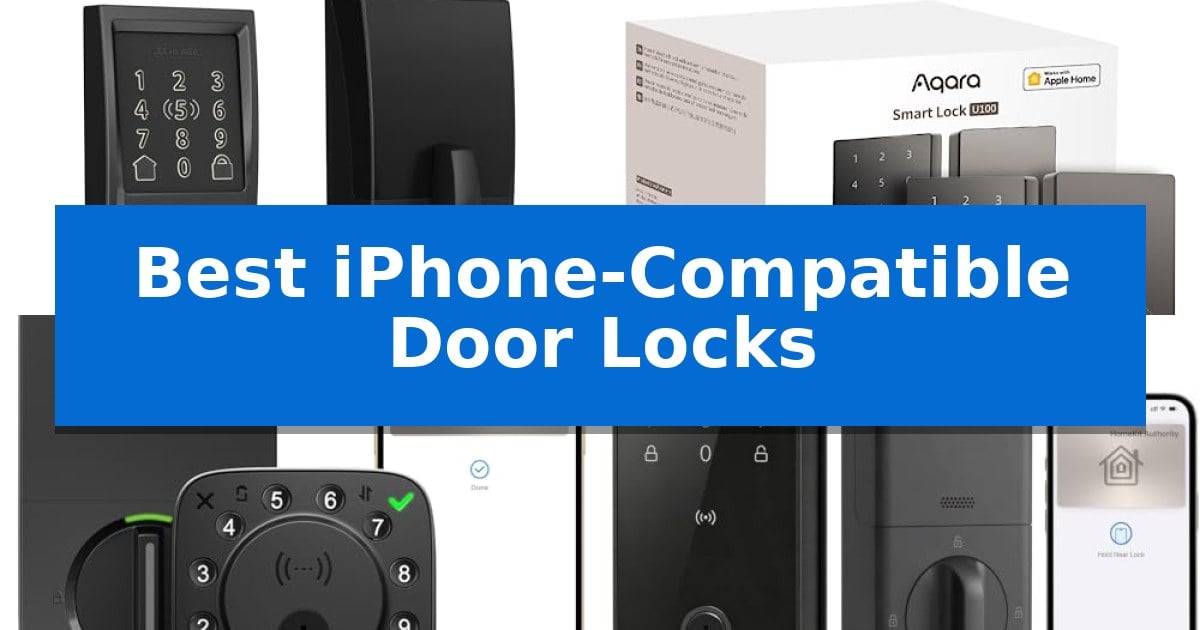
Upgrading your home security with a smart lock offers unparalleled convenience, especially when it integrates seamlessly with your existing Apple ecosystem. The Best iPhone-Compatible Door Locks allow you to ditch physical keys in favor of secure, digital access methods like Apple Home Key, which lets you unlock your door by simply tapping your iPhone or Apple Watch.
Whether you are looking for biometric fingerprint scanning, remote management via Wi-Fi, or robust Apple HomeKit integration, choosing the right hardware is essential for a reliable experience. We have analyzed the leading options on the market to help you find a secure, user-friendly solution that fits your specific door setup and smart home requirements.
Best iPhone-Compatible Door Locks in 2026: Unlock with a Simple Tap
Quick Comparison
| Product | Best For | Key Strength | Score |
|---|---|---|---|
| Schlage Encode Plus Smart Deadbolt | Best Overall | Apple Home and home keys support for tap-to-unlock functionality. | 4.9 |
| Aqara Smart Lock U100 | Best Biometric Apple Home Integration | Apple Home Key support for convenient tap-to-unlock functionality. | 4.8 |
| ULTRALOQ Bolt NFC Smart Deadbolt | Versatile Multi-Platform NFC Access | Native Apple Home Key and Android NFC support for instant, phone-based unlocking. | 4.6 |
| Dreame Lite Smart Door Lock | Seamless Apple Home Key Support | Native Apple Home Key support for iPhone and Apple Watch | 4.4 |
| eufy Security Smart Lock C34 | Easy Apple Home Ecosystem Setup | Native Apple Home support for seamless iPhone integration. | 4.6 |
How We Chose
- Apple Home and Home Key compatibility for seamless iPhone and Apple Watch unlocking.
- Versatility of access methods, including fingerprint, PIN codes, and physical key backups.
- Connectivity standards such as built-in Wi-Fi, Thread, or Bluetooth for stable performance.
- Build quality and physical security certifications like BHMA ratings.
- Ease of installation and battery longevity for low-maintenance operation.
1 Schlage Encode Plus Smart Deadbolt — Gold Standard for Apple Home
Integrating smart home security into an Apple-centric ecosystem is simplified by the Schlage Encode Plus Smart WiFi Deadbolt, which features native support for Apple Home and Apple home keys. This allows users to lock or unlock their doors by simply tapping their iPhone or Apple Watch against the lock, providing a seamless entry experience without needing to fumble for physical keys.
Beyond its integration with Apple devices, the Schlage Encode Plus Smart WiFi Deadbolt includes built-in WiFi, enabling remote control and monitoring through the Schlage Home app. Users can manage up to 100 access codes, view detailed lock history, and receive customizable notifications from anywhere with an internet connection. The device also supports voice commands when paired with Amazon Alexa or Google Assistant.
Security is a primary focus for this model, which boasts a fingerprint-resistant touchscreen and a customizable built-in alarm that detects door movement or forced entry attempts. It holds the highest residential security, durability, and finish ratings from BHMA industry experts, ensuring robust protection for standard residential doors.
Installation is designed to be straightforward, requiring only a screwdriver and no complex hardwiring. The Snap ‘n Stay design holds the lock in place on the door during the installation process, allowing for a one-person setup. It is compatible with standard door thicknesses ranging from 1-3/8 inches to 1-3/4 inches and supports both 2-3/8 inch and 2-3/4 inch backsets.
Best for: Homeowners deeply integrated into the Apple ecosystem who prioritize tap-to-unlock convenience and remote WiFi management.
Skip if: Users who do not have a standard door thickness or backset, or those who prefer a non-WiFi, purely offline smart lock solution.
PROS
- Apple Home and home keys support for tap-to-unlock functionality.
- Built-in WiFi for remote access and monitoring without a separate hub.
- BHMA certified for high-level residential security and durability.
- Snap ‘n Stay design simplifies the installation process.
CONS
- Requires a stable WiFi connection for remote management features.
- Limited to specific door dimensions and backset configurations.
2 Aqara Smart Lock U100 — Best Biometric Apple Home Integration
Integrating a smart lock into an Apple ecosystem requires seamless connectivity, and the Aqara Smart Lock U100 addresses this by offering native support for Apple Home and Home Key. This deadbolt allows users to unlock their door by simply tapping an iPhone or Apple Watch against the lock, providing access even when the device is out of power.
Beyond its Apple integration, the Aqara Smart Lock U100 provides flexible entry methods, including a high-precision fingerprint reader capable of storing up to 50 unique prints. For additional security, the device utilizes local storage for sensitive data, ensuring that biometric information remains encrypted and stored on the hardware itself.
The lock is built for durability with a zinc alloy body and an IP65 weatherproof rating, allowing it to function in extreme temperatures ranging from -31°F to 151°F. It is powered by 4 AA batteries, which provide a lifespan of up to 8 months, and includes a USB-C port for emergency power if the batteries are fully depleted.
Automation enthusiasts can leverage the Aqara Smart Lock U100 through an Aqara Zigbee 3.0 hub to connect with third-party ecosystems like Alexa, Google Home, and IFTTT. The built-in gyroscope enables an auto-lock feature that secures the door once closed, while a Do Not Disturb mode allows users to silence audible alerts during late-night hours.
Best for: The Aqara Smart Lock U100 is best for Apple users seeking seamless Home Key integration and a variety of biometric entry options.
Skip if: Skip this model if you do not own an Apple Home Hub, as it is required to share Apple Home Keys with guests.
PROS
- Apple Home Key support for convenient tap-to-unlock functionality.
- High-precision fingerprint reader with capacity for 50 users.
- IP65 weatherproof rating for reliable outdoor performance.
- Local AES encryption for enhanced data privacy.
CONS
- Requires an Aqara Zigbee 3.0 hub for full third-party ecosystem integration.
- Apple Home Hub needed for sharing digital keys with guests.
3 ULTRALOQ Bolt NFC Smart Deadbolt — Versatile Multi-Platform NFC Access
Securing your home with the ULTRALOQ Bolt NFC Smart Deadbolt offers a versatile approach to keyless entry, featuring native support for Apple Home Key and Android NFC. This deadbolt allows for instant access by simply tapping your iPhone, Apple Watch, or compatible Android device, ensuring you can enter even if your phone battery is depleted.
Beyond NFC capabilities, this 8-in-1 keyless entry system provides multiple ways to manage access, including smartphone app control, voice commands via Siri, Alexa, or Google Assistant, and up to 50 unique passcodes. The inclusion of a door sensor enables Smart Auto Lock and Auto Unlock functionality, which automatically secures the door when closed or unlocks it as you approach with your device.
Designed for durability and ease of use, the lock is built from solid zinc alloy and meets BHMA Grade 1 standards for residential security. It carries an IP65-rated weather resistance certification, protecting the internal components against dust and rain. Installation is a straightforward DIY process requiring only a screwdriver, with no complex wiring needed.
The system integrates into existing smart home setups through a 2.4GHz Wi-Fi connection, requiring no additional bridge for remote management. Users can share eKeys or codes for temporary access, making it a practical choice for Airbnb hosts or apartment management. The device is powered by 8 AA batteries, rated for up to one year of regular use.
Best for: Homeowners and renters seeking a versatile, multi-platform smart lock that supports both Apple Home Key and Android NFC for seamless, phone-based entry.
Skip if: Users who rely on 5GHz Wi-Fi networks exclusively, as this device requires a 2.4GHz connection for remote app features and smart home integration.
PROS
- Native Apple Home Key and Android NFC support for instant, phone-based unlocking.
- BHMA Grade 1 certified construction using solid zinc alloy for high durability.
- Versatile 8-in-1 entry methods including voice control, app access, and physical keys.
- IP65-rated weather resistance ensures reliable performance in various outdoor conditions.
CONS
- Requires a 2.4GHz Wi-Fi network for remote control and smart home features.
- Router placement sensitivity requires the hub to be within 70 feet for optimal connectivity.
4 Dreame Lite Smart Door Lock — Seamless Apple Home Key Support
Integrating your home security with your Apple ecosystem is simplified by the Dreame Lite Smart Door Lock, which features native Apple Home Key support. This allows you to unlock your front door by simply tapping your iPhone or Apple Watch against the lock, providing a seamless entry experience without needing to fumble for keys or remember passcodes.
Beyond its primary Apple integration, the Dreame Lite Smart Door Lock offers versatile access methods, including AI fingerprint recognition, customizable PIN codes, and NFC cards. The unit is powered by 8 AA batteries, which are rated for up to 12 months of battery life. If the power runs low, a USB-C emergency power port is located on the device to ensure you are never locked out.
Installation is designed for standard US doors without requiring professional tools or drilling. The lock is constructed from durable aluminum alloy and carries an IP54 water-resistant rating, allowing it to function in temperatures ranging from 14°F to 131°F. Note that this specific model is engineered exclusively for left-handed doors.
Connectivity is managed via Bluetooth through the DREAME NAVO App, which allows for remote management and instant alerts. While the lock supports Apple Home features, users should ensure they have a Home Hub—such as a HomePod or Apple TV—to enable remote control and guest access sharing. The device maintains a stable connection when your iPhone is within 50 feet of the lock.
Best for: Users deeply integrated into the Apple ecosystem who require Apple Home Key functionality and a left-handed door configuration.
Skip if: Homeowners with right-handed doors or those who require a Wi-Fi-native lock without the need for a separate Apple Home Hub.
PROS
- Native Apple Home Key support for iPhone and Apple Watch
- Multiple access methods including AI fingerprint and NFC
- Long 12-month battery life with USB-C emergency backup
- IP54 water-resistant aluminum alloy construction
CONS
- Not compatible with right-handed doors
- Requires a Home Hub for remote Apple Home control
5 eufy Security Smart Lock C34 — Easy Apple Home Ecosystem Setup
Integrating home security into your existing Apple ecosystem is simplified with the eufy Security Smart Lock C34, which features native Apple Home support. This allows users to manage front or back door access directly through the Apple Home app on an iPhone, providing a streamlined experience for monitoring event logs and handling guest access without needing a separate bridge or hub.
The eufy Security Smart Lock C34 is designed for versatility, offering multiple entry methods including app control, a physical keypad, a traditional key, and voice commands via Amazon Alexa, Google Assistant, or Apple Home. This flexibility ensures that every family member can access the home using their preferred method, while the built-in Wi-Fi connectivity facilitates remote management and real-time notifications from anywhere.
Installation is straightforward, requiring only about 15 minutes on standard doors in the US and Canada without the need for additional drilling. The device is powered by 8 AA batteries, which provide up to 8 months of battery life based on typical usage of 10 unlocks per day. For long-term peace of mind, the lock includes 18 months of electronic protection and 36 months of mechanical coverage.
While the device offers robust smart home integration, users should note that its reliance on standard AA batteries requires periodic maintenance compared to hardwired alternatives. However, the Matter support and broad compatibility with SmartThings make it a highly adaptable choice for those looking to unify their smart home automation under a single, reliable interface.
Best for: Homeowners invested in the Apple Home ecosystem who want a hub-free, easy-to-install smart lock with multiple entry options.
Skip if: Users who prefer a hardwired power solution or those who require advanced biometric features like fingerprint scanning.
PROS
- Native Apple Home support for seamless iPhone integration.
- No hub required due to built-in Wi-Fi connectivity.
- Versatile access options including app, keypad, and voice control.
- Easy 15-minute installation on standard doors.
CONS
- Battery-powered operation requires periodic replacement of 8 AA batteries.
- No integrated biometric scanner for fingerprint entry.
Best iPhone-Compatible Door Locks Buying Guide
Understanding Apple Home Key Integration
The most significant feature for iPhone users is Apple Home Key support. This technology utilizes the NFC chip in your iPhone or Apple Watch to unlock your door with a simple tap, similar to using Apple Pay. It is highly secure and often functions even if your device battery is low, providing a reliable alternative to traditional keys.
When shopping, verify if the lock requires a specific hub to enable remote access or if it supports built-in Wi-Fi. While some locks rely on Bluetooth for local control, a hub or Wi-Fi connection is necessary if you want to manage access codes, view logs, or lock/unlock your door while away from home.
Biometric vs. Keypad Access
Many modern smart locks offer multiple entry methods to ensure you are never locked out. Fingerprint scanners provide the fastest entry, allowing you to unlock your door in a single motion. Look for high-precision sensors that can store multiple prints for family members.
Alternatively, touchscreen keypads are a reliable backup. Many models include features like anti-peep technology, which allows you to enter random digits before or after your actual code to prevent onlookers from guessing your PIN based on fingerprint smudges.
Security and Durability Standards
A smart lock must be a physical security device first and a tech gadget second. Look for BHMA (Builders Hardware Manufacturers Association) certification, which rates locks on security, durability, and finish. A Grade 1 rating indicates the highest level of residential security available.
Consider the IP rating if the lock will be exposed to the elements. An IP65 or higher rating ensures the internal electronics are protected against dust and rain, which is critical for front doors that do not have significant overhead cover.
Installation and Door Compatibility
Most smart deadbolts are designed for DIY installation using only a screwdriver. Before purchasing, check your door's thickness and backset measurements. Standard US doors typically range from 1-3/8 to 1-3/4 inches thick, and most smart locks are designed to fit these common dimensions.
Be aware of door handing. Some locks are reversible, while others are specific to left-handed or right-handed doors. Always confirm your door's orientation before finalizing your purchase to avoid compatibility issues during setup.
Battery Life and Emergency Power
Smart locks are typically battery-operated, usually requiring four to eight AA batteries. Look for models that offer at least 6 to 12 months of battery life under typical usage conditions to minimize the frequency of replacements.
Always choose a lock that includes an emergency power port (usually USB-C). This allows you to jump-start the lock with a power bank if the batteries die completely while you are away, ensuring you are never stranded outside your home.
Frequently Asked Questions
Do I need a hub for these smart locks?
It depends on the model. Some locks feature built-in Wi-Fi for direct connection, while others require a specific brand-compatible hub or an Apple Home Hub (like a HomePod or Apple TV) to enable remote features and automations.
Can I still use a physical key?
Yes, all the models listed in this guide include a physical key override as a fail-safe measure, ensuring you can always enter your home even if the electronic systems are unavailable.
Are these locks secure against hacking?
These locks utilize advanced encryption standards, such as AES encryption, to protect your data. Features like local storage for fingerprints ensure that sensitive biometric information is not uploaded to the cloud.
What happens if my iPhone battery dies?
If you are using Apple Home Key, the system is designed to work for a period even after your iPhone battery is depleted, allowing you to tap and unlock your door in emergencies.
Can I share access with guests?
Yes, most of these locks allow you to manage guest access through the Apple Home app or the manufacturer's dedicated app, enabling you to issue temporary or permanent digital keys.
Conclusion: Our Top Pick
For most users, the Schlage Encode Plus Smart Deadbolt stands out as the premier choice due to its robust build quality, seamless Apple Home Key integration, and reliable built-in Wi-Fi connectivity. It offers the best balance of physical security and smart home convenience, making it a dependable addition to any modern home.
While other options offer unique features like biometric scanners or lower price points, the Schlage Encode Plus provides a refined, consistent experience that justifies its position as the gold standard for Apple Home users. Ensure your door meets the standard thickness requirements before installation to enjoy the full benefits of this high-performance smart lock.