
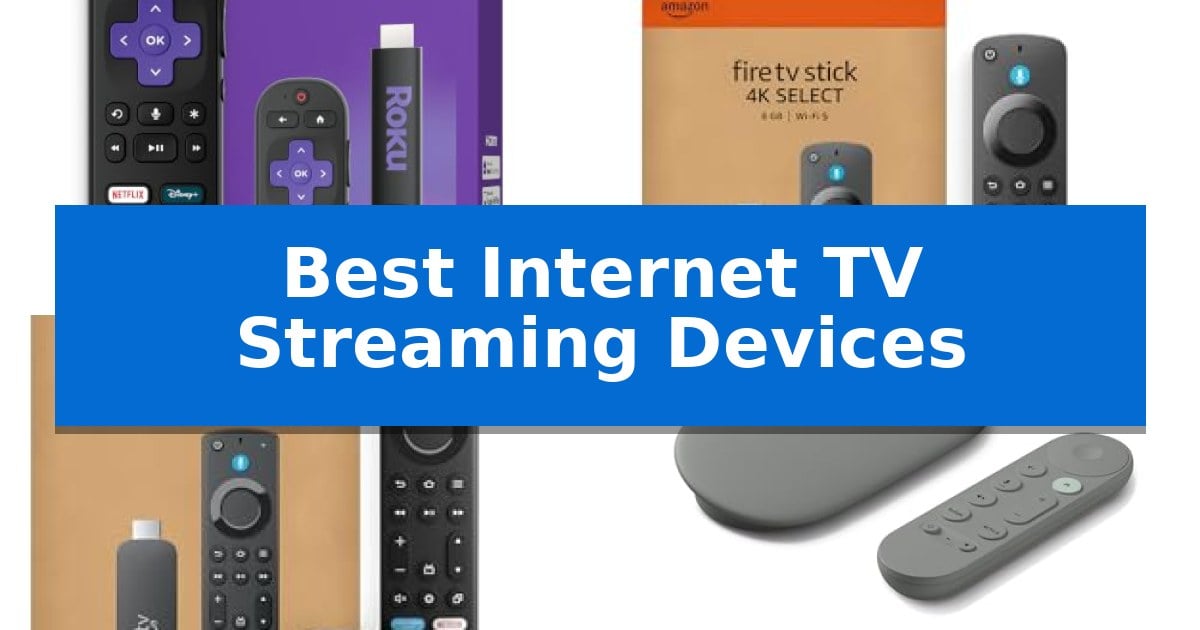
Finding the right hardware to bridge the gap between your favorite online content and your television screen can feel overwhelming. With so many platforms and hardware options available, identifying the Best Internet TV Streaming Devices requires looking past the marketing jargon to focus on what actually impacts your daily viewing experience.
Whether you prioritize a clean, simple interface for quick access to apps or need high-performance hardware for gaming and 4K streaming, the right device changes how you interact with your media. We have analyzed the latest options to help you navigate the current landscape of streaming technology and find a solution that fits your specific setup.
Best Internet TV Streaming Devices in 2026
Quick Comparison
| Product | Best For | Key Strength | Score |
|---|---|---|---|
| Roku Streaming Stick | Best Overall | Compact, hidden design that avoids blocking other HDMI ports. | 4.9 |
| Amazon Fire TV Stick 4K | Fast AI-Powered Content Discovery | Supports 4K Ultra HD with HDR10+ for high-quality visuals. | 4.5 |
| Amazon Fire TV Stick 4K Max | High-Performance Streaming and Gaming | 16GB of storage offers double the capacity of standard streaming sticks. | 4.3 |
| Google TV Streamer | Personalized Recommendations for Everyone | Personalized recommendations based on household viewing habits. | 4.6 |
| TiVo Stream 4K | Unified Search Across All Apps | Centralized search and watch lists across multiple streaming apps. | 4.5 |
How We Chose
- Interface navigation speed and ease of use.
- Compatibility with 4K Ultra HD and HDR standards.
- Available storage capacity for apps and local downloads.
- Integration with smart home ecosystems and voice control assistants.
- Physical form factor and ease of installation behind a television.
1 Roku Streaming Stick — Simple Interface for Easy Navigation
The Roku Streaming Stick simplifies home entertainment by plugging directly into the back of your television, utilizing a compact design that stays out of sight and avoids blocking neighboring HDMI ports. This device eliminates the need for extra cords or a wall outlet by drawing power directly from the TV, creating a clean, clutter-free setup.
Navigating entertainment is streamlined through the included Roku Voice Remote, which allows you to power your TV, adjust volume, and search for content using voice commands. The platform provides access to popular apps, live TV, and sports, all managed through a straightforward, easy-to-navigate home screen.
Designed for versatility, the device is portable enough to take on the go. You can move it between rooms or take it while traveling without needing to log into someone else's device, maintaining your personal preferences wherever you connect. Setup is completed in minutes, focusing on accessibility for any user.
The unit features long-range Wi-Fi to maintain a stable connection for streaming. By consolidating control into one remote and simplifying the interface, it reduces the complexity often associated with managing multiple streaming services and hardware inputs.
Best for: Users seeking a minimalist, easy-to-install streaming solution that remains hidden behind the television.
Skip if: Users who require wired Ethernet connectivity or specific high-end audio/video standards not explicitly supported by this model.
PROS
- Compact, hidden design that avoids blocking other HDMI ports.
- Voice-controlled remote that manages both the streaming device and TV power/volume.
- Portable form factor suitable for travel and easy room-to-room movement.
- Simplified setup process that takes only minutes to complete.
CONS
- No wired Ethernet port for those who prefer a hardwired network connection.
- Power reliance on the TV's USB output may not be compatible with all older television models.
2 Amazon Fire TV Stick 4K — Fast AI-Powered Content Discovery
The Amazon Fire TV Stick 4K simplifies high-definition home entertainment by integrating 4K Ultra HD streaming with High Dynamic Range 10+ (HDR10+) support. This compact device connects directly to your television's HDMI port, providing an immediate upgrade to your viewing experience with a modern interface designed for rapid navigation.
Equipped with the 2026 Fire TV experience, the device allows users to pin favorite applications and browse dedicated content categories efficiently. The inclusion of Alexa+ enables natural language voice commands, allowing you to search for shows, manage smart home devices, or view Amazon Photos without navigating complex menus.
Beyond traditional streaming, the Amazon Fire TV Stick 4K supports cloud gaming via Xbox Game Pass and Luna. This feature allows users to play titles like Call of Duty: Black Ops 7 and Hogwarts Legacy directly on their TV, provided they have a compatible controller and the necessary subscriptions.
Setup is straightforward, requiring only a power connection and a Wi-Fi link to begin streaming from services such as Prime Video, Netflix, and Disney+. The device also functions as a central hub for smart home control, enabling users to dim lights or check weather updates directly through the interface.
Best for: Users seeking a compact, voice-controlled 4K streaming solution with integrated cloud gaming capabilities.
Skip if: Users who require a wired Ethernet connection or those who do not have a compatible controller for cloud gaming services.
PROS
- Supports 4K Ultra HD with HDR10+ for high-quality visuals.
- Alexa+ integration allows for natural voice-based content discovery and smart home management.
- Enables cloud gaming access without the need for a dedicated console.
- Modern interface design facilitates faster app access and personalized recommendations.
CONS
- Requires a separate compatible controller for cloud gaming functionality.
- Subscription fees may apply for various streaming services and gaming platforms.
3 Amazon Fire TV Stick 4K Max — High-Performance Streaming and Gaming
Modern streaming requires more than just access to content; it demands the processing power to navigate interfaces without delay and the storage capacity to keep your favorite applications ready. The Amazon Fire TV Stick 4K Max addresses these needs by integrating a high-performance processor designed for fluid navigation and lightning-fast app launches, ensuring that your entertainment experience remains seamless.
Beyond its processing capabilities, this device is built for high-fidelity media consumption, supporting 4K Ultra HD resolution alongside Dolby Vision, HDR10+, and Dolby Atmos audio. For those who prioritize organization and variety, the device features 16GB of internal storage, which provides double the capacity of many standard streaming sticks, allowing for a broader library of apps, games, and downloads.
Usability is enhanced through the included voice-enabled remote, which features dedicated channel buttons for live TV and a 'recents' button for quick navigation. The integration of Alexa+ allows for natural voice commands to manage smart home devices or search for content across multiple platforms, while the Fire TV Ambient Experience transforms your television into a display for museum-quality art and photography when not in use.
Gamers can also utilize the device's hardware for fluid gameplay through Amazon Luna, which requires no console. With support for Wi-Fi 6E, the device is engineered to maintain a stable connection, making it a versatile choice for users who want a high-performance, all-in-one solution for streaming, gaming, and smart home management.
Best for: Users seeking a high-performance streaming device with extra storage for apps and games, and those who want integrated smart home control via Alexa.
Skip if: Users who do not require 4K resolution or advanced gaming features and prefer a more basic, lower-cost streaming solution.
PROS
- 16GB of storage offers double the capacity of standard streaming sticks.
- Wi-Fi 6E support ensures a fast and stable wireless connection.
- Powerful processor enables fluid navigation and quick app starts.
- Comprehensive HDR and audio support including Dolby Vision and Dolby Atmos.
CONS
- Subscription fees may apply for various streaming services accessed through the device.
- Advanced features like Wi-Fi 6E require a compatible router to see performance benefits.
4 Google TV Streamer — Personalized Recommendations for Everyone
Navigating your entertainment library is streamlined with the Google TV Streamer 4K, which aggregates movies and shows from across your various services directly onto a single, personalized home screen. By leveraging tailored recommendations based on individual viewing habits, this device ensures that finding new content is an intuitive experience for everyone in the household.
The Google TV Streamer 4K supports high-fidelity visuals through 4K HDR with Dolby Vision, providing detailed picture quality for compatible displays. For audio enthusiasts, the device allows for the connection of speakers that support Dolby Atmos, enabling a more immersive 3D sound environment for your media setup.
Beyond standard streaming, the device functions as a central hub for your home entertainment, offering access to over 800 free channels via services like Pluto TV and Tubi. Users can manage their viewing schedule effectively by adding interesting titles found on mobile apps or Google search directly to a unified watchlist.
Designed for modern connectivity, the unit requires an HDMI 2.1 cable (sold separately) to facilitate its high-resolution output. With 32 GB of storage, it provides ample space for apps and system functions, while its compact dimensions of 6.4 x 3 x 1 inches allow it to integrate discreetly into most entertainment centers.
Best for: Users who want a centralized, personalized streaming hub that integrates live TV, subscription services, and smart home control in one interface.
Skip if: Users who require an included HDMI cable in the box or those who do not utilize HDR-capable displays and Dolby Atmos audio systems.
PROS
- Personalized recommendations based on household viewing habits.
- Access to over 800 free channels via integrated services.
- Supports 4K HDR with Dolby Vision and Dolby Atmos audio.
- Generous 32 GB of internal storage for apps and content.
CONS
- HDMI 2.1 cable is not included and must be purchased separately.
- Requires specific compatible hardware to fully utilize 4K HDR and Dolby Atmos features.
5 TiVo Stream 4K — Unified Search Across All Apps
Navigating multiple streaming platforms often requires switching between different interfaces, but the TiVo Stream 4K simplifies this experience by providing a single, centralized hub for your content. This compact device aggregates your watch lists and recommendations across various services, allowing you to search and browse without jumping between individual apps.
Powered by Android TV, the device integrates Google Assistant for hands-free voice control, enabling you to launch applications or manage smart home devices directly from your remote. It supports high-quality media playback, including 4K UHD resolution, Dolby Vision HDR, and Dolby Atmos sound, ensuring your hardware can handle modern visual and audio standards.
The TiVo Stream 4K is designed for efficiency, with a maximum power consumption of 5 W and a compact physical footprint of approximately 3.03 x 2.09 x 0.63 inches. It is built to operate within a standard temperature range of 0°C to 40°C, making it a versatile addition to most home entertainment setups.
By consolidating platforms like Netflix, Prime Video, Disney+, and Peacock into one interface, the device aims to reduce the time spent searching for content. It serves as a practical solution for users who want to streamline their viewing habits without the complexity of managing multiple app-specific navigation menus.
Best for: Users who want to consolidate multiple streaming services into a single, voice-controlled interface.
Skip if: Users who prefer a minimalist interface or those who do not require integrated cross-app search functionality.
PROS
- Centralized search and watch lists across multiple streaming apps.
- Integrated Google Assistant for voice-controlled navigation.
- Supports 4K UHD, Dolby Vision HDR, and Dolby Atmos.
- Compact and energy-efficient design.
CONS
- Requires an existing subscription for each individual streaming service.
- Functionality is dependent on the Android TV ecosystem.
Best Internet TV Streaming Devices Buying Guide
Understanding Streaming Resolution and HDR
Modern streaming devices are designed to support 4K Ultra HD resolution, which provides four times the detail of standard HD. When shopping, ensure your device supports HDR10+ or Dolby Vision if your television is compatible, as these standards significantly improve color accuracy and contrast in supported content.
It is important to remember that the streaming device is only one part of the chain. Your television must also support these high-resolution standards to see the full benefit. If you are using an older 1080p television, a 4K-capable device will still function, but you will not see the resolution upgrade until you upgrade your display.
The Importance of Storage Capacity
Storage space on a streaming device determines how many applications, games, and cached media files you can keep installed at once. While many entry-level sticks offer modest storage, higher-end models often provide double the capacity, which is essential if you plan on using cloud gaming services or downloading offline content.
If you only use a few core apps like Netflix or Prime Video, standard storage is usually sufficient. However, for users who frequently switch between many niche streaming services or utilize gaming features, opting for a device with expanded internal memory will prevent the need to constantly uninstall and reinstall apps.
Smart Home Integration and Voice Control
Most contemporary streaming devices now act as central hubs for your smart home. Features like Alexa or Google Assistant integration allow you to use your voice to launch shows, search for content, or even control smart lights and thermostats without leaving your couch.
When choosing a device, consider which ecosystem you already use. If your home is heavily invested in one specific smart assistant, choosing a streaming device that natively supports that platform will provide a much more seamless experience than trying to bridge two different systems.
Form Factor and Connectivity
The physical design of a streaming device matters more than it might seem, especially if your television is mounted flush against a wall. Compact, stick-style devices are designed to plug directly into an HDMI port and hide behind the TV, reducing cable clutter.
Connectivity also plays a role in performance. Look for devices that support modern Wi-Fi standards like Wi-Fi 6E, which help maintain a stable, high-speed connection even in homes with many devices competing for bandwidth. A strong connection is vital for preventing buffering during high-bitrate 4K streams.
Unified Search and Content Discovery
One of the biggest frustrations in modern streaming is jumping between different apps to find a specific movie or show. Many devices now feature unified search capabilities that aggregate results from across all your installed services, letting you see where a title is available without opening each app individually.
This feature is particularly useful for families or households with multiple users. Some devices even offer personalized recommendations based on your viewing habits, making it easier to discover new content that aligns with your interests rather than just sticking to the most popular titles on a single platform.
Frequently Asked Questions
Do I need a 4K TV to use a 4K streaming device?
No, you can use a 4K streaming device with a 1080p TV. The device will automatically downscale the output to match your television's resolution, though you will not benefit from the 4K clarity until you upgrade your display.
Can I use these devices while traveling?
Yes, most compact streaming sticks are designed to be portable. You can simply plug them into the HDMI port of a hotel or guest TV, connect to the local Wi-Fi, and access your accounts without needing to log into the host's device.
Do these devices require a monthly subscription?
The streaming devices themselves do not require a subscription, but the individual apps you install (such as Netflix, Hulu, or Disney+) will typically require their own separate subscription fees to access their content libraries.
How do I control my TV volume with these remotes?
Most modern streaming remotes use HDMI-CEC technology, which allows the streaming remote to send volume and power commands directly to your TV through the HDMI connection, effectively replacing your original TV remote.
What is the benefit of a device with more storage?
More storage allows you to install a larger number of applications and games. It also provides more room for system updates and can improve performance by preventing the device from running out of space for temporary cache files.
Conclusion: Our Top Pick
After reviewing the available options, the Roku Streaming Stick stands out as the most balanced choice for the majority of users. Its combination of a simple, intuitive interface and a compact design that hides neatly behind your television makes it an excellent upgrade for any living room setup.
While other devices offer more specialized features for gaming or heavy smart home integration, the Roku Streaming Stick excels at the core task of providing a smooth, reliable, and easy-to-navigate streaming experience. It is our top recommendation for anyone looking to simplify their home entertainment without unnecessary complexity.