
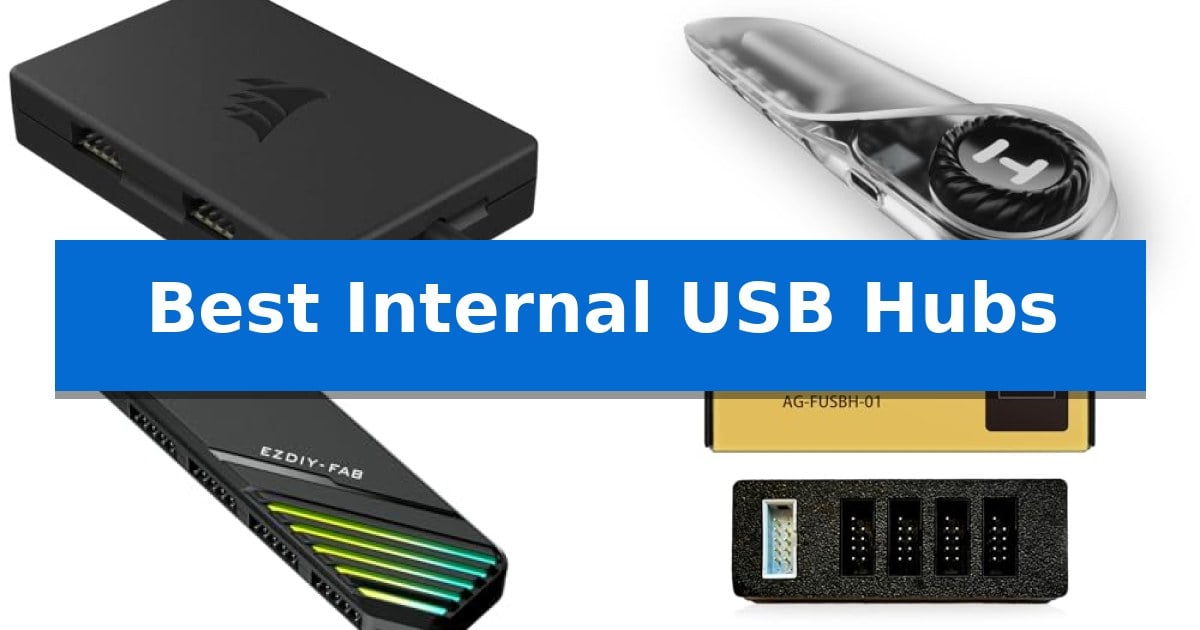
Building a modern PC often involves adding numerous internal components, from liquid cooling systems and RGB controllers to fan hubs and front-panel modules. If your motherboard lacks sufficient 9-pin headers, you quickly run into a connectivity wall. The Best Internal USB Hubs provide a reliable solution by transforming a single header into multiple ports, ensuring all your devices remain powered and operational.
Selecting the right hub involves balancing your specific component count with the physical constraints of your case. Whether you need a compact solution for a Mini-ITX build or a high-capacity hub for a complex enthusiast setup, these internal expansion tools streamline your cable management while maintaining stable data and power delivery.
Best Internal USB Hubs in 2026: Solving Header Bottlenecks
Quick Comparison
| Product | Best For | Key Strength | Score |
|---|---|---|---|
| Corsair Internal USB Hub | Best Overall | Magnetic installation allows for versatile and secure mounting inside most steel PC cases. | 4.9 |
| Hyte Powered Internal USB Hub | Modern Design with Easy Troubleshooting | Four USB 2.0 output headers for expanded component connectivity | 4.7 |
| EZDIY-FAB MH01 Internal USB Hub | Hybrid Cable Reduces Clutter | Massive 4-port expansion from a single header | 4.8 |
| Airgoo Internal USB Hub | Space-Saving Magnetic Mount | Magnetic mount for flexible, tool-free positioning inside the PC case. | 4.3 |
| Thermalright Internal USB Hub X5 | High-Capacity Five-Port Expansion | SATA-powered for stable and reliable power delivery | 4.8 |
How We Chose
- Header Expansion Capacity: Assessing how many additional 9-pin USB 2.0 ports each unit provides.
- Power Delivery Stability: Verifying the use of dedicated SATA power connectors to ensure consistent voltage for connected devices.
- Installation Versatility: Evaluating the effectiveness of magnetic or adhesive mounting systems for clean cable routing.
- Physical Dimensions: Considering the profile and form factor to ensure compatibility with tight spaces and small-form-factor cases.
- Build Quality and Aesthetics: Reviewing the inclusion of protective housing and cable management features.
1 Corsair Internal USB Hub — Reliable Four-Port Expansion
Managing internal cable routing and component connectivity becomes significantly easier with the Corsair Internal 4-Port USB 2.0 Hub, which provides a centralized solution for systems lacking sufficient motherboard headers. By utilizing a magnetic installation design, this hub attaches directly to any magnetic surface within your PC case, allowing for flexible placement even in compact builds like Mini-ITX systems.
This hub supports up to 480Mbps bandwidth across its four 9-pin USB 2.0 ports. It is engineered to consolidate connections for various internal components, including AIO CPU coolers, power supplies, and RGB lighting controllers. The device relies on a standard internal USB 2.0 header connection and a SATA power connection to ensure stable operation for all attached peripherals.
Compatibility is a primary focus, with the unit designed to function seamlessly with most Intel and AMD motherboards. Its low-profile dimensions—measuring approximately 1.97 inches in length and 0.63 inches in height—ensure it fits into tight spaces where traditional expansion cards might be restricted or unavailable.
The Corsair Internal 4-Port USB 2.0 Hub simplifies the build process for users managing multiple internal USB-dependent devices. By providing a dedicated space for these connections, it helps maintain a cleaner aesthetic and more organized cable management within the chassis.
Best for: PC builders who need to connect multiple internal USB 2.0 devices like AIO coolers and RGB controllers but have run out of motherboard headers.
Skip if: Users requiring high-speed data transfer for external drives, as this hub is strictly limited to USB 2.0 speeds.
PROS
- Magnetic installation allows for versatile and secure mounting inside most steel PC cases.
- Four 9-pin USB 2.0 ports provide ample expansion for internal components.
- Compact form factor is specifically designed to fit into tight spaces, including Mini-ITX builds.
CONS
- USB 2.0 bandwidth limitation restricts data transfer speeds to 480Mbps.
- Requires a SATA power connection in addition to the motherboard USB header.
2 Hyte Powered Internal USB Hub — Modern Design with Easy Troubleshooting
Modern PC builds often demand more connectivity than standard motherboards provide, particularly when managing complex lighting, cooling, and DIY component ecosystems. The Hyte Powered Internal USB Hub addresses this by transforming a single internal USB 2.0 header into four reliably powered outputs, ensuring your components receive consistent power for stable operation.
Designed with a compact footprint of 6.77 by 3.39 inches, this hub is built for efficient cable management in crowded chassis environments. It features extra-strength magnets and an included adhesive strip, providing versatile mounting options that allow you to secure the device anywhere inside your case, simplifying the installation process for custom builds.
Troubleshooting is streamlined through the inclusion of an illuminated rotary switch. This feature provides a clear visual indicator that the hub is powered on, allowing you to verify connectivity for your internal devices without needing to navigate complex BIOS settings or software interfaces.
By focusing on essential internal expansion, the Hyte Powered Internal USB Hub offers a straightforward solution for enthusiasts. Its combination of secure mounting, clear power status, and increased header capacity makes it a practical addition to any custom PC setup requiring additional USB 2.0 connectivity.
Best for: PC builders who need to expand their motherboard's internal USB 2.0 connectivity for multiple components like lighting and cooling controllers.
Skip if: Users who do not have an available internal USB 2.0 header on their motherboard or those who require high-speed USB 3.0 or USB-C internal expansion.
PROS
- Four USB 2.0 output headers for expanded component connectivity
- Magnetic and adhesive mounting options for flexible case placement
- Illuminated rotary switch for easy power status and troubleshooting
- Compact design suitable for various PC chassis sizes
CONS
- Limited to USB 2.0 speeds, which may not support high-bandwidth devices
3 EZDIY-FAB MH01 Internal USB Hub — Hybrid Cable Reduces Clutter
Managing internal cable clutter while expanding connectivity for AIO coolers, RGB controllers, and front panel headers is simplified by the EZDIY-FAB MH01 Internal USB Hub. This device addresses header bottlenecks by converting a single motherboard USB 2.0 header into four distinct ports, providing a centralized solution for complex builds.
The hub features an innovative 2-in-1 hybrid Type-C connection that integrates the 9-pin motherboard signal and SATA power into a single cable. This design choice reduces cable volume behind the motherboard tray while ensuring stable power delivery for sensitive components like LCD AIO screens and high-draw RGB devices.
Designed for versatility, the unit includes built-in magnets for tool-free mounting to any steel surface within the PC chassis. Its ultra-compact, low-profile design—measuring just 3.8 x 2.3 x 0.6 inches—allows it to fit into tight cable-management channels, while the stealth-black finish and subtle non-addressable RGB side lighting maintain a clean aesthetic.
Compatibility is prioritized through a plug-and-play interface that works across all major motherboard brands. By consolidating power and data, the EZDIY-FAB MH01 Internal USB Hub provides a practical approach to organizing internal connections without requiring complex wiring configurations.
Best for: PC builders needing to expand internal USB 2.0 header capacity for AIO coolers and RGB controllers in space-constrained cases.
Skip if: Users who do not have an available SATA power connector or a spare internal USB 2.0 header on their motherboard.
PROS
- Massive 4-port expansion from a single header
- Hybrid Type-C cable reduces internal cable clutter
- Magnetic mounting allows for flexible, tool-free installation
- Low-profile dimensions fit easily in tight spaces
CONS
- Requires SATA power connection for operation
- Non-addressable RGB lighting may not match all custom color schemes
4 Airgoo Internal USB Hub — Space-Saving Magnetic Mount
Managing internal cable routing and component connectivity often requires more expansion than a standard motherboard provides. The Airgoo Internal USB Hub addresses this by converting a single 9-pin motherboard header into four distinct ports, allowing for the simultaneous connection of multiple internal devices such as LED controllers, front panel interfaces, or LCD screens.
Designed for integration within a PC chassis, this hub utilizes a magnetic mount system. This allows users to secure the unit directly to any metal surface inside the case, facilitating a clean, tool-free installation that minimizes cable clutter. Its compact footprint of 3.35 x 1.18 x 0.75 inches ensures it remains unobtrusive and does not obstruct critical airflow paths.
Power stability is maintained through a dedicated S-ATA power connector, which ensures that all four ports receive consistent voltage even when fully populated. This setup is entirely plug-and-play, requiring no additional drivers for operation across Windows, macOS, or Linux environments, making it a straightforward solution for expanding internal connectivity.
The device is built for durability and ease of use, functioning as a passive expansion tool that delivers the necessary signal to connected peripherals without performance loss. By consolidating multiple internal connections into one hub, it simplifies the build process for users managing complex lighting or monitoring setups.
Best for: Users needing to expand their motherboard's internal USB 2.0 connectivity for multiple peripherals like LED controllers or front panels.
Skip if: Users who require high-speed USB 3.0 or USB-C internal headers, as this hub is limited to 9-pin USB 2.0 specifications.
PROS
- Magnetic mount for flexible, tool-free positioning inside the PC case.
- S-ATA power delivery ensures stable, consistent operation for all connected devices.
- Compact dimensions prevent interference with other internal components or airflow.
- Plug-and-play compatibility across major operating systems without requiring drivers.
CONS
- Limited to USB 2.0 speeds and 9-pin header compatibility.
5 Thermalright Internal USB Hub X5 — High-Capacity Five-Port Expansion
Managing internal cable routing and component connectivity becomes significantly easier with the Thermalright Internal USB Hub X5, which provides a dedicated solution for systems lacking sufficient motherboard headers. By utilizing a SATA-powered connection, this hub ensures stable and consistent power delivery to all attached devices, preventing the voltage drops often associated with passive expansion methods.
The hub features five USB 2.0 ports with standard 9-pin connectors, making it a versatile choice for users looking to integrate multiple internal peripherals such as RGB controllers, fan hubs, or liquid cooling interfaces. Its compact design, measuring just 4.13 inches by 1.57 inches by 0.59 inches, allows it to fit discreetly within most PC cases without obstructing airflow or cable management paths.
Installation is simplified through the inclusion of built-in magnets, which allow for secure, tool-free attachment to any steel surface inside the chassis. This magnetic mounting system provides the flexibility to reposition the hub as your internal component layout evolves, ensuring that your connections remain organized and accessible.
Backed by a 2-year warranty, this hub offers a reliable way to expand your system's internal connectivity. While it is specifically designed for USB 2.0 headers, its robust power delivery and ease of installation make it a practical addition for enthusiasts managing complex cooling or lighting setups.
Best for: Users needing to expand internal USB 2.0 connectivity for components like RGB controllers and fan hubs in cases with limited motherboard headers.
Skip if: Users requiring high-speed USB 3.0 or 3.1 internal connectivity, as this hub is strictly limited to USB 2.0 speeds and headers.
PROS
- SATA-powered for stable and reliable power delivery
- Magnetic mounting allows for tool-free, flexible installation
- Five-port expansion provides ample connectivity for internal peripherals
- Compact dimensions ensure easy integration into tight spaces
CONS
- USB 2.0 limitation restricts data transfer speeds for high-bandwidth devices
Best Internal USB Hubs Buying Guide
Understanding Header Compatibility
Most internal USB hubs are designed to connect to a standard 9-pin USB 2.0 header on your motherboard. Before purchasing, verify that your motherboard has at least one available internal header. These hubs are generally backward compatible and work across various motherboard platforms, but the primary constraint is the physical availability of the header on your board.
Ensure that your chosen hub uses a dedicated power source, typically a SATA power connector. This is crucial because a single motherboard header cannot provide enough power for multiple high-draw devices like AIO coolers or extensive RGB lighting arrays. Relying solely on the motherboard header for power can lead to connection drops or unstable device performance.
Mounting and Cable Management
Internal USB hubs are often placed behind the motherboard tray, where space is limited. Magnetic mounting is a highly preferred feature, as it allows you to reposition the hub easily on any steel surface within your case without needing permanent adhesives. This flexibility is vital for maintaining a clean build and keeping cables organized.
Consider the length and flexibility of the cables included with the hub. A hybrid cable design, which combines data and power into a single connection, can significantly reduce clutter. When routing cables, ensure they do not interfere with airflow or put excessive strain on the motherboard header pins, which are delicate and can be damaged if pulled.
Port Count and Device Requirements
Assess the total number of internal USB devices you plan to connect. While four ports is the standard for most users, some setups may require five or more. Overloading a hub beyond its rated capacity or attempting to daisy-chain multiple hubs can lead to signal degradation or power instability, so it is better to choose a hub that meets your exact needs.
Keep in mind that these hubs typically operate at USB 2.0 speeds, which is sufficient for peripherals like AIO coolers, fan controllers, and internal Bluetooth modules. They are not intended for high-bandwidth data transfers, so ensure your connected devices are compatible with the USB 2.0 standard to avoid potential performance bottlenecks.
Aesthetics and Troubleshooting
While internal components are often hidden, many hubs now feature stealth-black finishes or subtle RGB lighting to match the theme of your build. A hub with a low-profile design is essential if you are working in a tight space, such as a Mini-ITX case, where every millimeter of clearance matters.
Troubleshooting internal connectivity can be frustrating. Some hubs include LED indicators that illuminate when the unit is powered on, providing a quick visual confirmation that the hub is receiving electricity. This simple feature can save significant time during the initial build process or when diagnosing a device that isn't being detected by your system.
Warranty and Reliability
Because these hubs manage power and data for critical components like your CPU cooler, reliability is paramount. Look for products that offer a clear manufacturer warranty, as this reflects the brand's confidence in the stability of their power delivery circuitry. A well-built hub should provide consistent, clean power to prevent damage to your connected hardware.
Always check the build quality of the connectors. Loose or poorly fitting 9-pin headers can cause intermittent connectivity issues. High-quality hubs feature robust connectors that provide a secure fit, ensuring that your devices remain connected even if the PC case is moved or subjected to minor vibrations.
Frequently Asked Questions
Will an internal USB hub affect the performance of my connected devices?
No, when powered correctly via a SATA connector, an internal USB hub provides the necessary voltage and data bandwidth for standard internal peripherals like AIO coolers and RGB controllers without impacting their performance.
Can I use an internal USB hub with any motherboard?
Yes, these hubs are designed to be universally compatible with standard 9-pin USB 2.0 headers found on almost all modern Intel and AMD motherboards.
Is magnetic mounting safe for my PC components?
Yes, the magnets used in these hubs are specifically designed for PC cases and will not interfere with your motherboard, CPU, or other sensitive electronic components.
Do I need to install drivers for these hubs?
No, these hubs are plug-and-play devices. They do not require any software or drivers to function; your operating system will recognize the connected devices automatically.
What happens if I exceed the power limit of the hub?
Exceeding the power limit can cause devices to disconnect or fail to initialize. Always ensure your SATA power cable is securely connected to your power supply to provide the maximum stable power available to the hub.
Conclusion: Our Top Pick
Choosing the right expansion tool is essential for a clean and functional PC build. After evaluating the available options, the Corsair Internal USB Hub stands out as the most reliable choice for most users. Its compact design and magnetic installation make it incredibly easy to integrate into any system, while its robust power delivery ensures that your critical components remain connected without issue.
While other options offer unique features like RGB lighting or additional ports, the balance of build quality and ease of use provided by the Corsair unit makes it our top recommendation. It provides the stability needed for high-end cooling and lighting setups, ensuring your internal connectivity remains seamless and worry-free.