
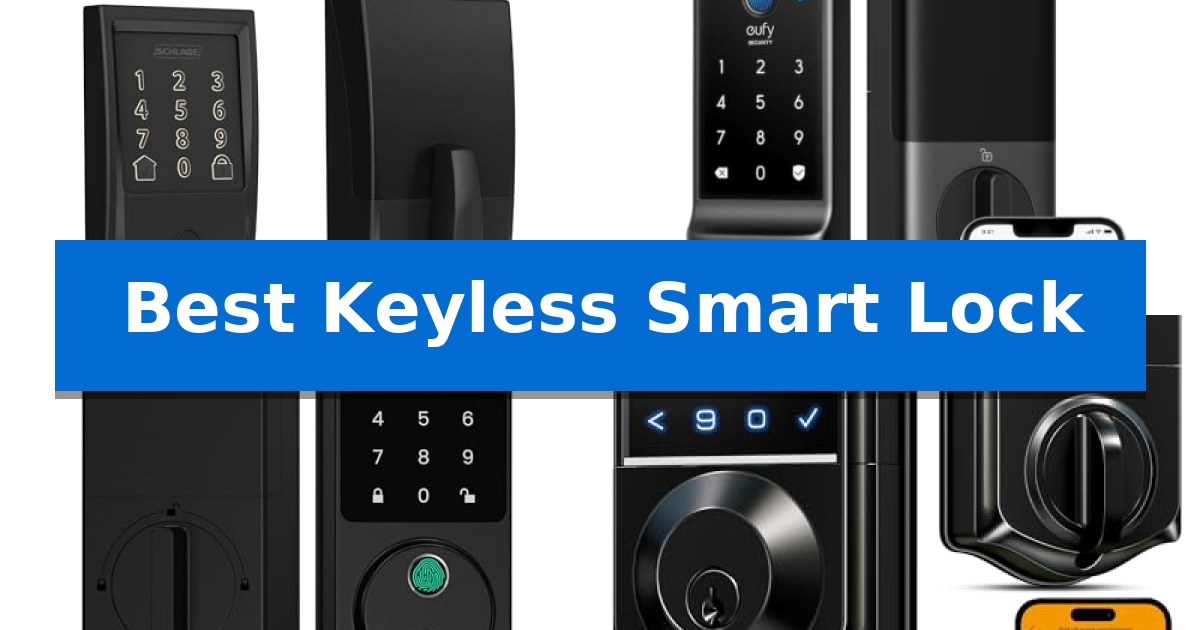
Choosing the Best Keyless Smart Lock transforms how you manage home security, offering a seamless blend of convenience and protection. By moving away from traditional physical keys, you gain the ability to monitor entry points, share temporary access with guests, and ensure your door is locked even when you are away.
With a variety of models available, selecting the right device depends on your specific needs, such as remote connectivity, biometric precision, or battery longevity. This guide evaluates leading smart locks to help you find a reliable solution that integrates perfectly with your lifestyle and existing home setup.
Best Keyless Smart Lock in 2026
Quick Comparison
| Product | Best For | Key Strength | Score |
|---|---|---|---|
| Schlage Encode Smart WiFi Deadbolt | Best Overall | Built-in WiFi eliminates the need for a separate bridge or hub. | 4.9 |
| eufy Security Smart Lock C220 | Best for Long Battery Life | Long-lasting battery life of up to 8 months. | 4.6 |
| Wyze Auto-Lock Bolt v2 | Best for Adaptive Fingerprint Speed | 0.5-second fingerprint recognition for rapid entry. | 4.3 |
| Veise VE017 Fingerprint Smart Lock | Best for Multi-Tenant Management | Advanced AI fingerprint recognition with 0.2-second verification. | 4.6 |
| Philips 4200 Series WiFi Deadbolt | Best All-in-One Handle Set | All-in-one hardware includes both the deadbolt and a matching door lever. | 4.9 |
How We Chose
- Connectivity and Remote Access: We prioritized locks with stable, built-in WiFi or app-based management for real-time monitoring.
- Biometric Accuracy: We evaluated the speed and precision of fingerprint scanners to ensure reliable, near-instant entry.
- Battery Efficiency: We assessed power management systems to determine which models offer the longest operational life between replacements.
- Installation and Compatibility: We looked for designs that fit standard door thicknesses and require minimal tools for a straightforward setup.
- Security Features: We examined built-in intrusion alerts and encryption standards to ensure robust protection against unauthorized access.
1 Schlage Encode Smart WiFi Deadbolt — Best for Reliable Remote Access
Managing home access requires a balance between convenience and robust security, and the Schlage Encode Smart WiFi Deadbolt addresses this by integrating built-in WiFi compatibility directly into the lock. This design eliminates the need for an additional hub, allowing users to monitor and control their entry points through the Schlage Home app from anywhere with a secure internet connection.
For those who prioritize flexibility, the lock supports up to 100 unique access codes, making it suitable for managing entry for family members, guests, or service providers. The system provides customizable notifications and detailed lock history, ensuring users stay informed about home activity. Integration with Alexa and Google Home enables hands-free voice control, provided the lock is paired with the app and a compatible voice-enabled device.
Security is a core focus, as evidenced by the BHMA-certified highest residential Security, Durability and Finish rating. The unit features a fingerprint-resistant touchscreen and a built-in, customizable alarm that triggers during door movement or forced entry attempts. The connection is fully encrypted, providing a layer of digital protection alongside the physical deadbolt hardware.
Installation is designed for standard doors with a thickness between 1-3/8 inches and 1-3/4 inches, utilizing a Snap ‘n Stay design that holds the lock in place during the setup process. Powered by four AA batteries, the device includes a low-battery indicator on the touchscreen and within the app, with a physical backup key provided for emergency access. The auto-lock feature offers adjustable time delays, ensuring the door secures itself after a set period.
Best for: Homeowners who require reliable remote access and integration with existing smart home ecosystems without the complexity of a separate hub.
Skip if: Users who prefer a purely offline, non-WiFi-dependent lock or those with non-standard door dimensions outside the 1-3/8 to 1-3/4 inch range.
PROS
- Built-in WiFi eliminates the need for a separate bridge or hub.
- BHMA-certified for high residential security and durability.
- Supports up to 100 programmable access codes for versatile entry management.
- Fingerprint-resistant touchscreen maintains a clean aesthetic.
CONS
- Battery-operated requirement necessitates periodic maintenance and monitoring.
- WiFi dependency means remote app features are unavailable if the home network is offline.
2 eufy Security Smart Lock C220 — Best for Long Battery Life
Securing your home with the eufy Security Smart Lock C220 offers a versatile approach to keyless entry, featuring six distinct unlocking methods including a rapid-response fingerprint scanner that registers in under one second. This device is engineered for longevity, utilizing eight AA batteries to provide up to eight months of operation, ensuring that your access remains consistent without frequent maintenance.
The integration of Self-learning AI allows the fingerprint recognition system to improve its accuracy with every use, minimizing the need for repeated attempts. For those who prefer remote management, the built-in Wi-Fi eliminates the need for an external bridge, allowing for direct control via the eufy Security app from anywhere. This connectivity also enables voice command integration with Alexa and Google Voice Assistant.
Designed for straightforward implementation, the lock is compatible with most standard deadbolts and can be installed in approximately 15 minutes without the need for drilling. Its IP53 waterproof rating and robust construction, which is BHMA Grade 3 Certified for durability after 100,000 cycles, ensure reliable performance in temperatures ranging from -22℉ to 158℉.
The eufy Security Smart Lock C220 also integrates seamlessly into the broader eufy ecosystem, allowing users to coordinate the lock with other devices like video doorbells for unified home security routines. An integrated alarm system provides additional peace of mind by alerting users to unusual attempts to tamper with the deadbolt.
Best for: Homeowners seeking a long-lasting, multi-method keyless entry solution that integrates directly with existing Wi-Fi networks.
Skip if: Users requiring high-security commercial-grade hardware or those whose door setup is incompatible with standard 54mm deadbolt bores.
PROS
- Long-lasting battery life of up to 8 months.
- Built-in Wi-Fi removes the requirement for a separate bridge.
- Self-learning AI fingerprint recognition for improved accuracy.
- Easy 15-minute installation without drilling.
CONS
- BHMA Grade 3 certification is lower than higher-tier security ratings.
- Battery life may fluctuate based on usage frequency.
3 Wyze Auto-Lock Bolt v2 — Best for Adaptive Fingerprint Speed
Accessing your home with a simple touch is made possible by the Wyze Auto-Lock Bolt v2, which features a high-speed fingerprint scanner capable of unlocking in just 0.5 seconds. Designed for both security and convenience, this device integrates an AI learning scanner that improves its recognition accuracy over time, adapting to your unique touch to minimize failed attempts.
The hardware is built to withstand daily use, featuring a scratch and smudge-resistant tempered glass interface that maintains a clean appearance. For added peace of mind, the lock is rated BHMA2 for durability and carries an IP53 rating, ensuring it can handle environmental exposure. The anti-peep keypad provides an extra layer of privacy, allowing you to enter codes without revealing them to onlookers.
Connectivity is a central component of this system, with built-in Wi-Fi enabling remote management through the Wyze app. When paired with a compatible Wyze Video Doorbell, you can verify visitors via a live feed and unlock the door directly from your phone. This ecosystem integration allows for a seamless entry process, whether you are home or away.
Power management is handled by 8 AA batteries, providing up to 8 months of operation. In the event of a power depletion, a USB-C port is conveniently located to allow for emergency power using a standard power bank. Users also retain the flexibility of traditional access via the included physical backup keys, ensuring you are never locked out.
Best for: Homeowners seeking a fast, adaptive fingerprint entry system with integrated remote app control and emergency power options.
Skip if: Users who require a lock compatible with specific third-party smart home ecosystems beyond the Wyze platform or those needing a different physical form factor.
PROS
- 0.5-second fingerprint recognition for rapid entry.
- AI-enhanced scanner that improves accuracy with use.
- USB-C emergency power port for battery depletion scenarios.
- Remote management via built-in Wi-Fi and the Wyze app.
CONS
- Battery-dependent operation requiring periodic maintenance.
- Ecosystem-specific features work best when paired with other Wyze devices.
4 Veise VE017 Fingerprint Smart Lock — Best for Multi-Tenant Management
Managing property access across multiple users or tenants requires a system that balances security with operational flexibility. The Veise VE017 Fingerprint Smart Lock addresses this through a comprehensive smart user management system that allows administrators to remotely grant, pause, or delete access permissions via the KK Home App. This capability is paired with detailed activity logs, ensuring every entry event is tracked for complete transparency.
At the core of the lock's functionality is 8-in-1 smart unlocking, providing diverse entry methods including fingerprint, app control, fob cards, and traditional mechanical keys. The self-learning AI fingerprint recognition system is a standout feature, utilizing a dedicated on-device chip to verify access in under 0.2 seconds with 99.99% accuracy. This system continuously refines its recognition patterns, allowing for a seamless transition away from physical keys.
Security remains a priority with local AES128 encryption, ensuring that all user credentials and entry data are stored directly on the device rather than in the cloud. The Veise VE017 Fingerprint Smart Lock also incorporates an anti-peeping privacy code feature, allowing users to input random digits before or after their actual PIN to prevent unauthorized observation. For added peace of mind, the lock features active intrusion defense that triggers alerts upon repeated unauthorized attempts.
Designed for durability and ease of installation, the lock is constructed from all-zinc alloy and features an IP55 waterproof and dustproof rating, making it suitable for both interior and exterior doors. Installation is straightforward, requiring only a screwdriver and no professional hardwiring. With a battery life of approximately 12 months using 4 AA batteries and a USB-C emergency port for power backups, the device is built to maintain consistent operation.
Best for: Property managers and homeowners seeking a robust, multi-user access solution with remote management capabilities.
Skip if: Users who do not require remote app management or multi-tenant features may find the advanced software suite unnecessary for their needs.
PROS
- Advanced AI fingerprint recognition with 0.2-second verification.
- Comprehensive remote user management via the KK Home App.
- Local AES128 encryption for enhanced data privacy.
- Durable IP55-rated construction suitable for extreme temperatures.
CONS
- G1 Gateway required for remote access and voice assistant integration.
- Batteries not included in the package.
5 Philips 4200 Series WiFi Deadbolt — Best All-in-One Handle Set
Securing your home entrance with a single, cohesive hardware solution is simplified by the Philips 4200 Series WiFi Deadbolt, which integrates a smart deadbolt with a matching door lever. This all-in-one set eliminates the need to source compatible handles separately, providing a streamlined aesthetic for front door upgrades while offering multiple entry methods including a 0.3-second fingerprint scanner and a backlit keypad.
Connectivity is handled through built-in 2.4GHz WiFi, allowing for remote management via the Philips Home Access App without requiring an external hub or bridge. Users can monitor access history in real-time, share permanent, one-time, or recurring PIN codes for guests, and utilize voice commands through Alexa or Google Assistant for hands-free status checks.
The device includes a programmable auto-lock feature that can be set to engage between 0 and 180 seconds, ensuring the door is secured even if you forget. Power is provided by standard 1.5V alkaline batteries, which support up to 6 months of daily performance with integrated low-battery alerts to prompt timely maintenance.
Designed for DIY installation, the lock is compatible with doors ranging from 1-3/8" to 1-3/4" thick. While the unit is factory-configured for right-opening doors, it can be reset to accommodate left-opening configurations. The manufacturer provides dedicated US-based support via phone and email to assist with setup and operational questions.
Best for: Homeowners seeking an all-in-one smart lock and handle set that supports remote app control and biometric entry without needing an extra hub.
Skip if: Users who require compatibility with 5GHz WiFi networks or those who prefer to use rechargeable lithium batteries, as this device is optimized for 2.4GHz networks and standard 1.5V alkaline batteries.
PROS
- All-in-one hardware includes both the deadbolt and a matching door lever.
- 0.3-second fingerprint access for rapid, secure entry.
- Built-in 2.4GHz WiFi removes the requirement for a separate hub or bridge.
- Versatile PIN management supports recurring and one-time codes for guests.
CONS
- Battery sensitivity requires standard 1.5V alkaline batteries, excluding rechargeable or high-power lithium options.
- WiFi range limitations require the lock to be within 33 feet of the router for a stable connection.
Best Keyless Smart Lock Buying Guide
Understanding Connectivity Standards
Most modern smart locks rely on WiFi or Bluetooth connectivity to communicate with your smartphone. Models with built-in WiFi are generally more convenient because they do not require a separate hub or bridge to enable remote access, allowing you to control the lock from anywhere via an app.
When choosing, consider the distance between your door and your router. A strong, stable signal is essential for features like real-time notifications and remote unlocking to function without latency or connection drops.
Biometric vs. Keypad Entry
Fingerprint scanners offer the fastest entry method, often unlocking in under a second. Look for AI-learning sensors that improve recognition accuracy over time, which helps reduce failed attempts and improves the overall user experience for family members.
Keypads remain a reliable backup or primary method for guests. Features like anti-peep technology, which allows you to enter random digits before or after your actual PIN, provide an extra layer of privacy against onlookers.
Battery Life and Power Management
Smart locks are typically powered by AA batteries, with performance varying based on usage frequency and connectivity. A lock that offers 6 to 12 months of battery life is ideal for reducing maintenance frequency.
Always check for emergency power options, such as a USB-C port, which allows you to jump-start the lock with a power bank if the batteries die while you are away from home.
Installation and Door Compatibility
Before purchasing, verify your door's thickness and the backset measurement. Most smart deadbolts are designed to fit standard door preparations (1-3/8 in to 1-3/4 in), making them suitable for most residential upgrades without the need for professional drilling.
Look for 'Snap 'n Stay' or self-aligning designs that hold the lock in place during installation, which significantly simplifies the process if you are working alone.
Security and Durability Ratings
Check for BHMA (Builders Hardware Manufacturers Association) certification, which indicates the lock has been tested for security, durability, and finish quality. Higher grades generally signify better resistance to forced entry.
If you are installing the lock on an exterior door exposed to the elements, ensure it has an IP rating (such as IP53 or IP55), which confirms the device is protected against dust and moisture.
Frequently Asked Questions
Do I need a professional locksmith to install a smart lock?
Most smart locks are designed for DIY installation and can be set up in about 15 minutes using only a screwdriver, provided your door already has a standard deadbolt hole.
What happens if my WiFi goes down?
Most smart locks retain their core functionality. You can still unlock them using your PIN code, fingerprint, or the physical backup key included with the device.
Can I use smart locks with Airbnb or rental properties?
Yes, many models allow you to generate temporary or recurring access codes, making them excellent for managing guest entry without needing to hand over physical keys.
Are smart locks secure against hacking?
Reputable smart locks use encrypted connections to protect your data. Features like local storage for credentials and anti-peep keypads further enhance your security.
How do I know when to change the batteries?
Most locks feature a low-battery indicator on the touchscreen and will send a notification to your smartphone app well in advance of the power running out.
Conclusion: Our Top Pick
For those seeking the most reliable and feature-rich experience, the Schlage Encode Smart WiFi Deadbolt stands out as our top recommendation. Its built-in WiFi connectivity eliminates the need for extra hubs, while its BHMA-certified security and intuitive app control provide consistent peace of mind for any homeowner.
While other models offer specialized benefits like longer battery life or faster fingerprint scanning, the Schlage Encode provides the most balanced performance for daily use. It is an excellent choice for anyone looking to upgrade their home security with a proven, user-friendly system that integrates seamlessly with existing smart home ecosystems.