
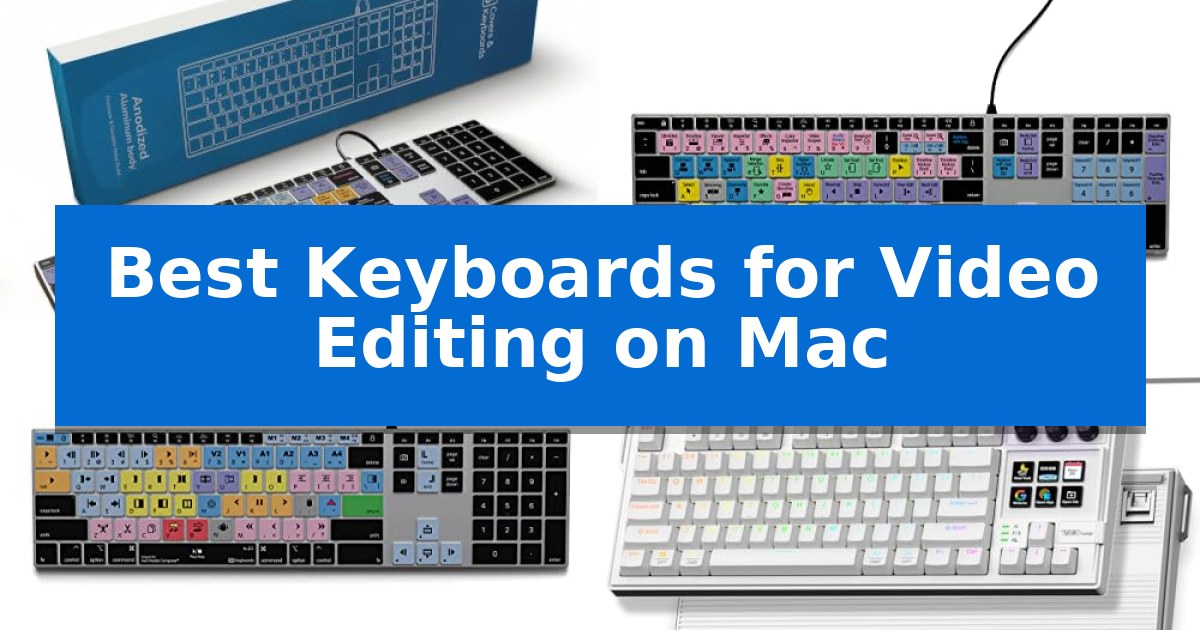
Video editing requires precision and speed, often involving hundreds of repetitive commands that can slow down your creative process. Finding the Best Keyboards for Video Editing on Mac can significantly reduce the time spent navigating menus by placing essential timeline, trim, and playback controls directly at your fingertips.
Whether you are a professional filmmaker or a content creator, the right hardware transforms your workspace. From dedicated shortcut-printed keys to fully programmable macro pads, these tools help you maintain focus on your story rather than your software interface.
Best Keyboards for Video Editing on Mac in 2026: Speed Up Your Workflow
Quick Comparison
| Product | Best For | Key Strength | Score |
|---|---|---|---|
| KB Covers Adobe Premiere Pro Keyboard | Best Overall | Color-coded shortcuts for over 150 Premiere Pro commands. | 4.9 |
| KB Covers Final Cut Pro Keyboard | Color-Coded Commands for Mac | Color-coded shortcuts for over 150 Final Cut Pro commands. | 4.4 |
| KB Covers Avid Media Composer Keyboard | Professional Layout for Broadcast Editors | Color-coded shortcut keys for Avid Media Composer improve workflow speed. | 4.7 |
| VSD K1 Pro Macro Keyboard | Custom LCD Keys for Workflow Control | 6 customizable LCD keys for visual shortcut management. | 4.4 |
| Logickeyboard DaVinci Resolve Wireless Keyboard | Dedicated Resolve Keys for Mac | Dedicated visual shortcuts for DaVinci Resolve | 4.3 |
How We Chose
- Software-specific shortcut integration for popular NLEs.
- Hardware build quality and ergonomic stability.
- Connectivity standards including USB-C and wireless reliability.
- Programmability and customization options for complex macro sequences.
- Compatibility with current macOS hardware and port configurations.
1 KB Covers Adobe Premiere Pro Keyboard — Visual Shortcuts for Faster Editing
The KB Covers Adobe Premiere Pro Keyboard streamlines complex editing workflows by featuring over 150 color-coded shortcuts printed directly onto the keys. This design allows editors to execute commands like trimming, cutting, and timeline navigation without needing to memorize or look up hotkeys, significantly reducing the time spent navigating menus.
Engineered specifically for the macOS environment, this keyboard includes the standard Command, Option, and Control keys, ensuring a native feel for Mac users. It connects via a reliable USB-C cable, providing a stable, lag-free connection that eliminates the need for Bluetooth pairing or battery management. The plug-and-play functionality works across various hardware, including MacBook Pro, MacBook Air, iMac, Mac mini, and Mac Studio.
Beyond its specialized layout, the device serves as a fully functional typing tool. Each key displays both the Adobe Premiere Pro shortcut icon and the standard letter, allowing users to transition between professional editing and everyday typing without swapping hardware. The solid aluminum frame provides a durable foundation, while the integrated backlighting ensures key visibility in dim studios or during late-night editing sessions.
This keyboard is an ideal choice for content creators who prioritize efficiency and a clutter-free desk. By integrating the control interface directly into the typing surface, it removes the need for additional external control panels or complex software drivers. It is a straightforward, hardware-based solution for those seeking to optimize their Adobe Premiere Pro environment on a Mac.
Best for: Video editors and content creators using Adobe Premiere Pro on a Mac who want to accelerate their workflow with visual shortcut references.
Skip if: Users who prefer wireless connectivity or those who do not use Adobe Premiere Pro as their primary editing software.
PROS
- Color-coded shortcuts for over 150 Premiere Pro commands.
- USB-C wired connection ensures a stable, lag-free experience without batteries.
- Backlit keys improve visibility in low-light editing environments.
- Solid aluminum frame provides a durable and premium build quality.
CONS
- Wired-only connection limits desk placement flexibility.
- Software-specific layout is less versatile for users who switch between different non-linear editing applications.
2 KB Covers Final Cut Pro Keyboard — Color-Coded Commands for Mac
Streamlining complex video editing workflows requires precision, and the KB Covers Final Cut Pro Keyboard addresses this by integrating over 150 dedicated shortcuts directly onto the keycaps. By color-coding these commands by function, the layout allows editors to identify trimming, playback, and timeline marking tools at a glance without navigating through software menus.
Designed specifically for the Apple ecosystem, this keyboard features a standard macOS US layout with dedicated Command, Option, and Control keys. It connects via a USB-C wired interface, ensuring a stable, lag-free connection that eliminates the need for Bluetooth pairing or battery management. The plug-and-play functionality allows for immediate use across various Mac models, including MacBook Pro, MacBook Air, iMac, Mac mini, and Mac Studio.
The hardware is constructed with a solid aluminum frame, providing a durable foundation for intensive editing sessions. The keys are backlit, which is particularly useful for working in dim studios or during late-night projects. Because it functions as a standard keyboard while retaining its shortcut labels, users can transition between professional editing tasks and everyday typing without needing to swap hardware or install custom drivers.
This peripheral serves as a specialized tool for creators who prioritize efficiency in Final Cut Pro. While it is tailored for a specific software environment, its build quality and direct integration make it a practical addition for filmmakers, YouTubers, and students who spend significant time in the timeline.
Best for: Video editors and content creators who use Final Cut Pro on Mac and want a dedicated, wired interface for faster shortcut access.
Skip if: Users who require a wireless keyboard or those who primarily edit in software other than Final Cut Pro, as the printed shortcuts will not correspond to their specific workflows.
PROS
- Color-coded shortcuts for over 150 Final Cut Pro commands.
- USB-C wired connection ensures no latency and no battery maintenance.
- Backlit keys improve visibility in low-light editing environments.
- Solid aluminum frame provides a durable and stable typing experience.
CONS
- Software-specific layout limits the utility of the printed shortcuts if used with non-Final Cut Pro applications.
- Wired-only design may not suit users who prefer a completely cable-free workspace.
3 KB Covers Avid Media Composer Keyboard — Professional Layout for Broadcast Editors
Editing complex timelines requires precision, and the KB Covers Avid Media Composer Keyboard streamlines this workflow by featuring dedicated, color-coded shortcut keys directly on the board. Designed specifically for film and broadcast professionals, it eliminates the need to memorize hotkeys by placing essential trimming and timeline commands in plain sight.
Built with a solid aluminum frame, this keyboard provides a stable, professional feel for long editing sessions. The backlit keys ensure visibility in dim studios or late-night production environments, while the USB-C wired connection guarantees a lag-free, reliable interface without the need for batteries or Bluetooth pairing.
This device is a true keyboard, not a specialized control panel. It retains standard letter keys alongside the Avid-specific icons, allowing you to use it for everyday typing and professional editing within the same session. It is fully compatible with macOS and offers a plug-and-play experience for any Mac equipped with a USB-C port, including Mac Studio, iMac, and MacBook Pro models.
By integrating the Avid Media Composer layout directly into the hardware, it serves as a practical tool for editors, assistant editors, and students. Because it requires no software or drivers, it fits seamlessly into existing studio setups, providing an immediate boost to command accessibility.
Best for: Film and television editors who rely on Avid Media Composer and require a dedicated, backlit hardware solution for faster command execution on Mac.
Skip if: Users who prefer a wireless setup or those who do not use Avid Media Composer, as the specialized key layout is tailored exclusively to that software.
PROS
- Color-coded shortcut keys for Avid Media Composer improve workflow speed.
- Backlit aluminum construction offers durability and visibility in low-light environments.
- Plug-and-play USB-C connectivity ensures a stable, battery-free connection.
- Dual-purpose design allows for standard typing alongside professional editing commands.
CONS
- Wired-only design may not suit users who prefer a wireless workspace.
- Software-specific layout limits the utility of the printed shortcuts if using other non-Avid editing applications.
4 VSD K1 Pro Macro Keyboard — Custom LCD Keys for Workflow Control
Streamlining complex video editing workflows on a Mac requires precise control over shortcuts and media management, which is exactly what the VSD K1 Pro Macro Keyboard provides through its integrated 6 LCD keys and 3 multi-function knobs. By allowing users to assign individual actions or complex multi-step macros to these customizable displays, this device acts as a dedicated stream controller deck that can be tailored to specific editing software requirements.
The keyboard features a hot-swappable PCB compatible with 3-pin or 5-pin switches, offering a tactile, creamy typing feel enhanced by a gasket-mounted structure and a 5-layer sound-dampening system. This build quality ensures that the mechanical feedback remains consistent and quiet during long editing sessions, while the concave keycaps and adjustable 3°–6°–13° stands promote ergonomic comfort.
Interaction is further simplified by the built-in intelligent TFT color display, which provides real-time updates and an interface for adjusting volume, backlighting, and system settings. Users can personalize the LCD keys with custom images or animations, making it easier to identify specific tools or macros at a glance. Note that full customization of the screen and macro mapping requires a wired connection and software installation on macOS.
Designed for durability and stability, the VSD K1 Pro Macro Keyboard is rated for 50 million keystrokes and features a sturdy ABS case with non-slip rubber feet. While it offers deep customization for power users, its reliance on a wired USB-A to USB-C connection means users should ensure their Mac setup supports this interface or have the necessary adapters on hand.
Best for: Video editors and content creators who need a tactile, programmable interface to manage complex shortcuts and media controls on a Mac.
Skip if: Users who require a wireless connection or a compact, low-profile keyboard without macro-specific hardware controls.
PROS
- 6 customizable LCD keys for visual shortcut management.
- Hot-swappable PCB allows for personalized switch preferences.
- Gasket-mounted structure provides a dampened, comfortable typing experience.
- 3 multi-function knobs for precise volume and parameter control.
CONS
- Wired-only connection limits desk placement flexibility.
- Software installation required for full LCD and macro customization.
5 Logickeyboard DaVinci Resolve Wireless Keyboard — Dedicated Resolve Keys for Mac
Efficient video editing requires precise control over software commands, and the Logickeyboard DaVinci Resolve Wireless Keyboard is engineered to minimize menu navigation by featuring dedicated visual keyboard shortcuts mapped specifically for DaVinci Resolve. By placing complex editing functions directly on the keys, this hardware allows editors to maintain focus on the timeline, significantly streamlining the post-production workflow.
Designed for a clutter-free creative space, this device utilizes Bluetooth connectivity to provide a reliable, cable-free connection to your Mac. The keyboard includes backlit keys, a critical feature for editors working in dimly lit studios or during late-night projects, ensuring that every shortcut remains visible regardless of ambient lighting conditions.
The unit is powered by an integrated rechargeable battery, which removes the need for disposable batteries and supports a more sustainable, long-term setup. With a slim profile of approximately 0.5 inches in height, the keyboard maintains a low-profile, ergonomic stance that integrates easily into most professional desk configurations.
While this keyboard provides specialized control for DaVinci Resolve, it is a purpose-built tool. Users who frequently switch between multiple non-linear editing applications may find that the permanent key labeling is optimized strictly for one software environment, making it a specialized choice rather than a general-purpose peripheral.
Best for: Professional video editors using DaVinci Resolve on macOS who want dedicated hardware shortcuts to accelerate their workflow.
Skip if: Users who frequently switch between different editing software programs or those who prefer a mechanical switch feel over a low-profile keyboard.
PROS
- Dedicated visual shortcuts for DaVinci Resolve
- Backlit keys for low-light environments
- Wireless Bluetooth connectivity
- Rechargeable battery design
CONS
- Software-specific layout limits versatility
- Low-profile design may not suit mechanical keyboard enthusiasts
Best Keyboards for Video Editing on Mac Buying Guide
Shortcut-Printed vs. Programmable Layouts
The primary distinction in editing keyboards is between shortcut-printed models and fully programmable macro decks. Shortcut-printed keyboards feature color-coded keys that display specific commands for software like Adobe Premiere Pro or Final Cut Pro, making them ideal for editors who want to learn hotkeys quickly without memorizing complex manuals.
Conversely, programmable macro keyboards offer deeper customization. These devices often include LCD keys or rotary knobs that allow you to assign multi-step operations or specific tool triggers. These are better suited for editors who have already mastered their software and need to build custom, multi-page workflows for unique tasks.
Connectivity and Power Requirements
For professional environments, USB-C wired connectivity remains the gold standard. A wired connection ensures a stable, lag-free experience and eliminates the need to manage batteries or deal with potential Bluetooth interference during long rendering or editing sessions.
If your desk setup requires a cleaner look, wireless keyboards with Bluetooth connectivity provide flexibility. However, ensure the model supports a rechargeable battery to avoid the inconvenience of frequent battery swaps, and verify that the wireless signal maintains high reliability to prevent input latency.
Build Quality and Ergonomics
Editing sessions can last for hours, making the physical build of your keyboard critical. Backlit aluminum frames provide a sturdy, premium feel that resists movement during intense typing, while also offering visibility in dim studio environments.
Look for features like adjustable stands and dampening structures—such as gasket mounts or multi-layer foam—which can significantly reduce wrist strain and cavity noise. A keyboard that feels solid and provides tactile feedback helps maintain accuracy throughout the day.
Compatibility with macOS
Since you are editing on a Mac, ensure the keyboard layout is specifically designed for macOS. This includes the presence of dedicated Command, Option, and Control keys in their correct positions.
Many professional editing keyboards are designed as plug-and-play devices, meaning they do not require complex software drivers to function. Always check the manufacturer's compatibility charts to ensure the device will work with your specific Mac model, whether you are using a MacBook Pro, Mac Studio, or iMac.
Switch Types and Typing Feel
The typing feel is a subjective but important factor. Mechanical switches are often preferred for their durability and satisfying tactile response, which can help confirm that a command has been registered without needing to look at the screen.
Some models offer hot-swappable PCBs, allowing you to change the switches to match your preference for linear, tactile, or clicky feedback. This level of customization ensures that your keyboard remains comfortable and responsive as your editing style evolves.
Frequently Asked Questions
Do I need to install special software to use shortcut-printed keyboards?
Most shortcut-printed keyboards are plug-and-play and do not require additional software. They function as standard keyboards where the printed icons serve as a visual guide for the default hotkeys in your editing software.
Can I use a programmable macro keyboard for non-editing tasks?
Yes, many programmable keyboards allow you to create multiple profiles. You can switch between an editing profile for your NLE and a standard typing profile for general productivity or gaming.
Are wired keyboards better for video editing than wireless?
Wired keyboards are generally preferred for professional editing because they offer a lag-free, stable connection and do not require battery management, ensuring your input is always registered instantly.
What is the benefit of backlit keys in an editing suite?
Backlit keys are essential for editors who work in dim lighting or dark studios. They ensure that your shortcut labels remain visible, helping you maintain speed and accuracy during late-night sessions.
How do I know if a keyboard is compatible with my specific Mac?
Check the manufacturer's compatibility list to confirm the keyboard supports your Mac's port type (e.g., USB-C) and the macOS operating system. Most modern editing keyboards are designed to be compatible with all current Mac models.
Conclusion: Our Top Pick
For editors seeking the most efficient way to navigate their timeline, the KB Covers Adobe Premiere Pro Keyboard stands out as the top choice. Its color-coded, shortcut-printed keys provide immediate visual confirmation of commands, significantly reducing the learning curve for complex editing tasks.
The combination of a durable, backlit aluminum frame and reliable USB-C wired connectivity makes it a dependable tool for any professional Mac-based editing suite. By eliminating the need for software drivers and offering a familiar layout, it allows you to focus entirely on your creative output.