
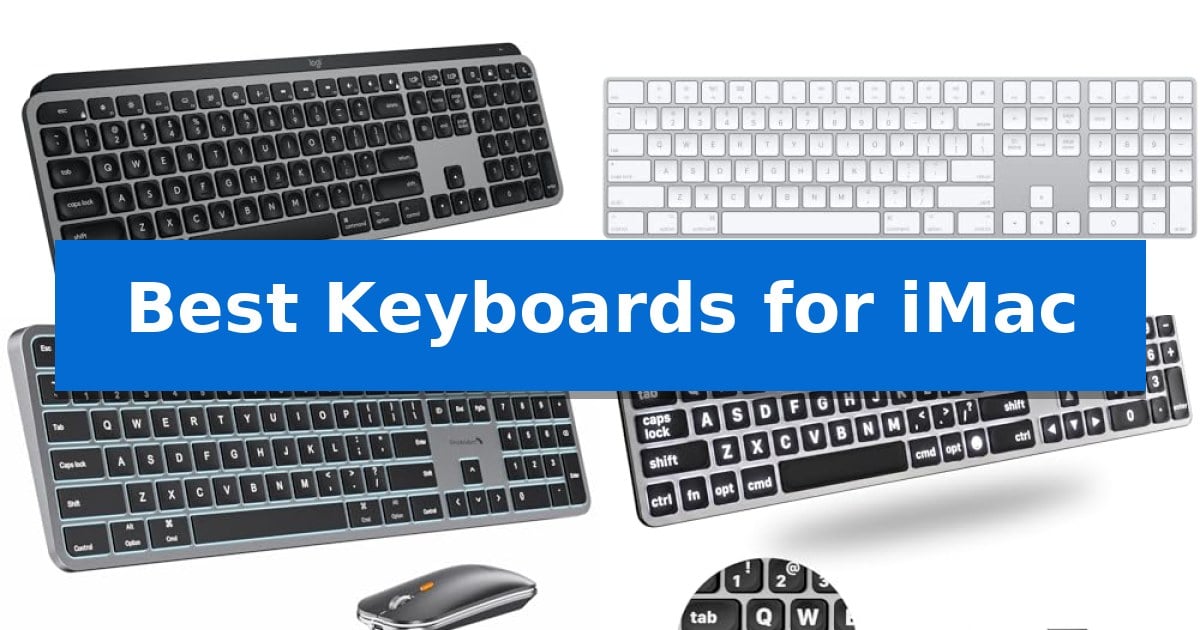
Finding the right peripheral for your desktop can significantly impact your daily workflow. Whether you are managing complex spreadsheets or drafting long documents, the Best Keyboards for iMac should offer seamless integration with macOS while providing a tactile experience that suits your personal typing style.
Our guide evaluates a range of models, from sleek wireless designs that complement your desk aesthetic to reliable wired options for consistent connectivity. We focus on essential factors like layout, key travel, and device switching to help you identify the hardware that best supports your specific computing needs.
Best Keyboards for iMac in 2026: Enhance Your Mac Desktop Setup
Quick Comparison
| Product | Best For | Key Strength | Score |
|---|---|---|---|
| Logitech MX Keys S Mac Keyboard | Best Overall | Mac-specific layout with matching aesthetic finishes. | 4.9 |
| Apple Magic Keyboard Numeric Keypad | Seamless Native Apple Integration | Extended layout with dedicated numeric keypad and navigation controls. | 4.3 |
| ProtoArc KM100-A Mac Keyboard | Multi-Device Backlit Versatility | Full-size layout with a dedicated numeric keypad for efficient data entry. | 4.9 |
| Macally Wired Large Print Keyboard | High Visibility Key Design | Oversized key print for enhanced visibility. | 4.6 |
| Macally USB C Wired Keyboard | Reliable Compact Wired Connection | Dual USB-C and USB-A connectivity for broad system compatibility. | 4.6 |
How We Chose
- Native macOS layout support and dedicated function keys.
- Connectivity options, including Bluetooth stability and wired USB-C integration.
- Physical design, focusing on key travel, spacing, and overall desk footprint.
- Productivity enhancements such as backlighting, multi-device switching, and programmable shortcuts.
- Build materials and long-term reliability for daily office or creative use.
1 Logitech MX Keys S Mac Keyboard — Premium Fluid Typing Experience
The Logitech MX Keys S Mac Keyboard is engineered specifically for the Apple ecosystem, featuring a dedicated Mac key layout and a finish designed to complement your existing setup. Its low-profile, laptop-like design incorporates spherically dished keys that are shaped to match your fingertips, promoting a fluid and precise typing experience.
Beyond its physical design, this keyboard enhances productivity through Smart Actions shortcuts accessible via the Logi Options+ app, allowing you to trigger multiple tasks with a single keystroke. The integrated smarter illumination system detects your hands as they approach, automatically adjusting the backlight intensity based on your current environment to maintain focus.
Connectivity is a core strength, supporting seamless pairing with up to three devices across macOS, iPadOS, and iOS via Bluetooth Low Energy. The unit is USB-C rechargeable, providing a convenient power solution that fits into modern workflows. Its optimized keyboard angle is specifically intended to support better wrist posture during extended periods of use.
Built with sustainability in mind, the Space Grey model incorporates 26% certified post-consumer recycled plastic. For users who utilize multiple peripherals, the keyboard is designed to pair effectively with the MX Master 3S for Mac, enabling cross-computer file and text transfers between up to three Apple machines.
Best for: Users deeply integrated into the Apple ecosystem who require a multi-device, backlit, and ergonomic typing solution.
Skip if: Users who prefer mechanical switches with high-travel actuation or those who require a wired-only connection.
PROS
- Mac-specific layout with matching aesthetic finishes.
- Smarter illumination that adjusts to ambient light and hand proximity.
- Multi-device pairing for up to three Apple devices.
- Customizable Smart Actions for automating repetitive tasks.
CONS
- Non-mechanical key switches may not suit users preferring tactile or clicky feedback.
- Fixed internal battery requires recharging rather than allowing for user-replaceable batteries.
2 Apple Magic Keyboard Numeric Keypad — Seamless Native Apple Integration
The Apple Magic Keyboard Numeric Keypad offers a streamlined typing experience specifically engineered for the Apple ecosystem, featuring a stable scissor mechanism beneath each key for enhanced precision. Its extended layout includes dedicated document navigation controls and full-size arrow keys, providing a familiar and efficient interface for users who frequently manage spreadsheets or data-heavy applications.
Designed for seamless integration, this keyboard connects wirelessly via Bluetooth to your Mac, iPad, or iPhone. The internal rechargeable battery eliminates the need for disposable cells, and the device includes a Lightning to USB cable to facilitate both pairing and charging through a standard USB port on your computer. Users can expect the battery to last for about a month or more between charges, depending on usage patterns.
The keyboard maintains a slim profile that complements the aesthetic of an iMac while providing the necessary tactile feedback for extended typing sessions. By prioritizing native compatibility, it ensures that users can begin working immediately upon pairing without the need for additional drivers or complex configuration steps.
While the extended layout provides significant utility for productivity, the physical footprint is larger than compact alternatives. It is an ideal choice for those who prioritize a consistent, reliable connection and a dedicated numeric input area within their workspace.
Best for: Users who require a dedicated numeric keypad and a seamless, native wireless connection for their Mac, iPad, or iPhone.
Skip if: Users who prefer a compact, minimalist desk footprint or those who require mechanical key switches for a different tactile feel.
PROS
- Extended layout with dedicated numeric keypad and navigation controls.
- Rechargeable internal battery eliminates the need for disposable batteries.
- Seamless Bluetooth connectivity across Mac, iPad, and iPhone devices.
- Low-profile design with stable scissor-switch keys for precise typing.
CONS
- Larger physical footprint compared to compact keyboard models.
- Non-mechanical key switches may not suit users seeking specific tactile or audible feedback.
3 ProtoArc KM100-A Mac Keyboard — Multi-Device Backlit Versatility
The ProtoArc KM100-A Mac Keyboard prioritizes ergonomic comfort with an intentionally flat design that promotes a neutral wrist position, helping to minimize strain during extended typing sessions. This full-size layout includes a dedicated numeric keypad, making it a practical choice for users who frequently manage data or spreadsheets on their Mac devices.
Equipped with soft white LED backlighting, this keyboard offers three adjustable brightness levels to ensure visibility in low-light environments. The keys utilize responsive scissor switches designed for quiet, efficient typing, while the included mouse provides customizable sensitivity with three DPI levels—1000, 1600, and 2400—to suit different workflow requirements.
Versatility is a core feature, as the system allows you to switch between three different devices simultaneously via dedicated Bluetooth channels. Both the keyboard and mouse are rechargeable, featuring built-in batteries and an automatic sleep mode that activates after 60 minutes of inactivity to conserve power.
Compatibility is tailored specifically for the Apple ecosystem, supporting macOS 10.12 or later, as well as iOS and iPadOS 13.0 or above. Because this is a full-size peripheral set, it provides a comprehensive input solution for MacBook, Mac Pro, and Mac Mini users who have sufficient desk space to accommodate the larger footprint.
Best for: Users who require a full-size, backlit keyboard and mouse combo for multi-device workflows on macOS and iPadOS.
Skip if: Users with limited desk space or those who require compatibility with Windows or Linux operating systems.
PROS
- Full-size layout with a dedicated numeric keypad for efficient data entry.
- Triple-device connectivity allows for seamless switching between Mac and iPad.
- Adjustable LED backlighting enhances visibility in dim lighting.
- Rechargeable batteries eliminate the need for disposable replacements.
CONS
- Large footprint requires more desk space than compact alternatives.
- Bluetooth-only connection lacks a USB dongle option for non-Bluetooth devices.
4 Macally Wired Large Print Keyboard — High Visibility Key Design
Navigating the desktop experience requires hardware that prioritizes visibility and seamless integration, especially for those who spend long hours at their workstation. The Macally Wired Keyboard for Mac addresses these specific needs by featuring oversized key print that is four times larger than standard lettering, ensuring that every character remains legible at a glance.
Beyond its high-visibility design, this 107-key full-size keyboard is engineered specifically for the macOS environment. It includes 16 dedicated shortcut keys that mirror the intuitive layout users expect from Apple peripherals, allowing for quick adjustments to volume, screen brightness, and media playback without needing to navigate through system menus.
The device offers versatile 2-in-1 wired connectivity, featuring a dual-port plug that supports both USB-A and USB-C interfaces. This design choice ensures compatibility with a wide range of hardware, from older Mac models to the latest MacBook Pro and Mac mini setups, providing a stable, battery-free connection that eliminates the need for charging or pairing.
For environments with varying lighting conditions, the keyboard is equipped with backlit keys that offer three distinct levels of brightness. This feature ensures that the large-print characters remain easy to identify in dim workspaces, providing a consistent typing experience regardless of the time of day.
Best for: Users who require high-visibility key legends and a reliable, battery-free wired connection for their Mac workstation.
Skip if: Users who prefer a wireless, minimalist desk setup or those who require mechanical switches for tactile feedback.
PROS
- Oversized key print for enhanced visibility.
- Dual USB-C and USB-A connectivity for broad compatibility.
- 3-level adjustable backlighting for various lighting environments.
- Dedicated macOS shortcut keys for efficient workflow.
CONS
- Wired-only connection limits desk mobility.
- Full-size footprint requires more desk space than compact alternatives.
5 Macally USB C Wired Keyboard — Reliable Compact Wired Connection
Maintaining a clean, efficient workspace requires hardware that respects your desk real estate while providing the tactile feedback necessary for daily tasks. The Macally USB C Wired Keyboard addresses this by combining a slim, space-efficient footprint with a reliable, tethered connection that eliminates the need for batteries or wireless pairing.
Designed for users who prioritize consistent performance, this keyboard features responsive scissor switch keys. These provide a low-profile typing experience with reduced noise and shorter key travel, mimicking the feel of a standard laptop keyboard. This design choice ensures that every keystroke is stable and quiet, which is particularly beneficial in shared office environments or quiet home setups.
Integration with the macOS ecosystem is handled through 13 dedicated shortcut keys. These provide immediate, one-touch access to essential system controls such as Mission Control, screen brightness, media playback, and volume adjustment. By mapping these functions directly to the top row, the keyboard maintains the familiar workflow expected from Apple-compatible peripherals.
The hardware is built for broad compatibility, featuring a dual USB-C and USB-A connection. This hybrid plug design allows for direct connectivity to both modern USB-C enabled Macs and older systems without requiring additional adapters. As a plug-and-play device, it offers a dependable, uninterrupted typing experience that is ready for use immediately upon connection.
Best for: Users who require a reliable, battery-free typing solution that integrates seamlessly with both legacy and modern Mac hardware.
Skip if: Users who prefer the freedom of wireless connectivity or require a mechanical switch feel for their typing tasks.
PROS
- Dual USB-C and USB-A connectivity for broad system compatibility.
- Space-saving slim design ideal for minimalist or crowded workspaces.
- 13 dedicated shortcut keys for quick access to macOS system controls.
- Responsive scissor switch keys for quiet, stable typing.
CONS
- Wired-only connection limits desk mobility compared to wireless alternatives.
Best Keyboards for iMac Buying Guide
Connectivity and Compatibility
The most critical factor for any iMac user is how the keyboard connects to the system. While many modern keyboards offer Bluetooth wireless connectivity, ensuring the device supports macOS natively is vital for accessing system-level shortcuts like Mission Control or brightness adjustments.
For users who prefer a zero-latency connection or want to avoid battery management, wired USB-C keyboards provide a reliable, plug-and-play solution. Always verify if your chosen model includes the necessary cables or adapters to match your specific iMac port configuration.
Layout and Ergonomics
Keyboards for iMac come in various sizes, ranging from compact layouts that save desk space to full-size designs that include a dedicated numeric keypad. If your work involves heavy data entry or financial software, the extended numeric pad is an essential feature for efficiency.
Consider the key profile and switch mechanism as well. Low-profile, scissor-switch keys often mimic the feel of a laptop, which can be more comfortable for those transitioning from a MacBook, whereas mechanical options may offer more travel and tactile feedback.
Backlighting and Visibility
Working in low-light environments is much easier with a backlit keyboard. Many modern models feature smart illumination that adjusts brightness based on ambient light or detects when your hands are approaching the keys to save power.
For users who require extra clarity, some manufacturers offer large-print key designs. These high-visibility layouts ensure that characters are easy to read at a glance, reducing eye strain during long working sessions.
Multi-Device Functionality
If you use multiple Apple devices, such as an iPad or a secondary MacBook alongside your iMac, look for a keyboard with multi-device pairing. This allows you to switch between your computer, tablet, and phone with a single button press.
This feature is particularly useful for users who need to copy and paste text or move files between different Apple hardware, streamlining your creative or administrative workflow significantly.
Customization and Shortcuts
Advanced keyboards often include companion software that lets you assign custom shortcuts to specific keys. These macros can automate repetitive tasks, such as opening specific apps or executing complex system commands with one keystroke.
While standard media keys are sufficient for basic users, power users should prioritize models that offer robust software support for creating these time-saving actions, ensuring your hardware works as hard as you do.
Frequently Asked Questions
Do all keyboards work with an iMac?
While many USB and Bluetooth keyboards will technically type on an iMac, they may not have the correct Mac-specific layout or function keys. It is best to choose a model explicitly designed for macOS to ensure full feature compatibility.
Is a wired or wireless keyboard better for an iMac?
Wireless keyboards offer a cleaner desk aesthetic and portability, while wired keyboards eliminate the need for charging and provide a consistent, uninterrupted connection. Your choice depends on whether you prioritize desk organization or reliability.
Can I use a Windows keyboard on my iMac?
You can, but the Command and Option keys will be swapped, and some media keys may not function as expected. You can remap keys in macOS settings, but a dedicated Mac keyboard is generally more intuitive.
How do I know if a keyboard is compatible with my iMac's ports?
Most modern iMacs use USB-C ports. If you choose a wired keyboard, ensure it has a USB-C connector or comes with a reliable adapter to avoid compatibility issues.
Do I need special software for my keyboard to work?
Basic typing functions usually work immediately via plug-and-play. However, to enable advanced features like custom shortcuts, backlighting adjustments, or firmware updates, you may need to install the manufacturer's specific software.
Conclusion: Our Top Pick
Selecting the right hardware for your desktop setup requires balancing your specific productivity needs with the aesthetic and functional requirements of your iMac. After reviewing the available options, the Logitech MX Keys S Mac Keyboard stands out as the most versatile choice for most users.
With its dedicated Mac layout, fluid typing experience, and the ability to seamlessly switch between three devices, it provides a comprehensive solution for both creative and office tasks. While other models offer specific benefits like high-visibility keys or wired simplicity, the overall balance of features in this model makes it a reliable centerpiece for any modern workspace.