
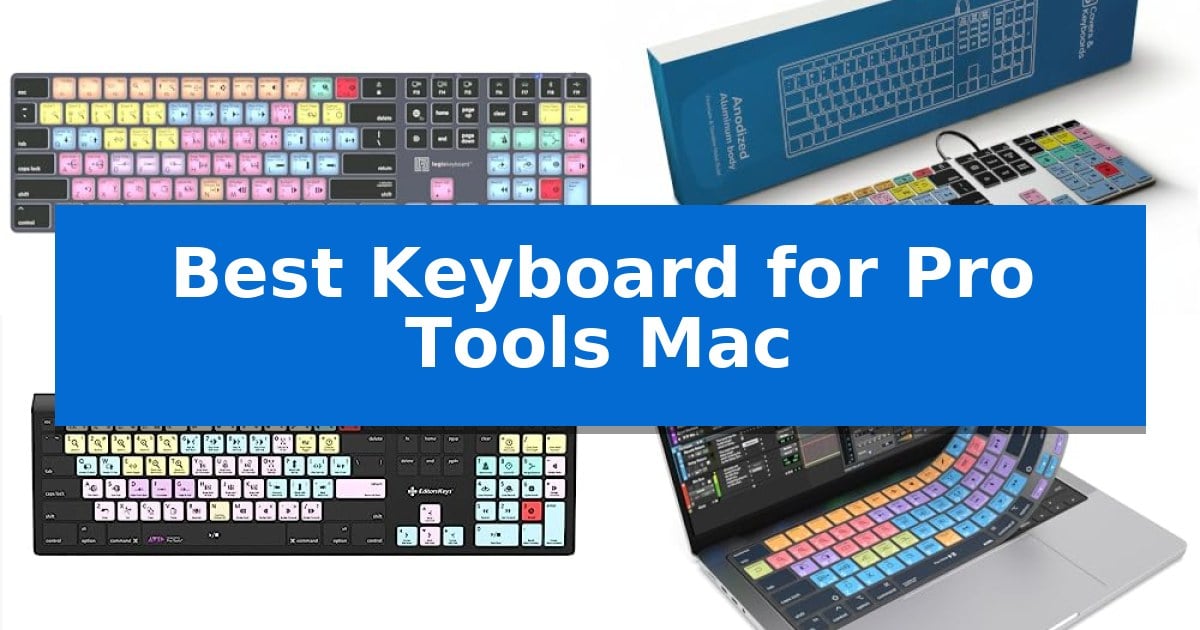
Finding the right interface for your audio workstation can significantly impact your creative speed. When working in complex environments like Avid Pro Tools, having immediate access to transport, editing, and mixing commands is essential for maintaining focus during long sessions.
The Best Keyboard for Pro Tools Mac should bridge the gap between standard typing comfort and specialized functionality. Whether you prefer a dedicated shortcut-labeled layout or a versatile wireless setup that integrates with your existing macOS ecosystem, choosing the right tool depends on your specific studio requirements.
Best Keyboard for Pro Tools Mac in 2026: Streamline Your Audio Workflow
Quick Comparison
| Product | Best For | Key Strength | Score |
|---|---|---|---|
| Logickeyboard Titan Wireless Keyboard | Best Overall | Visual keyboard shortcuts for Pro Tools improve editing speed. | 4.9 |
| KB Covers Pro Tools Keyboard | Wired Aluminum Shortcut Layout | Color-coded shortcut keys for faster command execution | 4.6 |
| Editors Keys Avid Pro Tools Keyboard | Backlit Workflow Efficiency | Dedicated Pro Tools shortcuts printed on keys for faster navigation. | 4.6 |
| JCPal Pro Tools Keyboard Cover | Ultra-Thin Shortcut Protection | Over 90 color-coded shortcuts for rapid access to Pro Tools commands. | 4.3 |
| Logitech MX Keys S Mac Keyboard | Premium Fluid Typing Experience | Dedicated Mac layout with matching Apple-style finishes. | 4.3 |
How We Chose
- Shortcut Accessibility: Presence of color-coded or labeled Pro Tools commands.
- Compatibility: Native support for macOS layouts and USB-C or Bluetooth connectivity.
- Build Quality: Durability and ergonomic design for extended editing sessions.
- Visibility: Availability of backlighting for low-light studio environments.
- Versatility: Ability to function as a standard typing tool alongside specialized audio controls.
1 Logickeyboard Titan Wireless Keyboard — Dedicated Pro Tools Shortcut Keys
The Logickeyboard Titan Wireless Backlit Keyboard for Avid Pro Tools – Mac streamlines complex audio editing workflows by integrating visual keyboard shortcuts directly onto the keycaps. Designed specifically for Mac users, this peripheral eliminates the need to memorize intricate command sequences, allowing for faster navigation and tool selection within the Pro Tools environment.
This keyboard features Bluetooth connectivity, providing a clean, cable-free workspace. The inclusion of backlit keys ensures visibility in low-light studio environments, which is essential for long editing sessions. Its construction includes a rechargeable battery, removing the requirement for frequent disposable battery replacements.
Measuring 17.9 inches in length and 6.4 inches in width, the device offers a full-sized layout that maintains a familiar typing experience. With a weight of 2.13 pounds, it provides a stable footprint on any desk surface. The unit is backed by a 2-year warranty, supporting its long-term utility in professional settings.
While the dedicated shortcut layout significantly enhances efficiency for Pro Tools users, the specialized keycaps are tailored specifically for that software. Users who frequently switch between multiple digital audio workstations or require a general-purpose keyboard for non-editing tasks may find the specific labeling less versatile than a standard blank or QWERTY-only layout.
Best for: Professional audio editors and sound engineers using Avid Pro Tools on a Mac who want to increase workflow speed through dedicated shortcut keys.
Skip if: Users who require a multi-purpose keyboard for diverse software applications or those who prefer a compact, tenkeyless design.
PROS
- Visual keyboard shortcuts for Pro Tools improve editing speed.
- Backlit keys provide clear visibility in dark studio environments.
- Bluetooth connectivity enables a clutter-free wireless setup.
- Rechargeable battery eliminates the need for disposable batteries.
CONS
- Specialized key layout is less versatile for general-purpose typing or other software.
- Full-sized dimensions require significant desk space.
2 KB Covers Pro Tools Keyboard — Wired Aluminum Shortcut Layout
Navigating complex audio sessions requires precision, and the KB Covers Pro Tools Keyboard simplifies this by featuring over 150 color-coded shortcuts directly on the keycaps. By mapping essential editing, recording, and mixing commands to specific keys, this peripheral allows engineers to execute functions visually without relying on memory or constant menu navigation.
Designed specifically for the macOS ecosystem, this keyboard maintains a standard US layout while integrating dedicated Command, Option, and Control keys. It connects via a USB-C wired interface, ensuring a stable, lag-free connection that eliminates the need for battery management or Bluetooth pairing. This plug-and-play design is compatible with various Mac systems, including the MacBook Pro, MacBook Air, iMac, Mac mini, and Mac Studio.
The hardware features a backlit aluminum build, providing a durable frame that remains visible in dim studio environments or during late-night sessions. Unlike specialized control panels, this remains a fully functional typing device. Each key retains its standard letter alongside the Pro Tools shortcut icon, allowing users to switch between standard typing and audio command execution within the same session without needing additional drivers or software.
This keyboard is a practical tool for those who prioritize a streamlined workflow in Avid Pro Tools. By removing the friction of memorizing hotkeys, it helps maintain focus on the creative process. Users should verify their Mac's port availability to ensure a direct USB-C connection before integration.
Best for: Audio engineers and music producers who want to accelerate their Pro Tools workflow on a Mac through visual shortcut mapping.
Skip if: Users who require a wireless connection or those who do not use Avid Pro Tools as their primary digital audio workstation.
PROS
- Color-coded shortcut keys for faster command execution
- Backlit keys for visibility in low-light studio conditions
- Stable USB-C wired connection with no battery requirements
- Durable aluminum frame construction
CONS
- Wired-only connection limits desk placement flexibility
- Specific layout is optimized primarily for Pro Tools users
3 Editors Keys Avid Pro Tools Keyboard — Backlit Workflow Efficiency
Navigating complex audio editing sessions requires precise control, and the Editors Keys Avid Pro Tools Keyboard simplifies this by integrating essential software shortcuts directly onto the keycaps. Designed specifically for Mac users, this tool removes the need to memorize intricate command sequences, allowing for a more fluid creative process.
The keyboard features color-coded keys that group related Pro Tools functions, making it easier to locate specific commands at a glance. This layout is complemented by gentle backlighting, which ensures that every icon and text label remains visible even in dim studio environments, supporting long-form editing sessions without eye strain.
Built with a sleek black finish, the unit is crafted for durability to handle the demands of professional use. It utilizes a plug-and-play design, meaning it is ready for immediate use upon connection to a Mac without requiring additional software or complex configuration steps.
While this keyboard excels at streamlining workflow through its dedicated shortcut layout, it is a full-sized peripheral. Users who prefer a minimalist desk setup or require a portable solution for mobile recording rigs may find its footprint to be a significant consideration.
Best for: Professional audio editors and producers who want to accelerate their Pro Tools workflow on a Mac through dedicated, color-coded shortcut keys.
Skip if: Users who prioritize a compact, minimalist, or wireless desk setup, as this is a full-sized, wired peripheral.
PROS
- Dedicated Pro Tools shortcuts printed on keys for faster navigation.
- Backlit keys for improved visibility in low-light studio conditions.
- Plug-and-play connectivity requiring no extra software installation.
- Color-coded layout to help organize and identify editing functions.
CONS
- Full-sized design may occupy significant desk space.
- Wired connection limits flexibility compared to wireless alternatives.
4 JCPal Pro Tools Keyboard Cover — Ultra-Thin Shortcut Protection
Navigating complex audio production workflows requires precision, and the JCPal Avid Pro Tools Shortcut Guide Keyboard Cover streamlines this by placing over 90 essential commands directly at your fingertips. Designed for studio environments, this cover features color-coded shortcuts for editing, mixing, automation, and transport, allowing engineers to locate functions without navigating through software menus.
The cover is constructed from 0.3 mm ultra-thin silicone, which maintains the tactile responsiveness of the underlying MacBook keys. This material choice ensures that rapid keystrokes during intense recording or mixing sessions remain accurate and comfortable, while simultaneously providing a protective barrier against dust, crumbs, and accidental liquid spills.
Maintenance is straightforward due to the washable design; the cover can be removed, rinsed, and dried for reuse, helping to keep the workstation clean. It is specifically engineered to fit a range of Apple devices, including MacBook Pro 14 and 16-inch (M1-M5) and MacBook Air 13 and 15-inch (M2-M5) models, utilizing a standard US English ANSI layout.
While this cover significantly enhances workflow efficiency for Pro Tools users, it is a specialized tool. It is best suited for those who rely heavily on keyboard shortcuts for audio production and require a physical reference guide integrated into their hardware setup.
Best for: Audio engineers and producers using Pro Tools on MacBook Pro or Air who want to accelerate their workflow with visual shortcut references.
Skip if: Users who prefer a tactile typing experience without any overlay or those who do not use the Avid Pro Tools software suite.
PROS
- Over 90 color-coded shortcuts for rapid access to Pro Tools commands.
- 0.3 mm ultra-thin silicone maintains keyboard responsiveness.
- Washable protection guards against spills, dust, and debris.
- Broad compatibility with current MacBook Pro and Air models.
CONS
- US English ANSI layout only, which may not suit users with different regional keyboard configurations.
5 Logitech MX Keys S Mac Keyboard — Premium Fluid Typing Experience
Precision and efficiency are essential when managing complex audio editing sessions, and the Logitech MX Keys S Mac Keyboard offers a refined interface tailored for these demands. By combining a dedicated macOS layout with a low-profile, stable build, this keyboard provides a consistent typing experience that minimizes fatigue during long hours of work.
The keyboard integrates deeply with the Logi Options+ software, allowing users to configure Smart Actions. This feature is particularly effective for professional workflows, as it enables the automation of repetitive, multi-step commands into a single keystroke. This capability can significantly accelerate navigation and tool selection within software environments.
Connectivity is managed via Bluetooth Low Energy, supporting stable, simultaneous pairing with up to three Apple devices. The hardware also includes smarter illumination that detects hand proximity to activate backlighting, which adjusts automatically to ambient light levels. Power is maintained through a USB-C rechargeable battery, offering up to 10 days of use on a full charge.
Designed with ergonomics in mind, the keyboard features an optimized angle to support natural wrist posture. The construction of the Space Grey model utilizes 26% post-consumer recycled plastic, balancing material sustainability with a professional aesthetic that complements Apple hardware.
Best for: Users seeking a dedicated Mac-layout keyboard with multi-device switching and automated shortcut capabilities.
Skip if: Users who prefer mechanical switches with high-travel actuation or those who require a wired-only connection for their setup.
PROS
- Dedicated Mac layout with matching Apple-style finishes.
- Smart Actions automation via Logi Options+ software.
- Multi-device pairing for up to three Apple devices.
- Proximity-sensing backlit keys for improved visibility.
CONS
- Fixed battery design requires USB-C recharging.
- Low-profile keys may not suit users who prefer deep mechanical travel.
Best Keyboard for Pro Tools Mac Buying Guide
Shortcut Integration vs. Standard Layouts
Specialized keyboards for Pro Tools feature color-coded keys that display transport, editing, and mixing commands directly on the keycaps. This design is intended to reduce the time spent memorizing complex hotkeys, allowing for a more intuitive editing experience.
Conversely, standard keyboards offer more versatility for general tasks but require you to rely on muscle memory or external reference guides. If you are a professional engineer, the dedicated shortcut layout often provides a more efficient, streamlined workflow.
Connectivity and Power Requirements
Choosing between wired and wireless connectivity involves a trade-off between convenience and reliability. Wired keyboards, typically using USB-C connections, provide a stable, lag-free link that never requires charging, which is ideal for permanent studio desks.
Wireless options offer a cleaner workspace and the flexibility to move your keyboard as needed. However, these models rely on rechargeable batteries or Bluetooth pairing, necessitating occasional charging and potential connection management.
The Importance of Backlighting
Audio production often occurs in dimly lit studios to reduce eye strain and improve focus on the screen. Backlit keys are a critical feature for these environments, ensuring that your shortcut labels remain visible regardless of the ambient lighting.
When selecting a backlit model, consider the brightness adjustability. Some keyboards offer auto-illumination that detects hand proximity, which can help conserve battery life on wireless models while maintaining visibility when you need it most.
Ergonomics and Typing Feel
Since audio editing involves long hours at the desk, the physical typing experience is paramount. Look for a low-profile design or keys that are shaped to fit your fingertips, as these features can reduce wrist strain and improve typing accuracy.
The build material also contributes to the overall feel. Aluminum frames often provide a more stable, premium typing surface compared to lighter plastic alternatives, which can help keep the keyboard firmly in place during rapid editing sessions.
Compatibility with macOS
Ensure that your chosen keyboard is explicitly designed for the macOS US layout. This includes having the correct Command, Option, and Control keys, which are essential for navigating the Mac operating system and executing Pro Tools commands correctly.
Some keyboards offer additional software integration through proprietary apps, allowing for customizable shortcuts or smart actions. Verify that any software provided is compatible with your current version of macOS to ensure seamless integration.
Frequently Asked Questions
Do I need special software to use a Pro Tools shortcut keyboard?
Most dedicated Pro Tools keyboards are plug-and-play devices. The shortcuts are printed on the keys for your reference, so no specific drivers or software are usually required to make the commands work.
Can I use a Pro Tools keyboard for everyday typing?
Yes. These keyboards function as standard QWERTY keyboards. The shortcut labels are printed alongside the standard letters and symbols, allowing you to use them for emails, documentation, and other tasks without issue.
Are keyboard covers better than dedicated keyboards?
Keyboard covers are an excellent, cost-effective solution if you already own a high-quality keyboard and want to add shortcut labels. They are also washable and protect your hardware from spills and dust, though they may slightly alter the tactile feel of the keys.
How do I know if a keyboard is compatible with my Mac?
Check the product specifications for 'macOS US layout' or 'Mac compatibility'. Most keyboards listed for Mac will connect via USB-C or Bluetooth and include the specific modifier keys required for Apple systems.
Why is backlighting important for audio editing?
Audio studios are frequently kept dark to minimize screen glare. Backlit keys allow you to see your shortcuts and standard keys clearly without needing to turn on bright overhead lights that could distract from your work.
Conclusion: Our Top Pick
Selecting the right tool for your audio workstation is a balance of specialized functionality and personal comfort. For those who prioritize a dedicated, efficient workflow, the Logickeyboard Titan Wireless Keyboard stands out as the top choice. Its combination of wireless freedom, backlit keys, and clearly marked Pro Tools shortcuts makes it a highly capable companion for any Mac-based studio.
While other options like wired aluminum boards or protective covers offer distinct advantages in terms of stability or cost-effectiveness, the Titan Wireless provides the most comprehensive feature set for professional audio engineers. Ensure your workspace setup aligns with your connectivity preferences to get the most out of your chosen keyboard.