
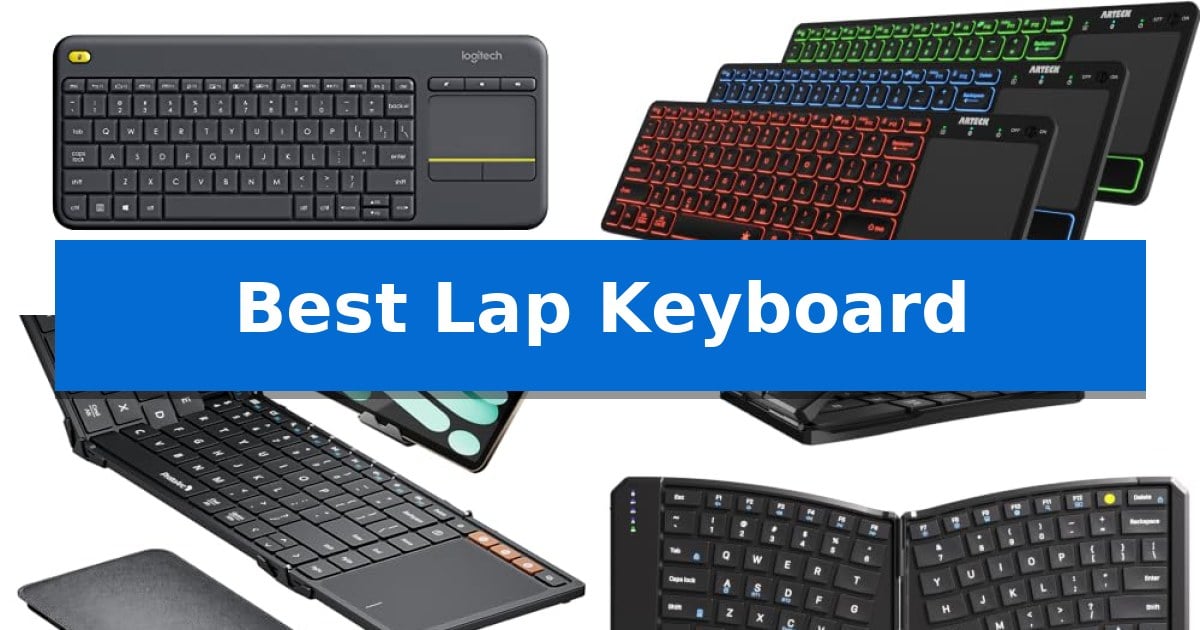
Navigating a PC-connected television or managing multiple mobile devices from the comfort of your couch requires a specific set of tools. A standard desktop keyboard often feels cumbersome and lacks the necessary integrated navigation features for relaxed, long-distance use.
We have evaluated the Best Lap Keyboard options to help you find a solution that balances typing comfort with intuitive media control. Whether you need a dedicated living room controller or a versatile portable device, these selections prioritize wireless stability and ergonomic design to streamline your workflow.
Best Lap Keyboard in 2026: Simplify Your Living Room Navigation
Quick Comparison
| Product | Best For | Key Strength | Score |
|---|---|---|---|
| Logitech K400 Plus Wireless Touch Keyboard | Best Overall | Integrated touchpad eliminates the need for a separate mouse. | 4.9 |
| Arteck Universal Backlit Bluetooth Touch Keyboard | Backlit Keys for Dim Rooms | Integrated touchpad eliminates the need for a separate mouse. | 4.7 |
| ProtoArc XK01 TP Foldable Keyboard | Portable Tri-Fold Design | Integrated multi-touch trackpad provides laptop-like cursor control without an external mouse. | 4.3 |
| Yadkbo Ergonomic Foldable Keyboard | Split Layout Reduces Strain | Built-in rear metal support ensures stability on laps and soft surfaces. | 4.5 |
| Miritz K809 Mini Wireless Keyboard | Ultra-Compact Handheld Navigation | Dual-mode connectivity supports both Bluetooth 5.2 and 2.4GHz wireless. | 4.4 |
How We Chose
- Wireless Connectivity: We prioritize devices offering stable 2.4GHz or Bluetooth connections with a range of at least 33 feet.
- Integrated Navigation: We evaluate the inclusion and responsiveness of built-in touchpads or trackballs for mouse-free operation.
- Form Factor and Ergonomics: We assess the physical size, weight, and layout to ensure the device remains stable and comfortable during lap use.
- Compatibility: We verify support for common operating systems including Windows, Android, and Chrome OS to ensure broad device integration.
- Battery Efficiency: We look for power management features like auto-sleep modes and long-lasting battery life for extended, uninterrupted use.
1 Logitech K400 Plus Wireless Touch Keyboard — Integrated Touchpad for TV Control
Managing a PC-connected television setup often requires a balance between distance and control, which is where the Logitech K400 Plus Wireless Touch Keyboard excels. By integrating a built-in touchpad directly into the keyboard chassis, this device removes the need for a separate mouse, streamlining your living room entertainment area into a single, cohesive interface.
Designed for plug-and-play simplicity, the keyboard connects via a Unifying receiver that plugs into any standard USB port. This wireless freedom allows for reliable control from up to 33 feet away, making it well-suited for navigating media libraries or browsing from a couch. The inclusion of quiet keys and a responsive touchpad ensures that operation remains unobtrusive during movie nights or casual web browsing.
Durability and longevity are central to its design, featuring a spill-resistant exterior to protect against minor accidents. The power management system is highly efficient, offering an up to 18-month battery life with an integrated on/off switch to conserve energy when not in use. This makes it a low-maintenance solution for users who prefer to set up their hardware once and rely on it consistently.
Compatibility is broad, supporting Windows, Android, and Chrome OS, which allows for seamless integration across various PC, tablet, and smart-TV platforms. While it prioritizes a compact, all-in-one form factor, users seeking advanced features like backlighting or Bluetooth connectivity might consider the Logitech K830 as an alternative. Overall, it provides a practical, reliable method for managing media-centric computing environments.
Best for: Users needing an all-in-one, space-saving input device for controlling PC-to-TV media setups from a distance.
Skip if: Users who require a full-sized mechanical keyboard, backlighting, or Bluetooth connectivity for their specific workspace.
PROS
- Integrated touchpad eliminates the need for a separate mouse.
- Long battery life of up to 18 months reduces maintenance frequency.
- Spill-resistant design adds a layer of durability for living room use.
- 33-foot wireless range provides reliable connectivity across most rooms.
CONS
- Lacks Bluetooth connectivity, relying solely on the included USB receiver.
- No backlighting on the keys, which may be difficult to see in dark rooms.
2 Arteck Universal Backlit Bluetooth Touch Keyboard — Backlit Keys for Dim Rooms
Navigating a home entertainment setup or a desktop workstation from the comfort of a couch requires a peripheral that integrates navigation and typing into one frame. The Arteck Universal Backlit Bluetooth Touch Keyboard addresses this by incorporating a built-in touchpad, allowing users to manage cursor movement and media input without needing a separate mouse.
Designed for versatility, the keyboard features 7 unique backlight colors with two brightness levels, which assists in visibility during low-light conditions. To preserve battery life, it includes an auto sleep feature that activates when the device is idle. The unit connects via Bluetooth, offering a 10-meter wireless range, providing enough distance for most living room or office configurations.
The device is built for broad utility, maintaining wide compatibility across Windows, Mac, Android, iPad OS, and Chrome OS. Its slim profile—measuring just 0.24 inches in height—makes it easy to store when not in use. The inclusion of media hot keys provides direct control over playback and volume, simplifying the management of TV-connected computers or HTPCs.
Included with the keyboard is a USB-C charging cable and a 24-month warranty. While the wireless range is sufficient for most rooms, actual performance may vary depending on the specific wireless environment. This keyboard is a practical solution for users who need a compact, all-in-one input device for multi-platform environments.
Best for: Users who need a compact, backlit keyboard with an integrated touchpad for controlling HTPCs, smart TVs, or multiple mobile devices from a distance.
Skip if: Users who require a full-sized mechanical keyboard with a dedicated number pad or those who prefer a wired connection for zero-latency gaming.
PROS
- Integrated touchpad eliminates the need for a separate mouse.
- 7-color LED backlighting improves visibility in dim environments.
- Wide compatibility across major operating systems and devices.
- Slim, portable design at only 0.24 inches thick.
CONS
- Wireless range may be impacted by environmental interference.
- Compact form factor lacks a dedicated numeric keypad.
3 ProtoArc XK01 TP Foldable Keyboard — Portable Tri-Fold Design
The ProtoArc XK01 TP Foldable Keyboard integrates a multi-touch trackpad directly into its tri-fold chassis, allowing users to manage cursor navigation and typing from a single portable device. This design eliminates the need for a separate mouse, creating a streamlined mobile workstation for tablet and phone users who prioritize space-saving hardware.
Built for productivity on the move, the device features an 88-key layout with 0.65-inch keycaps and a dedicated shortcut row. The tri-fold mechanism includes a built-in phone stand and arrives with a PU leather carrying pouch, emphasizing its role as an all-in-one travel accessory.
Connectivity is handled via Bluetooth 5.1, supporting seamless switching between three distinct devices such as phones, tablets, and laptops. This multi-device capability allows for quick transitions without the need for constant re-pairing, fitting into varied mobile workflows.
Power management is supported by a 300mAh battery that offers up to 120 days of standby time. The keyboard includes an auto-sleep function that activates after 60 minutes of inactivity, and the folding design acts as a physical power switch to preserve battery life during transit.
Best for: Mobile professionals and travelers who need a compact, all-in-one typing and navigation solution for tablets and smartphones.
Skip if: Users who require a full-sized desktop keyboard experience or those who prefer dedicated mechanical switches for heavy-duty typing tasks.
PROS
- Integrated multi-touch trackpad provides laptop-like cursor control without an external mouse.
- Tri-fold design includes a built-in phone stand and protective pouch for high portability.
- 3-device Bluetooth 5.1 switching enables efficient multi-tasking across different mobile platforms.
- Extended 120-day standby time with smart auto-sleep functionality.
CONS
- Foldable form factor may feel less rigid than a standard non-folding desktop keyboard.
- Compact 0.65-inch keycaps require adjustment for users accustomed to full-sized desktop layouts.
4 Yadkbo Ergonomic Foldable Keyboard — Split Layout Reduces Strain
Typing on a soft surface like a couch or bed often leads to keyboard instability, but the Yadkbo Ergonomic Foldable Keyboard solves this with a built-in rear metal support structure. This design locks the keyboard flat, preventing it from collapsing or folding while in use on your lap or knees.
The device features a 166-degree V-shape split keyset intended to align hands and wrists in a more natural posture during extended typing sessions. While it requires a brief 1–2 day adaptation period, the layout is designed to reduce joint strain. The low-profile scissor-switch keys provide tactile feedback while operating quietly, making it suitable for shared environments like libraries or offices.
Connectivity is handled through dual Bluetooth channels and an included 2.4G USB receiver, allowing you to toggle between up to three devices using quick hotkeys. It is compatible with Windows, macOS, iOS, iPadOS, and Android systems. The 210mAh rechargeable battery supports up to 70 hours of continuous use, and an intelligent auto-sleep mode activates after 10 minutes of inactivity to preserve power.
Constructed with scratch-resistant PU leather and featuring strong magnetic adsorption, the keyboard remains securely closed during travel. It also includes one-touch multimedia hotkeys for tasks like screen capture and volume control, along with an Fn Lock function to streamline workflow efficiency.
Best for: Users who need a portable, ergonomic keyboard that remains stable while typing on a lap or soft surface.
Skip if: Users who prefer a traditional flat keyboard layout and do not wish to undergo an adaptation period for a split-key design.
PROS
- Built-in rear metal support ensures stability on laps and soft surfaces.
- 166-degree V-shape split layout promotes a natural hand posture.
- Multi-device connectivity allows switching between three devices via Bluetooth or 2.4G.
- Whisper-quiet scissor-switch keys minimize typing noise.
CONS
- Requires a 1–2 day adaptation period to get used to the split key layout.
- Non-standard key arrangement may feel unfamiliar to those accustomed to traditional flat boards.
5 Miritz K809 Mini Wireless Keyboard — Ultra-Compact Handheld Navigation
Navigating media centers or managing multiple devices from the couch requires a precise input tool, and the Miritz K809 Mini Wireless Keyboard addresses this by integrating a sensitive touchpad directly into a frame roughly the size of an iPhone. This handheld design eliminates the need for on-screen navigation, allowing for fluid control over Smart TVs, HTPCs, and mobile devices.
The device features dual-mode connectivity, offering both Bluetooth 5.2 for seamless pairing with tablets and smartphones, and a 2.4GHz wireless option via the included USB receiver for plug-and-play compatibility with PCs and gaming consoles. With a range of up to 33 feet, it provides reliable operation across most living room or office environments.
Durability and ergonomics are prioritized through an aluminum frame that provides a premium feel compared to standard plastic alternatives. The non-slip keycaps are designed to cradle fingertips, offering tactile feedback that makes typing more precise during quick searches or messaging tasks.
For low-light environments, the keyboard includes RGB backlighting with one-touch color cycling, ensuring keys remain visible during movie nights or late-night work sessions. The unit is powered by a 1000mAh rechargeable battery and utilizes an auto sleep/wake function to maximize efficiency between USB-C charging intervals.
Best for: Users needing a compact, handheld input device for navigating media centers, Smart TVs, and multi-device setups from a distance.
Skip if: Users who require a full-sized keyboard layout for heavy-duty typing or professional document creation will find the mini form factor too restrictive.
PROS
- Dual-mode connectivity supports both Bluetooth 5.2 and 2.4GHz wireless.
- Durable aluminum frame provides a premium, lightweight build.
- Integrated touchpad enables mouse-like navigation without extra peripherals.
- RGB backlighting ensures visibility in dark environments.
CONS
- Ultra-compact size may be difficult for users with larger hands to type on comfortably.
- Limited key count necessitates reliance on function layers for standard keyboard inputs.
Best Lap Keyboard Buying Guide
Connectivity and Range
When choosing a keyboard for living room or travel use, the wireless connection is paramount. Most devices rely on either a 2.4GHz USB receiver or Bluetooth 5.1/5.2 technology. A 2.4GHz receiver typically offers a plug-and-play experience with minimal setup, while Bluetooth allows for seamless switching between multiple devices like tablets, phones, and laptops.
Ensure the device maintains a reliable signal at your intended distance. Most modern units are rated for a 33-foot range, which is generally sufficient for standard living room setups. If you plan to switch between devices frequently, look for models that support multi-device pairing to avoid constant re-pairing.
Integrated Touchpad Navigation
A defining feature of a lap-friendly keyboard is the built-in touchpad. This eliminates the need for a separate mouse, which is impractical on a couch or in tight travel spaces. Look for touchpads that support multi-touch gestures, as these allow for easier scrolling and navigation through media menus.
The placement of the touchpad is also critical. Some designs place it on the right side for traditional navigation, while others integrate it into a more compact form factor. Ensure the surface is responsive and large enough to allow for precise cursor control without requiring excessive finger movement.
Ergonomics and Typing Comfort
Typing on your lap presents unique challenges, as the surface is rarely flat or stable. Keyboards with a rear metal support structure or a rigid chassis are less likely to flex or collapse during use. This stability is essential for maintaining a consistent typing experience.
For users concerned about wrist strain, some designs feature a split keyset layout or a V-shape design. While these may require a short adaptation period, they can significantly reduce fatigue during longer sessions. Always check the key spacing to ensure it feels natural compared to a standard desktop keyboard.
Portability and Build Quality
If you intend to carry your keyboard, look for foldable or tri-fold designs. These models often include protective pouches and magnetic closures, making them ideal for commuters or travelers. A compact footprint does not necessarily mean sacrificing functionality, provided the device includes a full shortcut row.
Consider the materials used in the construction. An aluminum frame or high-quality PU leather can provide both durability and a premium feel. These materials are often more resistant to wear and tear than standard plastic, ensuring your device survives the rigors of frequent travel.
Power Management
Battery life is a major convenience factor. Many modern keyboards feature rechargeable batteries with USB-C charging, which is more efficient than replacing disposable cells. Look for devices that offer auto-sleep modes that activate after a period of inactivity to maximize runtime.
Some models provide real-time power indicators, allowing you to check the remaining charge with a simple key combination. This prevents unexpected power loss during critical tasks. Always confirm the standby time, as some high-efficiency models can last for over 100 days on a single charge.
Frequently Asked Questions
Can I use these keyboards with my Smart TV?
Most of these keyboards are compatible with Smart TVs, Android-based TV boxes, and HTPCs, provided the device supports standard USB or Bluetooth input devices.
Do I need to install software to use these keyboards?
Most models are plug-and-play. However, some, like the Logitech K400 Plus, offer optional software to customize controls and save preferred settings.
Are these keyboards suitable for gaming?
These keyboards are primarily designed for media control, navigation, and general typing. While they function for basic tasks, they may lack the high-polling rates and mechanical switches preferred for competitive gaming.
How do I know if the keyboard will work on my lap?
Look for models with a rigid chassis or a built-in rear support structure. These features prevent the keyboard from folding or collapsing while resting on soft surfaces like knees or couch cushions.
What is the benefit of a backlit keyboard?
Backlit keys provide essential visibility in dim environments, such as a darkened living room or a bedroom, making it easier to locate keys without needing external lighting.
Conclusion: Our Top Pick
Finding the right device for your specific setup depends on whether you prioritize media navigation or mobile productivity. For most living room environments, the Logitech K400 Plus Wireless Touch Keyboard stands out as the most reliable choice due to its intuitive integrated touchpad, long battery life, and seamless plug-and-play compatibility with various media devices.
While other options offer specialized features like backlighting or foldable designs, the Logitech model provides the most consistent experience for PC-to-TV control. Its spill-resistant design and reliable 33-foot wireless range make it a practical, low-maintenance addition to any home entertainment system.