
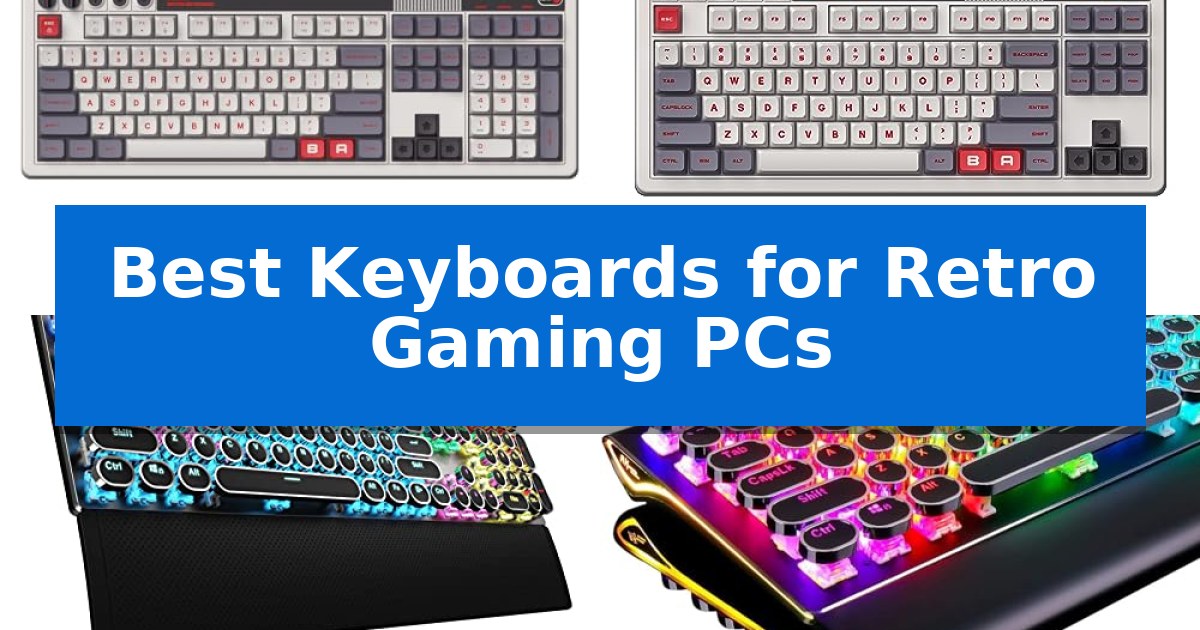
Building a vintage-inspired rig requires peripherals that match the aesthetic without sacrificing the responsiveness needed for modern gaming. The Best Keyboards for Retro Gaming PCs offer a unique intersection of nostalgic design and contemporary hardware, ensuring your setup looks the part while delivering the tactile feedback expected by today's players.
Whether you are looking for the classic typewriter-style round keycaps or a full-layout board with integrated numpads, these keyboards provide the necessary mechanical switches and programmable features to enhance your experience. We have evaluated the top options to help you find a device that balances form and function for your specific desk setup.
Best Keyboards for Retro Gaming PCs in 2026
Quick Comparison
| Product | Best For | Key Strength | Score |
|---|---|---|---|
| 8Bitdo Retro 108 Mechanical Keyboard | Best Overall | Hot-swappable PCB allows for easy switch customization. | 4.9 |
| 8Bitdo Retro Mechanical Keyboard | Iconic design with programmable buttons | Dual Super Buttons for instant, software-free macro programming. | 4.7 |
| AULA F2088 Mechanical Keyboard | Authentic vintage typewriter feel | Authentic typewriter-style round keycaps with durable double-shot construction. | 4.7 |
| RK ROYAL KLUDGE S108 Keyboard | Full-size layout with retro flair | Mechanical blue switches provide precise, tactile feedback. | 4.5 |
| Camiysn Retro Mechanical Keyboard | Compact retro style for gaming | Tactile blue switches provide satisfying audible and physical feedback. | 4.3 |
How We Chose
- Switch Type and Tactile Feedback: We prioritized mechanical switches that provide the crisp, audible click associated with vintage typing.
- Layout and Ergonomics: We assessed whether the keyboard offers a full-size layout with a numpad or a compact form factor to suit your desk space.
- Connectivity Options: We looked for modern interfaces including Bluetooth, 2.4G wireless, and USB-C to ensure seamless integration with current hardware.
- Customization and Programmability: We examined the availability of hot-swappable PCBs and software-free button mapping for personalized gaming controls.
- Build Materials: We considered the use of metal panels and durable PBT keycaps to ensure long-term reliability and an authentic retro feel.
1 8Bitdo Retro 108 Mechanical Keyboard — Classic aesthetic with modern internals
The 8Bitdo Retro 108 Mechanical Wireless Keyboard brings a distinct aesthetic to modern computing by blending classic design cues with a full-sized 108-key layout. This keyboard is built for those who appreciate a nostalgic look but require the utility of an integrated numpad and dedicated function key shortcuts for daily tasks.
Performance is driven by Kailh Box White Switches V2, which provide a tactile typing experience suitable for both gaming and productivity. The board features a top mount style and a hot-swappable PCB, allowing users to customize their switch preferences without soldering. The dye-sublimation PBT keycaps are crafted with an MDA-like height, offering a comfortable profile for extended sessions.
Connectivity is highly flexible, supporting Bluetooth, 2.4G, and USB-C connections to accommodate various PC and Android setups. For gamers, the board supports n-key rollover to ensure accurate input registration during intense gameplay. Users can also utilize fast-mapping on programmable buttons directly on the device, eliminating the need for constant software interaction, though the 8BitDo Ultimate Software remains available for deeper customization.
This keyboard is a practical choice for users who want a retro-inspired peripheral that does not sacrifice modern functionality. Its compatibility with Windows 10 (1903) or above and Android 9.0 or above ensures it fits into most contemporary home office or gaming environments.
Best for: Users who want a full-sized, hot-swappable mechanical keyboard with a retro aesthetic and multi-device wireless connectivity.
Skip if: Users who require a compact or tenkeyless form factor, as the 108-key layout occupies a larger desk footprint.
PROS
- Hot-swappable PCB allows for easy switch customization.
- Triple-mode connectivity including Bluetooth, 2.4G, and USB-C.
- Full 108-key layout with an integrated numpad for maximum utility.
- No-software required fast-mapping for programmable buttons.
CONS
- Large footprint due to the full-sized 108-key design.
- Specific switch type (Kailh Box White V2) may not suit users preferring linear or silent tactile options.
2 8Bitdo Retro Mechanical Keyboard — Iconic design with programmable buttons
The 8Bitdo Retro Mechanical Keyboard brings a nostalgic aesthetic to modern desktop setups, utilizing an 87-key layout that mirrors classic hardware designs. This keyboard is built for those who appreciate tactile feedback, featuring Kailh Box Switch V2 White switches that provide a distinct mechanical feel for typing and gaming.
Functionality is enhanced by the inclusion of Dual Super Buttons, which are large, programmable keys that allow users to map specific functions or macros instantly without the need for additional software. The device supports n-key rollover, ensuring that multiple simultaneous keystrokes are registered accurately during intense gaming sessions.
Connectivity is versatile, offering users the choice between Bluetooth, 2.4G wireless, or USB-C wired connections. The keyboard is compatible with Windows 10 (1903) or above and Android 9.0 or above, making it a flexible choice for various computing environments. Its hot-swappable PCB design allows for future customization of switches without soldering.
The build quality is complemented by dye-sub PBT keycaps, which are designed for durability and resistance to wear over time. A classic power status LED and an independent control panel provide clear visual feedback, maintaining the retro theme while offering modern control over the device's state.
Best for: Retro gaming enthusiasts and users who want a tactile, programmable mechanical keyboard with a classic aesthetic.
Skip if: Users who require a full-sized keyboard with a dedicated number pad or those who prefer low-profile, silent membrane switches.
PROS
- Dual Super Buttons for instant, software-free macro programming.
- Hot-swappable PCB allows for easy switch customization.
- Triple-mode connectivity including Bluetooth, 2.4G, and USB-C.
- Durable dye-sub PBT keycaps for long-lasting use.
CONS
- 87-key layout lacks a dedicated numeric keypad.
- Top mount style may feel stiffer compared to gasket-mounted alternatives.
3 AULA F2088 Mechanical Keyboard — Authentic vintage typewriter feel
Achieving an authentic vintage aesthetic for a modern gaming rig often requires balancing period-correct style with contemporary mechanical performance. The AULA F2088 Mechanical Keyboard addresses this by combining a classic typewriter-inspired design with modern blue switches, providing the crisp tactile feedback and audible click often associated with vintage hardware.
Built with a durable aluminum alloy metal panel, this keyboard offers a sturdy foundation that resists scratches while maintaining a professional look. The stepped floating keycap design, paired with double-shot injection molded round keycaps, ensures durability and clear backlight visibility. This layout is specifically engineered to fit fingertips for precise positioning, which helps reduce fatigue during extended gaming or typing sessions.
Functionality is managed through a versatile multimedia and backlight control knob. Users can toggle between 19 lighting effects or adjust brightness and speed, with the ability to save three custom backlight profiles. The inclusion of a magnetic wrist rest provides ergonomic support, elevating the hands to a comfortable angle for prolonged use.
For gaming performance, the board features 104 keys with anti-ghosting technology, allowing for simultaneous keystrokes without input errors. The plug-and-play USB connection ensures compatibility across Windows, Linux, and Mac OS systems without the need for additional drivers, making it a straightforward addition to any retro-themed setup.
Best for: Gamers seeking a vintage typewriter aesthetic combined with modern mechanical switch performance and programmable lighting.
Skip if: Users who require a silent typing experience or a low-profile, ultra-compact keyboard will find the clicky blue switches and full-size layout unsuitable.
PROS
- Authentic typewriter-style round keycaps with durable double-shot construction.
- Dedicated media and backlight control knob for quick adjustments.
- Sturdy aluminum alloy panel provides a robust and scratch-resistant build.
- Anti-ghosting technology ensures reliable input during high-speed gaming.
CONS
- Clicky blue switches produce a loud sound profile that may not be ideal for shared environments.
- Full-size 104-key layout occupies significant desk space compared to tenkeyless alternatives.
4 RK ROYAL KLUDGE S108 Keyboard — Full-size layout with retro flair
The RK ROYAL KLUDGE S108 Keyboard brings a distinct aesthetic to any setup by combining a classic typewriter-inspired design with modern mechanical performance. Its round keycaps and matte-finish aluminium alloy panel provide a tactile, vintage feel that pairs well with retro-themed gaming environments, while the 108-key full-size layout ensures all necessary inputs are readily available.
Performance is driven by mechanical blue switches, which offer the audible click and medium resistance often associated with traditional typing. For gaming, the board features 108-key anti-ghosting to ensure every input is registered during intense sessions. The detachable wrist rest is included to provide ergonomic support, helping to alleviate pressure during extended periods of use.
Visual customization is managed through dynamic per-key RGB illumination, offering up to 168 lighting modes. Users can adjust brightness and speed, or take advantage of the customizable transparent sidelight to enhance the gaming atmosphere. The board is designed for broad compatibility, supporting Windows, Linux, and Mac OS systems via a plug-and-play connection that requires no additional drivers.
Versatility is a core component of this model, as it allows users to swap the vintage typewriter keycaps for standard keycaps if a different typing experience is desired. The combination of a robust metal build and flexible lighting options makes it a functional choice for those seeking a retro look without sacrificing the responsiveness of a modern mechanical gaming keyboard.
Best for: Gamers who want a vintage typewriter aesthetic combined with the tactile feedback and anti-ghosting performance of modern mechanical switches.
Skip if: Users who prefer a low-profile, silent typing experience or those who require a wireless connection for their gaming setup.
PROS
- Mechanical blue switches provide precise, tactile feedback.
- 108-key anti-ghosting ensures reliable input during gaming.
- Customizable RGB lighting includes 168 modes and transparent sidelights.
- Detachable wrist rest improves ergonomics during long sessions.
- Universal keycap compatibility allows for easy customization.
CONS
- Wired-only connectivity limits placement flexibility.
- Audible click of blue switches may be too loud for shared environments.
5 Camiysn Retro Mechanical Keyboard — Compact retro style for gaming
The Camiysn Retro Mechanical Keyboard brings a distinct aesthetic to any setup with its unique round keycaps and black retro punk design. This wired mechanical keyboard is built for those who appreciate the tactile sensation of blue switches, which provide medium resistance, an audible click, and clear tactile feedback during use.
Designed for versatility, this keyboard features 26 anti-ghosting keys to ensure reliable input during intense gaming sessions or fast-paced office work. The RGB backlighting is fully adjustable, allowing users to cycle through multiple light modes, brightness levels, and speed settings using simple Fn key combinations.
Compatibility is straightforward thanks to its USB plug-and-play interface, which supports a wide range of systems including Windows, Mac, and Linux. The chassis includes adjustable rear feet to help achieve a comfortable typing angle, while the two-color injection molding process used for the keycaps ensures long-term durability.
Maintaining the device is simple with the built-in reset keyboard function, accessible via a specific key sequence if adjustments need to be reverted. This keyboard balances a nostalgic visual style with the functional requirements of a modern mechanical peripheral.
Best for: Gamers and typists who want a distinct retro typewriter aesthetic combined with the tactile performance of blue mechanical switches.
Skip if: Users who require a silent typing experience or those who prefer low-profile, chiclet-style keys over the pronounced height and travel of round mechanical keycaps.
PROS
- Tactile blue switches provide satisfying audible and physical feedback.
- Customizable RGB lighting allows for personalized visual effects.
- Durable two-color injection molded keycaps resist wear.
- 26 anti-ghosting keys support complex input during gaming.
CONS
- Clicky switch design may be too loud for shared office environments.
- Wired-only connection limits desk cable management options.
Best Keyboards for Retro Gaming PCs Buying Guide
Understanding Mechanical Switch Types
The feel of a retro keyboard is largely defined by its mechanical switches. Most retro-styled boards utilize blue switches or Kailh Box White switches, which are known for their distinct tactile bump and audible click. These switches provide the classic 'typewriter' experience that many enthusiasts seek.
When choosing, consider the actuation force and noise level. While clicky switches are satisfying, they can be loud in shared environments. Some modern retro boards offer hot-swappable PCBs, allowing you to change the switches later if you decide you prefer a quieter or smoother typing experience.
Layout and Form Factor Considerations
Your choice of layout should depend on your desk space and gaming habits. A full-size 108-key layout is ideal if you frequently use the numpad for data entry or specific game bindings. These boards provide a complete set of function keys and shortcuts.
Alternatively, a compact 87-key or TKL (tenkeyless) layout saves significant desk space, allowing for more room to move your mouse. These smaller footprints are often preferred by gamers who prioritize ergonomics and a cleaner, more minimalist retro aesthetic.
Connectivity: Wireless vs. Wired
Modern retro keyboards often bridge the gap between old-school looks and new-school convenience. Many models now feature Bluetooth and 2.4G wireless connectivity, which helps reduce cable clutter on your desk. This is particularly useful if you switch between a retro gaming PC and a modern laptop.
If you prefer a zero-latency connection for competitive gaming, a wired USB-C connection remains the gold standard. Many of the best keyboards offer both, giving you the flexibility to use a cable for gaming and wireless for casual desktop use.
Keycap Material and Durability
The keycaps are the part of the keyboard you interact with most. Look for dye-sublimation PBT keycaps, which are more resistant to wear and shine than standard ABS plastic. PBT provides a textured, premium feel that holds up well over years of use.
Retro keyboards often feature round, typewriter-style keycaps. While these look fantastic, they have a different profile than standard rectangular keycaps. Ensure the profile, such as MDA-like height, is comfortable for your specific typing style and finger placement.
Programmability and Customization
Advanced retro keyboards allow you to map keys without complex software. Features like fast-mapping programmable buttons enable you to assign macros or specific game functions on the fly, which is a major advantage for gaming efficiency.
Check if the keyboard supports n-key rollover, which ensures that every keystroke is registered even when multiple keys are pressed simultaneously. This is essential for fast-paced gaming where complex inputs are common.
Frequently Asked Questions
Are retro-style keyboards compatible with modern Windows and Mac systems?
Yes, most modern retro mechanical keyboards are designed with plug-and-play compatibility for Windows and Mac systems via USB or wireless connections.
What is a hot-swappable PCB?
A hot-swappable PCB allows you to remove and replace mechanical switches without soldering, making it easy to customize the typing feel or replace a faulty switch.
Do round typewriter-style keycaps affect gaming performance?
While they offer a unique aesthetic, round keycaps have a different surface area than standard keys. Most users adapt quickly, but they may feel different during high-speed gaming compared to traditional flat keycaps.
Can I use these keyboards for office work as well as gaming?
Absolutely. The mechanical switches and full-layout options make these keyboards excellent for both typing-heavy office tasks and gaming sessions.
How do I clean a mechanical keyboard with round keycaps?
Use a keycap puller to remove the keys, then use compressed air to clear debris from the switch plate. Most PBT keycaps can be cleaned with mild soap and water.
Conclusion: Our Top Pick
Selecting the right keyboard for your retro gaming PC comes down to balancing your need for authentic vintage style with the reliability of modern mechanical components. For most users, the 8Bitdo Retro 108 Mechanical Keyboard stands out as the best choice due to its full-layout utility, versatile connectivity options, and high-quality Kailh Box White switches.
If you require a more compact setup, the 87-key variant offers similar performance with the added benefit of programmable super buttons. Regardless of your choice, ensuring your keyboard features durable PBT keycaps and a solid build will guarantee that your retro-inspired setup remains functional and stylish for years to come.