
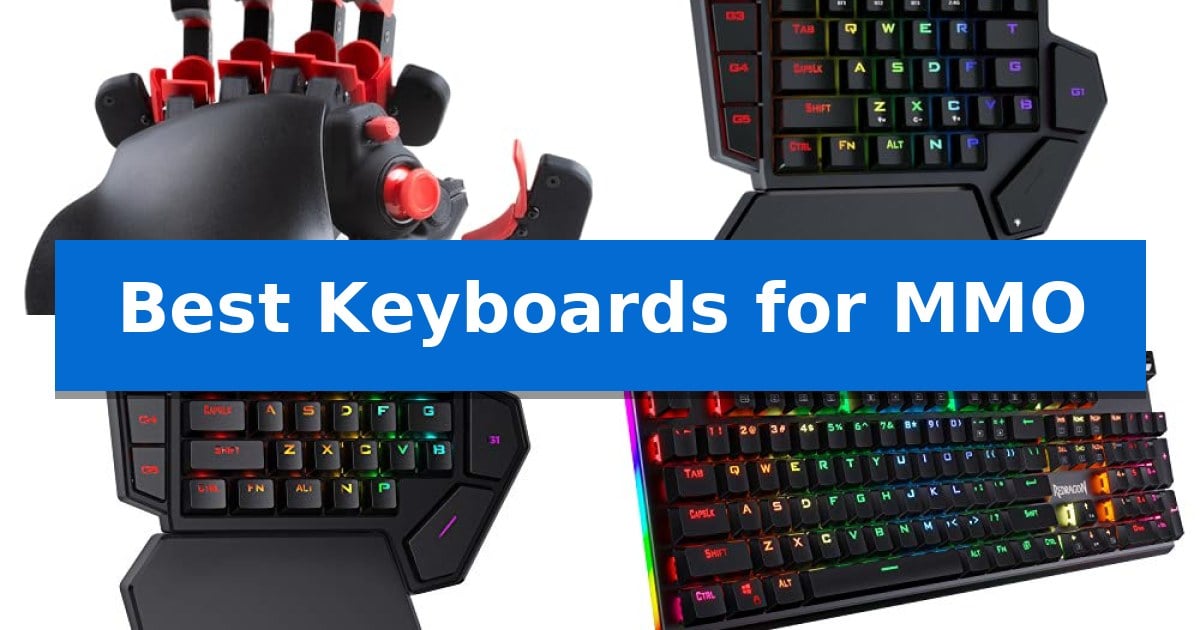
Navigating complex ability rotations in massive multiplayer online games requires more than just standard typing speed. When your survival depends on executing a dozen commands within seconds, the hardware you use becomes a critical extension of your reaction time. Finding the Best Keyboards for MMO means prioritizing devices that offer dedicated macro management, ergonomic layouts, and reliable switch responsiveness to ensure every input registers exactly when needed.
Whether you prefer a compact one-handed keypad for extra mouse space or a full-sized mechanical board with dedicated G-keys, the right equipment can significantly reduce physical strain during long sessions. We have analyzed five distinct options to help you determine which layout best fits your specific playstyle and desk setup.
Best Keyboards for MMO in 2026: Master Your Ability Rotations
Quick Comparison
| Product | Best For | Key Strength | Score |
|---|---|---|---|
| AZERON Cyborg II Gaming Keypad | Best Overall | Hall Effect analog thumbstick provides drift-free, 360-degree movement. | 4.9 |
| Redragon DITI Wireless Gaming Keypad | Untethered Macro-Heavy Performance | 7 dedicated macro keys for instant ability execution. | 4.4 |
| Redragon K585 Wired Gaming Keypad | Compact Dedicated Ability Control | 7 onboard macro keys allow for 28 total programmable combinations. | 4.6 |
| Redragon K580 Mechanical Gaming Keyboard | Dedicated On-Board Macro Keys | 5 dedicated macro keys for on-the-fly combo recording. | 4.4 |
| Redragon K671 Mechanical Gaming Keyboard | Smooth Linear Switch Responsiveness | Hot-swappable switches for easy maintenance and customization. | 4.6 |
How We Chose
- Macro Programmability: Assessing the ease of mapping complex ability rotations to dedicated keys or software profiles.
- Ergonomic Design: Evaluating the physical layout, wrist support, and overall comfort for long-duration gaming.
- Switch Responsiveness: Analyzing the tactile feedback and actuation force of the mechanical switches provided.
- Connectivity and Versatility: Considering the impact of wired versus wireless options on desk organization and input latency.
- Customization Potential: Reviewing the availability of hot-swappable sockets and software-driven lighting or key remapping.
1 AZERON Cyborg II Gaming Keypad — Advanced Analog Thumbstick Control
The AZERON Cyborg II Gaming Keypad shifts the traditional gaming interface by replacing the standard keyboard layout with a 3D-printed, ergonomic structure designed specifically for right-handed players. By offloading movement and command inputs to an ergonomic, one-handed device, it allows the mouse to remain dedicated to aiming, a configuration that can streamline complex input sequences in intensive gaming sessions.
Central to its design is a Hall Effect analog thumbstick, which provides a distinct alternative to digital WASD keys. This component supports 360-degree movement in compatible titles and eliminates stick drift, while offering customizable sensitivity, dead zones, and cone angles. The thumbstick is versatile enough to function as a mouse, providing additional control flexibility for users who prefer hybrid input methods.
With 30 mappable inputs, the device allows for extensive customization, where each button is individually connected to avoid the limitations of traditional connection matrices. Users can configure these buttons as keyboard, controller, or mouse inputs, or assign complex macros. The keypad supports up to six onboard control layouts, which can be managed and fine-tuned via the dedicated Azeron software, including RGB lighting profiles.
The AZERON Cyborg II Gaming Keypad is built with a modular main board to support future software updates and hardware enhancements. It is sized for hands ranging from 6.3 to 7.5 inches, featuring adjustable parts to ensure a tailored fit. While designed for right-handed use, its ergonomic focus aims to reduce the reach required for standard keyboard layouts during prolonged gameplay.
Best for: Right-handed gamers seeking an ergonomic, highly customizable one-handed input device for complex keybinding and analog movement.
Skip if: Users who require a full-sized standard keyboard for typing tasks or those with hand sizes outside the 6.3 to 7.5-inch range may find this specialized keypad less comfortable or functional.
PROS
- Hall Effect analog thumbstick provides drift-free, 360-degree movement.
- 30 individually mappable inputs allow for extensive macro and keybinding customization.
- Advanced ergonomic adjustability ensures a tailored fit for various hand sizes.
- Onboard profile storage allows for six saved layouts for quick switching.
CONS
- Right-handed design limits usability for left-handed gamers.
- Specialized form factor requires a learning curve compared to traditional keyboards.
2 Redragon DITI Wireless Gaming Keypad — Untethered Macro-Heavy Performance
The Redragon DITI Wireless Gaming Keypad streamlines complex ability rotations by offering 7 dedicated onboard macro keys, allowing players to map up to 28 distinct commands across four profiles. This one-handed design removes the clutter of a full-sized board, providing a focused interface for MMO and MOBA titles where rapid, repeatable inputs are essential.
Built for a clean desk setup, the device features dual-mode connectivity via 2.4GHz wireless or Bluetooth. It provides 15-20 hours of continuous gameplay on a single charge, ensuring reliable performance during extended sessions without the restriction of cables. The inclusion of a USB pass-through port adds further utility for connecting additional peripherals directly to your station.
Customization is a core focus, as the keypad utilizes a hot-swap socket compatible with most 3-pin or 5-pin switches. It ships with pre-installed Red switches rated for 50 million keypresses, offering a consistent tactile feel. Users can further tailor their experience through dedicated software, which enables the recording of complex macro sequences and the adjustment of vibrant RGB lighting effects.
The ergonomic design includes a detachable magnetic wrist rest, allowing for a smaller footprint when space is limited. Whether you are managing ability bars or executing instant combos, the Redragon DITI Wireless Gaming Keypad adapts to your specific keybind requirements through its flexible, programmable architecture.
Best for: MMO and MOBA players who require a compact, programmable interface for complex macro management and ability rotations.
Skip if: Users who require a full-sized keyboard for typing tasks or those who prefer a traditional layout for non-gaming applications.
PROS
- 7 dedicated macro keys for instant ability execution.
- Hot-swap sockets allow for easy switch customization without soldering.
- Wireless flexibility with dual 2.4GHz and Bluetooth connectivity.
- Detachable wrist rest for adjustable ergonomic support.
CONS
- Limited battery life of 15-20 hours may require frequent charging for heavy users.
3 Redragon K585 Wired Gaming Keypad — Compact Dedicated Ability Control
Managing complex ability rotations in MMOs often requires more than a standard keyboard layout can provide, which is where the Redragon K585 Wired Gaming Keypad offers a specialized solution. By consolidating essential commands into a compact, ergonomic form factor, this device allows players to maintain full control over their character's actions without the physical strain of reaching across a full-sized board.
The Redragon K585 Wired Gaming Keypad features 7 onboard macro keys that support up to 28 total combinations across four profiles, enabling instant execution of intricate ability sequences. Its swap-ready socket design is a notable inclusion, allowing users to replace switches with any 3-pin or 5-pin variant without soldering, ensuring the tactile feel matches personal preference.
Designed for a streamlined desk setup, the unit includes a USB pass-through port for connecting a mouse or headset directly. The detachable magnetic wrist rest provides flexibility, allowing users to reduce the device's footprint when space is limited. With 16.8 million color RGB lighting and five distinct modes, the keypad integrates visually into most gaming environments.
While the device excels at macro management, it is a dedicated off-hand tool rather than a replacement for a full typing keyboard. Users should note that this keypad is intended to complement an existing setup, focusing specifically on gaming-centric inputs and programmable command efficiency.
Best for: Players who need dedicated, programmable macro keys for complex ability rotations in MMO and MOBA titles.
Skip if: Users who require a full-sized keyboard for typing tasks or those who prefer a single-device solution for both gaming and general productivity.
PROS
- 7 onboard macro keys allow for 28 total programmable combinations.
- Swap-ready socket supports 3-pin or 5-pin switches for custom tactile feel.
- USB pass-through port enables cleaner cable management for peripherals.
- Detachable magnetic wrist rest offers ergonomic support and space-saving options.
CONS
- Limited to off-hand use and cannot function as a primary typing keyboard.
- Wired-only connectivity may not suit users prioritizing a wireless desk setup.
4 Redragon K580 Mechanical Gaming Keyboard — Dedicated On-Board Macro Keys
Managing complex ability rotations in high-stakes gaming requires reliable hardware, and the Redragon K580 Wired RGB Mechanical Gaming Keyboard provides a dedicated solution for players who rely on frequent inputs. By integrating 5 dedicated macro keys (G1-G5) directly onto the board, it allows users to record and execute complex combos on the fly without the need for background software.
The keyboard is built for durability, featuring a frame rated for 50 million keystrokes and double-shot keycaps designed to resist fading over time. Its full anti-ghosting capability ensures that every command is registered accurately, even during rapid, multi-key sequences common in fast-paced gaming environments.
For those who prefer a specific tactile feel, the Redragon K580 utilizes classic tactile Blue switches that provide audible feedback for every press. The board also features an upgraded socket that allows for switch swapping without the need for soldering, offering a level of customization for users who want to adjust their typing experience.
While the keyboard functions perfectly without extra software, it remains accessible for power users who wish to utilize companion software for advanced RGB lighting effects or more complex macro profiles. The inclusion of a dedicated media wheel further streamlines control, allowing for quick adjustments to volume or playback without exiting the game.
Best for: Players who require dedicated on-board macro keys for complex ability rotations and want the flexibility to swap mechanical switches.
Skip if: Users who prefer a silent typing experience or those who require a compact, tenkeyless design for limited desk space.
PROS
- 5 dedicated macro keys for on-the-fly combo recording.
- Hot-swappable switch sockets allow for easy customization.
- Full anti-ghosting ensures reliable input registration.
- Dedicated media controls for convenient volume and playback management.
CONS
- Blue switches produce a distinct audible click that may be too loud for some environments.
- Full-size layout occupies more desk space compared to compact alternatives.
5 Redragon K671 Mechanical Gaming Keyboard — Smooth Linear Switch Responsiveness
The Redragon K671 Mechanical Gaming Keyboard utilizes hot-swappable linear red switches that require minimal actuation force, providing the smooth, rapid response necessary for complex ability rotations in MMO and RPG titles. This wired mechanical board is engineered to prioritize input reliability, ensuring that every command is registered during intense gameplay sessions.
Customization is central to the design, featuring support for macro editing that allows users to remap keys, set complex shortcuts, or combine multiple functions into a single keystroke. While the integrated LED lighting offers 11 distinct modes with adjustable brightness and speed, users should note that the backlight color itself is fixed and cannot be altered.
Durability and clarity are addressed through double-shot PBT keycaps, which maintain legibility over time and provide a tactile typing experience. The board is also built with full-key anti-ghosting technology, preventing input conflicts when multiple keys are pressed simultaneously, which is essential for managing dense skill bars.
Designed for longevity and ease of maintenance, the hot-swappable nature of the switches allows for quick replacements, with four spare switches and two replacement keycaps included in the package. The unit also features 12 multimedia shortcuts for convenient control over volume and media playback without exiting the game environment.
Best for: Players who require a responsive, macro-capable mechanical keyboard with hot-swappable switches for MMO skill management.
Skip if: Users who prioritize full RGB color customization or require wireless connectivity for their gaming setup.
PROS
- Hot-swappable switches for easy maintenance and customization.
- Macro editing support for efficient key remapping and shortcuts.
- Full-key anti-ghosting to prevent input conflicts.
- Double-shot PBT keycaps for long-term durability.
CONS
- Fixed backlight color that cannot be changed via software.
- Wired-only connection limits desk placement flexibility.
Best Keyboards for MMO Buying Guide
Understanding MMO-Specific Input Needs
MMO games often require managing dozens of unique abilities, items, and social shortcuts simultaneously. A standard keyboard layout can become a bottleneck, forcing your fingers to stretch across the board. Keyboards designed for this genre often include dedicated macro keys that allow you to trigger complex sequences with a single press, effectively reducing the physical fatigue associated with repetitive tasks.
When choosing between a full-sized board and a keypad, consider your available desk space and mouse movement requirements. A one-handed keypad provides a smaller footprint, allowing you to position your mouse closer to your body, which can improve accuracy and comfort during intense encounters.
The Importance of Switch Type
Mechanical switches are the industry standard for gaming due to their durability and consistent feel. Linear switches (often red) offer a smooth keystroke without a tactile bump, which many players prefer for rapid-fire ability casting. Conversely, tactile switches (often blue) provide a distinct physical click, offering clear feedback that a command has been registered.
Many modern gaming boards now feature hot-swappable sockets, which allow you to change the switches without soldering. This is a significant benefit if you decide to experiment with different actuation forces or noise levels later on without needing to purchase an entirely new device.
Macro Management and Software
The ability to store profiles directly on the hardware is a major advantage for competitive play. On-board memory ensures that your keybinds remain active even if you move your device to a different computer. This eliminates the need to constantly reconfigure settings via software every time you log in.
Look for companion software that allows for fine-tuned customization, such as adjusting sensitivity, dead zones, or lighting effects. While some boards offer basic plug-and-play functionality, advanced software is often necessary to unlock the full potential of complex macro sequences.
Ergonomics and Wrist Health
Gaming for hours at a time can place significant stress on your wrists and hands. A detachable wrist rest is a highly recommended feature, as it helps maintain a neutral wrist position and reduces the risk of strain. Some specialized keypads go further by offering adjustable components that can be tailored to your specific hand size.
If you experience discomfort, consider the angle of your wrist while gaming. Keypads that allow for a more natural, vertical hand position can be a game-changer for players who suffer from repetitive strain injuries or simply want to improve their long-term comfort.
Connectivity: Wired vs. Wireless
Wired connections are traditionally favored for their reliability and lack of battery concerns. However, modern 2.4GHz wireless technology has reached a point where latency is virtually imperceptible, offering the freedom to position your keypad anywhere on your desk without cable clutter.
If you choose a wireless model, always check the battery life to ensure it can handle your longest gaming sessions. Most wireless gaming peripherals also include a wired mode, providing the best of both worlds if you forget to charge your device.
Frequently Asked Questions
Do I really need a dedicated macro keypad for MMOs?
While not strictly required, a keypad can significantly improve your efficiency by placing all your primary ability keys within easy reach of your thumb and fingers, reducing the need to move your hand across a full-sized keyboard.
What is the benefit of hot-swappable switches?
Hot-swappable sockets allow you to replace individual switches if they fail or if you simply want to try a different type of switch (e.g., changing from clicky to linear) without needing to buy a new keyboard or perform complex soldering.
Can I use a gaming keypad for non-gaming tasks?
Yes, most programmable keypads allow you to remap keys to any function, making them useful for productivity tasks like video editing, graphic design, or complex software shortcuts.
How do I know if a keypad will fit my hand size?
Check the manufacturer's specifications for recommended hand size ranges. Some advanced keypads, like the Azeron Cyborg II, offer adjustable parts to accommodate different hand dimensions.
Is wireless latency an issue for MMO gaming?
Modern 2.4GHz wireless technology is designed to be as responsive as a wired connection, making latency a non-issue for most MMO players.
Conclusion: Our Top Pick
When selecting the right hardware for your MMO setup, the AZERON Cyborg II Gaming Keypad stands out for its unique combination of advanced ergonomics and deep customization. Its ability to map 30 inputs and utilize a Hall Effect analog thumbstick allows for a level of control that traditional keyboards simply cannot match, making it an excellent choice for players looking to optimize their ability rotations.
While the learning curve for such a specialized device can be steeper than a standard board, the long-term benefits to your comfort and input efficiency are substantial. If you prioritize a traditional layout, the other options listed offer reliable mechanical performance and macro capabilities that remain highly effective for any dedicated MMO player.