
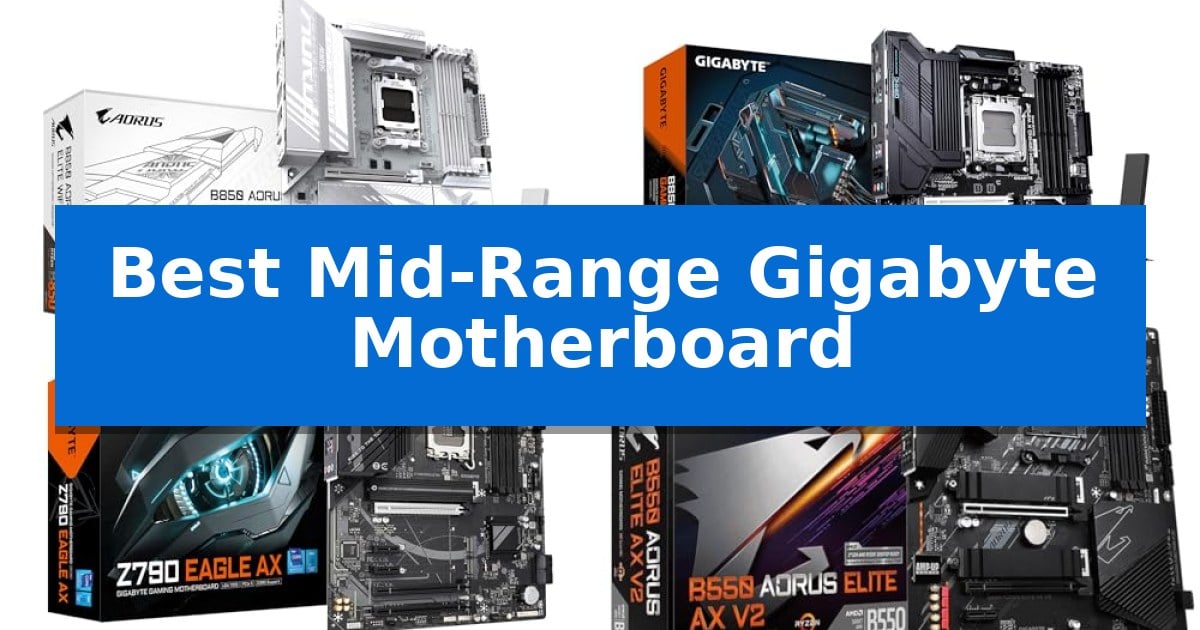
Selecting the right foundation for your PC requires balancing current hardware requirements with long-term compatibility. Finding the Best Mid-Range Gigabyte Motherboard involves identifying a board that provides stable power delivery and essential connectivity without unnecessary overhead.
Whether you are upgrading to the latest AMD Ryzen processors or building a new Intel-based workstation, the choice of chipset and form factor dictates your system's upgrade path. This guide focuses on boards that offer reliable thermal management and modern interface support for a balanced build.
You may also want to compare Best Mid-Range Garmin GPS Units, Best Mid-Range Gaming Projectors, and Best Mid-Range Gaming PCs.
Best Mid-Range Gigabyte Motherboard
Quick Comparison
| Product | Best For | Key Strength | Score |
|---|---|---|---|
| GIGABYTE B850 AORUS Elite Motherboard | Best Overall | 14+2+2 power phase design for stable power delivery | 4.9 |
| GIGABYTE B850M Gaming X Motherboard | Balanced Thermal Performance | 10+2+2 power phase design for stable processor power delivery. | 4.8 |
| GIGABYTE Z790 Eagle AX Motherboard | Future-Ready Intel Connectivity | 12+1+1 phase digital VRM for stable power delivery | 4.6 |
| GIGABYTE B550 AORUS Elite Motherboard | Proven AM4 Reliability | 12+2 Power Phase design ensures steady power delivery. | 4.7 |
| GIGABYTE B550 Eagle Motherboard | Essential Features for Gamers | Digital twin 10+3 power phase design for stable power delivery. | 4.5 |
How We Chose
- Socket and Chipset Compatibility: Ensuring the board supports the intended CPU generation and memory standard.
- Power Delivery Architecture: Evaluating the VRM phase count to ensure stable power for mid-to-high-tier processors.
- Thermal Management: Assessing the presence of dedicated heatsinks for VRMs and M.2 slots to prevent throttling.
- Connectivity and Expansion: Verifying the availability of PCIe 5.0 slots, M.2 storage options, and modern USB interfaces.
- Form Factor Suitability: Matching the motherboard size to your chassis requirements and expansion needs.
1 GIGABYTE B850 AORUS Elite Motherboard — Premium Power for Modern Builds
Building a high-performance PC requires a foundation that balances modern connectivity with robust power delivery. The GIGABYTE B850 AORUS Elite WIFI7 ICE provides a specialized platform for the latest AMD Ryzen 7000, 8000, and 9000 series processors, utilizing a 14+2+2 power phase design to maintain stability under load. This configuration ensures that the motherboard can handle the power demands of high-end CPUs, providing the necessary overhead for consistent operation during intensive computing tasks.
This ATX motherboard is designed with a distinct Snow White finish, making it a visual centerpiece for custom builds. Beyond its appearance, it integrates essential thermal management through VRM and M.2 Thermal Guard heatsinks. These components are critical for dissipating heat during sustained workloads, ensuring that high-speed storage and power delivery systems remain within optimal operational temperatures.
Connectivity is a primary focus for this board, offering PCIe 5.0 support and three M.2 slots for high-speed storage configurations. The inclusion of WIFI7 and 2.5GbE LAN provides flexible, high-bandwidth networking options, while the USB-C port ensures compatibility with modern peripherals and high-speed data transfer needs. Additionally, the Sensor Panel Link allows for advanced monitoring and customization of system data.
Practicality is addressed through the EZ-Latch design, which simplifies the installation and removal of components like graphics cards and M.2 drives. With four DIMM slots for DDR5 memory and a 5-year manufacturer warranty, this board is engineered to serve as a reliable core for current and future-ready desktop systems. Its ATX form factor provides ample space for expansion, making it a suitable choice for users who prioritize connectivity and build aesthetics.
Best for: Builders seeking a white-themed, high-connectivity ATX motherboard for modern AMD Ryzen processors.
Skip if: Users requiring a smaller form factor like Micro-ATX or Mini-ITX, as this board is strictly ATX.
PROS
- 14+2+2 power phase design for stable power delivery
- PCIe 5.0 and WIFI7 support for modern connectivity
- EZ-Latch mechanism for easier hardware installation
- 5-year manufacturer warranty for long-term reliability
CONS
- ATX form factor may be too large for compact PC cases
2 GIGABYTE B850M Gaming X Motherboard — Balanced Thermal Performance
Building a high-performance system on the AM5 platform requires a foundation that balances thermal management with modern connectivity. The GIGABYTE B850M Gaming X WIFI6E offers a focused approach to this requirement, utilizing a 10+2+2 power phase design to support the latest AMD Ryzen 9000, 8000, and 7000 series processors.
This mATX motherboard prioritizes efficient heat dissipation through fully covered MOSFET heatsinks, ensuring stability during sustained workloads. For storage and expansion, it includes two M.2 slots and PCIe 5.0 support, providing the bandwidth necessary for modern high-speed NVMe drives and future-proofing your graphics configuration.
Connectivity is a central theme of this board, featuring integrated WIFI6E for high-speed wireless networking and 2.5GbE LAN for reliable wired connections. The inclusion of USB-C ports ensures compatibility with a wide range of modern peripherals, while the EZ-Latch design simplifies the installation process for M.2 drives and other components.
With four DIMM slots supporting DDR5 memory, this board provides the necessary headroom for memory-intensive applications. Backed by a 5-year manufacturer warranty, the GIGABYTE B850M Gaming X WIFI6E is engineered for users who need a compact, reliable, and well-equipped platform for their next PC build.
Best for: Builders seeking a compact mATX foundation with modern connectivity like WIFI6E and PCIe 5.0 for AMD AM5 processors.
Skip if: Users requiring extensive multi-GPU support or additional PCIe expansion slots beyond the mATX form factor.
PROS
- 10+2+2 power phase design for stable processor power delivery.
- Integrated WIFI6E and 2.5GbE LAN for fast networking.
- Fully covered MOSFET heatsinks for effective thermal management.
- EZ-Latch mechanism for simplified hardware installation.
CONS
- mATX form factor limits the number of available expansion slots.
3 GIGABYTE Z790 Eagle AX Motherboard — Future-Ready Intel Connectivity
Building a reliable foundation for a modern PC requires balancing current processing power with future expansion capabilities. The GIGABYTE Z790 Eagle AX Motherboard centers its design on the LGA 1700 socket, providing broad support for Intel Core 14th, 13th, and 12th Gen processors. This versatility ensures that builders can select from a wide range of CPU options while maintaining a stable platform for their system.
Power delivery and thermal management are critical for sustained performance under load. This board features a 12+1+1 phase digital VRM solution, which is engineered to provide consistent power to the processor. To manage heat effectively, the motherboard incorporates an enlarged MOSFET heatsink and M.2 Thermal Guard technology, helping to maintain optimal operating temperatures for the VRM and high-speed storage drives during intensive tasks.
Connectivity is a primary strength of this model, catering to users who require fast data transfer and modern networking. It supports DDR5 memory across four DIMM slots, enabling high-bandwidth performance. For storage and peripherals, the board includes PCIe 4.0 support, multiple NVMe M.2 slots, and a USB 3.2 Gen 2×2 Type-C port, ensuring compatibility with current high-speed external devices and internal components.
Practical assembly features such as Q-Flash and EZ-Latch simplify the building process, allowing for easier BIOS updates and component installation. With integrated Wi-Fi 6E and 2.5GbE networking, the board provides robust options for both wireless and wired connectivity, making it a well-rounded choice for users looking for a balanced, feature-rich motherboard.
Best for: Builders seeking a versatile, feature-rich foundation for Intel 12th through 14th Gen processors with support for high-speed DDR5 memory and modern connectivity.
Skip if: Users who require legacy connectivity or those who do not intend to utilize DDR5 memory, as this board is specifically designed for the newer standard.
PROS
- 12+1+1 phase digital VRM for stable power delivery
- DDR5 memory compatibility for increased bandwidth
- Advanced thermal design with heatsinks and M.2 guards
- Modern connectivity including Wi-Fi 6E and USB 3.2 Gen 2×2 Type-C
CONS
- DDR5-only architecture limits compatibility with older DDR4 RAM modules
4 GIGABYTE B550 AORUS Elite Motherboard — Proven AM4 Reliability
Building a reliable foundation for an AMD-based system requires balancing power delivery with modern connectivity, and the GIGABYTE B550 AORUS Elite AX V2 addresses this through a robust 12+2 Power Phase design. This motherboard is engineered to support the Ryzen 5000, 4000, and 3000 series processors, providing a stable environment for demanding computing tasks through its premium chokes and capacitors.
Thermal management is a priority in this design, featuring an Advanced Thermal Armor system. This includes a dedicated VRM heatsink and an M.2 Thermal Guard to ensure that high-speed storage components maintain optimal operating temperatures. The inclusion of an integrated I/O shield simplifies the assembly process, allowing for a more straightforward PC DIY experience.
Connectivity options are extensive, catering to both high-speed data transfer and networking needs. The board provides a PCIe 4.0 x16 slot reinforced with PCIe UD Armor for structural integrity, alongside a PCIe 4.0 M.2 slot for fast NVMe storage. For networking, it integrates WIFI 6 and 2.5 GbE LAN, ensuring high-bandwidth capabilities for both wireless and wired setups.
The board supports DDR4 memory across four DIMM slots with Extreme Memory Profile support to maximize system responsiveness. Users benefit from a versatile port selection, including Front USB 3.2 Gen 1 Type-C for modern case compatibility, making it a well-rounded choice for those seeking a reliable and feature-rich mid-range platform.
Best for: Builders looking for a reliable, feature-rich ATX motherboard for Ryzen 5000/4000/3000 series processors with integrated Wi-Fi 6 and PCIe 4.0 support.
Skip if: Users requiring support for older CPU generations not listed or those needing a smaller form factor like Micro-ATX or Mini-ITX.
PROS
- 12+2 Power Phase design ensures steady power delivery.
- Integrated I/O shield simplifies the installation process.
- Advanced Thermal Armor provides effective heat dissipation for VRMs and M.2 drives.
- Comprehensive connectivity including Wi-Fi 6 and 2.5 GbE LAN.
CONS
- ATX form factor may be too large for compact PC builds.
5 GIGABYTE B550 Eagle Motherboard — Essential Features for Gamers
The GIGABYTE B550 Eagle WIFI6 AMD AM4 ATX Motherboard provides a foundational platform for AMD Ryzen 5000, 4000, and 3000 series processors, utilizing the AM4 socket. Designed for users who need a balance of modern connectivity and thermal management, this board incorporates a digital twin 10+3 phase VRM solution to ensure steady power delivery to the CPU.
Thermal performance is addressed through enlarged VRM heatsinks that feature 5 W/mk thermal pads, assisting in heat dissipation during sustained workloads. The inclusion of a pre-installed I/O armor simplifies the PC assembly process, reducing the number of steps required to secure the motherboard into a chassis.
For memory and storage, the board supports DDR4 memory across four DIMM slots and includes AMD EXPO Memory Module Support for optimized settings. Storage expansion is facilitated by two M.2 slots, while the PCIe 4.0 interface provides high-bandwidth support for compatible components.
Connectivity is a primary focus of this model, featuring integrated WIFI 6 for wireless networking and a 1GbE LAN port for wired connections. The rear I/O panel offers versatile options, including USB 3.2 Gen 2 and a USB 3.2 Gen 1 Type-C port, ensuring compatibility with a wide range of modern peripherals.
Best for: Builders seeking a reliable AM4 platform with integrated Wi-Fi 6 and modern connectivity for Ryzen 3000 through 5000 series processors.
Skip if: Users requiring support for newer AM5 processors or DDR5 memory, as this board is strictly limited to the AM4 socket and DDR4 architecture.
PROS
- Digital twin 10+3 power phase design for stable power delivery.
- Integrated WIFI 6 for high-speed wireless connectivity.
- Pre-installed I/O armor simplifies the installation process.
- Advanced thermal armor with high-conductivity thermal pads.
CONS
- DDR4 memory limitation prevents use of faster DDR5 modules.
- AM4 socket compatibility restricts future CPU upgrade paths to older generation processors.
Best Mid-Range Gigabyte Motherboard Buying Guide
Understanding Motherboard Chipsets
The chipset serves as the communication hub between your CPU, memory, and peripherals. For AMD builds, the B-series chipsets offer a sweet spot by providing most of the features found in flagship models while maintaining a more accessible price point.
Intel users should look for Z-series boards if they intend to utilize specific overclocking features or require maximum lane availability. Always verify that the motherboard socket matches your processor generation, as even minor variations can lead to compatibility issues.
Power Delivery and VRM Quality
The Voltage Regulator Module (VRM) is responsible for converting power from your supply to the CPU. A robust power phase design, such as a 14+2+2 configuration, ensures that your processor receives clean, consistent power even under heavy workloads.
When choosing a board, look for high-quality chokes and capacitors. These components are essential for maintaining stability during long rendering sessions or intensive gaming, reducing the risk of system crashes or performance degradation.
Thermal Management Solutions
Heat is the primary enemy of electronic components. Motherboards with comprehensive heatsinks covering the VRMs and M.2 storage slots help dissipate heat effectively, allowing your system to maintain peak performance for longer durations.
Check for boards that include thermal pads with high conductivity ratings. These pads bridge the gap between the heat-generating components and the metal heatsinks, ensuring that heat is transferred away from the motherboard surface efficiently.
Storage and Expansion Connectivity
Modern builds rely heavily on fast NVMe storage. Ensure your motherboard features multiple M.2 slots, ideally supporting PCIe 5.0 or 4.0, to take advantage of the latest high-speed SSDs available on the market.
Beyond storage, consider your expansion needs. If you plan to add multiple graphics cards or specialized add-in cards, verify the number of available PCIe slots and their physical spacing to avoid interference with other components.
Form Factor and Case Compatibility
Motherboards typically come in ATX or mATX form factors. ATX boards provide more space for expansion slots and additional headers, making them ideal for full-tower cases where space is not a constraint.
mATX boards are excellent for compact builds. While they offer fewer expansion slots, they often include all the necessary features for a standard gaming or productivity setup, provided you do not require excessive peripheral connectivity.
Frequently Asked Questions
What is the primary difference between ATX and mATX motherboards?
The main difference is physical size and expansion capability. ATX boards are larger and offer more PCIe slots and headers, while mATX boards are more compact, fitting into smaller cases at the cost of fewer expansion options.
Do I need a PCIe 5.0 motherboard for my build?
PCIe 5.0 provides future-proofing for next-generation graphics cards and storage. If you plan to keep your system for several years, a board with PCIe 5.0 support is a beneficial investment.
How do I know if my CPU is compatible with a motherboard?
Always check the motherboard's socket type (e.g., AM5 for Ryzen 7000/8000/9000) and the manufacturer's CPU support list. The socket must match exactly for the processor to function.
Why is VRM cooling important?
VRM cooling prevents the power delivery components from overheating. If these components get too hot, they may throttle power to the CPU, leading to lower performance or system instability.
Can I use DDR4 memory on a DDR5 motherboard?
No, memory slots are physically keyed differently. You must use the memory type specified by the motherboard, which is almost exclusively DDR5 for modern mid-range boards.
Conclusion: Our Top Pick
Choosing the right motherboard is about matching your specific hardware requirements with a reliable platform. The GIGABYTE B850 AORUS Elite Motherboard stands out as our top pick due to its balanced combination of a 14+2+2 power phase design, PCIe 5.0 support, and comprehensive thermal guards. It provides the necessary headroom for modern high-performance processors while ensuring long-term stability with its 5-year warranty.
While other options in this lineup offer specific advantages for compact builds or Intel-based systems, this board delivers the most versatile feature set for a wide range of users. By prioritizing essential connectivity and robust power delivery, it serves as a dependable foundation for any mid-range build.