
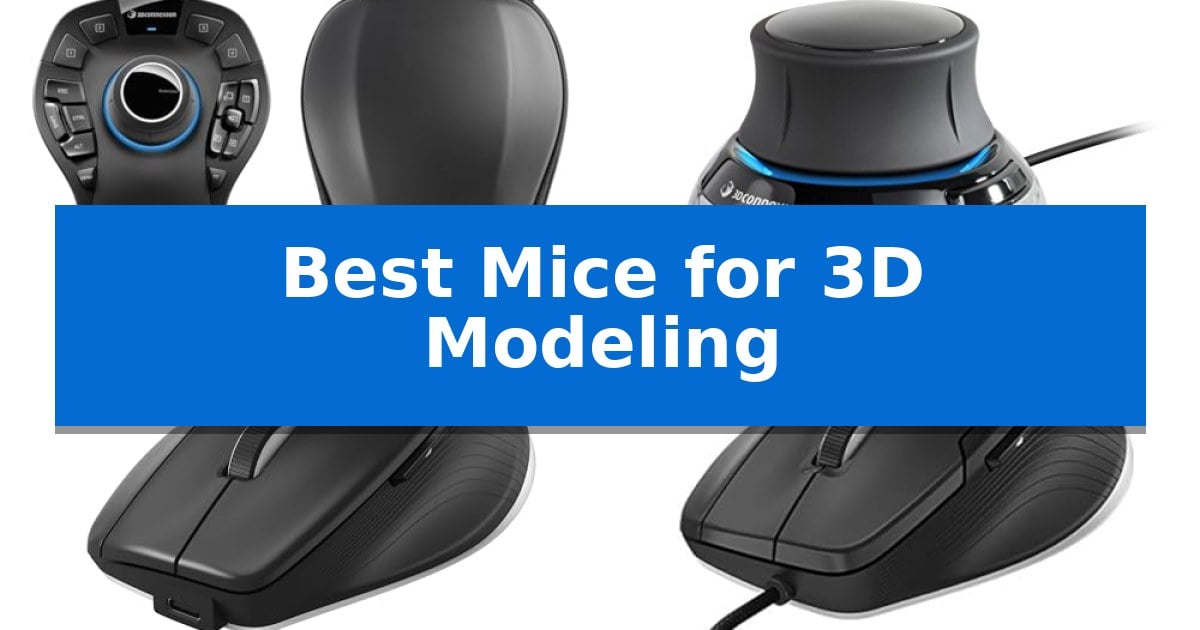
Achieving high-level precision in digital design requires tools that go beyond the capabilities of a standard office peripheral. When working with complex geometries and intricate assemblies, the Best Mice for 3D Modeling serve as the bridge between your creative intent and the software environment, allowing for fluid navigation and reduced strain during long sessions.
Selecting the right hardware depends on whether you need specialized six-axis navigation for 3D manipulation or an ergonomic mouse optimized for high-resolution CAD tasks. This guide examines the top-performing solutions from 3Dconnexion, focusing on how their specific sensor technologies, programmable buttons, and ergonomic designs impact your professional output and daily workflow.
You may also want to compare Best Mice for 3D Artists, Best Mice Feet and Skates, and Best Mice and Keyboards for Gaming.
Best Mice for 3D Modeling
Quick Comparison
| Product | Best For | Key Strength | Score |
|---|---|---|---|
| 3Dconnexion SpaceMouse Pro Wireless | Best Overall | Six-Degrees-of-Freedom (6DoF) sensor for intuitive 3D object manipulation. | 4.9 |
| 3Dconnexion SpaceMouse Compact | Space-Saving 3D Control | Six-degrees-of-freedom (6Dof) sensor for precise 3D model manipulation. | 4.3 |
| 3Dconnexion CadMouse Pro Wireless | Ergonomic Precision for CAD | Dedicated middle mouse button for improved CAD navigation. | 4.8 |
| 3Dconnexion CadMouse Compact | Compact Design for Professionals | Dedicated middle mouse button for improved 3D navigation. | 4.8 |
| 3Dconnexion SpacePilot Pro | Workflow Efficiency with LCD | Six degrees-of-freedom (6DoF) sensor for precise 3D model manipulation | 4.8 |
How We Chose
- Navigation Precision: Assessing the integration of six-degrees-of-freedom (6DoF) sensors for intuitive model manipulation.
- Ergonomic Design: Evaluating the physical form factor and button placement to support long-term comfort during intensive design tasks.
- Programmability: Analyzing the availability of customizable radial menus and programmable keys to streamline software-specific commands.
- Connectivity Standards: Reviewing the reliability of wireless protocols, including Bluetooth Low Energy and 2.4 GHz RF, alongside USB-C wired options.
- Workflow Integration: Considering the inclusion of specialized features like LCD workflow assistants that provide direct access to application tools.
1 3Dconnexion SpaceMouse Pro Wireless — Advanced Six-Axis Navigation
Navigating complex 3D environments requires precise control that standard peripherals often struggle to provide. The 3Dconnexion SpaceMouse Pro Wireless addresses this by utilizing a Six-Degrees-of-Freedom (6DoF) sensor, allowing users to intuitively pan, zoom, and rotate models simultaneously. This hardware-based approach is designed to offload navigation tasks from the primary mouse, creating a more fluid workflow for digital sculpting and architectural design.
The device emphasizes a professional-grade build with wireless and USB-C connectivity, ensuring it integrates into modern workstations without cable clutter. It supports Bluetooth Low Energy for flexible pairing options, maintaining a stable connection during long design sessions. The inclusion of a rechargeable Li-poly battery with 1100 mAh capacity provides the necessary power for extended use, minimizing the need for frequent charging interruptions.
By separating navigation from selection, this controller enables a specialized input method that can significantly reduce repetitive motion during intensive modeling tasks. While it requires a learning curve to master the 6DoF movements, it offers a distinct advantage for users who need to manipulate complex geometry in real-time. The ergonomic design is tailored to support the hand during prolonged operation, making it a functional addition to a dedicated 3D modeling setup.
Best for: Professional 3D modelers and CAD designers who require simultaneous 6-axis navigation to improve workflow efficiency.
Skip if: Users who primarily perform 2D design work or those who prefer a single-device setup without the need for specialized navigation hardware.
PROS
- Six-Degrees-of-Freedom (6DoF) sensor for intuitive 3D object manipulation.
- Flexible wireless and USB-C connectivity options.
- Integrated rechargeable 1100 mAh battery for cordless operation.
- Supports Bluetooth Low Energy for efficient power management.
CONS
- Requires a learning curve to master the 6DoF navigation style.
- Occupies additional desk space as a secondary input device.
2 3Dconnexion SpaceMouse Compact — Space-Saving 3D Control
Navigating complex digital environments requires more than a standard pointer, and the 3Dconnexion SpaceMouse Compact addresses this by utilizing a six-degrees-of-freedom (6Dof) sensor. This specialized hardware allows for intuitive and precise movement within CAD applications, enabling users to pan, zoom, and rotate models simultaneously in a way that traditional input devices cannot replicate.
The device is built with a brushed steel base to ensure stability during intensive 3D navigation, while its compact footprint ensures it fits easily on crowded workstations. It connects to a wide range of operating systems, including Windows, macOS, and Linux, ensuring broad compatibility for professional design environments.
Customization is handled through two dedicated buttons, each capable of opening a 3Dconnexion radial menu. These menus provide direct, rapid access to up to eight of your most-used application commands, streamlining your workflow by reducing the need to navigate through complex on-screen toolbars.
Designed for those who prioritize efficiency in 3D modeling, this controller serves as a dedicated companion to your primary mouse. While it excels at spatial manipulation, it is a specialized tool that requires a learning curve for those accustomed to traditional input methods.
Best for: Professional CAD designers and 3D modelers who need precise, intuitive spatial navigation in complex digital environments.
Skip if: Users seeking a general-purpose mouse for standard office tasks or those who do not work within 3D CAD software will find this device redundant.
PROS
- Six-degrees-of-freedom (6Dof) sensor for precise 3D model manipulation.
- Radial menus provide quick access to custom application commands.
- Brushed steel base ensures high stability during use.
- Compact design saves valuable desk space.
CONS
- Specialized functionality is limited primarily to CAD and 3D design applications.
3 3Dconnexion CadMouse Pro Wireless — Ergonomic Precision for CAD
The 3Dconnexion CadMouse Pro Wireless Mouse is engineered specifically for CAD professionals, featuring a dedicated middle mouse button that eliminates the need to click the scroll wheel during complex 3D modeling tasks. This design choice prioritizes efficiency and comfort, allowing users to navigate 3D environments with greater precision.
Equipped with a 7200 dpi optical sensor, the device provides high-resolution tracking for detailed design work. Its connectivity options include 2.4 GHz RF, Bluetooth, and USB-C, offering flexibility for various workstation setups. The inclusion of 7 buttons allows for customizable shortcuts, which can be mapped to frequently used commands in professional software.
The Smart Mouse Wheel 2 provides controlled scrolling, which is essential for zooming in and out of intricate 3D models without overshooting. With a weight of 0.9 pounds and dimensions of 8 x 6 x 4 inches, the mouse is built with a substantial, ergonomic form factor intended for extended use at a desk.
While the device offers robust features for CAD workflows, its size and weight are tailored for stationary desktop use rather than portable travel. Users should ensure their workspace accommodates a larger, ergonomically shaped mouse to fully benefit from its button layout and specialized wheel functionality.
Best for: Professional CAD designers and 3D modelers who require a dedicated middle button and precise control for complex software environments.
Skip if: Users who prefer a lightweight, compact, or ambidextrous mouse for travel or general-purpose computing.
PROS
- Dedicated middle mouse button for improved CAD navigation.
- Triple connectivity including 2.4 GHz RF, Bluetooth, and USB-C.
- Smart Mouse Wheel 2 for precise zoom control.
- 7 programmable buttons to streamline design workflows.
CONS
- Larger form factor may not suit users with smaller hands or those seeking a portable design.
4 3Dconnexion CadMouse Compact — Compact Design for Professionals
Precision and efficiency are paramount when navigating complex 3D environments, and the 3Dconnexion CadMouse Compact is engineered specifically to address these requirements. By incorporating a dedicated middle mouse button, this device eliminates the need to rely on the scroll wheel for pan, zoom, and rotate functions, which is a common point of friction in standard office mice.
The mouse features a compact ergonomic shape that maintains comfort during extended modeling sessions. It is equipped with a high-resolution sensor designed for tracking accuracy, ensuring that cursor movements remain consistent across various surface types. The inclusion of Smart Mouse Wheel 2 technology provides controlled scrolling, which is particularly beneficial when navigating through extensive part libraries or complex assembly trees.
With 7 buttons, including 5 programmable buttons, users can assign frequently used commands directly to the mouse. This customization capability allows for a more streamlined workflow, reducing the reliance on keyboard shortcuts. The device connects via a reliable wired USB interface, ensuring consistent connectivity without the need for battery management.
The 3Dconnexion CadMouse Compact is built for professionals who require a specialized tool for CAD and 3D design applications. Its design prioritizes functionality and build quality, backed by a 3-year manufacturer limited warranty, making it a durable choice for demanding daily use.
Best for: Professional 3D modelers and CAD designers who require a dedicated middle mouse button and programmable shortcuts for efficient software navigation.
Skip if: Users who prioritize a wireless connection or require a larger, full-sized palm grip mouse may find the compact, wired design of this model less suitable for their preferences.
PROS
- Dedicated middle mouse button for improved 3D navigation.
- 5 programmable buttons to streamline design workflows.
- Compact ergonomic shape suitable for various hand sizes.
- 3-year manufacturer limited warranty for long-term support.
CONS
- Wired USB connection limits mobility compared to wireless alternatives.
- Compact size may not provide enough support for users who prefer a large palm-filling mouse.
5 3Dconnexion SpacePilot Pro — Workflow Efficiency with LCD
The 3Dconnexion SpacePilot Pro 3D Mouse 3DX-700036 centers its design around a specialized six degrees-of-freedom (6DoF) sensor, providing engineers with precise control over complex 3D models. This device is engineered to streamline professional workflows by integrating advanced navigation directly into the hand-resting experience.
Beyond its core sensor, the unit features a Color LCD Workflow Assistant that provides visual feedback and access to essential application commands. The hardware is built for high-demand environments, offering 31 programmable keys that allow users to map frequently used shortcuts and modifiers for rapid access during MCAD tasks.
Ergonomics are prioritized through an advanced wrist design intended to provide superior comfort during extended modeling sessions. The inclusion of Dual-Function QuickView Navigation Keys and dedicated keyboard modifiers further reduces the need to switch between the mouse and the keyboard, keeping the focus on the design workspace.
This controller is a specialized tool for those who require dedicated hardware for 3D navigation rather than a standard pointing device. By consolidating application control and navigation into a single interface, it serves as a dedicated peripheral for professional engineering and design applications.
Best for: Professional engineers and 3D designers requiring dedicated six-degrees-of-freedom navigation and extensive shortcut mapping for MCAD software.
Skip if: Users seeking a general-purpose mouse for standard office tasks or those who prefer a compact, minimalist desktop setup.
PROS
- Six degrees-of-freedom (6DoF) sensor for precise 3D model manipulation
- 31 programmable keys for deep application control
- Color LCD Workflow Assistant for visual command feedback
- Advanced wrist design for improved comfort during long sessions
CONS
- Large footprint requiring significant desk space
- Specialized design limited primarily to 3D modeling and engineering software
Best Mice for 3D Modeling Buying Guide
Understanding 6DoF Navigation
The core advantage of specialized 3D mice is the Six-Degrees-of-Freedom (6DoF) sensor. Unlike a standard mouse that operates on a 2D plane, these devices allow you to pan, zoom, and rotate models simultaneously in a 3D space.
This technology is essential for engineers and designers who need to inspect complex assemblies from every angle without constantly switching between tools or keyboard shortcuts.
Ergonomics and Long-Term Comfort
In professional design, repetitive strain is a significant concern. Mice designed for CAD often feature a dedicated middle mouse button and an optimized shape that supports the hand in a natural position.
Choosing a mouse with an ergonomic profile helps maintain productivity during extended modeling sessions by reducing the tension typically associated with clicking a scroll wheel repeatedly.
Programmability and Workflow Efficiency
The ability to map software commands to physical buttons is a game-changer for complex applications. Many professional mice offer radial menus that provide instant access to your most-used tools.
By reducing the distance your hand travels across the keyboard, you can keep your focus on the model, significantly speeding up the iterative design process.
Wired vs. Wireless Connectivity
Modern CAD environments often benefit from the flexibility of wireless connectivity, such as 2.4 GHz RF or Bluetooth. These options reduce desk clutter and allow for a more dynamic workspace.
However, for users who prefer a consistent, battery-free experience, USB-C wired connections remain a reliable standard that ensures the device is always ready for use.
Sensor Resolution and Accuracy
For precision tasks, the optical sensor resolution (DPI) is a critical metric. A high-resolution sensor ensures that every micro-movement is accurately translated to the screen, which is vital when working on fine details.
Pairing a high-DPI mouse with a quality surface ensures consistent tracking, preventing the jitter that can occur with lower-grade sensors during delicate adjustments.
Frequently Asked Questions
Do I need a 3D mouse if I already have a high-end standard mouse?
A standard mouse is excellent for 2D selection and clicking, but it cannot replicate the simultaneous pan, zoom, and rotate capabilities provided by a 6DoF 3D mouse, which is specifically designed for 3D environment navigation.
Are these mice compatible with all CAD software?
Most professional 3D mice are designed to be compatible with major CAD and 3D modeling suites, but it is always recommended to check the manufacturer's compatibility list for your specific software version.
How does a 6DoF sensor differ from a standard optical sensor?
A standard optical sensor tracks movement on a flat surface (X and Y axes). A 6DoF sensor tracks movement in three-dimensional space, allowing for movement along the X, Y, and Z axes, as well as rotation around those axes.
Is a wireless 3D mouse as reliable as a wired one?
Modern wireless protocols like 2.4 GHz RF provide latency-free performance comparable to wired connections, making them highly reliable for professional design work.
Can I use a 3D mouse and a standard mouse at the same time?
Yes, most professionals use a 3D mouse in their non-dominant hand for navigation and a standard CAD mouse in their dominant hand for selection and command execution.
Conclusion: Our Top Pick
For professionals seeking the most comprehensive control over their 3D environment, the 3Dconnexion SpaceMouse Pro Wireless stands out as the primary choice. Its advanced 6DoF sensor and ergonomic design provide a level of navigation fluidity that standard peripherals simply cannot match, making it an essential investment for complex modeling workflows.
While the initial learning curve for 3D navigation may take time, the long-term gains in efficiency and reduced hand fatigue are significant. If your work involves daily interaction with 3D assemblies, this device offers the most robust feature set to support your design process.