
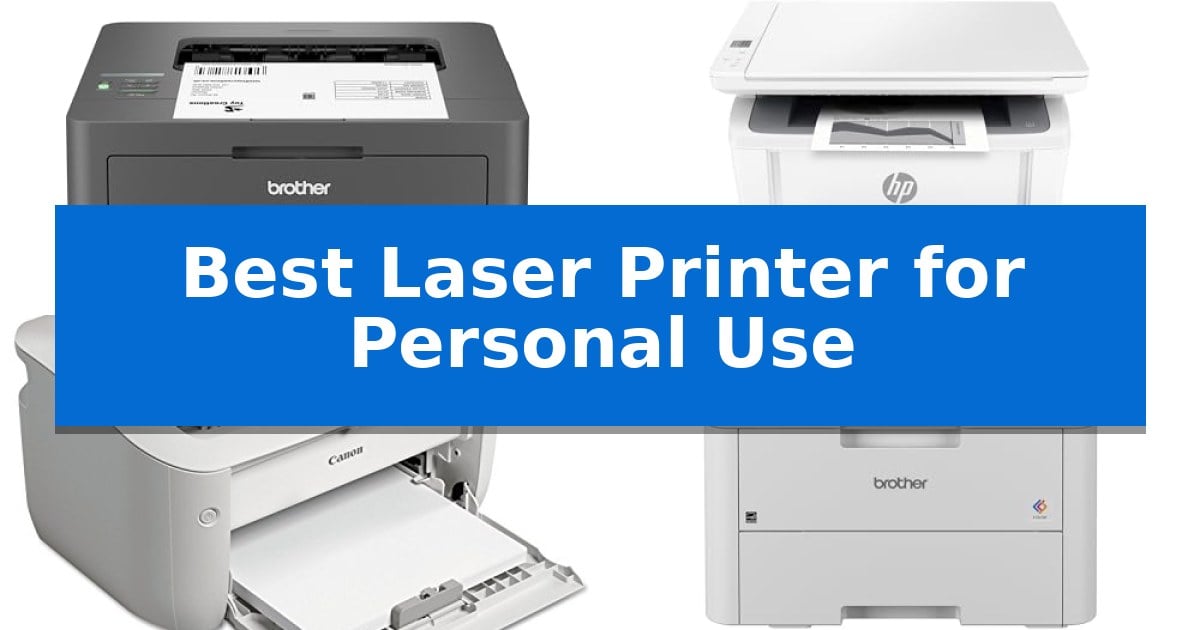
Finding the Best Laser Printer for Personal Use requires balancing your specific document needs against the physical constraints of a home workspace. Whether you are managing high-volume reports or simply need a reliable machine for occasional printing, the right device can significantly improve your daily productivity.
Our guide evaluates current laser technology to help you identify which features—such as wireless connectivity, automatic duplexing, or compact footprints—truly matter for your setup. By focusing on essential performance metrics, we help you cut through the technical noise to find a printer that integrates seamlessly into your life.
Best Laser Printer for Personal Use in 2026
Quick Comparison
| Product | Best For | Key Strength | Score |
|---|---|---|---|
| Brother HL-L2405W Laser Printer | Best Overall | Fast print speeds up to 30ppm for efficient document handling. | 4.9 |
| HP LaserJet MFP M140w Printer | World's Smallest Laser All-in-One | World's smallest laser all-in-one in its class for space-constrained areas. | 4.3 |
| Canon imageCLASS LBP6030w Printer | Space-Saving Design for Tight Desks | Compact design fits easily on crowded desks or shelves. | 4.3 |
| Brother HL-L3220CDW Color Laser Printer | Vibrant Color for Home Documents | Automatic duplex printing for efficient, paper-saving double-sided document production. | 4.9 |
| HP LaserJet Pro 3101sdw Printer | Fastest All-in-One for Small Teams | High-speed printing at up to 35 ppm for efficient document production. | 4.8 |
How We Chose
- Print speed and efficiency for individual document handling.
- Physical footprint and space-saving design for home desks.
- Connectivity standards including dual-band Wi-Fi and mobile app support.
- Paper handling versatility, such as tray capacity and specialty media support.
- All-in-one functionality versus dedicated single-function performance.
1 Brother HL-L2405W Laser Printer — Best for Home Office Productivity
Efficiency in a home office often comes down to the speed and reliability of your document output. The Brother HL-L2405W Wireless Compact Monochrome Laser Printer is engineered to handle high-volume text tasks, delivering crisp, professional-grade black and white documents at speeds up to 30ppm. Its compact footprint ensures it fits into tight workspaces without sacrificing the utility of a standard-sized printer.
Connectivity is a primary focus for this model, featuring dual-band wireless (2.4GHz/5GHz) support that allows for stable integration into modern home networks. For users who prefer a direct connection, a standard USB interface is also available. The inclusion of the Brother Mobile Connect App provides a streamlined way to manage print jobs, monitor toner levels, and order supplies directly from a mobile device, facilitating a more flexible workflow.
Practicality is further enhanced by the 250-sheet paper tray, which reduces the frequency of manual refills during long print runs. For specialized tasks, a manual feed slot accommodates envelopes and various specialty papers, adding versatility to the machine's core monochrome functionality. The printer is also compatible with the Refresh EZ Print Subscription Service, which can help automate toner replacement and manage supply costs.
Designed for longevity and support, the unit is backed by a 1-year limited warranty and access to ongoing technical support. By utilizing Brother Genuine TN830 or TN830XL toner, users can maintain consistent print quality and take advantage of the manufacturer's supply management tools.
Best for: Home office users who require a fast, reliable, and space-saving monochrome printer for high-volume document production.
Skip if: Users who require color printing, scanning, or copying capabilities, as this is a dedicated monochrome-only laser printer.
PROS
- Fast print speeds up to 30ppm for efficient document handling.
- Dual-band wireless connectivity for reliable network integration.
- 250-sheet paper tray minimizes the need for frequent paper replenishment.
- Compact design suitable for limited desk space.
CONS
- Monochrome-only output limits the printer to black and white documents.
- No integrated scanner or copier functionality.
2 HP LaserJet MFP M140w Printer — World's Smallest Laser All-in-One
The HP LaserJet MFP M140w Printer distinguishes itself as the world's smallest laser all-in-one in its class, offering a compact footprint that fits into tight workspaces while providing essential printing, scanning, and copying capabilities. Designed for small teams of 1-3 people, this device prioritizes space efficiency without sacrificing the professional-quality output expected from laser technology.
Performance is driven by a print speed of up to 21 black-and-white pages per minute. The unit integrates wireless connectivity with a self-reset feature to maintain stable network links. Users can manage tasks directly from mobile devices, PCs, or tablets, and the HP Smart app further streamlines workflows by enabling cloud scanning and remote print management.
Practicality is enhanced by specific document handling features, such as the ability to copy both sides of an ID card onto a single sheet of paper. The printer is engineered for straightforward operation, though it is important to note that it is designed to function exclusively with original HP chips and circuitry. Periodic firmware updates are utilized to ensure the continued effectiveness of these security and compatibility measures.
This laser printer serves as a reliable, space-saving solution for individuals or small groups requiring consistent, high-quality monochrome documentation. Its combination of a small physical profile and robust mobile integration makes it a functional addition to modern, desk-constrained professional environments.
Best for: Small teams of 1-3 people who need a compact, wireless laser printer for professional-quality monochrome documents.
Skip if: Users who require color printing or those who prefer the flexibility of using third-party ink or toner cartridges.
PROS
- World's smallest laser all-in-one in its class for space-constrained areas.
- Fast print speeds reaching 21 pages per minute.
- Wireless connectivity with self-reset for reliable mobile and PC printing.
- Integrated ID card copying for efficient document handling.
CONS
- Strict compatibility requiring original HP chips and circuitry.
- Monochrome only, limiting use to black and white documents.
3 Canon imageCLASS LBP6030w Printer — Space-Saving Design for Tight Desks
Efficiency in a home office often comes down to reclaiming desk space without sacrificing document quality. The Canon imageCLASS LBP6030w addresses this by integrating a compact design that measures just 14.3 inches wide and 7.8 inches high, allowing it to fit into tight workspaces where larger units would be impractical.
Designed for straightforward monochrome output, this printer delivers fast print speeds of up to 19 pages per minute. It supports a 150-sheet paper capacity, which is sufficient for handling standard personal printing tasks, such as reports or labels, without constant reloading. The device is also built with a focus on power efficiency, consuming less than 2 watts in Energy Saver mode.
Connectivity is handled through wireless printing capabilities, enabling users to send documents directly from compatible mobile devices. This eliminates the need for a direct wired connection to a computer, further reducing cable clutter on a desk. The system utilizes the Canon Genuine Toner 125, which provides a rated yield of approximately 1,600 pages.
Maintenance and longevity are supported by a 1-year limited warranty, providing coverage for the initial period of operation. By focusing on essential monochrome printing tasks, the Canon imageCLASS LBP6030w serves as a specialized tool for users who prioritize a small physical footprint and reliable wireless access for daily document needs.
Best for: Home office users who require a space-saving monochrome printer with wireless connectivity for occasional document printing.
Skip if: Users who require color printing, automatic duplexing, or high-volume scanning and copying capabilities.
PROS
- Compact design fits easily on crowded desks or shelves.
- Wireless connectivity allows for printing from mobile devices.
- Energy-efficient operation using less than 2 watts in standby.
- Fast print speeds of up to 19 pages per minute.
CONS
- Single-function design lacks scanning and copying features.
- Monochrome-only output limits document versatility.
4 Brother HL-L3220CDW Color Laser Printer — Vibrant Color for Home Documents
The Brother HL-L3220CDW Color Laser Printer simplifies home office workflows by combining high-speed output with professional-grade color quality. Designed to act as a central hub for document production, it delivers crisp text and vibrant graphics at a rate of 19 pages per minute, ensuring that reports and marketing materials are ready when needed.
Efficiency is central to this model's design, featuring automatic duplex printing that reduces paper consumption by handling double-sided documents without manual intervention. The inclusion of a 250-sheet paper tray minimizes the frequency of refills, while a dedicated manual feed slot provides the flexibility to handle envelopes and specialty media types for diverse printing tasks.
Connectivity is streamlined through advanced wireless capabilities, allowing users to print directly from laptops, smartphones, and tablets. The printer integrates seamlessly with major mobile platforms and cloud services, supported by built-in security protocols to protect sensitive business information during transmission.
Measuring 9.4 inches in height with a 15.7-inch square footprint, this printer balances a robust feature set with a manageable size for personal workspaces. It offers a reliable, low-maintenance solution for users who prioritize consistent, high-quality color output and modern mobile integration in their daily operations.
Best for: Home office users who require high-quality color documents and frequent wireless printing from mobile devices.
Skip if: Users who require high-volume, enterprise-level printing speeds or those who need a multi-function device with integrated scanning and copying capabilities.
PROS
- Automatic duplex printing for efficient, paper-saving double-sided document production.
- Wireless connectivity with secure mobile and cloud printing integration.
- 250-sheet paper tray capacity reduces the need for constant paper replenishment.
- 19 PPM output provides fast, professional-quality text and graphics.
CONS
- Single-function design lacks built-in scanning or copying features.
- Standard footprint may occupy significant desk space in very compact home offices.
5 HP LaserJet Pro 3101sdw Printer — Fastest All-in-One for Small Teams
Maintaining a consistent workflow in a small office requires equipment that balances speed with reliability. The HP LaserJet Pro 3101sdw Printer is engineered for teams that prioritize high-volume monochrome production, offering print speeds of up to 35 ppm. This performance level ensures that professional-quality reports and documents are generated efficiently, minimizing downtime during busy work cycles.
This all-in-one device consolidates printing, scanning, and copying into a single, space-saving footprint measuring 16.5 inches wide. It is equipped with a 250-sheet input tray and a 50-sheet auto document feeder, which collectively reduce the frequency of manual paper reloading. For those managing multi-page documents, the automatic two-sided printing feature provides a practical way to manage paper usage without manual intervention.
Connectivity is handled through a dependable wireless printing system, allowing for stable integration into shared office environments. The compact design ensures it fits easily on shared desks, making it a viable choice for workspaces where floor space is limited. Its straightforward interface supports the core needs of a professional setting without unnecessary complexity.
Users should be aware that this printer is designed to operate exclusively with cartridges containing HP chips or circuitry. The system will actively block cartridges that utilize non-HP components, and the device requires periodic firmware updates to maintain these security and operational standards. This design choice ensures consistent print quality but limits the flexibility of using third-party toner alternatives.
Best for: Small teams or home offices that prioritize fast, reliable monochrome document production and integrated scanning capabilities.
Skip if: Users who require color printing or those who prefer the flexibility of using third-party or non-branded toner cartridges.
PROS
- High-speed printing at up to 35 ppm for efficient document production.
- Integrated all-in-one functionality including scanning, copying, and printing.
- Automatic two-sided printing to support efficient paper management.
- 50-sheet auto document feeder for streamlined multi-page scanning.
CONS
- Strict cartridge compatibility limited to HP chips and circuitry.
- Monochrome-only output prevents color document printing.
Best Laser Printer for Personal Use Buying Guide
Understanding Monochrome vs. Color Laser Printing
The primary decision for most personal users is whether to invest in a monochrome or color laser printer. Monochrome models are typically more cost-effective and faster for text-heavy documents, making them ideal for students, remote workers, and home offices that primarily handle invoices, essays, or reports.
Color laser printers offer the versatility of printing vibrant graphics and presentations. While these units are often larger and require more maintenance due to the need for four separate toner cartridges, they are essential for users who need to produce professional-looking marketing materials or creative projects at home.
The Importance of Connectivity and Mobile Printing
Modern home offices rely on wireless connectivity to maintain a clean, cable-free environment. Look for printers that support dual-band Wi-Fi, as this ensures a more stable connection to your router, reducing the likelihood of print job interruptions or network drops.
Mobile printing capabilities, often managed through dedicated manufacturer apps, allow you to print directly from smartphones or tablets. This is particularly useful for printing documents stored in the cloud or emails received on the go, effectively removing the need to transfer files to a desktop computer first.
Evaluating Physical Footprint and Paper Handling
Space is often at a premium in personal workspaces. We prioritize models that offer a compact design without sacrificing essential features like a reliable paper tray. A standard 250-sheet tray is usually sufficient for personal use, as it minimizes the frequency of refills while keeping the printer's overall dimensions manageable.
Consider whether your workflow requires a manual feed slot. This feature is invaluable for printing on envelopes, cardstock, or labels without needing to empty and reconfigure your main paper tray, providing a significant boost to your daily document management efficiency.
Efficiency Features: Duplexing and Speed
Automatic duplex printing is a critical feature for reducing paper waste and creating professional-looking double-sided documents. While some entry-level models require manual flipping of pages, investing in a printer with an automatic duplexer saves time and ensures consistent alignment.
Print speed, measured in pages per minute (PPM), is another factor to consider. While personal users rarely need the high-speed output of enterprise machines, a printer that delivers at least 19-21 PPM ensures that even multi-page documents are ready quickly, allowing you to move on to your next task without delay.
Toner Management and Subscription Services
Laser printers rely on toner cartridges, which are a recurring cost. Many manufacturers now offer subscription services that track your toner levels and automatically ship replacements before you run out. This can be a convenient way to ensure you are never caught without supplies during a critical project.
Always verify the compatibility of the toner cartridges for your specific model. Some printers are designed to work exclusively with proprietary chips, which may limit your options for third-party supplies but often guarantees consistent print quality and machine reliability over the long term.
Frequently Asked Questions
Do laser printers dry out if not used for a long time?
Unlike inkjet printers, which use liquid ink that can clog or dry out, laser printers use dry toner powder. This makes them an excellent choice for personal users who may only print occasionally, as the toner remains stable even after periods of inactivity.
Can I print photos on a laser printer?
While laser printers are excellent for text and business graphics, they are generally not designed for high-quality photo printing. If your primary goal is printing high-resolution photographs, an inkjet printer is typically the better choice.
What is the benefit of a manual feed slot?
A manual feed slot allows you to print on specialty media like envelopes, labels, or heavy cardstock without having to remove the standard paper from your main tray. It provides flexibility for diverse printing tasks.
Is a color laser printer worth the extra cost?
A color laser printer is worth the investment if you frequently need to print charts, graphs, or documents with color-coded information. If you only print black-and-white text, a monochrome laser printer will be more economical and easier to maintain.
How do I connect my printer to my smartphone?
Most modern laser printers support mobile printing via the manufacturer's app, such as the Brother Mobile Connect app or the HP Smart app. Once the printer is connected to your Wi-Fi network, you can print directly from your mobile device by selecting the printer from your phone's print menu.
Conclusion: Our Top Pick
For most users seeking the Best Laser Printer for Personal Use, the Brother HL-L2405W Laser Printer stands out as the most balanced choice. Its combination of high-speed monochrome output, compact footprint, and reliable wireless connectivity makes it an ideal fit for a variety of home office environments.
While other models offer specialized features like scanning or color output, the Brother HL-L2405W provides the most consistent performance for standard document tasks. By choosing this model, you gain a dependable, low-maintenance printer that integrates easily into your existing digital workflow.